




Three rules fail on your cluster: one is marked “Critical”, one “Medium”, one “Low”. You have a day. Which do you start with, and why does each carry that severity? The CCSS score (Common Configuration Scoring System) is Dynatrace’s answer to that question for Kubernetes and cloud misconfigurations, and it is worth knowing what it measures before you lean on it.
I am not going back over enabling posture management; the KSPM and DynaKube article covers it. Assume the results are already there, and the question is how to read the severity label. Everything here applies to Dynatrace SaaS, based on the Security Posture Management documentation and the vendor’s blog post.
CCSS score: what Dynatrace says, and what it leaves out
The concepts page says a rule’s severity (Critical, High, Medium or Low) is determined with the Common Configuration Scoring System. Three groups of criteria feed it: likelihood (how easily the weakness can be exploited), technical impact (the effect on confidentiality, integrity and availability) and configuration impact (how far the flaw weakens the expected security controls).
The vendor’s post adds that researchers and domain experts score each weakness, and that a domain expert assigns the final label. It also says these severities replace older labels based on other factors, such as implementation difficulty, so some rules change level. On SaaS this happened automatically with version 1.334, rolled out in March 2026.
What neither the documentation nor the post publishes: Dynatrace’s exact formula, the thresholds between levels, and the new level of each rule. I do not make them up. The rest of this article therefore leans on the public specification, with its limit kept in mind: it explains the principle, not the vendor’s internal computation.
The NIST IR 7502 specification: the base equation
CCSS is described in NIST IR 7502. Its base equation is the CVSS one: a score from 0 to 10 combining an exploitability and an impact. Exploitability multiplies three factors (access vector, authentication, access complexity); impact aggregates the loss of confidentiality, integrity and availability.
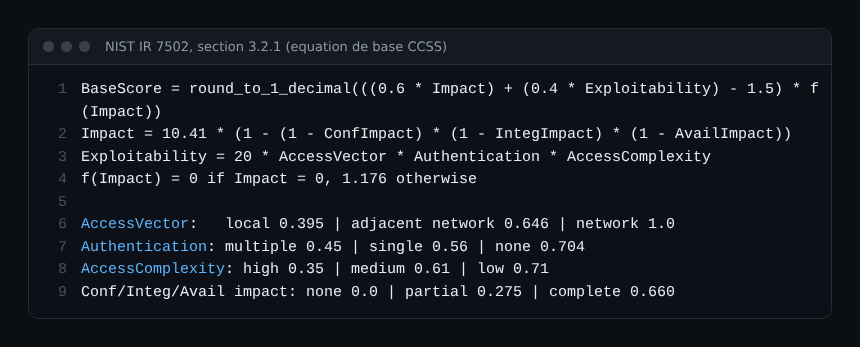
Two reading notes. First, a door open on the network, with no authentication and easy to use, has an exploitability about six times that of a local access that needs an account and a delicate manoeuvre (10.0 against 1.5 with the values above). Second, impact is not linear: the first dimension at “complete” lifts impact to 6.9, and the next two only bring it to 9.2, then 10.0.
Compute it yourself: one flaw, four profiles
To get a feel for the orders of magnitude, I transcribed the equation into a few lines of Python. The script says nothing about Dynatrace: it is a calculator for the specification.
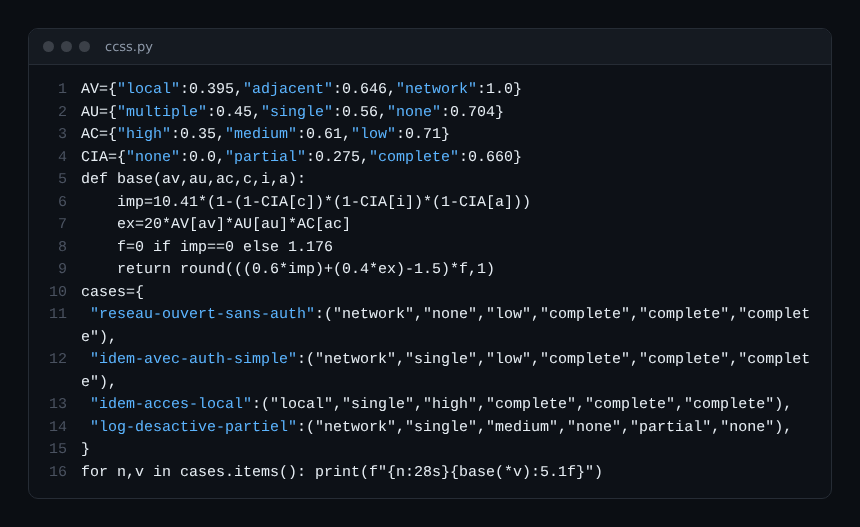
The profiles are fictional, chosen to isolate one criterion at a time:
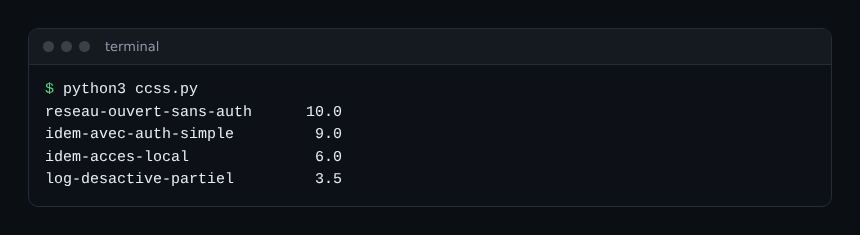
- Network, no authentication, complete impact: 10.0. This is a component that accepts everything from the network. The vendor’s post gives an example of exactly this kind: the CIS Kubernetes rule forbidding
--authorization-mode=AlwaysAllow, scored with a network vector, no authentication, low complexity and complete impact on all three dimensions, and classed Critical. - Same flaw with single authentication: 9.0. Requiring an account removes one point, no more.
- Local access, high complexity: 6.0. The flaw is as serious once exploited, but the attacker must already be on the machine.
- Logging switched off, partial integrity impact: 3.5. The specification recommends at least a partial integrity loss here, since the flaw hides the traces.
The same impact weight therefore gives very different severities depending on how far away the attacker is. That is the point of a score: it separates “serious if someone gets there” from “easy to reach”.
Reading a rule’s severity in Security Posture Management
In the app, severity is a sort key: the Assessment results view puts failed, critical rules first. A rule’s result is Failed as soon as one resource fails, however many are healthy. A “Critical” rule hitting one resource and a “High” rule hitting fifty are not directly comparable: severity describes the rule, not the breadth of exposure.
The Findings view then gives the per-resource detail. My method, in this order:
- Filter on Critical and High, then count resources per rule.
- For each rule, ask whether the vector really is network-reachable in your cluster: a component already isolated by a network policy changes the exposure, which a generic score cannot see.
- Set the “Manual” rules aside; the documentation says they are not actionable for now.
What the score does not know about your environment
A base CCSS score is intrinsic: it judges the weakness in general. The specification’s temporal and environmental metrics (patch availability, organisation-specific security requirements) exist to refine it. I found no mention in the documentation or the post of Dynatrace using them, so I treat them as not applied, without being able to assert it.
In practice: a “Low” rule on a cluster holding regulated data may deserve priority, and a “Critical” on a throwaway test cluster can wait. Severity guides the sorting; the decision stays yours. For image and code vulnerabilities, a scan such as Trivy or Application Security uses other scales, which should not be mixed with this one.
Best practices
- Note the switch date: after 1.334, comparing an old export with a recent one mixes two scales.
- Do not build an alert on a numeric threshold: Dynatrace does not publish the thresholds between levels.
- Keep the failing “Critical” rules in your weekly operations review, with one owner per rule.
- To understand a surprising severity, compare it with the vector described in the original rule (a CIS benchmark, for example) rather than the name alone.
Frequently asked questions
Is the CCSS score the same as the CVSS score of vulnerabilities?
No. According to NIST, the CCSS base equation reuses the CVSS one, but CCSS scores configuration errors, not software flaws. The two scales are not comparable.
Can I recompute the displayed severity with my own calculator?
Not reliably. Dynatrace publishes neither its exact formula nor its thresholds, and says an expert assigns the label. Use the calculator to understand the effect of a criterion, not to check a result.
What about Dynatrace Managed?
The post says to update to version 1.334 or later. I have not verified the behaviour in the Managed documentation: test before relying on it.
Conclusion
A posture rule’s severity is neither an opinion nor a percentage of risk: it is the outcome of a standardised ranking in which ease of access weighs as much as impact. Use it to order your day, then fix with what you know of your cluster. To place these rules within the topology, see also querying Kubernetes topology with DQL. Vendor source: the post on CCSS.
Independent blog, not affiliated with Dynatrace LLC. Dynatrace is a trademark of Dynatrace LLC. The script in this article applies NIST’s public specification, not the vendor’s internal computation.