



Tonight the platform team drains node-07 for a kernel update. One question decides the go-ahead: which services lose replicas, and who needs a heads-up? The Kubernetes topology graph in Dynatrace SaaS can answer in a single DQL query, if you know how to walk it. This article starts from four operating decisions and derives the queries from them.
The syntax facts come from the Dynatrace documentation. The use cases were sparked by the vendor’s blog post on the subject. The queries below are rewritten and were not run on a tenant for this article, so test them on a small scope before relying on them. Everything here applies to Dynatrace SaaS only.
The general syntax of smartscapeNodes and traverse is covered in the article on DQL and Smartscape. Here we do not tour the commands again: we put them to work.
Why query Kubernetes topology instead of using kubectl
With kubectl, every answer is a snapshot of one cluster. To find which services depend on a node, you chain three commands and cross-check by hand. With ten clusters, that becomes a chore.
The graph stores objects as nodes (K8S_NODE, K8S_POD, K8S_SERVICE, K8S_NAMESPACE, K8S_DEPLOYMENT, K8S_SECRET) and their links as edges: runs_on ties a pod to its node, routes_to a service to its pods, belongs_to an object to its namespace, is_part_of a pod to its controller, and uses a pod to a Secret. One query therefore spans every cluster connected to the environment.
Three pieces of syntax to remember
smartscapeNodes "*"starts the query. The type is unquoted (HOST), in braces for several types, or in double quotes for a pattern. The documentation states that a pattern accepts at most 64 wildcards.traverse edge, target_typefollows a link. The default direction isforward. Withdirection: backwardyou walk against the edge, for example from a node to its pods.fieldsKeepkeeps fields of the starting node in thedt.traverse.historyarray. Eachtraverseadds one record, anddt.traverse.history[0][name]reads the name at the first level.
Decision 1: drain a node without surprises
Before a drain you want the list of affected services, ranked by pods lost. Start from the node, go down to its pods, then to the services that route to them.
smartscapeNodes "*"
| filter type == "K8S_NODE" and name == "node-07"
| traverse runs_on, K8S_POD, direction: backward,
    fieldsKeep: {name, `k8s.namespace.name`, `k8s.cluster.name`}
| traverse routes_to, K8S_SERVICE, direction: backward,
    fieldsKeep: {name}
| fieldsAdd pod = dt.traverse.history[1][name]
| summarize pods_lost = countDistinctExact(pod),
    by: {service = name,
         namespace = `k8s.namespace.name`,
         cluster = `k8s.cluster.name`}
| sort pods_lost desc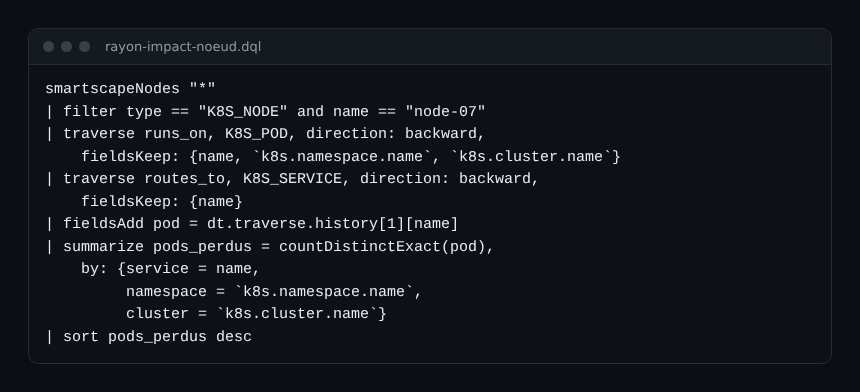
Read the result with care. A service losing one pod out of twelve is no cause for worry. A service losing two pods out of two is a reason to postpone the drain. An empty result may also mean the node name is wrong: check it first with smartscapeNodes "*" | filter type == "K8S_NODE".
Decision 2: who to warn, and where to look
The topology cannot guess who owns what. It rereads the labels your teams put on namespaces. If a namespace carries an owner label, the query returns it next to the cluster:
smartscapeNodes "*"
| filter type == "K8S_NAMESPACE"
| fields namespace = name, cluster = `k8s.cluster.name`, owner = tags[owner]
| sort cluster asc, namespace asc
Every row without an owner is a governance gap, not a query bug. Fix it at the source, for example with the enrichment described in the article on Kubernetes metadata enrichment. Then join this list with the result of decision 1 to know whom to call.
Decision 3: rotate a Secret without breaking production
Changing a Secret often means restarting the pods that mount it. So the question is how many pods and services depend on it. Start from the Secrets and walk the uses relationship backwards.
smartscapeNodes "*"
| filter type == "K8S_SECRET"
| traverse uses, K8S_POD, direction: backward,
    fieldsKeep: {name, `k8s.cluster.name`}
| fieldsAdd pod = name
| traverse routes_to, K8S_SERVICE, direction: backward, fieldsKeep: {name}
| fieldsAdd service = dt.traverse.history[1][name]
| summarize pods = countDistinctExact(pod),
    services = countDistinctExact(service),
    by: {secret = dt.traverse.history[0][name], cluster = `k8s.cluster.name`}
| sort pods desc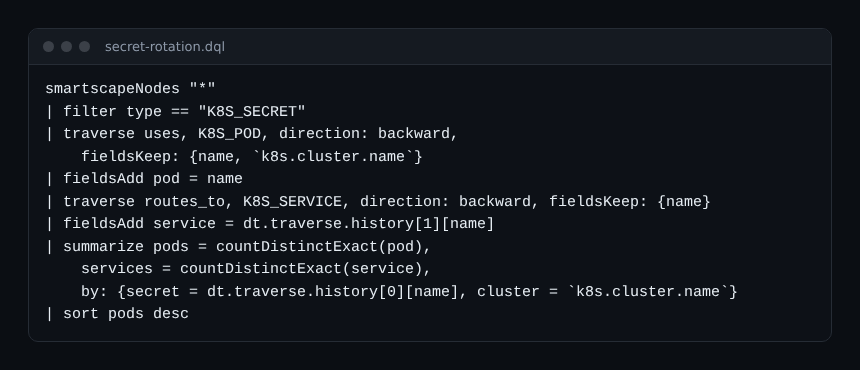
A Secret mounted by forty pods is rotated in several waves. A Secret mounted by two pods fits the usual maintenance window. The number is a basis for discussion with the teams involved, not a replacement for their judgement.
Decision 4: spot risks before the incident
Two weekly queries are worth a ritual. The first lists deployments with a single pod, so with no safety net during a drain:
smartscapeNodes "*"
| filter type == "K8S_DEPLOYMENT"
| traverse is_part_of, K8S_POD, direction: backward,
    fieldsKeep: {name, `k8s.namespace.name`, `k8s.cluster.name`}
| summarize pods = count(),
    by: {deployment = dt.traverse.history[0][name],
         namespace = `k8s.namespace.name`, cluster = `k8s.cluster.name`}
| filter pods == 1
One limit to know: a deployment with zero pods does not appear, since it has no pod to count. The second query looks for pods that disappeared during the last day, using the lifetime field:
smartscapeNodes "*"
| filter type == "K8S_POD"
| fieldsAdd fin = lifetime[end]
| filter fin < now() - 5m and fin > now() - 1d
| fields pod = name, cluster = `k8s.cluster.name`, namespace = `k8s.namespace.name`, fin
| sort fin desc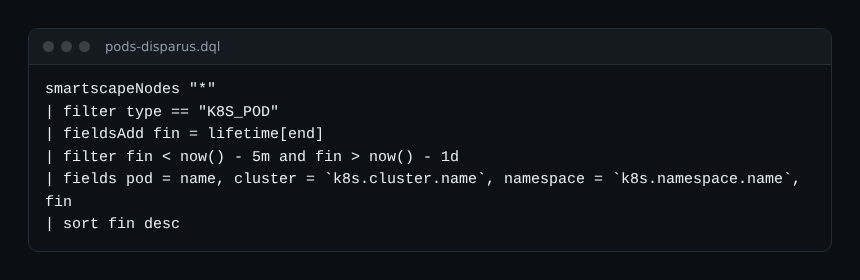
The five-minute and one-day thresholds are choices: adjust them to your deployment rhythm. A pod that vanishes outside a deployment window deserves a question. To turn these lists into alerts rather than manual reading, see Kubernetes alerts on nodes, pods and quotas.
Best practices for Kubernetes topology in DQL
- Filter early on
typeand on the cluster: atraverseover the whole environment costs more. - Name your fields with
fieldsAddright after eachtraverse, so you do not mix up the indexes ofdt.traverse.history. - Save useful queries in a Notebook or a Dashboard. To find an entity identifier, see the article on entity identifiers.
- Run each query on a test cluster before automating it.
Frequently asked questions
Do I need to enable anything to query Kubernetes topology?
Kubernetes monitoring must feed your SaaS environment, and your role must grant access to the smartscape Grail table, which requires the storage:smartscape:read permission according to the documentation. I did not verify the full enablement procedure here.
What is the difference between smartscapeNodes and smartscapeEdges?
smartscapeNodes returns objects, smartscapeEdges returns links. Use edges to list the relationship types available, and traverse to follow them from one object to the next.
Do these queries work on Dynatrace Managed?
This article covers Dynatrace SaaS only. I did not verify the availability of these commands on Managed: do not carry them over without testing.
Conclusion
A graph is only useful if it answers a decision. Draining a node, rotating a Secret, finding a single point of failure: each query above replaces a manual cross-check. To add trends and numbers, reread the DQL filter, summarize and timeseries commands. The official syntax reference is the Smartscape commands page.
Independent blog, not affiliated with Dynatrace LLC. Dynatrace is a trademark of Dynatrace LLC.