



Your team needs a view that no standard screen provides: one that joins teams, services and a home-grown DQL query. The operational decision is easy to state. Either you keep a dashboard and screenshots pasted into a wiki, or you build a small app that lives inside your environment. The Dynatrace App Toolkit is the command-line tool that makes the second option affordable. This article takes it the opposite way round from the documentation: first what to decide before writing code, then the minimal loop that gets an app running.
It applies to Dynatrace SaaS only (addresses ending in apps.dynatrace.com); Managed is not covered. span.observer did not deploy an app to write this piece: commands and options come from the developer documentation and the vendor’s post, linked below, and no output is made up.
The vendor’s post presents App Toolkit 1.0 as a single toolchain: create, develop and deploy, add app functions and update packages, all from one binary, dt-app. Keep that idea in mind; the rest follows from it.
Dynatrace App Toolkit: do you really need an app?
Before opening a terminal, put three questions to the team. They save you from maintaining code for nothing.
- Would a dashboard do? If the view is a set of DQL tiles, stay with a dashboard: no code, no release cycle.
- Who maintains the app? An app has a version, dependencies and an owner. Name that person before the first line of code, as for any service.
- What data will it read? The app’s
scopesare declared in its configuration: the fewer you ask for, the shorter the security review.
If the answer leans towards an app (custom interface, navigation, presentation logic), move on to the setup. For the queries behind your future pages, the article on advanced DQL techniques is a good base.
Prerequisites to check before running the command
The App Toolkit page lists precise requirements. Here they are as read in the documentation:
- Node.js 24 installed locally (check with
node --version); - your environment address, in the form
https://{environment-id}.apps.dynatrace.com/, which you can copy from the browser address bar; - network access to
dt-cdn.net,registry.npmjs.org, your environment andgithub.com(for templates); - free ports: 3000 to 3005 for the dev server, 30000 for local execution of app functions, 5343 for SSO authentication (the toolkit tries the next port if it is busy).
On a corporate workstation the network line is the one that fails first: ask for the four hosts to be opened before losing an hour on an installation error.
Creating the app: the minimal loop
The “First app in 5 minutes” tutorial gives this path. These are the steps in the order I would run them.
- In your editor’s terminal, run
npx dt-app@latest create. - Name the app, for example
my-first-app, then enter the environment address (the command may prefill it if you are already signed in). - Move into the folder:
cd my-first-app. - Start the local server:
npx dt-app dev. The app opens in the browser. - Open
ui/app/pages/Home.tsx, change the text of theHeadingelement to “My first app” and save: the browser refreshes on its own.
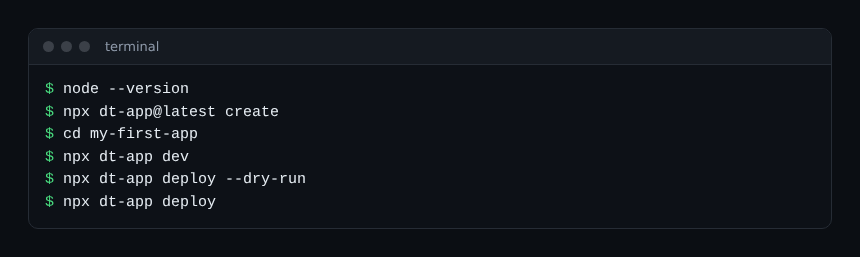
This image is an assembly of commands taken from the documentation, not a recorded session. Mind the browser detail: the documentation says Chrome 142 or later asks for permission to connect to devices on your local network; if the page stays blank, look for that prompt first.
What the vendor’s post stresses is the speed of the loop. It reports rebuilds dropping from about 2.7 seconds to 0.05 seconds thanks to change detection (only modified components are rebuilt and checked), and incremental type checking that only revisits changed files and their dependencies. Those figures are the vendor’s; span.observer has not measured them.
Reading the generated folder and the configuration
Version 1.x of the toolkit separates the interface from app functions. The workspace described in the documentation looks like this:
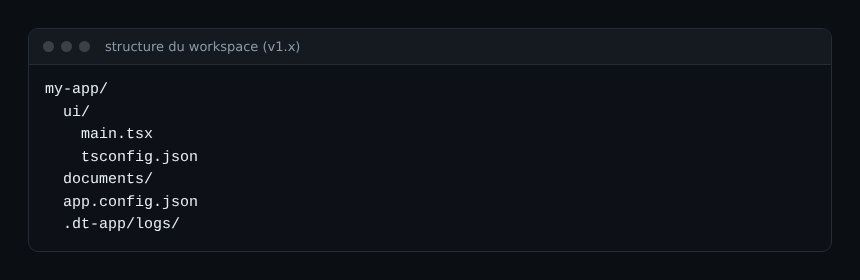
The file to know is app.config.json (or app.config.ts). At the top level, environmentUrl is required. Under app, the documentation requires id (lowercase, dot-separated namespace), name, version, description and scopes.
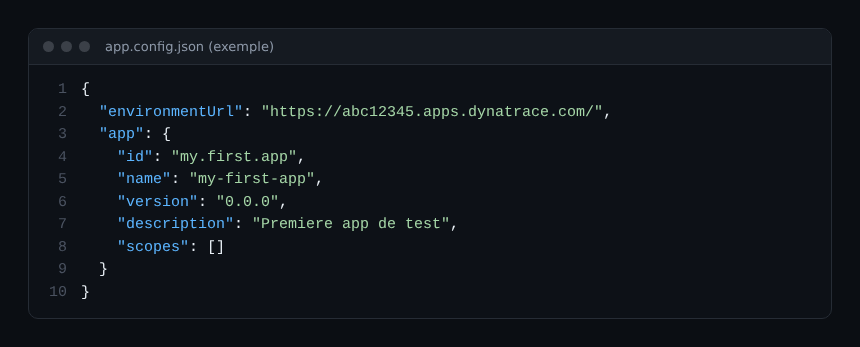
The example above is built from the documented fields with placeholder values: the environment ID abc12345 does not exist and your scopes depend on what the app will read. The version field deserves a team rule: bump it on every deployment, it is your rollback reference.
Deploying without surprises: dry run, then deploy
The dev server shares nothing. For colleagues to see the app, you must deploy it. npx dt-app deploy builds and deploys to the configured environment. Two useful options, according to the documentation:
--dry-runcreates a distributable.ziparchive inout/without deploying: this is the check to make before a first production release;--skip-buildreuses an existing build, handy when a pipeline has already built the app.
To remove the app, dt-app uninstall exists too, with its own --dry-run. What the documentation I read does not detail is the exact interactive sign-in flow and what appears in the environment after deployment. I therefore do not describe it; follow the “deploy your app” guide on the developer site.
Automating: the part that matters for on-call
The post stresses a point useful to SRE teams: every command can run in scripts or pipelines, with arguments and options on the command line instead of interactive prompts. The documentation gives the levers: the --non-interactive option, and environment variables. DT_APP_PLATFORM_TOKEN skips the default authentication flow; DT_APP_OAUTH_CLIENT_ID and DT_APP_OAUTH_CLIENT_SECRET automate SSO token retrieval, which helps in continuous integration. These secrets must never enter the repository: keep them in your CI tool’s vault.
Two more maintenance commands: dt-app update updates packages, and dt-app migration execute helps move between versions (options --from and --to). Schedule an update each quarter rather than doing it in an emergency. If you already manage your platform as code, the logic matches Terraform for alerts and dashboards: the app becomes a versioned artefact like the others. And to understand how the data behind your pages is identified, see the article on the entity ID.
Best practices
- One named owner and one repository per app, with code review as for any service.
- Minimal
scopes, reviewed with every new page. - A
deploy --dry-runbefore any production release, and theversionbumped. - CI secrets kept out of the repository;
DT_APP_DISABLE_TELEMETRY=1exists if your policy forbids the toolkit’s telemetry. - Start with one simple page that reads a single DQL query, then extend.
Frequently asked questions
Which Node.js version does the Dynatrace App Toolkit need?
The documentation states Node.js 24. Check it with node --version before running npx dt-app@latest create.
Does the toolkit work with Dynatrace Managed?
The sources I read refer to apps.dynatrace.com environments, so SaaS. Nothing was verified for Managed: this article does not claim it.
Can the commands run in CI without interaction?
Yes, according to the documentation: the --non-interactive option and the DT_APP_OAUTH_CLIENT_ID and DT_APP_OAUTH_CLIENT_SECRET variables are meant for this. Test with --dry-run first.
Conclusion
Building a Dynatrace app is a maintenance decision before it is a technical one. If the answer is yes, the create, dev, deploy --dry-run, deploy loop fits in five commands. For the official detail, read the vendor’s post on App Toolkit 1.0 and the developer documentation.
span.observer is an independent community blog, not affiliated with Dynatrace LLC. Trademarks belong to their owners. Tools change fast: check commands and options against the official documentation.