




Your application runs on AWS, but the product catalogue, or the Chinese region, lives on Alibaba Cloud. When a user complains, the first question is whether the fault is on your side or the other provider’s. To answer without opening a second console, the Alibaba Cloud Dynatrace extension brings that cloud’s metrics into the same tool. The vendor’s blog post sets out the ambition; what follows is an operator’s reading, checked against the documentation page.
The starting point is a decision: what do you want to see from that cloud, and at what cost? The extension is free, but every ingested data point is billed. Choosing your services before activation avoids a nasty surprise.
A note on method: span.observer has not connected this extension to an Alibaba account. The facts come from the documentation and the post, read on 11 November 2026. Anything that could not be read is marked “not verified”. The scope is Dynatrace SaaS; I read nothing about Managed for this topic.
Alibaba Cloud Dynatrace: what the extension collects
The extension runs on a remote ActiveGate. The ActiveGate queries Alibaba’s Cloud Monitor APIs and sends the values to Dynatrace. No agent is installed on the Alibaba resources. The post says a partner, Phenisys, developed it and that Dynatrace supports it.
The documentation lists six core services: ECS (virtual machines), SLB (load balancers), NAS (file storage), NAT Gateway, CEN (cross-region networking) and VPN. Kafka and ECI appear in its feature-set tables without being in the service list, so I make no promise about their coverage. Four database engines are optional: RDS for MySQL, PostgreSQL and SQL Server, plus MongoDB.
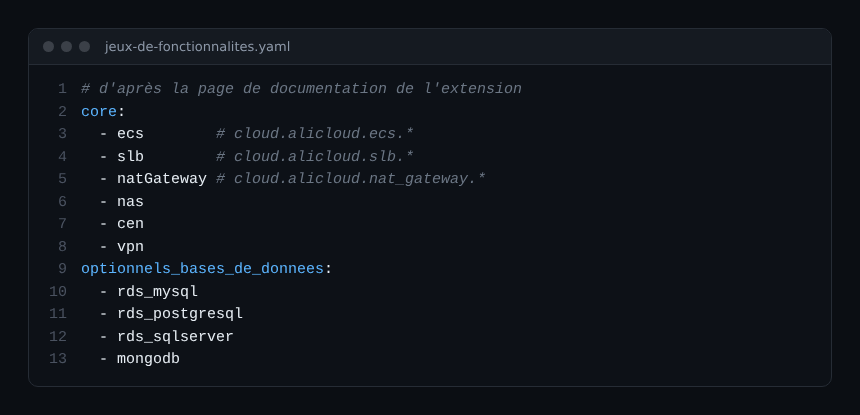
Metrics carry the cloud.alicloud prefix. For example, cloud.alicloud.ecs.cpu_utilization for the CPU of an ECS instance, or cloud.alicloud.slb.unhealthyservercount for servers judged unhealthy behind a load balancer. The page flags one limit: the cloud.alicloud.ecs.status metric has no Alibaba metric name listed, so I would not rely on it without a test.
Prepare access before you activate
The prerequisites come down to four items. You need a provisioned ActiveGate with network access to the Alibaba endpoints. You need an access key (ID and secret), entered directly or referenced from the Dynatrace vault. You need the region ID for each region. Finally, an API token with the entities.read and entities.write scopes is needed only to import tags.
On the Alibaba side, the page asks you to authorise read-only capabilities for RDS, MongoDB and Cloud Monitor, according to your security baseline. It does not list the RAM actions: those names change and must be read from Alibaba. Create a dedicated, read-only key. No minimum ActiveGate or Dynatrace version is stated: not verified.
Two limits matter for a real rollout: proxies are not yet supported, and CDN monitoring does not exist. If your ActiveGate goes out through a corporate proxy, settle that first. For the ActiveGate’s role, see the difference between environment and cluster ActiveGates.
Activate the extension, region by region
- In Dynatrace Hub, activate the Alibaba Cloud extension.
- Create one monitoring configuration per region, with its region ID and the key (or the vault reference).
- Choose the feature sets. Leave the databases for later if you hesitate.
- If you want Alibaba tags, add the token with the two scopes.
- Check that at least one metric is collected: the page requires it.
A useful architecture point: feature sets can match network segments. You can pair a feature set with an ActiveGate group that reaches that segment. One configuration can cover several instances; creating several is optional.
Estimate the cost before enabling everything
The extension itself costs nothing. You pay for the ingested data. In the classic model, each point costs 0.001 DDU. In the platform model, consumption is data points per minute multiplied by 60, 24 and 365. The documentation gives the points per minute for each resource: 5 for an ECS instance, 6 for an SLB, 4 for a NAT Gateway, 12 for RDS MySQL (databases are counted per region).
Take an example of my own making: 10 ECS instances, 2 SLBs, 1 NAT Gateway and 2 RDS MySQL databases. The calculation gives 90 points per minute, or about 47.3 million points a year.
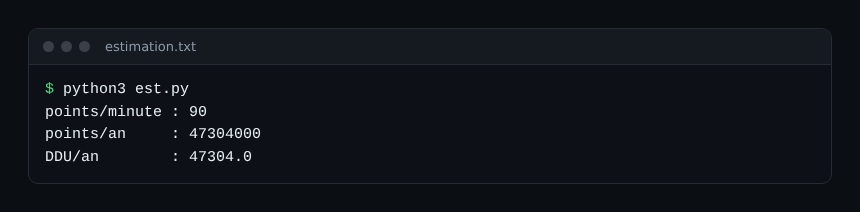
That figure is an estimate built from the page’s formula, not a measurement. Events and logs triggered by the extension are billed separately.
How to check that it works
After a few minutes, query a base metric with DQL, for example ECS CPU. The query below has not been run on a tenant: it is a starting check.

- If the series is empty, check the region ID and the ActiveGate’s network path to Alibaba.
- Compare one value with the Cloud Monitor console for the same minute.
- Check that tags appear, if you supplied the token.
Metrics do not replace correlation with your applications. The page says retrieved tags are matched with OneAgent entities, so you can filter by team. For the same exercise on Azure, see Azure Monitor logs, and on AWS see sending CloudWatch to Dynatrace.
Best practices
- Enable ECS, SLB and networking first; add databases afterwards, one at a time.
- Use a dedicated read-only Alibaba key stored in the vault.
- Estimate your points before activation, not after the first bill.
- Alert on unhealthy SLB servers rather than on every metric.
- Document the Alibaba services that are not covered: the page states that not everything is supported.
Frequently asked questions
Does Alibaba Cloud Dynatrace work on Managed?
I read nothing specific to Managed on the page I consulted. Treat the topic as not verified on Managed.
Do I need OneAgent on the Alibaba resources?
Not for metrics: they come from the Cloud Monitor API through an ActiveGate. OneAgent remains useful for application-level monitoring, and tags let you link the two.
Is the extension free?
Activation costs nothing, but ingested metrics are billed. The calculation is based on data points.
Conclusion
Before activating the extension, decide which services to follow, check that the ActiveGate works without a proxy, and count the points. Start with one test region, compare against the Alibaba console, then extend. Official documentation: Alibaba Cloud extension.
span.observer is an independent community blog, not affiliated with Dynatrace LLC (or with Alibaba Cloud). Trademarks belong to their owners. Tools change quickly: check options in the official documentation.