




It is 3 a.m., a problem opens on a host, and the on-call engineer has no idea who owns it. They dig through a wiki, ping three channels and lose twenty minutes. Dynatrace ownership exists to remove that search: every monitored entity carries a tag naming a team, and the team record carries the ways to reach it.
This article starts from an operations decision: where should the truth about “who owns what” live? I compare three options, then show how to place the tags, feed the team records and route an alert with a workflow. It applies to Dynatrace SaaS; Managed documentation exists too, with similar content, but I have not tested it (see below).
A note of honesty: span.observer did not build this setup on a tenant for this article. The facts come from the official documentation and a vendor post; the examples are templates to adapt, not measured results.
Dynatrace ownership: two layers not to confuse
The documentation describes ownership as key-value pairs placed on Smartscape nodes. In practice, two separate objects work together.
- The tag on the entity: a recognised key (by default
ownerordt.owner) and a value, the team identifier. - The team record: a name, an identifier, responsibilities, links and contact channels (Slack, Microsoft Teams, Jira, email).
The identifier is the join. If the tag says team-payments and a record carries that identifier, Dynatrace knows whom to notify. With no record, you have a name but no way to reach anyone.
Decide first: the source of truth
Before tagging anything, choose who is authoritative. Three options come up.
- Manual entry in the UI. Fast for ten teams, unsustainable for a hundred: responsibilities shift with every deployment.
- An existing directory (Microsoft Entra ID or ServiceNow) synced regularly. The most durable choice if your teams are already kept current there.
- Configuration as code (Settings API, Monaco or Terraform). You get Git history, but someone must be willing to review JSON files.
My view: pick one master and let Dynatrace hold a copy. Two diverging sources recreate exactly the doubt you wanted to remove. For the as-code route, the Terraform article gives the general frame.
Choose the tag keys
The documentation lists two default keys, owner and dt.owner, and up to three custom keys, set under Settings > Environment segmentation > Ownership > Keys. One point surprises people: keys are matched as prefixes, not exact keys.
In practice, if you declare team., then team.frontend, team.backend and team.support all count. That helps you reuse an existing convention, but a prefix that is too broad also catches unrelated tags. Keep a prefix that looks like none of your other tags.
The value is an identifier, optionally followed by a supplementary identifier. The identifier is mandatory, unique and cannot be changed later; the supplementary identifier stays editable. Choose stable identifiers (team-payments) rather than names that will change at the next reorganisation.
Place the tags on entities
The documentation recommends three routes: Kubernetes labels and annotations, host properties set with oneagentctl, and process group environment variables. On a cluster, an annotation in the manifest is the cleanest, because it travels with the deployment. On a classic host, the command is enough.
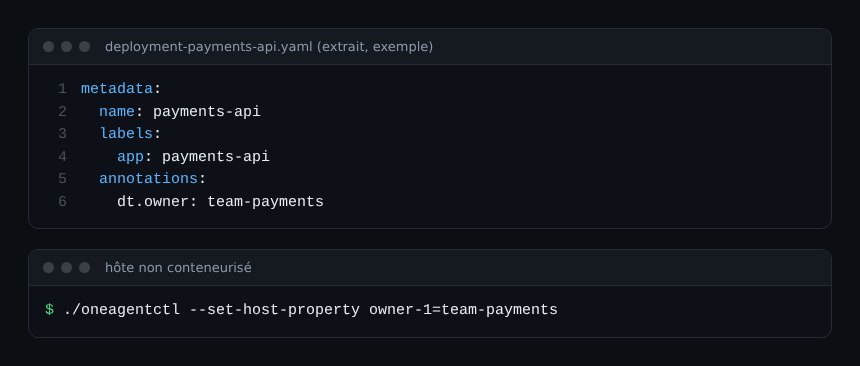
I did not verify whether the annotation must be allowed in Dynatrace’s Kubernetes settings before it is read, so test on a single deployment before rolling out. Likewise, the documentation does not detail propagation along the topology; do not assume it.
Feed the team records
The workflow action Import teams reads three sources: Entra ID groups, ServiceNow groups, or JSON in the Ownership schema. It also asks for two preferences: skip or overwrite existing teams, and fail everything or continue while logging errors. For a first sync, “continue and log” stops one bad row from blocking the rest.
The output gives a status (SUCCESS, PARTIAL or FAILED), the imported identifiers, duplicates and failures. Watch the duplicates: an identifier already taken will not be redefined.
Here is a record in the schema’s JSON format, with sample values. The five responsibilities are required, as are the contact and link lists.
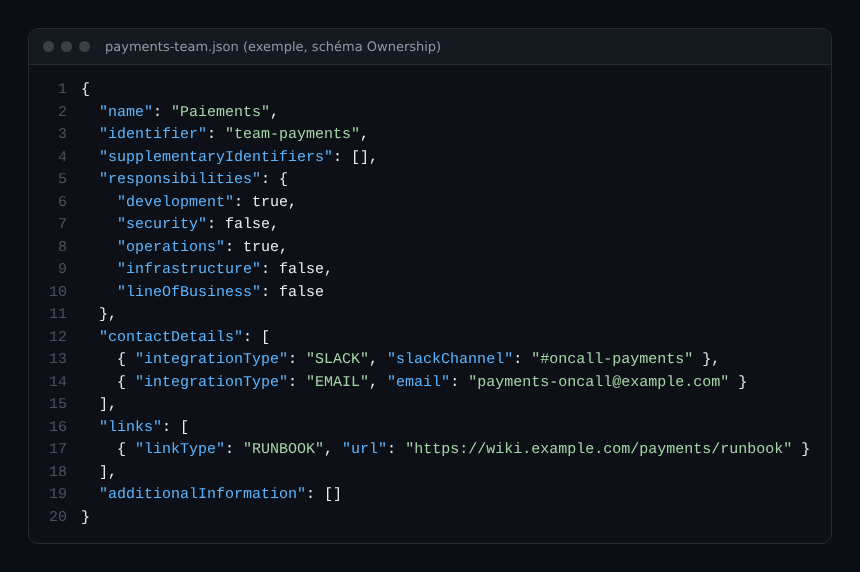
To create teams by hand or by API you need the permission to manage monitoring settings (UI), or settings.write or an IAM policy on the builtin:ownership.teams schema (API). The team-creation page also mentions builtin:ownership.config without reconciling the two: check the exact schema ID in your environment.
Route an alert with the Get owners action
The routing itself goes through a workflow. The Get owners action takes entity IDs (for example {{ event()["dt.entity.host"] }} for a problem event), a team filter and a responsibility filter. It returns owners and, per team, the Jira, Teams, Slack and email contact details.
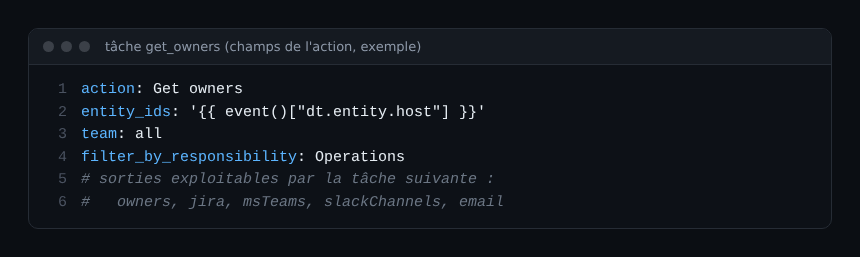
The next task only has to read those outputs to send the message or open the ticket. Filtering on the Operations responsibility avoids waking the security team for a full disk. For ticket creation, see the Jira and ServiceNow workflow.
The action pays off more once noise is under control: route problems, not hundreds of raw alerts. The article on reducing Davis alert noise prepares the ground.
Measure coverage, do not just install it
Ownership decays silently: a team is renamed, a service migrates, the tag stays. The vendor post suggests visualising coverage and blind spots in a notebook or dashboard, with an example dashboard to adapt. It also notes that DQL access to ownership data was still in development: check its state in the documentation before building a query on it.
A simple check beats a big project: each month, list critical entities with no tag and assign them. That is toil reduction in the SRE sense: you pay once so nobody searches at 3 a.m.
What about security context?
Do not confuse ownership with access control. Ownership says whom to notify; data access belongs to permissions and, on Grail, other mechanisms covered in the Grail versus Classic article. I did not re-read the security context page for this piece: treat it as a separate topic, to read before mixing the two. Tagging for management zones remains covered in the Management zones article.
Best practices
- One master for teams, synced on a fixed schedule.
- Stable identifiers, never a team name that may change.
- A key prefix distinct from your other tags.
- A first trial on a single deployment, then a monthly coverage audit.
Frequently asked questions
Does Dynatrace ownership work on Managed?
A Managed documentation page describes ownership (updated on 7 November 2023, with no version number). The SaaS page does not state the platform. I did not compare them feature by feature: check each action on your version before assuming it is available.
Can I change a team identifier?
No, according to the assignment page: the identifier is unique and permanent, only the supplementary identifier is editable. Plan neutral identifiers.
Should I use dt.owner or my own key?
Both work. If you already have a convention (for example team.), add it as a custom key rather than retagging everything, and watch the prefix effect.
Conclusion
Settle the source of truth first, put dt.owner on one deployment, import one team, then test Get owners on a real problem. The vendor post, The right person at the right time, and the Ownership documentation give the official detail.
span.observer is an independent community blog, not affiliated with Dynatrace LLC. Trademarks belong to their owners. Tools change quickly: check commands and options in the official documentation.