
Your ILM policy says warm or cold, yet the index stays on the hot nodes. Most of the time the culprit is the _tier_preference setting, which ILM’s migrate action is supposed to write. This article explains the tier preference ILM mechanism in Elasticsearch, the documented reasons it may not apply, and how to diagnose and fix it.
For an SRE team the stakes are practical: an index that never moves down keeps expensive storage and overloaded hot nodes, while the policy looks healthy. It applies to self-managed Elasticsearch and to Elastic Cloud. It does not concern Dynatrace Managed or Dynatrace SaaS, but the diagnosis belongs to cluster monitoring as described in our guide to the Dynatrace extension.
In short
- ILM moves an index between tiers with the
migrateaction, which writesindex.routing.allocation.include._tier_preference. - According to Elastic’s documentation, this action is injected automatically in the warm and cold phases.
- With
"migrate": { "enabled": false }, ILM no longer migrates anything: you must define allocation rules yourself. - Legacy attribute filters (
require.data,allocatewithinclude,requireorexclude) can conflict with the tier preference.
Tier preference ILM: what the setting really does
The index.routing.allocation.include._tier_preference setting tells Elasticsearch which tier should hold an index’s shards. According to Elastic’s “Data tiers” page, an ordinary index gets data_content by default, and an index created in a data stream gets data_hot. The setting accepts an ordered, comma-separated list: Elasticsearch uses the first tier that has nodes.
The migrate action page gives the values ILM sets: data_warm,data_hot in the warm phase and data_cold,data_warm,data_hot in the cold phase. The fallback to warmer tiers keeps an index from staying unassigned when the target tier has no node. In the frozen phase, ILM mounts the searchable snapshot directly with data_frozen; in the hot phase, migrate is not allowed.
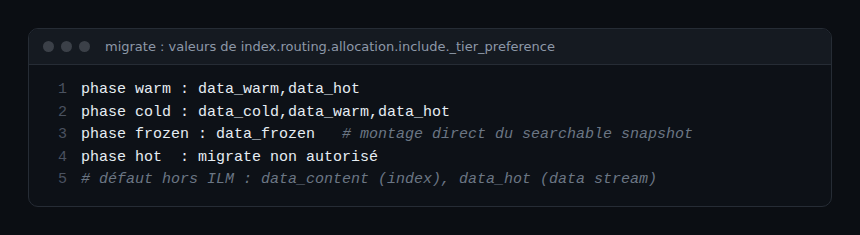
Two useful details: setting it to null removes the preference without restoring the default, and the setting does not unassign a shard that is already allocated. For frozen tier costs, see our frozen tier article.
Why ILM does not migrate your indices
Cause 1: the migrate action is disabled
The enabled parameter of migrate defaults to true. Setting it to false in a phase stops automatic migration. The documentation presents this for teams that manage allocation by hand with the allocate action, and it warns: do not disable automatic ILM migration without manually defining allocation rules. Otherwise the data may never reach the target tier, even though the phase shows as complete.
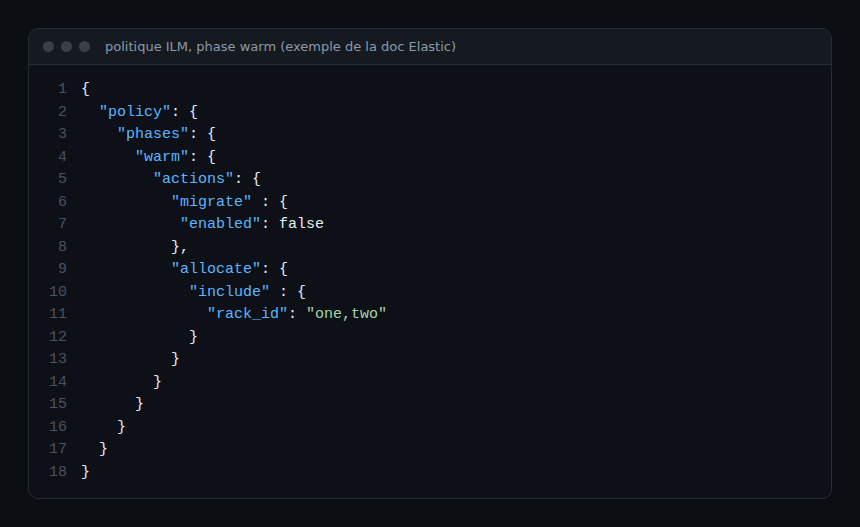
Cause 2: custom attribute filters
The allocate action accepts include (at least one listed attribute), exclude (none) and require (all), based on node attributes such as node.attr.box_type. These filters belong to the old hot-warm-cold model. Elastic’s documentation does not spell out how require or exclude combine with _tier_preference: the allocate page is silent on it, and the migrate page points back to it. Test that point on your own version rather than assuming.
What is documented is the case of an index that keeps an old index.routing.allocation.require.data conflicting with an outdated tier preference: remove that setting and correct the preference. The migration documentation also asks you to remove attribute filters from templates (legacy, composable and component), otherwise new indices inherit them.
Cause 3: no node has the right role
When self-managed, the roles data_hot, data_warm, data_cold, data_frozen and data_content are declared in elasticsearch.yml. On Elastic Cloud Hosted or ECE, a shared hot and content tier is included by default and cannot be removed; warm, cold and frozen are added in the interface. Without a node in the target tier, the fallback list sends the index to a warmer tier, which looks like a failed migration.
For retention upstream, see also our logsdb guide.
Diagnose step by step
- Read the ILM state with
GET <index>/_ilm/explain: the response gives the current policy, phase, action and step. Themanage_ilmandview_index_metadataprivileges are required. - Read the index settings and look for
index.routing.allocation.include._tier_preference, as well as anyrequire.dataor other attribute filters. - Re-read the policy: warm or cold phase with
migrate.enabled: false? Anallocateaction with filters? - Query allocation with
GET _cluster/allocation/explain(body:index,shard,primary). The response lists, node by node, the deciders and their decision (NO,YES,THROTTLE). - Check node roles in
elasticsearch.ymlor in the deployment configuration.
Fix: move from attributes to data tiers
Elastic’s documentation describes a path from attribute filters to node roles. The steps to remember: assign tier roles to nodes, clean the allocate actions in policies (an empty allocate action is invalid and must be deleted), remove the filters from templates, then update existing indices (require.data to null and a suitable _tier_preference). Each phase of every tier in your architecture must exist, even if empty, so that ILM can inject migrate.
The POST /_ilm/migrate_to_data_tiers API automates three of those four steps. It accepts dry_run (simulation, false by default), legacy_template_to_delete and node_attribute, and lists the migrated policies, indices and templates in its response. ILM must be stopped before the call.
POST /_ilm/stop
GET  /_ilm/status                          # wait for "operation_mode": "STOPPED"
POST /_ilm/migrate_to_data_tiers?dry_run=true
POST /_ilm/migrate_to_data_tiers
POST /_ilm/start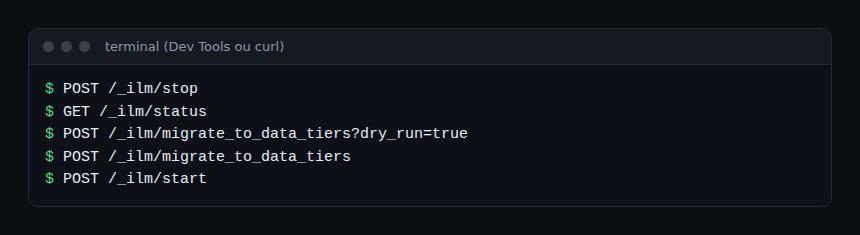
Run dry_run=true first and review the list of indices and policies it would touch. On Elastic Cloud, according to the documentation, migration is offered automatically when you upgrade to 7.10 or later, or add a warm, cold or frozen tier; you must then check custom templates.
How to check that it works
Run GET <index>/_ilm/explain again and confirm that the index moves through the phases. Then re-read the _tier_preference setting: it should match the phase (data_warm,data_hot in warm). Finally, check that the shards sit on nodes of the expected tier.
The observability angle
An index stuck on the hot tier shows up first in cluster metrics: disk space and shards per node. Expose them with the OpenTelemetry Collector (Elasticsearch and OpenTelemetry guide) and alert on hot node saturation rather than on ILM failure alone, which can show as complete. For context, read the difference between observability and monitoring.
Best practices
- Keep
migrateenabled unless you have a specific need, and never without manual allocation rules. - Prefer node roles to custom attributes.
- Test any migration with
dry_runbefore running it. - Alert on index age per tier, not only on policy status.
Frequently asked questions
What is _tier_preference?
It is the index setting index.routing.allocation.include._tier_preference, an ordered list of tiers for shard placement. ILM sets it through the migrate action.
Why is my warm phase “complete” when nothing moved?
With migrate.enabled: false and no manual allocation rule, the documentation says the data may not reach the target tier even though the phase is marked complete.
Should I delete the allocate action?
If it only holds legacy attribute filters, the migration documentation recommends removing them; an empty allocate action is invalid and must be deleted.
Conclusion
When ILM does not migrate your indices, start with migrate.enabled, then legacy attribute filters and node roles. The official pages below remain the reference for your version.
Sources
- Data tiers, Elastic documentation
- ILM migrate, Elastic documentation
- ILM allocate, Elastic documentation
- Migrate index allocation filters to node roles, Elastic documentation
span.observer is an independent blog, not affiliated with Dynatrace LLC or Elastic N.V. Product names belong to their respective owners; examples come from the official documentation or are fictitious, to be validated on your version.