
The Dynatrace entity ID is the key almost every automation asks for: the scope of a Settings object, the filter of an SLO, the selector of an alert, a parameter of a Terraform or Monaco module. A host or service name is not enough: it changes, repeats across environments and is not unique. The ID points to one precise entity, for example SERVICE-1125C375A187D27A.
Finding it should take ten seconds. In practice, people lose time copying the wrong identifier, getting fifty results instead of one, or writing a query that only works on one platform. Less toil here means more reliable runbooks and automations that do not break at the first rename.
This guide covers three methods: the Monitored entities API v2 with an entitySelector (Managed and SaaS), DQL in a Notebook (SaaS only, Grail), and bridging the two with classicEntitySelector().
What a Dynatrace entity ID is
Every monitored object (host, process, service, application, synthetic test…) is an entity, with a type and an identifier. The ID takes the form TYPE-IDENTIFIER: HOST-…, SERVICE-…, HTTP_CHECK-…, SYNTHETIC_TEST-…. The display name (displayName in the API, entity.name in DQL) is a label; the APIs expect the ID.
A concrete example: to declare key requests through the Settings API, the scope field must hold the service ID, and the documentation points precisely to the GET entities list call to find it.
Prerequisites
- For the API: a token with the
entities.readscope. A 401 or 403 at this stage is a matter of API token troubleshooting. - Base URL:
https://{your-domain}/e/{your-environment-id}on Managed,https://{your-environment-id}.live.dynatrace.comon SaaS. Through an ActiveGate:https://{your-activegate-domain}:9999/e/{your-environment-id}. - For DQL (SaaS): the
storage:entities:readpermission.
Method 1 — The API and the entitySelector (Managed and SaaS)
Step 1 — Search by type and name
The GET /api/v2/entities call requires one of two criteria: the type (type("…")) or the ID (entityId("…")). Then add the name:
curl -s -G "$DT_URL/api/v2/entities" \
  -H "Authorization: Api-Token $DT_TOKEN" \
  --data-urlencode 'entitySelector=type("SERVICE"),entityName.equals("AuthenticationService")' \
  --data-urlencode 'from=now-7d'
Three details matter:
entityName("…")on its own is a CONTAINS, case-insensitive by default.entityName.equals("…")requires equality,entityName.startsWith("…")a prefix,entityName.in("a","b")a list. For a case-sensitive comparison:caseSensitive(entityName.equals("…")).- Without
from, the search covers the last three days (now-3d). An entity switched off last week will not show up: widen the timeframe. - If the value contains a parenthesis or a comma, put it in quotation marks.
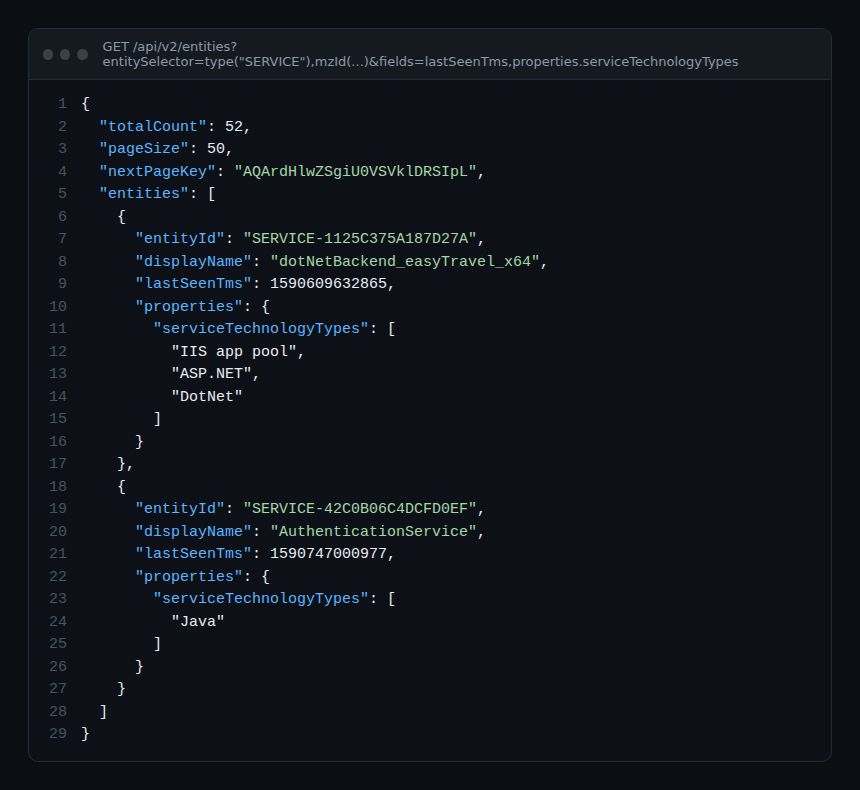
The response holds totalCount, pageSize (50 by default) and, if more results remain, a nextPageKey. For the next page, pass only nextPageKey: the documentation requires you to omit all other parameters.
Step 2 — Narrow down when the name is not enough
Several services share the same name (one per test environment, one per cluster)? Combine criteria; only entities matching all of them are returned:
# by tag
type("SERVICE"),entityName.equals("checkout"),tag("env:prod")
# by management zone
type("SERVICE"),entityName.equals("checkout"),mzName("Payments")
# by relationship: services running on a given host
type("SERVICE"),fromRelationships.runsOnHost(type("HOST"),entityName.equals("web-01"))
# excluding
type("HOST"),not(tag("Infrastructure:Linux"))
To see which properties and relationships a type exposes, call GET /api/v2/entityTypes/{type} and look at properties, fromRelationships and toRelationships. The fields parameter adds fields to the response, for example fields=+lastSeenTms,+properties.serviceTechnologyTypes.
Step 3 — Extract the ID cleanly
curl -s -G "$DT_URL/api/v2/entities" \
  -H "Authorization: Api-Token $DT_TOKEN" \
  --data-urlencode 'entitySelector=type("HOST"),entityName.startsWith("web-")' \
  | jq -r '.entities[] | "\(.entityId)\t\(.displayName)"'
Already have an ID and want to check what it is? GET /api/v2/entities/{entityId} returns the entity’s details, with the same entities.read scope.
Limits to keep in mind: a selector is at most 2,000 characters long and targets only one entity type per query. Deleted entities (synthetic tests, applications, custom devices…) are excluded by default; deletedEntities.include() brings them back.
Method 2 — DQL in a Notebook (SaaS)
In Dynatrace SaaS, open a Notebook and type fetch dt.entity.: auto-complete suggests the entity types. Each record contains the ID and the name by default.
fetch dt.entity.service
| filter entity.name == "AuthenticationService"
| fields id, entity.name
To discover a type’s fields, describe dt.entity.service lists them. To filter along relationships, the documentation recommends reusing a classic selector, faster and more complete than native DQL expand/lookup (limited to 100 IDs per type per record):
fetch dt.entity.host
| filter in(id, classicEntitySelector("type(host),toRelationship.isProcessOf(type(PROCESS_GROUP_INSTANCE),softwareTechnologies(JAVA))"))
| fields id, entity.name
Two Grail-specific caveats. First, Grail does not apply management zones: anyone with storage:entities:read sees every entity. Second, since version 1.334 the documentation announces a transition to the new Smartscape storage and advises against classic entity queries; the Smartscape on Grail model is queried with smartscapeNodes, for example smartscapeNodes HOST | fields id, type | limit 10. Test your queries on that model before freezing them in a dashboard. For more everyday queries, see DQL queries for operations.
Method 3 — On Managed: stick to the API
Dynatrace Managed has neither Grail nor DQL. The documented method remains API v2 with the entitySelector: same syntax, same scope, same pagination, with the URL https://{your-domain}/e/{your-environment-id}/api/v2/entities. The same selector then works in SLOs, the metric selector and the configuration APIs, which makes it a worthwhile investment. The endpoint overview is in the Dynatrace Managed APIs.
Best practices
- Search with
entityName.equalsrather than plainentityName: the default CONTAINS returns partial namesakes. - Always check
totalCount: a script expecting one result must fail if it gets two. - Store the ID in your configuration as code, but keep the selector that produced it alongside so you can regenerate it.
- Give the lookup token only the
entities.readscope, with no write permission.
How to check it works
Replay the call with the entityId("…") selector and the ID you obtained: the response must contain exactly one entity, with the expected displayName and a recent lastSeenTms. In DQL, fetch dt.entity.service | filter id == "SERVICE-…" must return a single record. If nothing comes back, widen the timeframe: the entity may not have been seen in the last three days.
Official references: Entity selector and Query monitored entities in Grail.
Frequently asked questions
Why can’t the API find an entity I still see in an old report?
Without a from parameter, the search is limited to the last three days. Add from=now-30d, and for some types (synthetic tests, applications) deletedEntities.include().
Can I request hosts and services in the same call?
No, a selector targets one type per query. Make two calls, or use a relationship (fromRelationships, toRelationships) to reach the neighbouring type.
Do management zones filter DQL results?
No. The documentation states that Grail does not apply management zone filters to entities; the storage:entities:read permission gives access to all of them.
Conclusion
A good habit: look the ID up through the API with a precise selector, check that a single result comes back, then reuse that same selector wherever Dynatrace accepts one. On SaaS, DQL and classicEntitySelector() bridge to Notebooks, while keeping an eye on the move to Smartscape on Grail.
span.observer is an independent community blog, not affiliated with Dynatrace LLC. Dynatrace is a trademark of its owner. Syntax and limits may change with the version and platform (SaaS or Managed): check them in the official documentation.