


Your Jaeger v1 has been running for years, and the question comes back at every architecture review: should you migrate to Jaeger v2 now, or wait? The answer depends less on a date than on what you run today: how many binaries, which flags, and what collection chain sits in front of storage.
This guide starts from that operating decision. The facts come from the jaegertracing.io documentation (version 2.23 shown as latest) and the jaegertracing/jaeger repository, read on 11 November 2026. I did not migrate a production system for this article: the configuration excerpts come from the repository, not from a span.observer test.
To place the Collector itself, see the Collector Contrib components; to monitor your own, monitoring the Collector.
Why migrate to Jaeger v2: what really changes
The documentation dates the release of Jaeger v2 to November 2024 and describes it as built on the OpenTelemetry Collector framework. The architecture page calls Jaeger “a customized distribution of the OpenTelemetry Collector with different roles”. One binary, jaeger, fills those roles depending on its configuration.
- Collector: receives traces from applications and writes them to storage.
- Ingester: reads spans from Kafka and writes them to storage.
- Query: serves the UI and the read API.
- Agent: the documentation now recommends the standard OpenTelemetry Collector instead.
In other words, what v1 set with flags becomes a YAML file in the Collector format. The repository README (Apache 2.0, about 23,400 stars displayed at reading time) announces “Jaeger v2 is out”.
The question of v1 end of life
To be honest on this point: I found no end-of-life date for v1 in the architecture, deployment or migration pages, nor in the README. The migration page only points to a shared Google document, which I could not use here. The documentation pages now list 2.x versions only.
So do not plan around an assumed date. Look for the support policy in the repository release notes before fixing your schedule, and remember that each month spent on v1 is a month without fixes from the main branch.
Map your v1 before touching anything
A successful migration starts with an inventory, not a YAML file. For each v1 component, note:
- which storage it uses (memory, Elasticsearch, Cassandra, Kafka as a buffer);
- which protocols applications send to it (OTLP, Jaeger gRPC or Thrift, Zipkin);
- which sampling strategy it serves to SDKs;
- which custom flags live in your manifests or charts.
This inventory mostly tells you where the risk hides: a service left on an old protocol, or a remotely served sampling strategy that everyone forgot.
Reading the v2 configuration file
You start it with jaeger --config config.yaml. It follows the Collector structure: a service block wires together components defined further down. The repository example shows it well.
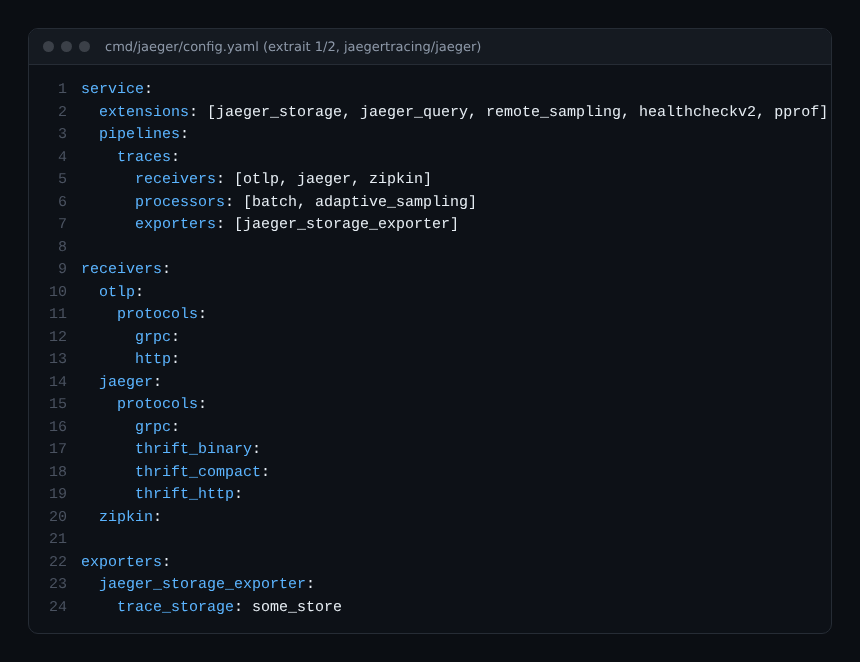
Three things to remember:
- the
tracespipeline has receivers (OTLP, Jaeger protocols, Zipkin), processors and one exporter; - the
jaeger_storage_exporterexporter writes to a named storage, heresome_store; - the
extensionslist enables Jaeger-specific features: storage, queries, remote sampling.
The second half of the file defines those extensions.
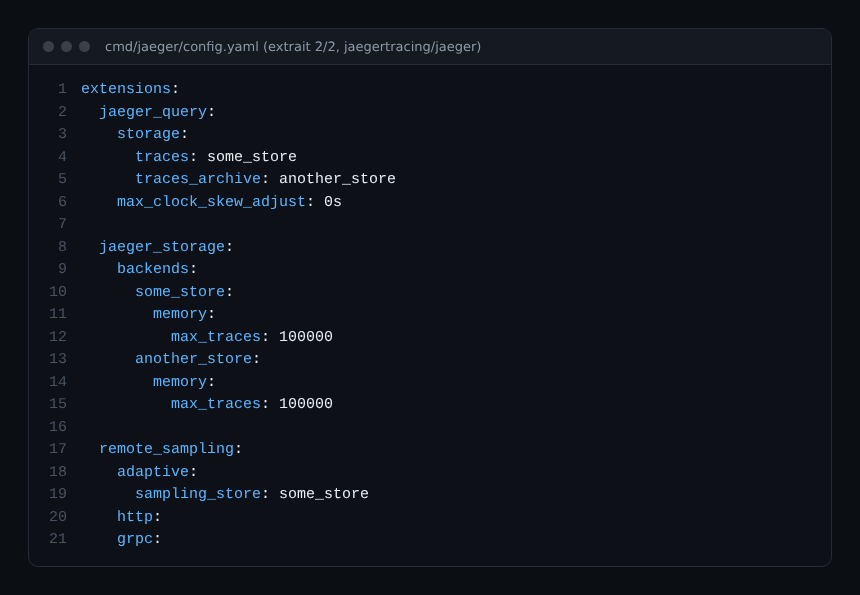
The jaeger_storage extension declares backends once, under a name. jaeger_query and the exporter refer to them by that name. This is a useful change of logic: switching storage means editing one entry, not several scattered flags. The memory backend in the example is for testing, not production.
Steps for a cautious migration
- Start in parallel. Run a Jaeger v2 next to v1 with test storage, and send it a copy of the traffic.
- Translate the configuration. Use your inventory: one receiver per protocol in use, one named backend per storage.
- Check the data. Compare known traces between the two instances in the UI.
- Switch writes, then reads.
- Shut down v1 once the retention window has passed.
For an upgrade between 2.x versions, the documentation gives an order: query first, then the ingester if you use Kafka, then the collector. That is not written for the v1 to v2 move, but the principle (readers before writers) is a good reflex.
The exporter queue trap
The documentation flags a subtle point: if the exporter queue acknowledges spans as soon as they are enqueued, a storage outage can lose data. To avoid it, it says to set wait_for_result: true and not to use the batch processor. The same exporter can also act as a connector and send permanently rejected spans to another pipeline, which works as a dead-letter box. Worth rereading before production, especially if your SLO covers trace completeness.
Best practices
- Version the YAML and review it like code.
- Keep receivers only for protocols actually in use: every open port is extra surface.
- Measure before and after: write latency, rejected spans, duration of a typical query.
- If you sample, also see the tail sampling rules so you do not lose the useful traces.
- Keep v1 read-only until retention has run out.
Frequently asked questions
Do I need an OpenTelemetry Collector in front of Jaeger v2?
No. The documentation states that you do not need it to operate Jaeger. It adds that a team already running one can place it in front of Jaeger for other telemetry types.
Do my applications have to change?
The example file keeps Jaeger and Zipkin receivers next to OTLP, so existing clients can keep writing. Check this in your own configuration.
What about Dynatrace?
This article covers Jaeger only. To send OpenTelemetry traces to Dynatrace, see the OpenTelemetry Collector with Dynatrace; the Dynatrace documentation separates SaaS and Managed, which I do not detail here.
Conclusion
Moving to Jaeger v2 means accepting a Collector-style YAML file in place of flags: better readability, at the price of a serious inventory. Start in parallel, check the traces, then switch. Sources: the Jaeger documentation and the jaegertracing/jaeger repository.
span.observer is an independent community blog, not affiliated with Dynatrace LLC or the Jaeger project. Brands mentioned belong to their owners. Tools change quickly: check commands and options in the official documentation.