



You ask your coding agent “who calls this function?” and it reads forty files to answer, spending tokens on every question. That is the problem codebase-memory-mcp sets out to fix: an MCP server that keeps a map of your code instead of making the agent rebuild it each time. This article treats the codebase-memory-mcp server as something you have to authorise, install and check. The repository is DeusData/codebase-memory-mcp.
Rather than tour every feature, I work through three operating decisions: what to hand the agent instead of raw files, what you let the installer write on the machine, and how to prove the saving is real on your own code.
A note on honesty: span.observer has not installed or run this project. Every fact comes from the README, server.json and other repository files, read on 11 November 2026. The latest commit I read is dated that same day, and server.json shows version 0.12.1. I could not read the star count from the source, so I do not quote it. The screenshots come from the repository, which is MIT-licensed.
The codebase-memory-mcp server: a map of the code, not a chat memory
The word “memory” is misleading. Nothing here remembers your conversations with the agent. The project indexes code, documentation and infrastructure files into a local knowledge graph. For conversational memory, look at https://span.observer/en/claude-mem-persistent-agent-memory/ or https://span.observer/en/ai-memory-coding-agent-memory-rust/ instead. This tool deals with structure: functions, calls, routes and dependencies.
According to the README, the project claims:
- an MIT licence and a native C backend, with no Docker and no language runtime to install;
- 163 supported languages and file formats, plus extra type resolution (“Hybrid LSP”) for some of them;
- 17 MCP tools, among them
search_graph,trace_path,detect_changesandget_architecture; - indexing and queries that need neither a hosted service nor an API key;
- 46 agent integrations, automatic or conditional, which the installer configures.
The backend contains no language model. As the README explains, your MCP client turns the question into tool calls: the agent might call trace_path with the direction set to “inbound”, the server queries the graph, and the agent rewords the result.
Decision one: what should the agent receive instead of files?
The project answers in one sentence: targeted graph queries, with compact, paged results. An agent hunting for the callers of a function does not need every file. It needs the list of callers, their paths and, if required, a snippet.
The tools fall into two groups. Indexing: index_repository, list_projects, index_status and check_index_coverage. Querying: structural and semantic search, call tracing, read-only Cypher, code snippets, file outlines, and detect_changes, which maps a git diff to the symbols it touches. The README suggests running get_graph_schema first.
One operating detail matters on large repositories. A synchronous index can outlast the time a client allows for a single tool call. The README then recommends async: true, followed by polling with status: true until the state is succeeded, failed or cancelled.
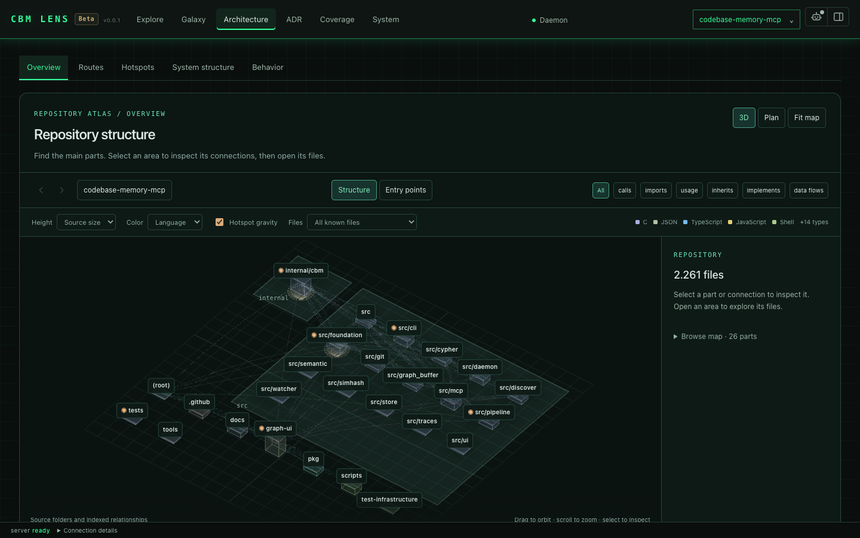
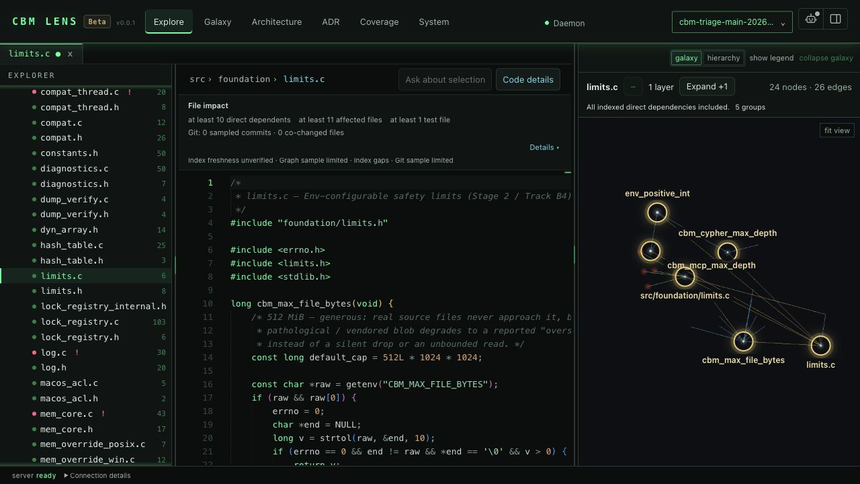
The project also ships a beta visual interface, CBM Lens (version 0.0.1). The first screenshot shows its Architecture view of the repository itself: folders become platforms and files become blocks. The second shows the source reader, with the file’s impact summary and its dependency graph on the right.
Decision two: what you let the installer write
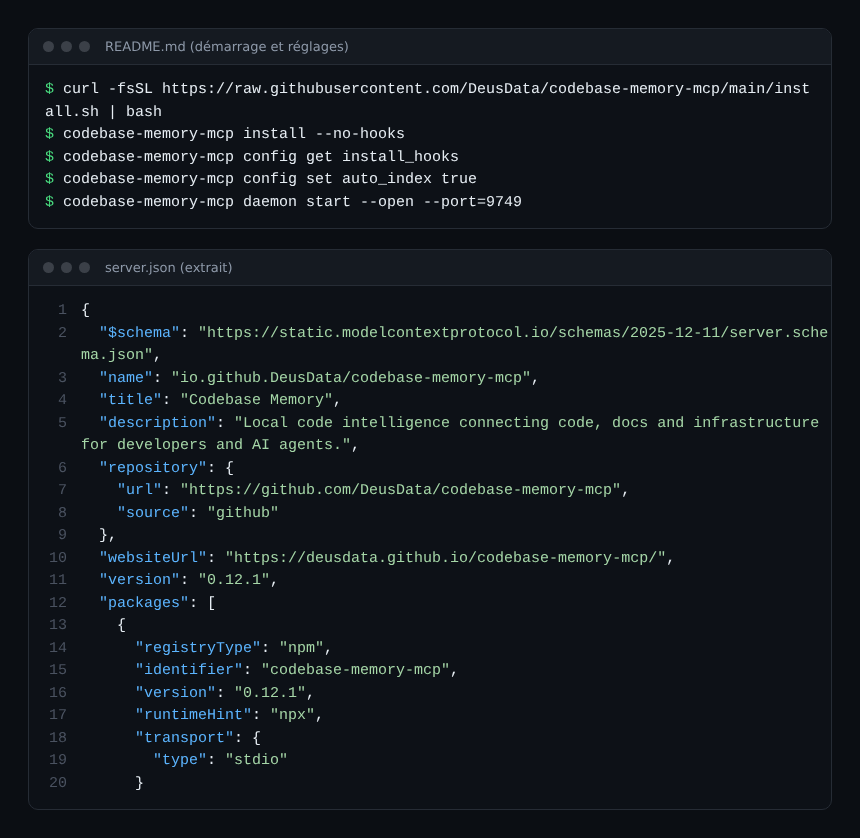
Installation takes one line, but that line deserves a pause. On macOS and Linux the README has you download install.sh from the main branch and run it. On Windows it has you download install.ps1, read it (“optional but recommended”), unblock it, then run it. Read the script before running it on Linux too: it is the same habit you would apply to any installer that edits your configuration files.
The install command does more than drop a binary. It detects your clients and adds MCP configuration, instructions, skills, agent profiles called Scout, Verify and Auditor, and hooks. By the README’s account, the hooks add context without replacing or blocking the requested tool (“context-only and fail-open”). They are on by default: install --no-hooks removes them, and config get install_hooks shows the current choice.
Other settings to decide before you roll it out:
auto_indexis off by default. When on, it indexes each new project at first connection, up toauto_index_limit.auto_watchis on by default: an indexed project is watched while a session owns it. Underdaemon start, watching continues after the session ends.- Indexes live in
~/.cache/codebase-memory-mcp/as SQLite databases. An index holds the structure of your code, so treat that folder like the code itself. CBM_CACHE_DIRmoves the folder, whileCBM_WORKERSandCBM_MEM_BUDGET_MBcap parallelism and memory, which helps inside a container.
On supply-chain safety, the README describes VirusTotal-scanned binaries, SLSA level 3 provenance, Sigstore cosign signatures and SHA-256 checksums verified by the install scripts. It also warns that Microsoft Defender may raise a false positive. These are the project’s own statements: the gh attestation verify command in the README lets you check provenance yourself. To frame what an MCP server may do on a workstation, read https://span.observer/en/secure-mcp-server/ and https://span.observer/en/audit-mcp-servers-enterprise/.
Decision three: prove the saving on your own code
The README cites a project study (an arXiv preprint covering 31 repositories) reporting ten times fewer tokens and 2.1 times fewer tool calls than file-by-file exploration. It also lists indexing times on an Apple M3 Pro: the Linux kernel (28 million lines) in 3 minutes, Django in about 6 seconds. All of these figures come from the project. I have not reproduced them, and they say nothing about your repository or your agent.
The project itself admits as much in docs/MEASURING_SAVINGS.md. That guide separates three questions: does the agent answer better, is the server fast and stable, and does it use fewer tokens or calls. A fast query does not prove a correct answer, and the server’s counters cannot see the model’s tokens. The guide asks you to freeze the experiment first: the exact commit, the question set and the expected scope of each answer.
Borrow that method as it stands. Put the same ten questions to your agent with and without the server, then record accuracy, call count and tokens. To follow those numbers over time, https://span.observer/en/mcp-tool-metrics-opentelemetry/ covers MCP tool metrics.
Observing a local MCP server
This server runs on the workstation, not in your production estate, so there is no web service to monitor in the usual way. Three points remain useful. Over stdio, standard output is reserved for the protocol’s JSON-RPC, and a client’s messages go to its error stream. The daemon writes its events to ${CBM_CACHE_DIR}/logs/cbm-daemon.log, and CBM_LOG_LEVEL sets the level (debug to error, or none). Finally, CBM_DIAGNOSTICS turns on a periodic snapshot, best kept for troubleshooting.
If you run a fleet of agents, tie these calls to your traces: https://span.observer/en/monitor-mcp-agents-opentelemetry/ shows how to instrument tool calls with OpenTelemetry. The README describes no OpenTelemetry export for this server, so do not assume one.
Limits to know about
- I have neither installed nor tested the software: everything is “according to the README”.
- I could not read the star count or real-world adoption, so I do not present the project as an established reference.
- CBM Lens is in beta (0.0.1). The README says the MCP server is the core of the project.
- Token and timing figures come from the project, on its own workloads.
- A clean
check_index_coverageresult only means “no recorded gap”, not “complete”, as the README puts it. - Async mode needs the daemon-backed server; a stand-alone CLI call with
--asyncis refused.
Good practice
- Read the install script, then test on a repository that holds no secrets.
- Leave
auto_indexoff until you have chosen which repositories it should cover. - Keep the hooks only once you have reviewed what they add to the agent’s context.
- Measure with and without the server, on your questions and a frozen commit.
- Handle the index folder as source code: permissions, backups and deletion when a project ends.
Frequently asked questions
Does codebase-memory-mcp send my code to the cloud?
According to the README, code analysis and graph storage run on your machine, with no hosted service or API key. CBM Lens’s local chat can optionally download a model, and inference stays in the browser. Your MCP client and its model, however, do see what the server returns.
How does it differ from a memory tool such as claude-mem?
A memory tool retains what the agent did or learned. This server describes the structure of the code: calls, dependencies, routes and infrastructure. The two complement each other rather than compete.
Which licence and which version?
The repository is MIT-licensed. server.json shows version 0.12.1 on the day I read it, and the same file lists npm and PyPI packages.
Conclusion
codebase-memory-mcp asks a fair question: why make an agent reread the code for every question when a local map can exist? Before adopting it, read the installer, choose your indexing settings, then measure the saving on your own repositories. For another project from the “Top GitHub repos” series, see https://span.observer/en/opensre-sre-agent-open-source/.
This blog is independent and not affiliated with Dynatrace LLC. codebase-memory-mcp is a third-party project, not published by Dynatrace.