Caveman reduce tokens: that is the promise of the JuliusBrussee/caveman repository, a skill and proxy for coding agents (Claude Code, Codex, Gemini CLI and others) that asks the agent to answer briefly and read less. The repository has about 115,000 stars at the end of October 2026, according to its GitHub page. The README says it started as a joke in April 2026.
For an operations team, the question is not the agent’s tone. It is cost: tokens consumed per session, per tool and per day, which nobody measures until the invoice arrives. This article presents the project from its README, then shows which metrics to watch on the LLM observability side, including the ones the project provides itself.
A word on honesty: span.observer is an independent blog and has not installed Caveman. The commands and figures come from the README, read on 26 October 2026; they are the project’s claims, not measurements by this blog.
Caveman reduce tokens: what the project does
- Author and licence: the repository belongs to Julius Brussee. The README states Apache-2.0 for the whole repository, and the LICENSE file is indeed the Apache 2.0 text. A LICENSING.md file covers older releases. The name “Caveman” and the logo are the author’s trademarks.
- Figures read on 26 October 2026: about 115,000 stars, about 6,600 forks, 1,886 commits. The page shows no release in its sidebar, but the README links to the 4.0.0 release notes and pins v4.0.1 in its install scripts.
- Six parts (“rocks” in the README): Say less (short answers), Read less (compressing logs, JSON, CSV and test output before the model reads them), Auto (choosing the model and effort level), Blocks (reusable scripts), Waste fixes (spotting waste) and Browse (compressed web pages).
The principle of the voice: answer first, one idea per sentence, but code, commands, paths and error messages stay untouched. The README stresses one point: the project never rewrites your prompts, because it cites a study (Adobe Research) saying that doing so makes answers worse.
A look at the Caveman Learn report
According to the README, the caveman learn command ranks where your tokens go, using agent history already on disk. The repository publishes a screenshot of the generated report.
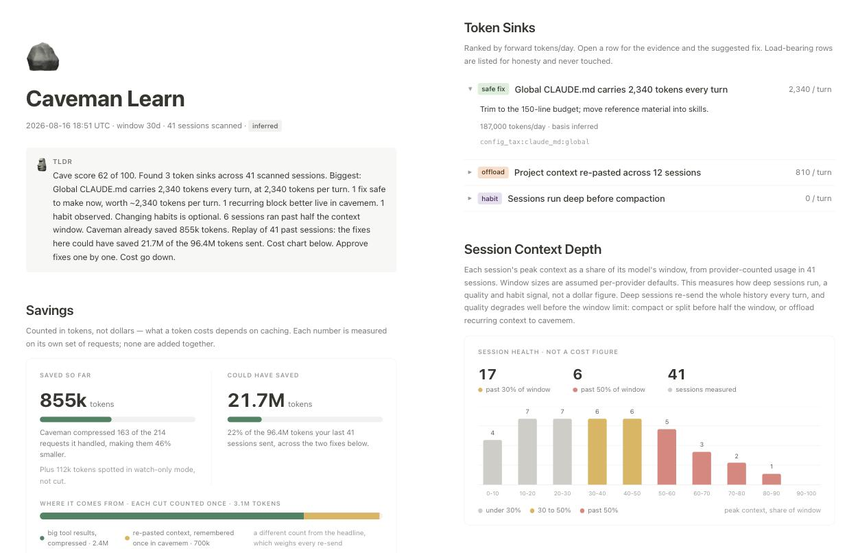
The screenshot comes from the repository README (Apache-2.0 licence). It shows a summary, “Saved so far” and “Could have saved” cards, a list of waste items (for example a global CLAUDE.md file that adds tokens on every turn) and a histogram of how much of the context window each session uses. The report states that figures are counted in tokens, not dollars, because a token’s price depends on caching. These values come from a demonstration run: yours will differ.
Installation step by step, from the README
- Prerequisite: Node.js 22.13 or later. The README lists Mac, Linux and Windows.
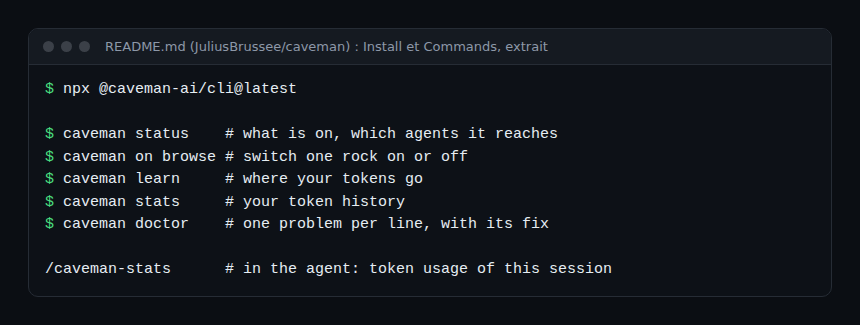
- Install with a single command that finds your agents and shows what it changes before applying it:
npx @caveman-ai/cli@latest - Check the state with
caveman statusandcaveman doctor. If you had Caveman before version 4.0, the README says to type@latest, otherwise the old local copy wins. - Skill-only variant, without the proxy:
npx skills add JuliusBrussee/caveman -gthen
/cavemanin the agent ($cavemanin Codex);stop cavemangoes back to normal mode. - Claude Code plugin variant:
claude plugin marketplace add JuliusBrussee/caveman && claude plugin install caveman@caveman
To uninstall, the README gives npx -y github:JuliusBrussee/caveman -- --uninstall (plus --allow-git=root on npm 12 or later). For Windows it provides a PowerShell 5.1 or later script. Read these scripts before running them: a curl ... | bash runs remote code.
Which metrics to watch to supervise tokens
Caveman provides caveman stats (token history) and /caveman-stats (real token usage of a Claude Code session). These are local views. A team also needs an independent measurement on the LLM observability side. The OpenTelemetry semantic conventions for generative AI define the span attributes gen_ai.usage.input_tokens and gen_ai.usage.output_tokens, and the metric gen_ai.client.token.usage. These conventions have Development status and now live in a dedicated repository: see our article on AI agent token cost with OpenTelemetry for the detail and caveats.
Four indicators are enough to start:
- Input tokens per session: they grow on every turn because context accumulates. This is the share “Read less” claims to reduce.
- Output tokens per request: the share the concise voice targets.
- Tool calls per task: an agent going in circles shows up here before the invoice does.
- Tasks completed: a token saving that makes more tasks fail is worth nothing. Measure both together.
SRE method: record these indicators for a week before installation, then a week after, on comparable tasks. Without a baseline, no saving can be demonstrated. If you already put a compression proxy in front of your models, compare with Headroom, LLM context compression, which exposes its own metrics. To keep control of what the agent does, see also T3 Code and coding agent control.
What the project claims (and its caveats)
The README publishes many figures. Here are a few, with the caveats that appear in the README itself:
- On ten development questions, the README counts 6,983 output tokens with no instruction, 4,334 with “Answer concisely.”, 4,119 with
/cavemanand 2,693 with/ultracave. It notes that “be concise” is the real baseline and that these measurements date from the 3.1.0 rules, not re-run. - For “Read less”, the README claims 33.2% fewer input tokens over whole sessions (54 Claude Code runs). It states the measurement dates from August 2026 on an older engine, and that HTML gets 9.9% worse for lack of a compressor.
- For “Auto”, it claims 54% lower cost over 85 tasks, stating that the run is half done and the score gap is too small to conclude.
- The voice rules cost about 1,160 input tokens, and if you pay per request (GitHub Copilot), shorter answers save nothing.
These figures are the author’s, on the author’s task sets. Do not take them as a promise for your team: measure your own.
Limits and open points
- Telemetry on by default: according to the README’s “Privacy” section, the CLI sends usage statistics (commands run, token counts, a random install ID, OS, IP address), but not your prompts, code or paths. To turn it off:
caveman telemetry offorDO_NOT_TRACK=1. Decide this before any company rollout. - Auto sends data: once signed in, Auto sends Caveman Cloud your latest request and whatever the agent attaches to it (CLAUDE.md, mentioned files). Do not enable it without a security review.
caveman off routingstops it. - In-house figures: the repository’s GitHub tagline speaks of “65% fewer tokens”, while the README details widely varying results (8.5% fewer output tokens in the cited JetBrains trial, 3% more than “be concise” for
/caveman). Take the detail, not the tagline. span.observer has not read the cited studies (Adobe, JetBrains, Elastic): they are README claims. - Maturity: the project dates from April 2026 and is maintained, according to the README, by one person. Blocks is a pre-release (v0.1.0-rc.5), and the README notes that use in the Claude app is not yet tested end to end.
- Licences: the GitHub page detects Apache-2.0 and MIT; the README says Apache-2.0 for the whole repository. Read LICENSING.md for older releases and third-party notices.
Best practices
- Install on a test machine first and read the list of changes the installer displays.
- Turn telemetry off and leave Auto off until the data policy is approved.
- Measure tokens and success rate before and after, with the same tasks.
- Keep your provider’s cost alerts, independent of the tool.
- Leave code, commands and errors as full text: always review a diff before accepting it.
Frequently asked questions
Does Caveman really save tokens?
The README publishes measurements, but they come from the author, on the author’s task sets, with written caveats. Count your own tokens before and after.
Is Caveman free and open source?
The README states Apache-2.0 for the whole repository. Auto mode requires a free account and a Free plan exists; its terms depend on Caveman Cloud, not on the repository licence.
What should be monitored in production?
Input and output tokens per session, the number of tool calls, the task success rate and the tool’s outbound connections. The OpenTelemetry GenAI conventions provide the metric names.
Conclusion
Caveman is a popular and well documented project, but its figures remain its author’s. For an SRE team, the right approach is the same as for any new dependency: read, install at small scale, switch telemetry off, and measure tokens before believing the savings. Sources: JuliusBrussee/caveman repository and OpenTelemetry GenAI semantic conventions.
span.observer is an independent community blog, not affiliated with Dynatrace LLC, the author of Caveman or the projects cited. Trademarks belong to their owners. Tools change quickly: check commands and options in their official documentation.