ai-memory coding agent memory is what this Rust open source project provides: it gives your agents (Claude Code, Codex, Cursor, Gemini CLI, OpenCode and more than twenty other harnesses) a shared long-term memory, stored as Markdown pages versioned with Git. The akitaonrails/ai-memory repository shows around 12,600 stars at the end of October 2026, under the MIT licence.
The README’s idea: quit Claude Code mid-task, open Codex in the same directory and continue without re-explaining the architecture, the failed approaches and the open questions. This article presents the project, its installation according to the README, what its web interface shows, its limits (captured data, youth) and how to supervise it with its Prometheus metrics. A note on honesty: span.observer has not installed ai-memory; the commands come from the README and the screenshots come from the repository.
ai-memory coding agent memory: what the repository says
- Who: the repository belongs to the
akitaonrailsaccount, under the MIT licence (2026 copyright in the maintainer’s name). Its website is aimemory.sh. - Figures read on 22 October 2026: about 12,600 stars, about 889 forks, 4,344 commits; version 3.2.0 appears in the changelog dated 21 October 2026; the required toolchain is Rust 1.95 or newer.
- Architecture: a self-contained Rust binary serving MCP and HTTP and owning a data directory with a versioned Markdown wiki (the source of truth), a derived SQLite index (FTS5, entities, optional embeddings) and logs.
- Cycle: capture through lifecycle hooks (prompts, tool calls, session boundaries), consolidation into pages at session end, recall by search and brief injection, then a “handoff” to the next agent.
The project insists on one point: the default path makes no LLM call. Capture, search and handoffs work without an API key, and the features that rewrite content (compaction, deduplication, “dream”) are optional and off by default. To compare with other approaches to agent memory, read our article on Hindsight; the README itself cites Hindsight in its comparison table.
Web interface tour
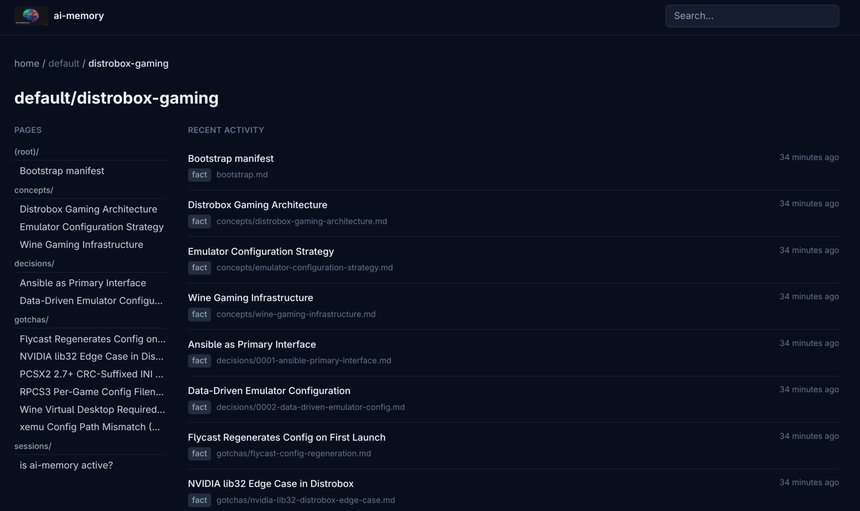
The server can start with --enable-web to offer a read-only view of the wiki in the browser, a link graph (/web/graph) and a JSON API under /api/v1. The screenshot below, taken from the repository, shows a project with its pages sorted by folder (concepts/, decisions/, gotchas/, sessions/) and recent activity.
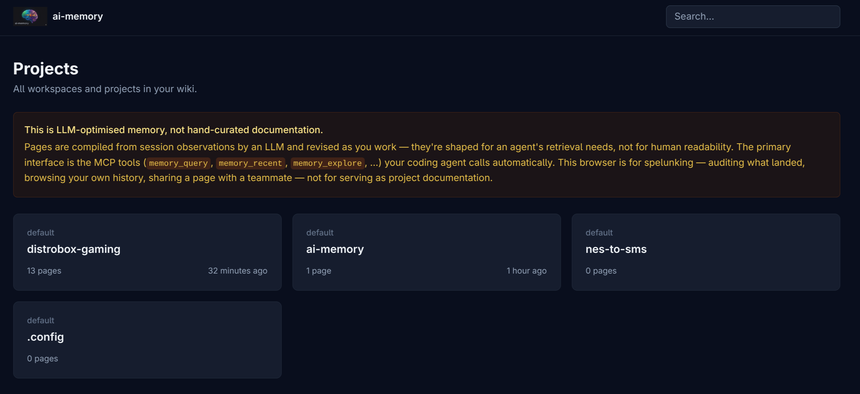
On the home screen, a notice from the project reminds you that these pages are “LLM-optimised memory, not hand-curated documentation”: compiled for retrieval by an agent, not for human reading. The browser is for auditing what was recorded.
Installation step by step
Step 1 — Linux and macOS
The README offers two commands, with no root rights:
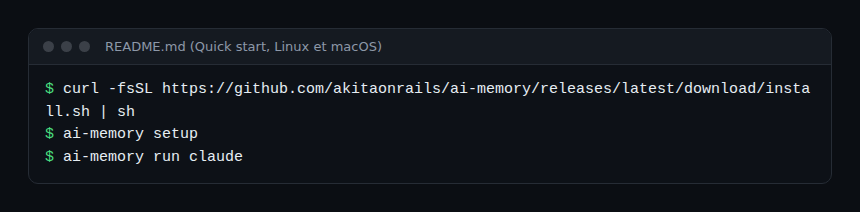
According to the README, install.sh downloads the release for your system, checks it against the published SHA-256 checksum (and refuses to install without a match), then links it in ~/.local/bin. ai-memory setup creates the data directory with a token in an owner-only file, starts a per-user service (systemd or launchd) and configures MCP, hooks and skills for the agents it finds, after confirmation. The --plan option prints the plan without changing anything.
Step 2 — Windows and other platforms
On Windows, the README gives two PowerShell commands (install.ps1 then ai-memory setup), and lists native Windows as “experimental”; Windows through WSL2 is “supported”. Packages exist for Arch (AUR), Fedora (RPM), NixOS, a macOS menu bar app and a Docker image.
Step 3 — Launch an agent
The README recommends starting the agent with ai-memory run claude (or codex): the launcher wires hooks and MCP if missing, and adds session continuity across harnesses. Then restart your agents and ask them “What do you remember about this project?” to check.
Limits and open points
- What is captured: hooks record prompts and tool calls, sanitised by a privacy boundary before storage. The DATA_HANDLING.md file states there is no encryption at rest in v1 and relies on filesystem permissions. Per-repository
[capture]rules let you exclude paths. - Authentication: the README warns that the Docker quick start has no authentication (loopback binding only). Native installs with
ai-memory initget a token. Add TLS through a reverse proxy as soon as the server leaves the machine. - Optional external paths: by default everything is local, with local embeddings. A remote LLM or embedding provider sends content to that provider if you enable it.
- Maturity: the project ships close major versions, lists native Windows as experimental and states, in its acknowledgements, that it was built in collaboration with Claude Code. Read the changelog before each update.
- Wrong memory: automatic memory can keep a false conclusion. The README mentions contradiction flagging, not a guarantee of truth.
How to supervise ai-memory
ai-memory is a long-running local service: supervise it as such. According to the repository’s documentation, three sources exist. The ai-memory status --json command (equivalent to the protected GET /admin/status) gives the state, including per-workload LLM call telemetry when a provider is configured. The GET /admin/metrics endpoint exposes, in Prometheus text format, hook counters by result, MCP tool calls split into read and write, and latency histograms for POST /hook and memory_query; labels come from a closed set and no query text, project name or token can appear in them. Finally /web/health shows the write queue, the hook spool and the consolidation queue.
The repository states there is no OpenTelemetry exporter: counters reset on restart, and OTLP export is marked “measure first”. To send them to Dynatrace, you can have an OpenTelemetry Collector read /admin/metrics with the Prometheus receiver, as explained in our article on OpenTelemetry and Prometheus, respecting the server’s authentication. This applies to Dynatrace SaaS; on Dynatrace Managed, check support for OTLP metric ingest.
On the agent side, the cost impact (the injected brief consumes tokens) is measured with the agent’s own telemetry, see the token cost of an AI agent with OpenTelemetry and supervising a coding agent in the enterprise.
How to check that it works
ai-memory statusandai-memory doctorreport no blocking warning.- After a session, a page appears in the wiki (web view or Markdown files).
- In a new agent in the same directory, asking “where did we leave off?” resumes the handoff.
Best practices
- Start on a repository with no secrets, with the exclusion
[capture]rules in place. - Keep the server on loopback; otherwise use tokens, accounts and TLS.
- Back up the data directory (the README describes a backup to a remote Git repository) and review the recorded pages.
- Pin the version and read the upgrade notes before migrating.
Frequently asked questions
Does ai-memory need an LLM or an API key?
Not by default: capture, search and handoffs work with no LLM call. A provider only improves summaries and semantic search, if you configure one.
Does data leave my machine?
According to DATA_HANDLING.md, not by default: the project says it sends no telemetry. Some options (a remote LLM or embedding provider, a shared server) send content wherever you point them.
Can a team share it?
Yes, according to the README: one common server, with multi-user authentication, attribution and an audit log. Personal handoffs stay personal.
Conclusion
ai-memory offers transparent coding agent memory: Markdown files you own, a single Rust binary and no LLM by default. It captures a lot of content: you decide what, where and with what supervision. Sources: akitaonrails/ai-memory repository.
span.observer is an independent community blog, not affiliated with Dynatrace LLC or the projects mentioned. Trademarks belong to their owners. Tools change quickly: check commands and options in their official documentation.