Your MCP server runs behind a gateway, and a client has just announced that it speaks the 2026-07-28 revision of the protocol. Do you upgrade now, or wait? To decide, you need to know what breaks silently. The mcp-migrate project is built for that: a command-line tool that reads a server’s code and lists what this revision changes. Here is my reading of mcp-migrate MCP server checks in production: what the tool detects and what it cannot see.
Facts re-read on 10 November 2026 in the cloned repository: Apache 2.0 licence, version 0.21.1 dated 30 October 2026 in the CHANGELOG, latest commit on 10 November 2026. I have not installed or run the tool. The outputs shown below are the README’s examples, not my own tests. I do not quote a star count because I could not read one reliably.
A word of framing, since this blog is about Dynatrace: mcp-migrate analyses code and depends on no Dynatrace offering, neither SaaS nor Managed.
mcp-migrate MCP server: the decision before the upgrade
The changes page for the revision dated 2026-07-28, read the same day, lists breaks of very different kinds. Some make a client fail at once. Others degrade caching or traceability without a single error. The tool does not replace reading the specification, but it spares you doing so by hand on every file.
My operating question is therefore simple: will my server fail, or just work less well? The answer sets the order of the work, not the final grade.
Three families of breakage, ranked by on-call risk
What breaks outright
The README classes 10 of its 21 rules as “breaking”. The most telling for an HTTP server: the Mcp-Session-Id header is gone (R001), the initialize handshake is removed (R009), and so are ping (R011) and logging/setLevel (R012). Add resources/subscribe, replaced by subscriptions/listen (R013), and the “resource not found” error code, moved from -32002 to -32602 (R017). The specification page confirms each of these.
One case deserves attention: in-memory state. Rule R002 flags, for example, a global dictionary keyed by connection. Behind a load balancer or after a restart, that state vanishes. The specification asks for handles minted by the server and passed as tool arguments.
What degrades without an error
Three “deprecated” rules (HTTP+SSE, Roots/Sampling/Logging, dynamic client registration) and eight “advisory” ones make up the grey zone. For instance, tools/list results must carry ttlMs and cacheScope (R016). Without them nothing crashes, but clients can no longer cache those lists. Tool ordering (R004) plays on the same ground.
What concerns observability
Rule R008 checks that trace context (traceparent, tracestate, baggage) is read from _meta. That is the point an SRE cares about: if the server ignores these keys, the OpenTelemetry trace stops at its door. It stays “advisory”, so it is easy to forget.
Reading the grade without fooling yourself
The README stresses three limits. First, every rule is capped: one Mcp-Session-Id read and fourteen give the same score of 75, grade C. The grade counts kinds of problem, not volume of work. To size the migration, the README points to --json, which lists every occurrence.
Second, only Python is graded. TypeScript is scanned by all 21 rules but gets no letter, and JavaScript is read by only 7 rules, according to the README. Third, exit code 2 means “code unreadable”, not “code clean”.
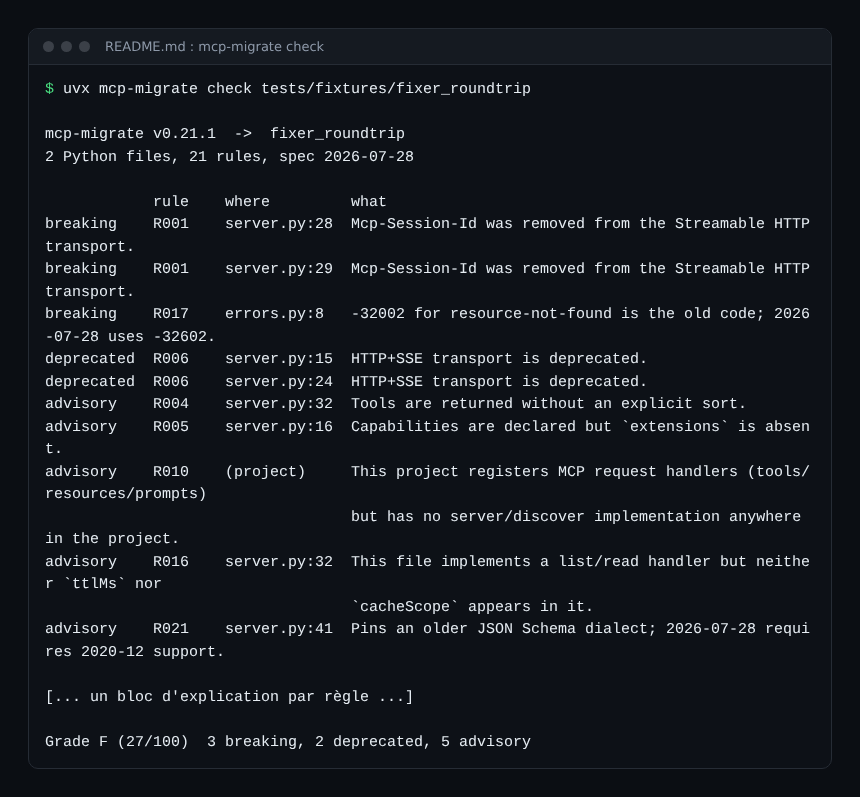
The grade is not an independent verdict either. The project’s “board” (21 public servers) was compiled by the project itself, not by the maintainers; the README says so. Inline suppressions do not count against the grade, and the tool prints their number on every run.
Step 1: run the check on your server
According to the README, two commands are enough to start:
uvx mcp-migrate check .
uvx mcp-migrate check . --json
To cut the noise at first, --rule R001 limits which rules run, and --severity breaking displays only the breaks without changing the grade or the exit code. Test folders are skipped by default; --include-tests adds them.
Step 2: read the fix diff before writing
The fix command works as a dry run by default. It prints the diff and writes only with --write. Each change is tagged “safe” or “review”. In the README’s example, three changes are safe (error code, extensions={}, tool sorting) and three need a human.
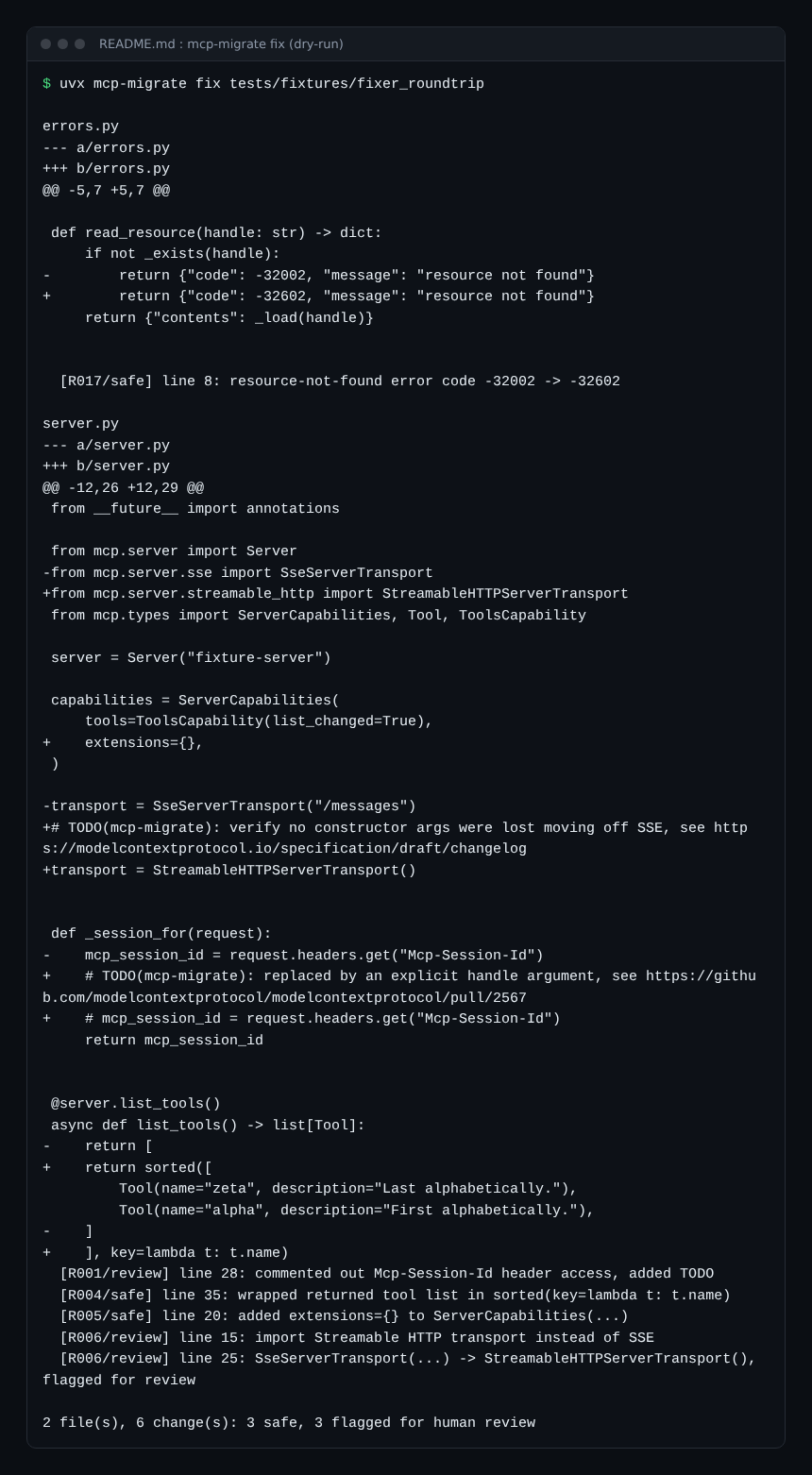
The key detail is the TODO(mcp-migrate) line left in the code: the tool comments out the session header read, but it cannot guess the name of your future handle. That is the right split. Only 19 fixers exist for 21 rules; R010 (server/discover) and R015 (resultType) have none.
Step 3: adopt it without blocking the whole team
An existing server rarely starts from zero findings. The README offers a baseline file: --write-baseline records the known findings, and --baseline fails the build only on new ones. The grade does not change: the debt stays visible.
For a false positive, a mcp-migrate: ignore[R001] comment with a reason is enough. Beware of R005, R015 and R016: the README states that suppressing one line silences the rule for the whole file.
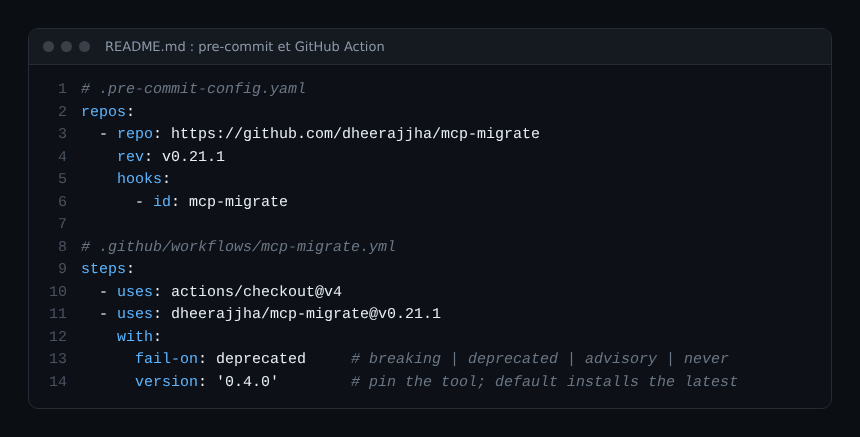
For continuous integration, the README provides a pre-commit hook and a GitHub Action, with SARIF output for the Security tab. It advises pinning the version: otherwise a new rule can turn a build red when the code has not moved.
Watching the server during the migration
A static check cannot see real behaviour. Here is what I would add, as a suggestion and not as a feature of the tool:
- compare the error rate per MCP method before and after the deployment;
- track the share of
tools/listrequests that still come back despite the cache, oncettlMsis added; - check that a client call lands in the same trace as the server-side tool call (R008).
For per-tool measurement, see MCP tool metrics; for trace propagation, monitoring MCP agents with OpenTelemetry.
Limits and open points
- A young, very active project: 21 rules, a 0.x version, and the README warns the JSON shape may change before 1.0.
- Detection by pattern, not by execution: the README admits to open classes of false positives.
- TypeScript grading is still undecided; JavaScript is only partly covered.
- I have not run the tool on a real server: not verified.
- A code check replaces neither integration tests with a real client nor a security audit, see auditing MCP servers in the enterprise.
Best practices
- Run
check --jsonfirst and count occurrences before promising a date. - Handle the “breaking” findings first, then caching and tracing.
- Read every “review” diff: a
TODOis a decision, not an oversight. - Pin the tool’s version in CI and bump it deliberately.
- Keep an end-to-end test with a recent client; to build or harden the server, see securing an MCP server.
Frequently asked questions
Does mcp-migrate change my code without warning?
No. fix is a dry run by default; you must pass --write to write. A file that would stop parsing after a fix is refused, according to the README.
Does an A grade mean my server is compliant?
No, only that none of the 21 rules found a matching pattern. The rules read code, not behaviour, and TypeScript gets no grade.
Is the project reliable enough to decide in production?
As a triage aid, yes, with its Apache 2.0 licence and an active repository. As the only check, no: it is a 0.x version and I have not tried it myself.
Conclusion
Before upgrading, use mcp-migrate on your MCP server to sort the work: what breaks, what degrades, what cuts the trace. Then validate with a real client and your metrics. Useful links: the specification’s changes page and the project repository cited above.
This blog is independent and not affiliated with Dynatrace LLC. The information comes from the project repository and the public specification, re-read on 10 November 2026, and may change; verify it in your own environment.