HyperFrames HTML to video: the heygen-com/hyperframes repository lets you write a video like a web page, then produce an MP4 that is identical on every render. The project describes itself as an open-source framework that turns HTML, CSS, media and seekable animations into deterministic videos, usable from the command line, from a coding agent through skills, or as the rendering core of hosted tools. It has around 69,500 stars in October 2026.
For a team producing launch videos, pull request walkthroughs or animated reports, the appeal is a reproducible render in a CI pipeline, which can therefore be supervised like any other job. This article follows the project’s README and documentation: what it is, what the output looks like, installation, limits, and how to observe a rendering pipeline. For the wider framework around agents that produce files, see guardrails for AI agents in production.
A note on honesty: span.observer has not installed or run HyperFrames. The commands come from the repository’s README and documentation. The first image is a preview published in the README; the other two are excerpts of those files, rendered by us.
HyperFrames HTML to video: what the repository says
- Publisher: the repository is hosted by the GitHub organisation
heygen-com. The README says the tool is used in production at HeyGen, with community examples (tldraw, TanStack, others in ADOPTERS.md). span.observer has no link with these companies. - Licence: Apache-2.0 (LICENSE file). The README stresses “no per-render fees or commercial-use thresholds”.
- Figures read on 22 October 2026 on the repository page: around 69,500 stars, around 6,300 forks, 5,817 commits on the main branch. The latest release shown is v0.8.185, dated 21 October 2026; the
hyperframesCLI package carries the same version. - Language: TypeScript, according to the repository topics; the CLI needs Node.js 22 or later and FFmpeg.
- Components: a CLI, an engine (page capture with Puppeteer and FFmpeg), a “producer” that orchestrates capture, encoding and audio mixing, a browser Studio for previewing, a catalogue of about 450 blocks and components, and distributed rendering on AWS Lambda.
The README itself compares HyperFrames with Remotion: the same principle (headless Chrome and FFmpeg), but plain HTML rather than React components, and Apache-2.0 against a “source-available” licence on Remotion’s side. That is the project’s presentation, not an independent measurement.
What the output looks like
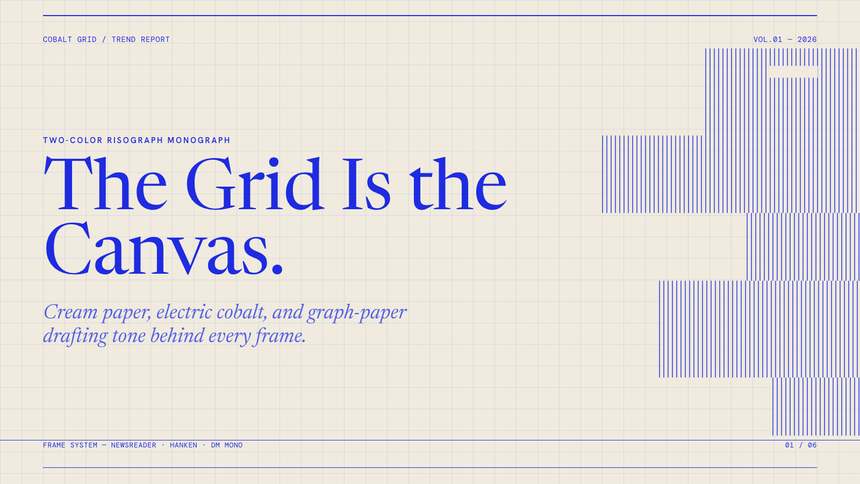
The README publishes design templates (“frame.md”) that serve as a starting point for an agent. Here is one, Cobalt Grid: a paper background with a draughtsman’s grid, a serif title and blue bars. It is an image of what a composition can produce, not a screenshot of the tool running.
A composition is an HTML file. data- attributes describe time and tracks, and a seekable animation (GSAP, CSS, Lottie, Three.js, Anime.js, WAAPI) can be positioned on any frame. Here is the README’s example:
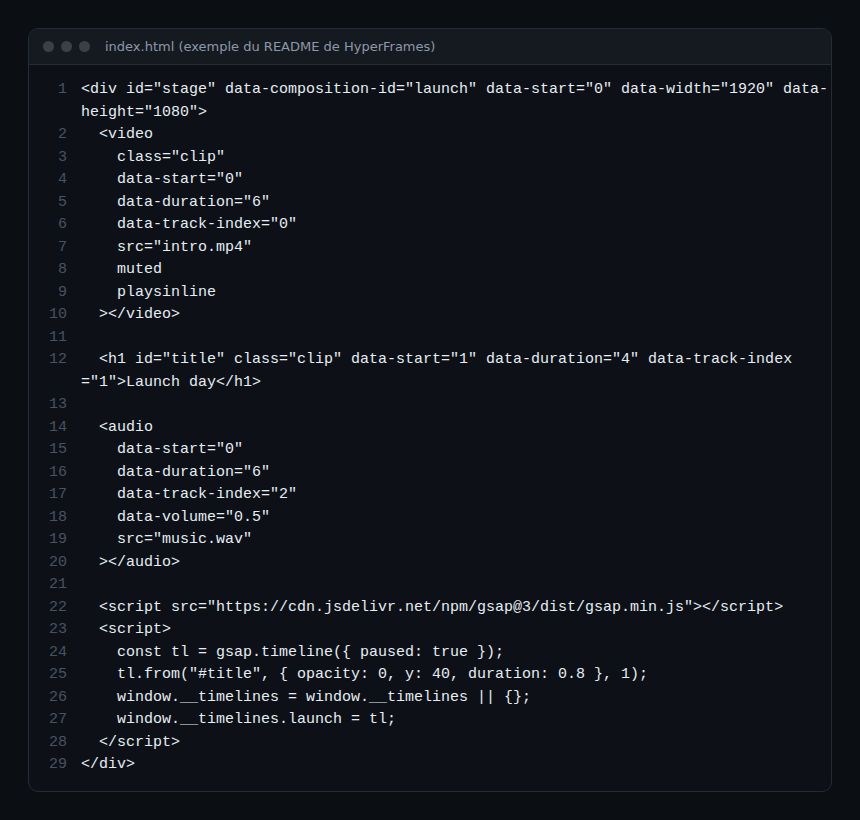
Reading the file: data-start and data-duration place each element in time, data-track-index assigns it to a track, and the GSAP timeline is created paused and registered in window.__timelines, which lets the engine position it without depending on the wall clock. According to the README, the engine seeks each frame in headless Chrome and encodes the result with FFmpeg: that is what makes the output identical for the same input.
Installation step by step
Step 1 — With a coding agent
For Claude Code, the README says to install the versioned plugin:
claude plugin marketplace add heygen-com/hyperframes
claude plugin install hyperframes@hyperframes
For standalone skills (OpenCode included):
npx skills add heygen-com/hyperframesThe project ships 7 skills; the core group contains /hyperframes, /hyperframes-cli, /hyperframes-registry and /media-use. A skill hands the agent a vendor’s instructions: read them before installing, like any code that runs with your rights.
Step 2 — By hand, with the CLI
Stated requirements: Node.js 22+ and FFmpeg.
npx hyperframes init my-video
cd my-video
npx hyperframes preview      # browser preview with live reload
npx hyperframes render       # render to MP4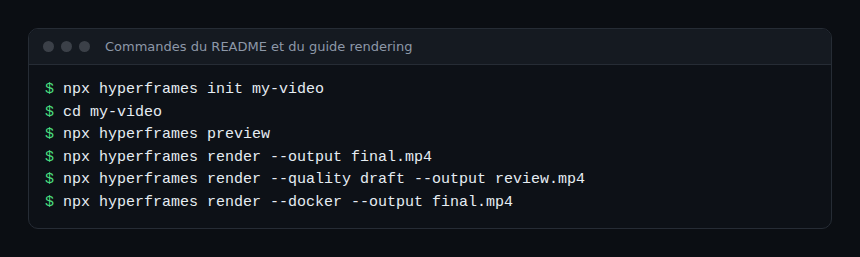
Step 3 — Tune the render
The rendering guide documents the options useful for an automated pipeline: --output (without it the result goes to renders/), --quality draft or high, --fps 60, --format webm|mov|gif|png-sequence|hls, --composition to target another file, and --docker when you need a controlled Chrome, FFmpeg and font environment, for example in CI. The documentation notes that Docker adds start-up time and is not required.
Limits and open points
- The release pace (v0.8.185 today) signals a very active, and therefore unstable, project: pin the CLI version in your pipelines.
- The Studio is described as “available, evolving” in the README table; the CLI is the most stable part.
- The repository uses Git LFS for about 240 MB of reference videos: worth knowing before cloning the whole repository.
- Under WSL2, the documentation warns that Chrome may fall back to software rendering, several times slower; it advises rendering from Windows if the GPU is not used.
- The examples load GSAP from a CDN: for an offline render, host the library yourself.
- Media generated by third-party services (voices, avatars) falls under those services’ terms, not the project’s licence.
Observing a HyperFrames rendering pipeline
HyperFrames is not a server: it is a command-line tool, so you supervise it like a job. What follows applies to Dynatrace SaaS and Dynatrace Managed alike, through the data from your CI or an OpenTelemetry Collector. The project itself documents no OpenTelemetry export.
- Duration and status: measure the duration and exit code of
npx hyperframes renderin your CI. The performance guide recommends measuring before changing anything, with Chrome DevTools on the preview, then comparing. - Machine settings:
npx hyperframes benchmarkcompares several combinations of fps, quality and worker count (1 to 20 runs, 3 by default);npx hyperframes doctorchecks that a machine can render. - Render quality:
lint,checkandsnapshotcatch problems before the full render. To drive a browser from an agent, see Chrome DevTools MCP for coding agents. - Provenance: every video carries two container tags,
hyperframes_rendererandhyperframes_version, readable withffprobe -v error -show_entries format_tags -of json out.mp4. Useful for finding which version produced a file. - CLI telemetry: the CLI collects usage data, including command names, render performance and a coarse environment fingerprint (system, CPU, memory, the name of the detected coding agent). Video content and project names are not collected, according to the documentation. It is turned off with
npx hyperframes telemetry disableand checked withtelemetry status. - Costs: the agent that writes the composition consumes tokens; track them as in AI agent token cost with OpenTelemetry.
How to check that it works
npx hyperframes doctorreports nothing missing.npx hyperframes previewplays the composition in the browser.npx hyperframes render --output final.mp4produces a file;ffprobereads its duration and provenance tags.- Two successive renders of the same composition give the same video, as the project promises; compare their checksums before building a regression test on it.
Best practices
- Pin the version of
hyperframesand of the installed skills. - Render in CI with
--dockerif reproducibility matters more than speed. - Keep source media in the video’s repository and size it to the output resolution.
- Decide on telemetry before deployment, not after.
- Review agent-generated content before release: text, brands, rights to music and images.
Frequently asked questions
Is HyperFrames free for commercial use?
The project is under the Apache-2.0 licence and the README states there are no per-render fees. Third-party services your compositions call have their own terms.
Do I need to know React?
No: a composition is an HTML file with time attributes and an animation. That is the design choice the README sets against Remotion.
Is the render really identical every time?
That is the stated goal (“same input, same frames, same output”). Differences usually come from the environment: Chrome version, fonts, FFmpeg. Hence the value of --docker mode and a comparison test.
Conclusion
HyperFrames answers a concrete need: having an agent produce videos without a graphical editor, with a render a CI pipeline can replay and measure. Keep three habits: pin the version, decide on telemetry, and measure every render. Sources: heygen-com/hyperframes repository.
span.observer is an independent community blog, not affiliated with Dynatrace LLC or the projects mentioned. Trademarks belong to their owners. Tools change quickly: check commands and options in their official documentation.