CLI-Anything agent-native software: the HKUDS/CLI-Anything repository starts from a simple observation. A coding agent handles a command line very well, but most software (GIMP, Blender, LibreOffice, Draw.io…) can only be used through a graphical interface. The project proposes to generate, with an agent, an “agent-native” command line around each piece of software, and a community catalogue, the CLI-Hub, to install the ones that already exist. The repository has around 56,100 stars in October 2026.
Giving an agent control of desktop software is useful, and delicate: every command it builds may come from untrusted input. This article follows the project’s README and documentation: what it is, how to install it, what the results look like, the security limits the project describes, and how to supervise these calls. For the security framework, see guardrails for AI agents in production.
A note on honesty: span.observer has not installed or tested CLI-Anything. The commands come from the README. The first and third images are excerpts of those documents rendered by us; the second is an image published in the repository.
CLI-Anything agent-native software: what the repository says
- Who: the repository belongs to the GitHub organisation
HKUDS. The README links to a technical report on arXiv (2606.03854) and to a community CLI-Hub where anyone can propose their own CLI by pull request. - Licence: Apache-2.0 (LICENSE file).
- Figures read on 22 October 2026 on the repository page: around 56,100 stars, around 5,100 forks, 893 commits, 82 open issues and 132 open pull requests. The page showed no dated release when read.
- Language and prerequisites: Python 3.10 or later; generated CLIs rely on Click (version 8 or later according to the README badges) and produce JSON output for agents, plus human-readable output.
- Stated tests: the README claims 2,461 passing tests (unit, end-to-end, subprocess). That is the project’s figure, which span.observer has not run.
- Compatible agents: the README names Claude Code, Codex, Cursor, OpenClaw (see our article on OpenClaw), OpenCode, Pi, Hermes and other agents that read skills.
A tour: the CLI-Hub and a result produced by a CLI
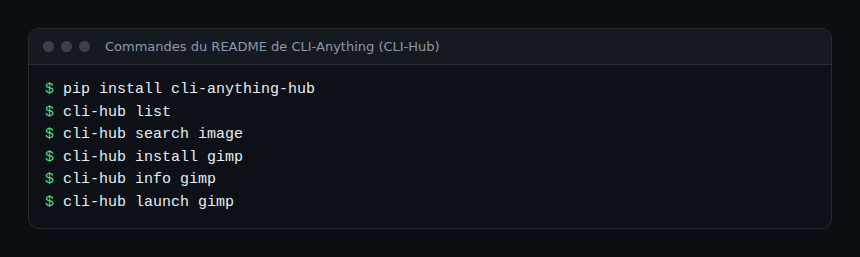
The “use what exists” entry point is the CLI-Hub manager, a pip package. The README gives these commands and notes that some CLIs wrap real desktop software that you must also install:
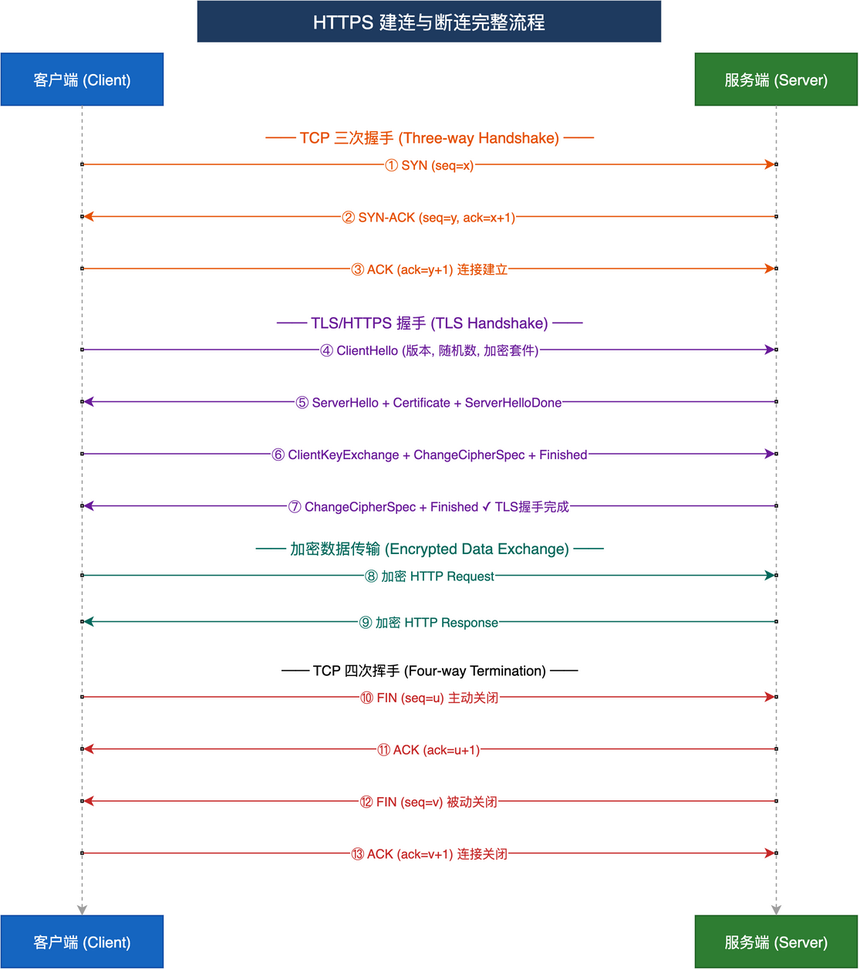
To illustrate the result, the README publishes demonstrations. The Draw.io one shows an agent building, through commands alone, a sequence diagram of an HTTPS connection (TCP handshake, TLS negotiation, encrypted exchange, termination). Here is the final artefact as the repository publishes it, with its Chinese and English labels:
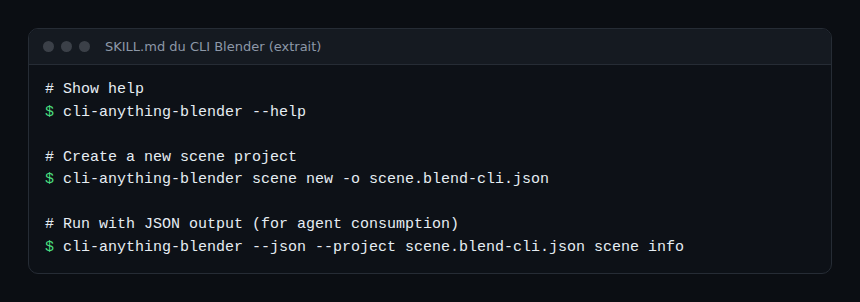
Every generated CLI follows the same pattern. The SKILL.md of the Blender CLI, for example, shows help, creating a scene project and a command with the --json option meant for agents:
Installation according to the README
Step 1 — Install the CLI-Hub
pip install cli-anything-hub
cli-hub list
cli-hub search image
cli-hub install gimp
cli-hub launch gimp
Before installing, cli-hub info <name> describes the CLI. If it wraps GIMP, Blender or LibreOffice, install that application too.
Step 2 — Give the meta-skill to the agent
npx skills add HKUDS/CLI-Anything --skill cli-hub-meta-skill -g -yYour agent can then search for and install a hub CLI on its own, from a prompt such as “Find appropriate CLI software in CLI-Hub and complete the task”. That autonomy is exactly what needs framing: see below.
Step 3 — Generate a new CLI (Claude Code)
/plugin marketplace add HKUDS/CLI-Anything
/plugin install cli-anything
/cli-anything ./gimp
The README describes a seven-phase pipeline: code analysis, design, implementation (Click CLI with REPL, JSON output, undo), test plan, test writing, documentation, publishing (setup.py). /cli-anything:refine then fills coverage gaps. On Windows, the README notes that Claude Code runs commands through bash: install Git for Windows or use WSL.
Limits and open points
- An agent builds commands. The repository’s SECURITY.md says so plainly: an agent may construct and run commands from untrusted input (prompts, files, other agents’ output). The attack surfaces listed: subprocess arguments, Script-Fu injection in GIMP, XML/SVG, path traversal, plaintext API keys.
- The mitigations described are up to each harness: allowlists before calls, escaping, path normalisation, 0o600 permissions for key files, never
shell=True. The project has already fixed cases (Script-Fu injection in GIMP, path traversal in the Sketch CLI, according to the README news). - Uneven quality: a catalogue open to community contributions holds CLIs of varying maturity; read a CLI’s code before giving it to an agent.
- Dependence on the original software: the CLIs do not replace GIMP or Blender, they drive them; their versions and licences remain their own.
- The repository moves fast (893 commits, 132 open pull requests): pin versions.
Supervising an agent’s calls through these CLIs
A CLI-Anything tool is a process launched by the agent: you supervise it on the agent side and on the system side. These leads apply to Dynatrace SaaS and Dynatrace Managed alike, through your agent client’s traces or an OpenTelemetry Collector; the project documents no OpenTelemetry export.
- Session log: for the Blender CLI, the documentation describes sessions that keep
session.json(current state), immutable artefact directories andtrajectory.json, an append-only history that ties each command to its visual preview. That is a native audit trail for this harness; check whether your CLI has an equivalent. - JSON output: the
--jsonoption gives a usable status. Log the command, the exit code and the duration of every call. - Agent-side traces: clients such as Claude Code emit tool events; the approach is detailed in supervising a coding agent in the enterprise.
- Resources: a CLI that launches Blender or LibreOffice consumes CPU, memory and disk; measure them on the host, as for a rendering job (see HyperFrames for a similar rendering pipeline).
How to check that it works
cli-hub listshows the registry, thencli-hub info <name>describes a CLI.- After
cli-hub install,cli-anything-<name> --helpanswers. - A command with
--jsonreturns a document you can read withjq. - In the agent, the skill list contains the CLI’s skill, and every call appears in your logs.
Best practices
- Install one CLI at a time, after reading its code and SKILL.md.
- Run the agent in a container or disposable machine when it drives software that reads and writes files.
- Limit the accessible directories and never put an API key in arguments.
- Log every CLI call with its exit code, and review them without looking for a culprit.
- For any CLI that writes or deletes, require human approval.
Frequently asked questions
Does CLI-Anything replace GIMP or Blender?
No: these CLIs drive the real software, which must be installed. The project provides the command layer, not the engine.
Do I need Claude Code to use it?
No. The README also describes installations for Codex, Cursor, OpenCode, Pi, OpenClaw, Hermes and other agents. The CLI-Hub catalogue works without an agent, with cli-hub.
Is it safe to let the agent install a CLI from the hub?
It is a supply-chain risk: the hub accepts community contributions. Require approval before each installation and read the code, as for any dependency.
Conclusion
CLI-Anything is useful if your agents must act on existing software, with a catalogue of ready-made CLIs. The trade-off, which the project itself describes in SECURITY.md, is that an agent builds commands from untrusted input: isolation, allowlists and a call log are not optional. For the protocol side of security, see also securing an MCP server. Sources: HKUDS/CLI-Anything repository.
span.observer is an independent community blog, not affiliated with Dynatrace LLC or the projects mentioned. Trademarks belong to their owners. Tools change quickly: check commands and options in their official documentation.