VoiceStudio local voice cloning is the pitch of the debpalash/VoiceStudio repository, which describes itself as an open-source, fully local alternative to ElevenLabs. One desktop application covers voice cloning, voice design from a text description, video dubbing, dictation, transcription and audiobooks. The repository has around 81,000 stars in October 2026: a number that attracts attention, but says nothing about what you are allowed to do with the tool.
This article follows the project’s README and documentation: what the tool is, what the AGPL-3.0 licence implies, how to install it, what its interface looks like, how to supervise it on a GPU server, and above all the framework to set before cloning anyone’s voice. To place it among self-hosted stacks, see our self-hosted open-source AI stack.
A note on honesty: span.observer has not installed or tested VoiceStudio. The commands come from the README, and the screenshots below come from the project’s repository.
VoiceStudio local voice cloning: who is behind it, which licence
- Author and maintainer: the repository belongs to
debpalash. LICENSE-NOTICE.md states a copyright of “Palash Debnath and VoiceStudio contributors” and says contributions are licensed to Yupcha Softwares Private Limited, the company that maintains the project. - Licence: AGPL-3.0 (GNU Affero General Public License v3), with a paid commercial offer, “VoiceStudio Pro”, for anyone who wants to embed it in a closed product.
- Figures read on 22 October 2026 on the repository page: around 81,000 stars, around 8,900 forks, 4,491 commits. The releases page showed v0.5.6 from 23 September; the
package.jsonon the main branch already carries version 0.5.7. - Default engine: the README names k2-fsa/OmniVoice, with other engines available and a catalogue described in
docs/feature-catalog.md. The project claims 646 languages. - Application: Electron is the only desktop app and web UI; v0.5.3 was the last Tauri release, according to the README.
What the AGPL-3.0 means in practice
The AGPL is a copyleft licence. The project summarises its effect in LICENSE-NOTICE.md (that summary has no legal value; only the text of LICENSE counts).
- You may use, copy, modify and redistribute the software, including for commercial or internal use.
- If you modify VoiceStudio and make that modified version available to other people over a network, you must offer them the complete source of your version under the same licence. That is the difference from the ordinary GPL: running it as a service does not avoid the obligation.
- Using the application as it is, for yourself or your team, does not oblige you to publish any code.
- Embedding VoiceStudio in a proprietary product or service without those obligations requires the project’s commercial licence.
Second trap: the application licence does not cover the models. The README says so plainly: model weights, tokenizers, voices and the terms for generated output come under separate licences, and a paid app licence does not grant those rights. The project provides an inventory (docs/licensing/model-inventory.md) and shows per-model licence notices in the model manager, stating that these notices do not certify commercial use. Before any production use, read the licence of each installed model. This is not legal advice: if in doubt, ask a lawyer.
A tour of the interface
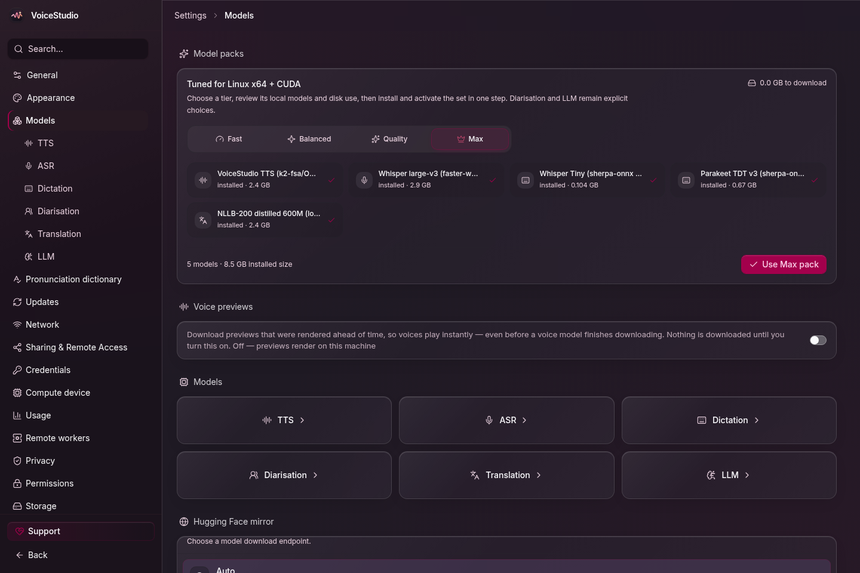
The next screenshot, published in the repository, shows Settings > Models: “model packs” (Fast, Balanced, Quality, Max) that install a set of models in one go for speech synthesis (TTS), recognition (ASR), translation and dictation, with the disk size of each.
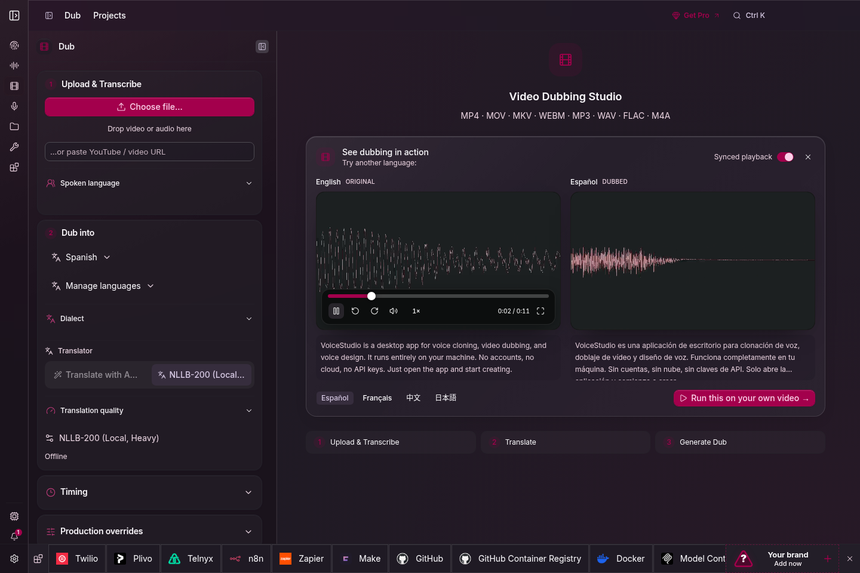
Video dubbing follows a three-step path: upload and transcribe, translate, generate. The left panel chooses the target language, the translator (here a local NLLB-200 model) and the timing.
Voice design starts from a free-text description (“a warm elderly British storyteller, slightly raspy”) or from preset starting points, then saves as a voice profile.
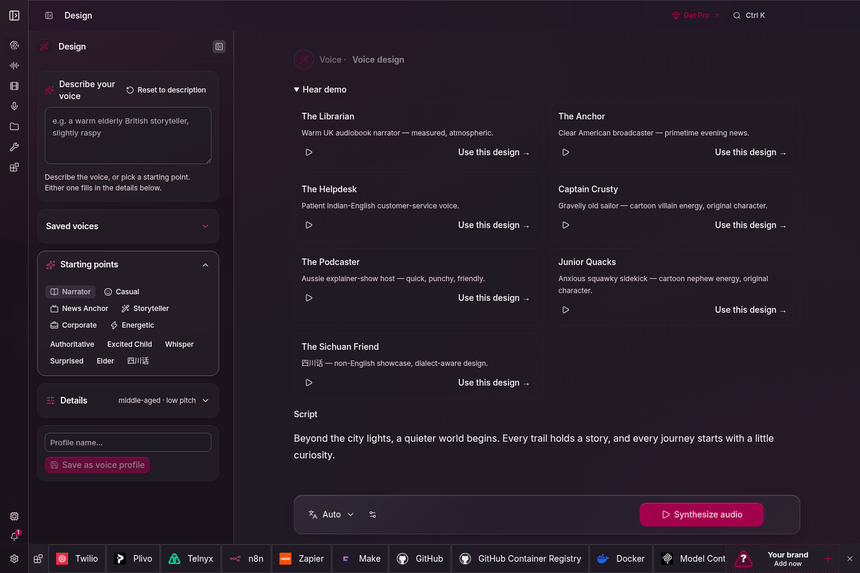
These screenshots also show, at the bottom, a bar of third-party integrations and a sponsor slot: that is the state of the interface when the captures were taken, not a choice made by span.observer.
Installation according to the README
Step 1 — Check the hardware
The README gives this support table: NVIDIA GPU on Windows or Linux (CUDA acceleration), Apple Silicon (Metal, MPS), CPU only is usable but slower (the installer then takes the small CPU build of PyTorch, about 5 GB of free disk), Windows on ARM is experimental, and Intel Macs get the interface only, connected to a remote backend.
Step 2 — Run the installer
On macOS and Linux:
curl -fsSL https://voicestudio.sh/install | shOn Windows, in PowerShell:
irm https://voicestudio.sh/install | iexPiping a remote script into a shell is a risky habit: the README offers, as a fallback, to run the script from the repository (scripts/install.sh) or to download the release packages (.dmg, .exe, .AppImage, .deb). Read the script before running it, or prefer the release package.
Step 3 — Or use Docker, for a server
The repository’s Docker documentation publishes the image ghcr.io/debpalash/voicestudio, for linux/amd64 only. It asks for an administrator key, because server mode protects settings and diagnostics:
export OMNIVOICE_API_KEY="$(python3 -c 'import secrets; print(secrets.token_urlsafe(32))')"
docker pull ghcr.io/debpalash/voicestudio:stable
docker run -d --name omnivoice \
  -p 127.0.0.1:3900:3900 \
  -e OMNIVOICE_API_KEY="$OMNIVOICE_API_KEY" \
  -v omnivoice-data:/app/omnivoice_data \
  ghcr.io/debpalash/voicestudio:stable
The port is published on 127.0.0.1 only. The first run downloads about 2.4 GB of model weights; follow it with docker logs -f omnivoice. Pin the :stable tag or an exact version: according to the documentation, :latest is a rolling preview of the main branch.
Cloning a voice: consent, rights and forbidden uses
The README sums up the rule in a few words: clone voices only with permission. That is the minimum, not a legal guarantee.
- Written, dated consent from the person whose voice you clone, with the purpose (project, duration, media). Keep it with the source sample.
- Personal rights: an identifiable voice is tied to its owner’s personality and may count as personal data; depending on the country, commercial use requires explicit agreement. This reading is general and does not replace a lawyer’s advice.
- Uses to rule out: impersonation, fake audio evidence, phone scams, disinformation, the voice of a deceased person or a minor without the agreement of their representatives.
- What the project provides: an invisible audio watermark (AudioSeal) that can be enabled in Settings > Privacy and, for calls, a “Voice ownership” field in which to record a consent statement. The repository’s roadmap, however, lists systematic logging of the source and consent of every clone as still open.
Put these rules in your internal policy before deploying the tool, as you would for a privileged agent (see guardrails for AI agents in production).
Limits and open points
- The project moves fast: 4,491 commits, a 0.5.x version, and iOS and Android companion apps described as a preview in the CHANGELOG. Pin a version.
- Quality and language claims are the project’s; check them on your own voices.
docs/benchmarks.mdanddocs/performance.mdare the starting point. - The README provides usage analytics that can be enabled after consent (PostHog); the Docker documentation lets you turn them off with
-e OMNIVOICE_ANALYTICS_DISABLED=1. - Model weights come from Hugging Face at install time: plan for bandwidth, disk and licence review.
Supervising VoiceStudio on a GPU server
For a desktop application, supervision is limited to what the application exposes. For a Docker deployment, several sources exist, all taken from the repository’s documentation. They apply to Dynatrace SaaS and Dynatrace Managed alike if you collect them through an agent or a Collector, because the tool is not a Dynatrace product.
- Logs: Settings > Logs shows backend and frontend logs, with search, a three-second refresh and copy. Nothing is sent remotely. Under Docker,
docker logsis enough; it is also what your collection agent will read. - Health: the application’s supervisor probes a compact
/healthcontract; the MCP toolcheck_healthreturns the backend status and the active GPU device. - GPU and memory: Settings > Performance reads
GET /api/settings/gpu-report(GPUs seen by the OS, PyTorch build, a verdict per engine) and shows live CPU, GPU, RAM and VRAM use. For long-term tracking, addnvidia-smior the DCGM exporter on the host. - Agents: the backend mounts an MCP server at
http://localhost:3900/mcp/with tools such asgenerate_speech,clone_voice,transcribeandcheck_health. The directory set byOMNIVOICE_MCP_BASE_PATHis the security boundary for files read or written; without it, paths are refused. Treat this entry point like any MCP server: securing an MCP server and observing MCP agents with OpenTelemetry.
The README describes no native OpenTelemetry export. Generation time, queueing or VRAM use are therefore measured from outside: container logs, host metrics, and traces on the agent side that calls generate_speech.
How to check that it works
- Open the interface, go to Voice cloning, pick the bundled demo voice and generate a sentence: the README describes this path.
- In Settings > Performance, check that the GPU is in use rather than the CPU.
- With Docker, check that the port is reachable only from the local machine and that the administrator key is requested.
- Call
check_healthfrom your MCP client.
Best practices
- Obtain and archive consent before any cloning; refuse requests without proof.
- Keep the service on 127.0.0.1 or behind an authenticated proxy, with a long API key.
- Pin the image version and read the licence of each model.
- Turn off usage analytics if your policy requires it.
- Expose audio files through a dedicated directory (
OMNIVOICE_MCP_BASE_PATH), never the disk root.
Frequently asked questions
Is VoiceStudio free for a company?
According to LICENSE-NOTICE.md, commercial and internal use of the application is free under AGPL-3.0. The paid commercial licence is for embedding it in a closed product. The models have their own terms.
Do I need a graphics card?
No, according to the README: the tool stays usable on the CPU, more slowly. An NVIDIA card or an Apple Silicon chip enables acceleration.
Do my recordings leave my machine?
The README says local workflows run on your hardware and remote services are optional. Models are downloaded from Hugging Face, and usage analytics are active only after consent.
Conclusion
VoiceStudio deserves attention from anyone looking for self-hosted speech synthesis and cloning with substantial documentation. It asks for three decisions in return: accept the AGPL-3.0, check the licence of each model, and write down the consent rules before the first clone. Sources: debpalash/VoiceStudio repository.
span.observer is an independent community blog, not affiliated with Dynatrace LLC or the projects mentioned. Trademarks belong to their owners. Tools change quickly: check commands and options in their official documentation. This article is not legal advice.