A log reaches Dynatrace with a pod name and a namespace, but with no owning team, no cost centre and no security context. At 3 a.m., the on-call engineer spends ten minutes working out who owns the service. Kubernetes metadata enrichment in Dynatrace fixes this at the source: it copies your namespace labels and annotations onto logs, spans, metrics and events.
Goal of this guide: enable enrichment in the DynaKube, scope it with a namespaceSelector, turn existing labels into Dynatrace fields (dt.security_context, dt.cost.costcenter, dt.cost.product) and check the result. The DynaKube parameter applies to Dynatrace SaaS and Dynatrace Managed; the central enrichment rules and Grail fields described below belong to Dynatrace SaaS (Latest Dynatrace).
If the Operator is not installed yet, start with deploying Dynatrace Operator on Kubernetes or the SaaS training module on OneAgent and the Operator.
What Kubernetes metadata enrichment does
The Dynatrace Operator webhook steps in whenever a pod is created in a selected namespace. It adds metadata.dynatrace.com/… annotations to the pod and provides enrichment files (in /var/lib/dynatrace/enrichment on Unix) that OneAgent and SDKs can read. Signals emitted by that pod then carry the same attributes, whatever the ingestion path.
The Dynatrace documentation on Kubernetes enrichment lists the data covered: distributed traces on Grail, OneAgent metrics, Kubernetes platform metrics, spans, metrics and logs collected by the OpenTelemetry Collector, logs from the OneAgent log module, logs collected by Fluent Bit, Smartscape Kubernetes entities and Kubernetes events. Coverage depends on the method you pick, as step 3 shows.
Three use cases come up:
- Security:
dt.security_contextacts as a boundary in data access policies, finer thank8s.namespace.nameork8s.cluster.name. - Costs:
dt.cost.costcenteranddt.cost.productfeed DPS Cost Allocation (see DPS licence consumption). - Routing and filtering:
k8s.namespace.label.<key>ork8s.namespace.annotation.<key>fields drive bucket selection, segmentation and problem routing.
Note: Dynatrace has introduced a new tagging model for Latest Dynatrace that will eventually supersede this approach. Since platform version 1.344 you can opt in to central configuration at cluster or tenant level; the approach described here remains supported.
Prerequisites
- Dynatrace Operator installed in the cluster and a DynaKube applied.
kubectlwith rights to edit the DynaKube and label namespaces.- For central rules: a Dynatrace SaaS environment and access to Settings.
- Namespace labels or annotations that already carry meaning (team, department, domain).
Enable Kubernetes metadata enrichment in the DynaKube
Step 1: pick namespaces with namespaceSelector
By default, the Operator injects into every namespace except those prefixed with kube- or openshift- and the one where it is installed. The documentation recommends staying in control with namespaceSelector. Label the target namespaces first:
kubectl label namespace paiement dt-monitoring=true
kubectl label namespace catalogue dt-monitoring=true
Then add the selector to the DynaKube:
apiVersion: dynatrace.com/v1beta6
kind: DynaKube
metadata:
  name: dynakube
  namespace: dynatrace
spec:
  apiUrl: https://<env-id>.live.dynatrace.com/api
  metadataEnrichment:
    enabled: true
    namespaceSelector:
      matchLabels:
        dt-monitoring: "true"
The critical lines:
apiVersion: dynatrace.com/v1beta6: the DynaKube API version for Dynatrace Operator 1.8.0 and later. Keep the one your Operator accepts.metadataEnrichment.enabled:falseby default in recent API versions. Since Dynatrace Operator 1.9.0, enrichment is implicitly enabled for namespaces where OneAgent injection or automatic OTLP exporter configuration is set up, even whenenabledisfalse.namespaceSelector: a standard KubernetesLabelSelector. It only affects injection by the webhook, not Kubernetes API monitoring by ActiveGate.
To exclude rather than include, use matchExpressions with the NotIn operator and the label Kubernetes adds to every namespace since version 1.22:
spec:
  metadataEnrichment:
    namespaceSelector:
      matchExpressions:
        - key: kubernetes.io/metadata.name
          operator: NotIn
          values:
            - batch-legacy
Apply with kubectl apply -f dynakube.yaml. The webhook only acts when pods are created: restart the affected deployments (kubectl rollout restart deployment -n paiement).
Step 2: turn labels into Dynatrace fields (SaaS)
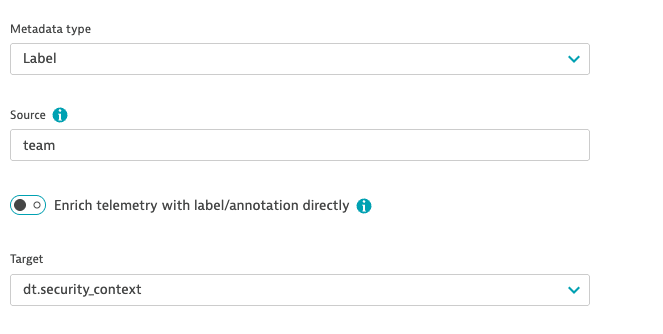
This is the option the documentation recommends, because it is the only one that enriches every signal, including Kubernetes platform metrics, events and entities. In Dynatrace SaaS, go to Settings > Collect and capture > Kubernetes Telemetry Enrichment, then Add rule:
- Choose Annotation or Label in Metadata type.
- Enter the namespace label or annotation key in Source.
- To keep the key as is, turn on Enrich telemetry with label/annotation directly; to rename it, turn this option off and pick a field in Target, for example
dt.security_context. - Save with Save changes.
The same rules exist as settings (schema builtin:kubernetes.generic.metadata.enrichment), so you can keep them under version control:
"rules": [
  { "type": "Annotation", "source": "metadata.example.com/team", "target": "dt.security_context" },
  { "type": "Label", "source": "department", "target": "dt.cost.costcenter" },
  { "type": "Label", "source": "app/name", "target": "dt.cost.product" }
]
Two constraints: at most 20 rules per configuration scope, and up to 45 minutes before rules take effect. After that delay, restart the pods. If you create the rules before deploying the DynaKube, there is no waiting time.
Step 3: pod or workload annotations, as a last resort
When a namespace cannot carry labels, add dedicated annotations to the pod or, since Dynatrace Operator 1.11.0, to the workload (the Operator propagates them to every pod it creates):
apiVersion: apps/v1
kind: Deployment
metadata:
  annotations:
    metadata.dynatrace.com/dt.security_context: sre
    metadata.dynatrace.com/dt.cost.costcenter: it_services
    metadata.dynatrace.com/dt.cost.product: fin_app
This method has documented limits: pod annotations take precedence over workload annotations, which take precedence over central rules; apart from the three fields dt.security_context, dt.cost.costcenter and dt.cost.product, it enriches neither Kubernetes metrics nor Kubernetes events. Above all, do not combine it with the rules from step 2: the documentation warns about conflicts.
Step 4: carry enrichment through the OpenTelemetry Collector
Without OneAgent, OTLP data often flows through a Collector. The repository of the Dynatrace Collector distribution (Apache 2.0 licence) provides an example that reads the annotations set by the Operator with the k8sattributes processor, then unpacks them with transform:
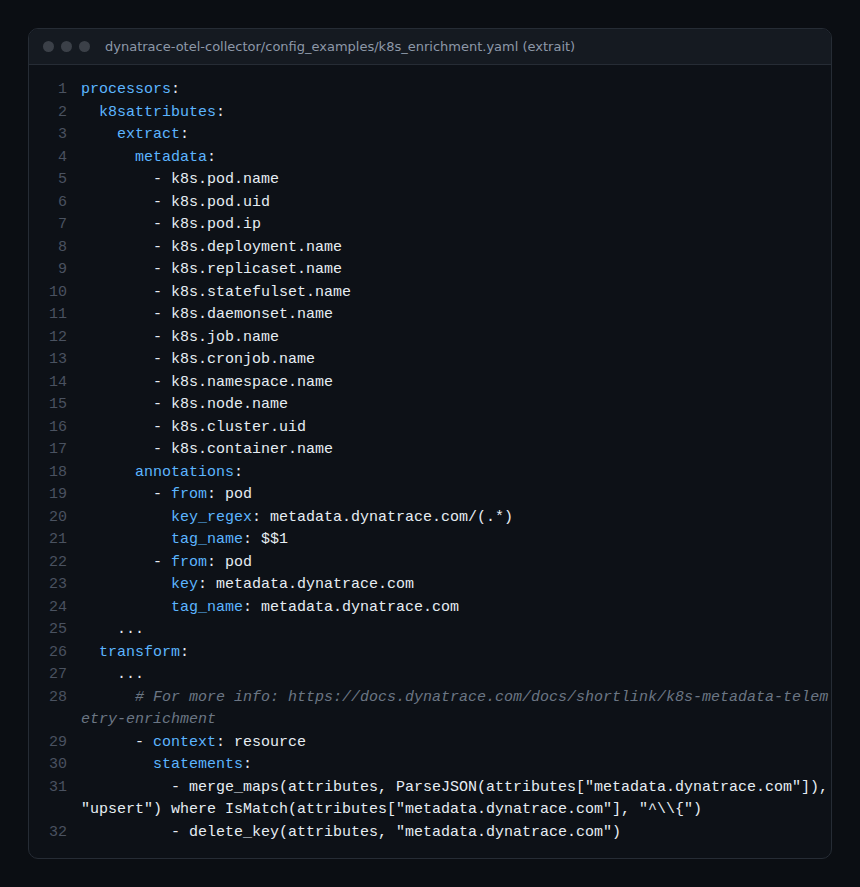
The metadata.dynatrace.com annotation holds a JSON object; the merge_maps(…, ParseJSON(…), "upsert") statement turns it into resource attributes, then delete_key removes the raw annotation. For the rest of the in-cluster Collector setup, see the OpenTelemetry Collector on Kubernetes.
How to check that it works
- Check that the namespace carries the expected label:
kubectl get namespace paiement -o yaml | grep -A5 labels - Check that the webhook enriched a recreated pod:
kubectl -n paiement get pod <pod-name> -o yaml | grep metadata.dynatrace.comNo annotation? The
namespaceSelectordoes not match the namespace, or the pod predates the change. - In SaaS, open a Notebook and run:
fetch logs, from: now() - 1h
| filter isNotNull(dt.security_context)
| summarize logs = count(), by: {k8s.namespace.name, dt.security_context}
| sort logs desc
Enriched namespaces should appear with their security context.
- In Managed, check the annotations at pod level (points 1 and 2); Grail fields and central rules do not apply there.
Best practices
- One source of truth: central rules or dedicated annotations, never both on the same scope.
- A dedicated security label per namespace, stable over time, rather than an application label that changes with every redesign.
- Explicit namespaceSelector: you know exactly where the Operator injects, and a new namespace gets nothing by surprise.
- Plan the restarts: schedule the
rollout restartafter the 45-minute delay, outside peak hours. - Align with existing tagging: reusing the keys from your tags and management zones avoids two competing vocabularies.
Frequently asked questions
Does metadata enrichment work with Dynatrace Managed?
The .spec.metadataEnrichment parameter and its namespaceSelector are in the Managed DynaKube documentation. The Kubernetes Telemetry Enrichment rules and fields such as dt.security_context for Grail policies are documented for Latest Dynatrace (SaaS).
Why don’t my new fields show up straight away?
Rules take up to 45 minutes to propagate, and the webhook only acts when pods are created. Wait, then restart the workloads.
How does it differ from the k8sattributes processor?
k8sattributes adds Kubernetes metadata to data passing through a Collector. Dynatrace metadata enrichment also covers OneAgent, Fluent Bit, platform metrics and events; the two complement each other, as the step 4 example shows. For attribute naming, see OpenTelemetry attributes in Dynatrace.
Conclusion
Kubernetes metadata enrichment turns labels already present on your namespaces into fields you can use for access, costs and routing. Start with a pilot namespace and a namespaceSelector, add a dt.security_context rule, check it in DQL, then widen the scope. Every alert then arrives with its owner, and MTTR benefits.
span.observer is an independent community blog, not affiliated with Dynatrace LLC. Dynatrace is a trademark of Dynatrace LLC. DynaKube parameters and settings change with Operator versions: check them in the official documentation.