DQL fieldsMove jsonExtract: these two commands, announced in the SaaS release notes for sprint 347 (16 September 2026), help you tidy up JSON logs. jsonExtract turns the keys of a JSON object into fields. fieldsMove tucks root-level fields into a nested record. Neither one overwrites an existing field.
The problem is a familiar one in operations. An application log arrives with a content field that holds JSON, and that JSON carries a loglevel key while the record already has a loglevel field. With a naive parser, one of the two wins silently, and your alert queries read the wrong value. Here the collision stays visible and you decide where to put it.
This article follows the official DQL reference (the pages “DQL extraction and parsing commands” and “DQL selection and modification commands”, read on 27 October 2026) and the sprint 347 notes. It applies to Dynatrace SaaS (Grail, DQL), not to Managed. To be clear about what we did: span.observer ran none of these queries. The examples taken from the reference are copied as they are, and the results shown are the ones the documentation states.
DQL fieldsMove jsonExtract: what the sprint 347 notes say
- fieldsMove: moves root-level fields that match an
includepattern (minus those matchingexclude) into a new field holding a nested record, and removes them from the root level. It is the counterpart offieldsFlatten. - jsonExtract: parses a JSON string and places the root-level keys of the object into fields of the record. The notes state that it never overwrites an existing field and that colliding keys can be collected in a dedicated field.
- Both commands extend the family of
fieldscommands (fieldsKeep,fieldsRemove,fieldsRename). The same release adds record-handling functions (recordField,recordFields,recordFromFields,recordKeys,recordValues), which this article does not cover.
fieldsMove syntax
The syntax from the reference is:
fieldsMove fieldName [, include: {pattern [, ...]}] [, exclude: {pattern [, ...]}]At least one of include or exclude is required. This rule stops you from moving every field by accident. The first argument is the name of the new field that will receive the record.
Here is the first example from the reference: every field whose name starts with k8s. goes into a field called k8s. The event and status fields stay at the root.
data record(
  event = "failed to find product",
  status = "NONE",
  k8s.namespace.name = "unguard",
  k8s.pod.name = "unguard-user-simulator-28334535-tqqxt",
  k8s.pod.uid = "d3e93267-e7f9-4a2d-b5df-dc2ac226a7ce"
)
| fieldsMove k8s, include: {"k8s.*"}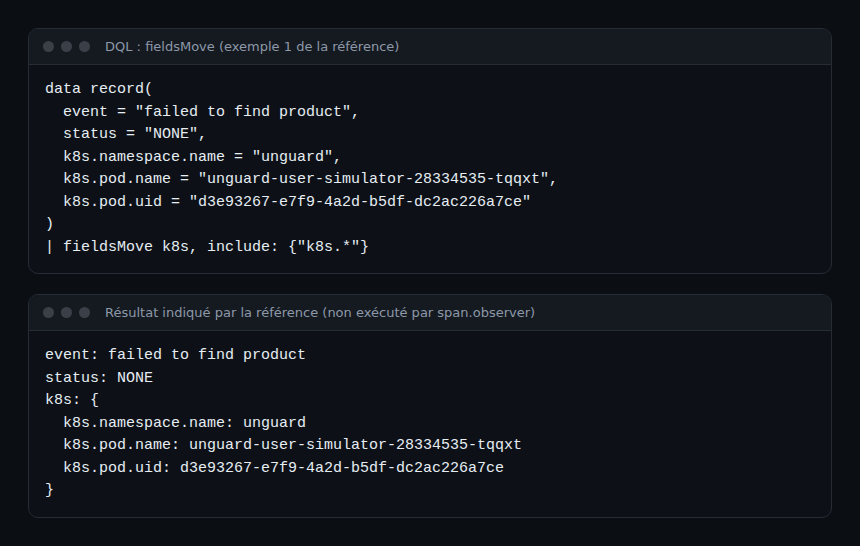
The second example in the reference adds exclude: {k8s.namespace.name}: the k8s.namespace.name field stays at the root and the other two enter k8s. This helps when a field serves as a filter or a dimension in your dashboards and must stay easy to reach.
| fieldsMove k8s, include: {"k8s.*"}, exclude: {k8s.namespace.name}jsonExtract syntax
jsonExtract input [, conflicts]input(required): a string expression that contains the JSON object.conflicts(optional): the name of the field where colliding keys are stored. Without it, colliding keys are discarded and no extra field is created.
With conflicts, the field holds an empty record when nothing collides. If the JSON object repeats a key, only one value is kept, with no guarantee about which.
Types follow JSON: number to long or double, boolean to boolean, string to string, null to null, array to array, object to record.
Practical steps: extract JSON without losing anything
Step 1 — See the key collision
The reference example uses a record that already has loglevel = "WARN", while the JSON in content contains "loglevel":"ERROR":
data record(timestamp = now(),
            content = """{"loggerName":"Log4JGenerator", "threadId":33, "loglevel":"ERROR"}""",
            loglevel = "WARN",
            log.source = "/var/log/messages")
| jsonExtract content, conflicts: collisions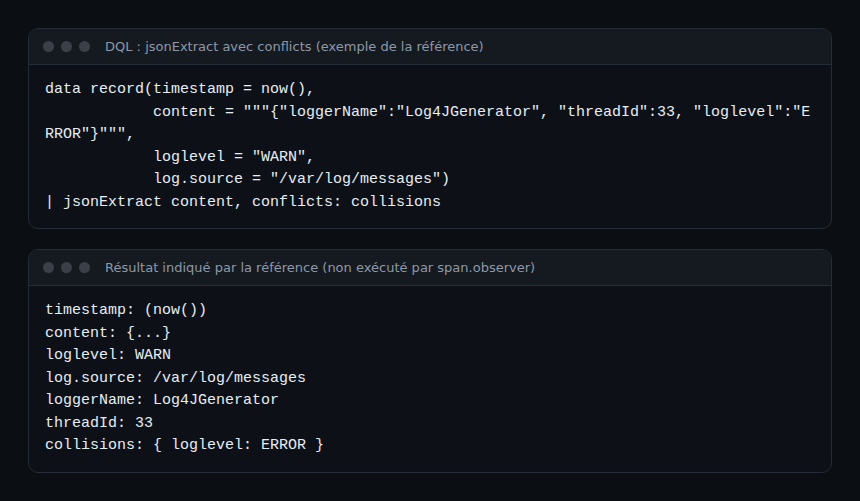
The result described by the reference: loglevel keeps the value WARN, loggerName and threadId appear as fields, and collisions contains loglevel: ERROR. The original value is intact and the JSON value stays available.
Step 2 — Apply jsonExtract to real logs
In Grail, every field in the stream must be known when the query is planned. Logs have no fixed schema, so the reference inserts fields before jsonExtract. Here is its example:
fetch logs
| filter startsWith(content, "{")
| fields timestamp, content
| jsonExtract content
The filter keeps the lines whose content starts with a brace. fields lists what you keep, then jsonExtract adds the keys from the JSON.
Step 3 — Tidy the Kubernetes fields
Another example from the reference, on logs:
fetch logs
| fieldsMove k8s, include: {"k8s.*"}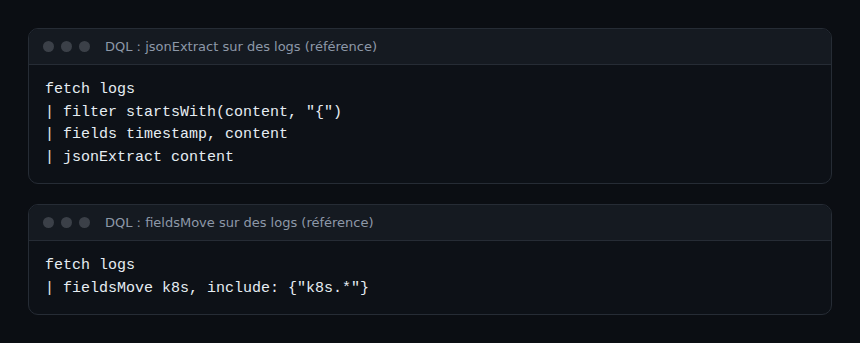
The root level stays readable, and the Kubernetes attributes end up in a k8s record.
Step 4 — Chain the two commands
Example written to illustrate, not run by span.observer. It combines the commands above; the syntax of each command comes from the reference, the chaining is ours and needs validating in your environment:
fetch logs
| filter startsWith(content, "{")
| fields timestamp, content, k8s.namespace.name, k8s.pod.name
| jsonExtract content, conflicts: collisions
| fieldsMove k8s, include: {"k8s.*"}
After fields, the stream holds only the listed fields. If a JSON key has the name of a retained field, the JSON value lands in collisions.
How to check that it works
- Run the
data record(...)examples first: they depend on no data from your environment. Compare with the results in the reference. - On logs, open the
collisionsfield: an empty record means no collision. - Check the types: a JSON number should be numeric, not a string.
- Re-read the
jsonExtractreference page before using it in a production query, since a command’s availability can differ by context (a DQL query or the OpenPipeline DQL processor).
Best practices
- Always set a
conflictsfield while you explore: an ignored collision is lost data. - Filter first (
startsWith(content, "{")) so you do not parse lines that are not JSON. - Keep at the root the fields your filters and SLOs use, with
exclude. - On the reliability side, an alert that reads the wrong
loglevelstretches MTTR: treat collisions as a signal.
To go further, see https://span.observer/en/advanced-dql-lookup-join-parse/ (parse, lookup, join), https://span.observer/en/dql-commands-filter-summarize-timeseries/ for the basic commands, https://span.observer/en/dql-smartscape-topology/ for topology and https://span.observer/en/log-pattern-analysis-dql/ for log analysis.
Internal links: advanced DQL, DQL commands, DQL Smartscape, log pattern analysis.
Frequently asked questions
Does jsonExtract overwrite an existing field?
No. According to the reference, existing fields are never removed or overwritten. Colliding keys are discarded, or stored in the field named by conflicts.
Can you run fieldsMove without include or exclude?
No. At least one of the two parameters is required, to avoid moving all fields by mistake.
How does it relate to fieldsFlatten?
fieldsMove gathers fields into a nested record; fieldsFlatten does the opposite by lifting nested fields back to the root, according to the reference.
Conclusion
fieldsMove and jsonExtract make JSON logs easier to read without losing data. Test the data record examples first, then adapt them to your logs.
Sources: SaaS release notes for sprint 347 and DQL reference, extraction and parsing.
span.observer is an independent community blog, not affiliated with Dynatrace LLC. Dynatrace is a trademark of Dynatrace LLC. SaaS features change quickly: check their availability in your environment and in the official documentation.