Dynatrace certification attracts more and more engineers: to validate a new role, reassure a client on an assignment or structure a team training plan. But the information in circulation is often outdated or contradictory: third-party sites quoting different numbers of questions, renamed levels, retired exams.
This guide goes back to sources published by Dynatrace itself: the Dynatrace University catalogue and the badges Dynatrace issues on the Credly platform. It sets out the levels, the logical order to take them, what we know (and do not know) about cost, then a concrete preparation plan with a practice environment.
A word of caution: the programme changes. Everything below was checked in October 2026; verify on Dynatrace University before you register. The certifications mainly cover Dynatrace SaaS; a dedicated Associate certification for Dynatrace Managed also exists.
Where to find the official list
Two sources are authoritative. Dynatrace University (university.dynatrace.com) hosts the courses, learning plans and exam registrations. Credly, the digital badge platform, publishes the description of every certification Dynatrace issues, with its earning criteria. The badge catalogue can even be read as JSON, so you can check for yourself what exists:
curl -s "https://www.credly.com/organizations/dynatrace/badges.json" \
  | jq -r '.data[] | select(.type_category=="Certification") | "\(.name) | \(.level // "-")"'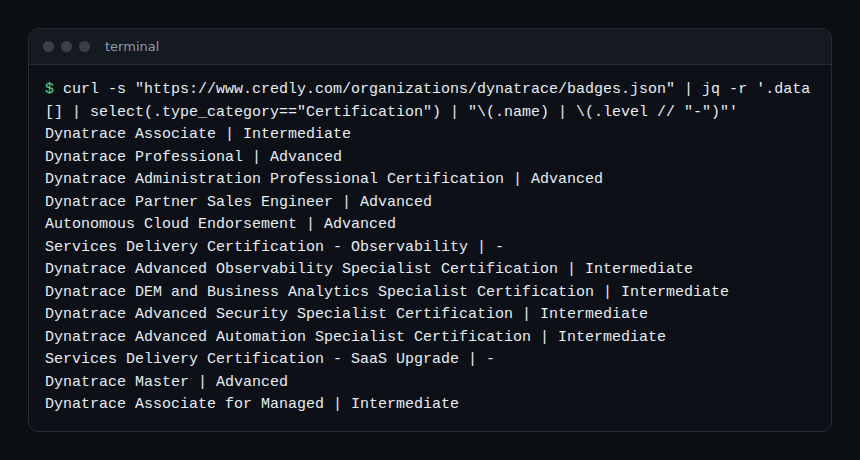
The list mixes technical certifications, partner-only badges (sales, service delivery) and older programmes. The table below keeps only what matters to an engineer.
Dynatrace certification by level
| Level | Credential | What it validates (according to Credly) | How to earn it |
|---|---|---|---|
| Discovery | Dynatrace Essentials (certificate) | Concepts, terminology and platform capabilities; does not measure hands-on skill | Complete the Dynatrace Essentials course |
| Discovery | Dynatrace Beginner (badge) | Navigation, system model, data analysis | Complete the Dynatrace for Beginners course |
| Associate | Dynatrace Associate | Architecture, capabilities, supported technologies, reporting and analysis | Pass the Associate exam |
| Associate | Dynatrace Associate for Managed | Same scope, for Managed | Pass the Associate for Managed exam |
| Professional | Administration Professional | Administer a Dynatrace SaaS environment: access, correct operation | Pass the dedicated exam |
| Professional | Implementation Professional | Architect, plan and deploy the platform, manage ingestion | Pass the dedicated exam |
| Specialist | Advanced Observability, Advanced Automation, Advanced Security, DEM and Business Analytics, Application Development | One domain in depth (cloud and containers, Workflows and SLOs, Application Security, RUM and business events, AppEngine) | Pass the specialty exam |
| Master | Dynatrace Master | End-to-end mastery, from installation to complex problem scenarios | Hold Dynatrace Professional, then submit an application |
Credly also lists a Dynatrace Professional badge (written exam and practical exam, with the Associate as a prerequisite) in addition to the two role-based Professional certifications. The University catalogue we consulted highlights the Administration and Implementation paths: confirm on University which one is open to new registrations before choosing.
What we know about cost
Credly classifies most certifications (Associate, Professional, Master and several Specialist) as paid. None of the pages we consulted shows a public price: the amount appears when you register on University and may depend on your status (customer, partner). We therefore quote no figure. The preparation learning plans in the University catalogue, however, are free, as is Dynatrace Essentials (4 h 30 announced).
Which order to follow?
- Complete beginner: Dynatrace Essentials or Dynatrace for Beginners, then Associate.
- Administrator of a SaaS environment: Associate, then Administration Professional.
- Implementer, consultant: Associate, then Implementation Professional.
- SRE or domain specialist: a Specialist certification after the Associate (for example Advanced Automation for Workflows, SLOs and Site Reliability Guardian).
- Team on Managed: Associate for Managed, which matches your platform.
Preparing a Dynatrace certification: a five-step plan
Step 1 — Read the exam scope
On Credly, each badge lists its skills. For the Associate: capabilities and monitoring, components and architecture, Digital Experience Management, installation and configuration, problems and resolution, reporting and analysis. Turn it into a self-assessment grid scored from 1 to 3.
Step 2 — Follow the free official learning plan
The University catalogue offers a “Dynatrace Associate Certification Learning Plan” (3 courses, 3 h 15 announced), an Administration Professional path (3 courses, 3 h 15) and an Implementation Professional path (9 courses, 4 h 54). Add short courses from the catalogue, such as “Introduction to Dynatrace Grail and DQL” (1 h).
Step 3 — Practise in a real environment
Theory is not enough. Open a 15-day SaaS trial or use Playground, with its sample data, and redo every topic by hand: install OneAgent, read a Problem, write a DQL query, build a dashboard. The Dynatrace tutorial for beginners gives a first path.
Step 4 — Follow a structured course
Our learning paths cover the same topics module by module, with exercises: Dynatrace SaaS training and Dynatrace Managed training. For SRE specialties, the SLO and SLA path prepares the SLO part of Advanced Automation.
Step 5 — Practise the questions
The catalogue contains a free module, “Dynatrace Associate Certification – Practice Simulations”. Take it under real conditions, note every mistake and go back to the official documentation for that topic.
How to verify a certification
- Every badge issued has a public Credly page that its holder can share.
- For hiring or a tender, ask for that link rather than a screenshot.
- Check the issue date and the platform concerned (SaaS or Managed).
Best practices
- Be wary of figures (number of questions, duration, pass mark) found on third-party sites: they contradict each other. Only the University registration page is authoritative.
- Choose the certification that matches your platform: a SaaS Associate does not prove mastery of the Managed CMC.
- Schedule preparation in fixed slots rather than cramming the night before.
- Practise on sample data, never on a customer’s production.
Frequently asked questions
How much does a Dynatrace certification cost?
Most exams are paid according to Credly, but no public price appears on the pages we consulted. Check the exam page on Dynatrace University while signed in, and ask your Dynatrace contact whether your contract includes exams.
Is the Associate required for the next levels?
For the Dynatrace Professional badge, yes: Credly lists the Associate as a prerequisite. For Master, you need Professional. For Specialist certifications and the role-based Professional ones, Credly mentions no prerequisite: check the exam page.
Is there a certification for Dynatrace Managed?
Yes: Dynatrace Associate for Managed, with a separate exam. If your team runs an on-premises cluster, it is the consistent choice; also read Dynatrace Managed vs SaaS to understand what differs.
Conclusion
Dynatrace certification follows a simple logic: a foundation (Essentials, Associate), a role-based Professional level, specialties, then Master by application. Start from the official sources, University and Credly, prepare with the free learning plans and plenty of practice, and check price and conditions when you register.
span.observer is an independent community blog, not affiliated with Dynatrace LLC. Dynatrace is a trademark of Dynatrace LLC. The certification programme, its conditions and prices change: only the Dynatrace University pages are authoritative.