The knowledge work plugins are a collection of plugins for Claude Cowork published by Anthropic in the anthropics/knowledge-work-plugins repository. Each plugin bundles skills, connectors, slash commands and sub-agents for one job function: sales, legal, finance, support, data. The repository shows about 31,200 stars in mid-October 2026, and its distinctive trait is one README sentence: everything is files, markdown and JSON, with no code and no build.
For a platform or SRE team the question is not “is this useful to sales?” but “what does this bundle of files do when my agent runs it with my connectors?”. This article presents the repository from its README and files, then lists what to check before deploying it: connector rights, untrusted content, token cost and traceability.
span.observer did not install or run these plugins for this article, and is neither affiliated with Anthropic nor speaking for the project. The excerpts and screenshots come from the repository files.
Knowledge work plugins: what the repository says
- Publisher and licence: Anthropic; Apache-2.0 licence (the repository LICENSE file).
- Figures read on 22 October 2026 on the repository page: about 31,200 stars, about 3,500 forks, 1,124 commits on the main branch. No release is shown.
- Content: the README announces 11 plugins (productivity, sales, customer-support, product-management, marketing, legal, finance, data, enterprise-search, bio-research, cowork-plugin-management). The repository page lists other folders such as
engineering,human-resources,operationsandsmall-business, so the README table was not the full list when read. - Targets: built for Claude Cowork, compatible with Claude Code according to the README.
The project is not a Dynatrace product. The monitoring part applies to Dynatrace SaaS and Dynatrace Managed alike, because it relies on what the client emits through OpenTelemetry.
A tour of a plugin: manifest, skills and connectors
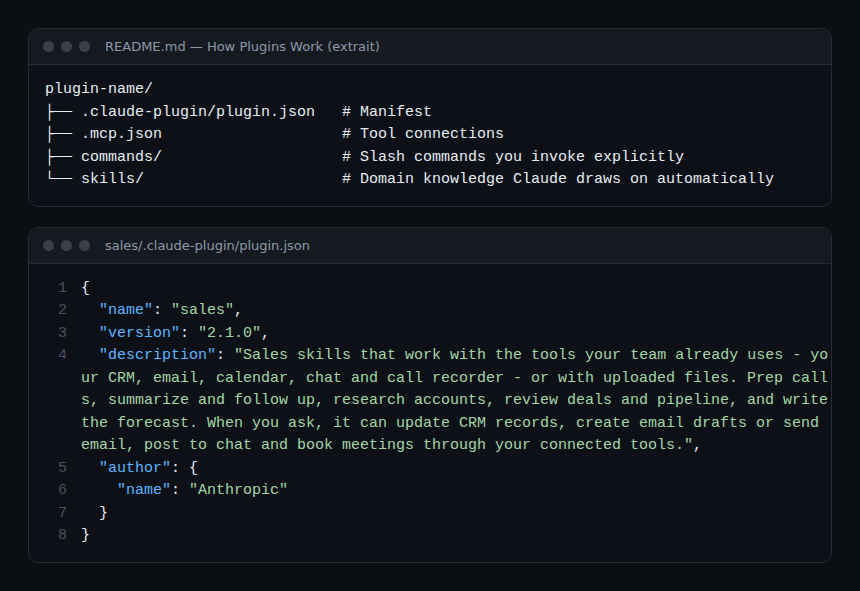
The README describes a single structure: a .claude-plugin/plugin.json manifest, a .mcp.json file for tool connections, a commands/ folder for commands you call, and a skills/ folder for knowledge Claude draws on by itself.
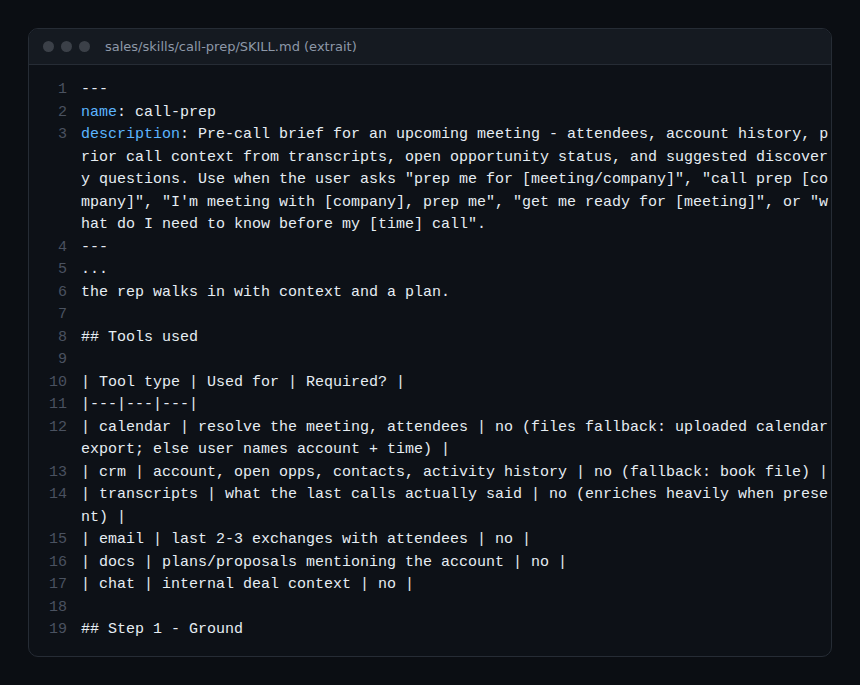
A skill is a SKILL.md file whose header says when it fires. The call-prep skill in the sales plugin lists the tools it can use (calendar, CRM, transcripts, email, documents, chat) and says for each whether it is required: none is, and the skill falls back to uploaded files.
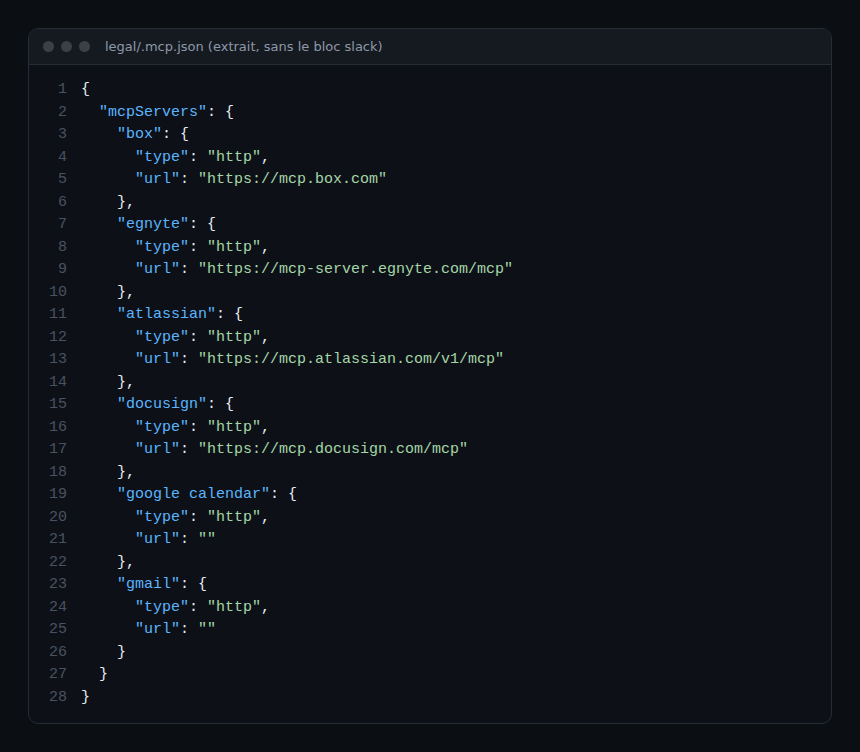
Connectors are MCP servers declared over HTTP. The legal plugin file, shown below without its Slack block, lists document and signature services; two entries (Google Calendar and Gmail) have an empty URL to fill in. For the protocol basics, see our explanation of the Model Context Protocol.
Step-by-step installation
In Claude Code
The README gives two commands: add the marketplace, then install a plugin.
claude plugin marketplace add anthropics/knowledge-work-plugins
claude plugin install sales@knowledge-work-plugins
Once installed, skills fire when the request matches and slash commands become available, for example /sales:call-prep or /data:write-query, according to the README.
In Cowork
The README says to install plugins from claude.com/plugins. The interface steps are not described in the repository: follow the Cowork documentation.
Customise before deploying
The README insists these plugins are generic starting points. Swap the connectors in .mcp.json, add your terminology and processes to the skill files, and adjust the workflows. The legal plugin, for instance, says to describe your playbook in a legal.local.md file and notes that its examples reflect US legal positions.
Limits and open points
- Connector rights: the sales plugin README says skills can update the CRM, create or send emails, post to chat and book meetings, “within each connector’s permissions”. The safeguard therefore sits in the connector rights, not in the skill text.
- Untrusted content: the same README says emails, transcripts and messages are read as information, never as instructions. That is a prompt instruction: it lowers the prompt-injection risk without removing it. See MCP tool poisoning.
- No release: no version is shown on the repository page, but each plugin has its own version in
plugin.json(2.1.0 for sales when read). Pin a commit if you copy the files. - Skill size: the call-prep SKILL.md contains long rules. A loaded skill uses context every time it runs.
- Legal or financial advice: the legal plugin states that it does not give legal advice.
Observing and monitoring the plugins
The plugins are just files, so there is nothing to monitor on the plugin side. The trace comes from the client that runs them and the connectors they call.
- Claude Code client: it emits a
claude_code.tool_resultevent through OpenTelemetry withtool_name,successandduration_ms, and attributes tokens and costs tomcp_server.nameandmcp_tool.name. Setup is in supervising a coding agent in the enterprise and cost calculation in the token cost of an AI agent. - Connectors: each service (CRM, document storage) has its own audit logs; that is where you see who read or wrote what.
- Cowork: the repository describes no telemetry; consult the Cowork administration documentation.
How to check that it works
- After installation, your client lists the plugin and its commands (
/sales:call-prepfor the README example). - Run a skill with a single read-only connector: the output should cite its sources.
- In your OpenTelemetry backend (Dynatrace SaaS or Managed, or another), a tool call appears with its name, duration and status.
Best practices
- Start with one plugin and read-only connectors, then open write access connector by connector.
- Review every
.mcp.json: remove services you do not use. - Keep your plugin copies in an internal repository, with review of skill changes.
- Watch tokens per plugin: a verbose skill shows in cost before it shows in quality.
Frequently asked questions
Do I need Cowork to use these plugins?
No: the README describes them as built for Cowork but compatible with Claude Code, with the install commands above.
Do the plugins send data anywhere?
The files themselves do not; the declared MCP connectors exchange data with third-party services under their own permissions. Review the URLs in .mcp.json.
Can I create my own plugin?
Yes: the README points to the cowork-plugin-management plugin or the structure described above. For a close finance case, see the Anthropic financial services repository.
Conclusion
The knowledge work plugins show how a vendor structures job-specific skills: a manifest, skills, MCP connectors, nothing more. Their value depends on your connectors and rights; their monitoring, on what your client emits. Another repository in the series covers the GitHub side: the GitHub MCP server. Source: anthropics/knowledge-work-plugins repository.
span.observer is an independent community blog, not affiliated with Dynatrace LLC, with the projects cited or with Anthropic. Trademarks belong to their owners. Tools change quickly: check commands and options in their official documentation.