OpenBot AI agent desktop workspace: the nightly-labs/openbot repository describes OpenBot as a local-first desktop workspace for persistent AI teammates. Each agent gets its own working folder and its own conversation. The repository has about 1,400 stars at the end of October 2026, and its latest release on GitHub is v0.51.1, published on 26 October 2026.
It is not yet another agent. It is an Electron application that puts agents you may already use side by side: Codex, Claude Code, Grok CLI, OpenCode, Gemini, Cursor CLI and Cline CLI. For an operations team the useful question is twofold: which rights do these agents receive, and what can you measure on a desktop machine? This article follows the README and the repository files, read on 26 October 2026.
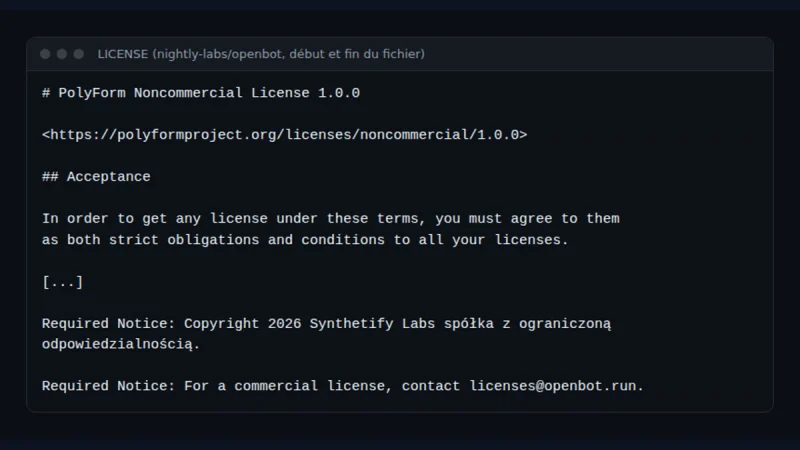
A note on honesty: span.observer has not installed OpenBot. The commands come from the README, and the three images below are real excerpts of repository files (LICENSE and README), rendered as they are. The README does not include a screenshot of the interface.
OpenBot AI agent desktop workspace: what the repository says
- Publisher: the README states “Copyright 2026 Synthetify Labs spółka z ograniczoną odpowiedzialnością”. The repository sits under the nightly-labs GitHub organisation.
- Licence: PolyForm Noncommercial 1.0.0. Versions up to and including 0.1.11 remain available under Apache-2.0, according to the README. Commercial use requires a separate licence; the contact given is [email protected].
- Classification: the README calls the project “source-available” and, in the Nix section, says OpenBot is “not free software”. It is therefore not open source in the usual sense.
- Stack: Electron, a SolidJS interface and a local SQLite database. An optional account service runs on Cloudflare Workers with D1.
- Figures: about 1,400 stars and 174 forks at the end of October 2026, read on the repository page.
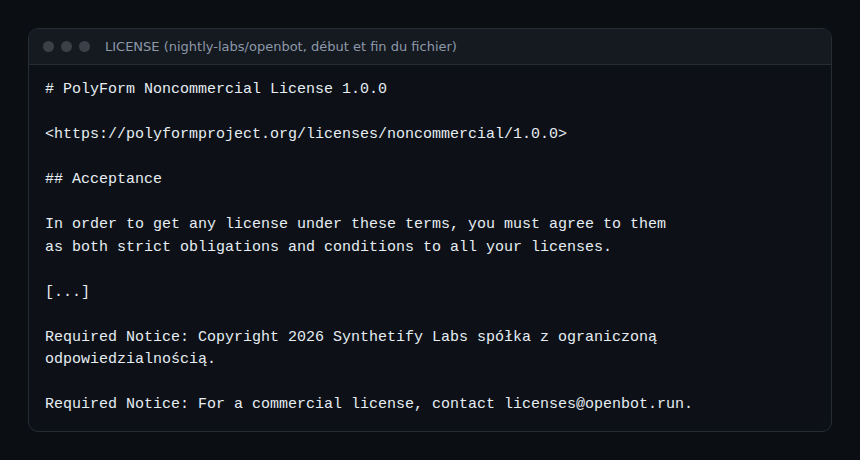
This excerpt matters for what follows: in a company, whether you may use the tool depends on what “noncommercial” allows in your case. Settle that with your legal team, not with this blog.
What the application does
According to the “What works” list in the README, OpenBot offers:
- persistent agents, each backed by its own session (Codex, Claude, Grok, OpenCode, Gemini, Cursor or Cline) and a local workspace;
- FIFO message queues with pause, resume, cancellation and crash-safe persistence;
- agent-to-agent messages, with replies, reactions, images and managed file transfers;
- shared channel chats with one task owner, explicit delegation and Stop, Resume, Reassign, Archive and Restore controls;
- a persistent embedded browser that agents can open, inspect and control;
- per-agent context monitoring, with automatic compaction before the model window fills up.
The README also stresses that OpenBot is “local-first, not offline-only”: Codex connects to OpenAI, Claude to Anthropic, Grok to xAI, and visited pages use the network.
Step-by-step installation
The README lists macOS 13 or newer (Apple silicon or Intel), Windows 10 or newer on x64, and Linux x64 or arm64 as an AppImage.
Step 1 — Download the desktop app
- macOS: get
OpenBot-*-arm64.dmg(or-x64.dmgon an Intel Mac) from GitHub Releases, drag the app to Applications, then open it. - Windows: run
OpenBot-*-x64.exe. The README says Windows releases are signed and that SmartScreen can still warn: check the checksum or the GitHub build attestation before running the installer. - Linux: download the AppImage, then
chmod +x OpenBot-*.AppImageand run it. The Linux AppImages are not signed, according to the README.
Step 2 — Recent Linux: the AppArmor profile
On Ubuntu 23.10 or newer and on Debian 13, the README explains that OpenBot exits at launch until an AppArmor profile is installed:
sudo install -m 0644 build/linux/openbot.apparmor /etc/apparmor.d/openbot
sudo systemctl reload apparmor
It adds that you should never start OpenBot with --no-sandbox, because that removes the boundary between the renderer and the rest of the computer.
Step 3 — Server option: headless Linux or Docker
For an always-on server (Ubuntu 24.04 or 26.04 with systemd), the README offers an install script and an email-code sign-in. The Docker variant uses a seccomp profile so that the Electron sandbox stays on.
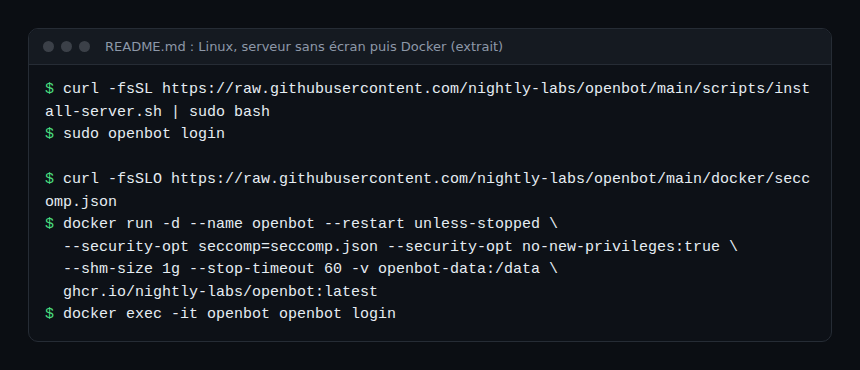
As with any curl | sudo bash, read the script before you run it. The README points to docs/self-hosted-server.md and docs/docker.md for the options.
Step 4 — Connect an agent provider
OpenBot can download a provider runtime (the Download button during onboarding or in Settings). You can also install your own: the README gives, for example, curl -fsSL https://claude.ai/install.sh | bash for Claude on macOS. OpenBot reuses the existing local CLI login and says it does not copy provider credentials.
Agent rights: read this before anything else
The repository is frank: OpenBot is a “development preview”, and agents run with danger-full-access and approvalPolicy: never. After an explicit consent at first launch, they read and modify files, run commands, use the network and control the embedded browser without per-action confirmations.
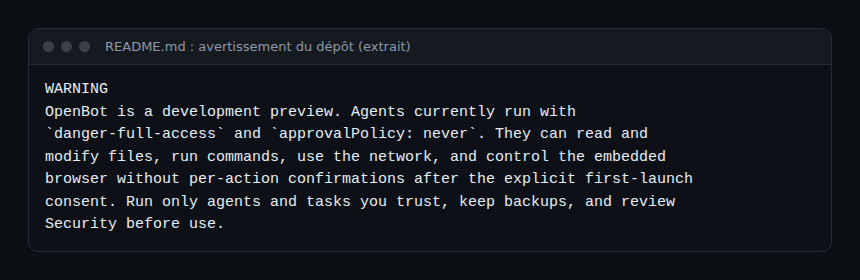
The Security section of the README adds that full access is a “current product decision”, not a security boundary. Each agent starts in ~/OpenBot/Agents/<agent-id> and also receives ~/OpenBot/Shared. The README states that these unrestricted modes “also permit host access outside those directories” when the provider and the operating system allow it.
Observing OpenBot on a desktop or a server
The README describes neither OpenTelemetry export nor Prometheus metrics, and none should be invented. What the repository does document:
- Diagnostics: the account menu offers exports of local data and “privacy-safe” diagnostics. Setup and reset problems are covered in
docs/TROUBLESHOOTING.md, data handling inPRIVACY.md. - Local data: the event log is in
userData/openbot.db(SQLite). Transfers carry an.openbot-transfer.jsonmanifest with owner, recipients, size and SHA-256. - Measurements from a clone of the repository:
bun run dev:cpumeasures idle CPU,bun run dev:memorymeasures resident memory per process kind, andbun run dev:benchreplays RAM and CPU scenarios on the built app, with startup marks. These commands target a development build; the README says their results only compare between two runs on the same machine. - Public service: a status page is announced at
status.openbot.run, hosted on GitHub Pages. - The agents themselves: traces, events and costs come from the providers. For that part, see observing MCP agents with OpenTelemetry and the token cost of an AI agent.
For teams that must frame this kind of tool, supervising a coding agent in the enterprise covers logs and guardrails on the workstation side.
Limits and open points
- Anchor to flag: PolyForm Noncommercial licence, so source-available and not open source. The change from Apache-2.0 (up to 0.1.11) is written in the README. Check that professional use is allowed before adopting it.
- Development preview: the README says so itself. Default rights are maximal, with no confirmation.
- Copyright assignment: the README says each outside contributor signs an agreement assigning copyright to Synthetify Labs.
- Provider dependency: each agent stays bound by its provider’s terms and quotas. The README points to
docs/provider-terms.mdfor Claude subscriptions. - Linux: remote desktop works under X11 but not under Wayland, and the arm64 AppImage does not include it, according to the README.
- No interface images: the README contains no screenshot, so we show none.
To compare the angle with other agent projects, see OpenClaw (one agent and its channels), Paperclip (fleet orchestration) and T3 Code (a control surface). OpenBot sits on the desktop, with agents that each have a folder and a persistent identity.
Good practice
- Try it first on a machine or VM without secrets, with backups, as the README recommends.
- Put only files in
~/OpenBot/Sharedthat any agent may read. - Run the Docker server with the supplied seccomp profile and
no-new-privileges, rather than disabling the sandbox. - Check the checksum or build attestation before running a Windows installer.
- Review the licence with your legal team before any use at work.
Frequently asked questions
Is OpenBot open source?
Not in the strict sense. The README describes it as source-available, under PolyForm Noncommercial 1.0.0. Versions up to and including 0.1.11 stayed under Apache-2.0.
Do I need an OpenBot account?
The README describes accounts as “optional”, using one-time codes sent by email; the account API runs on Cloudflare Workers. The server and Docker modes use openbot login.
Do agents ask for confirmation before acting?
Not per action. After the first-launch consent, agents run with danger-full-access and approvalPolicy: never. Hence the README advice to run only trusted agents and tasks.
Conclusion
OpenBot gathers several coding agents in one desktop app, with message queues, an embedded browser and delegation between agents. It is young, very active and very permissive by default, and its licence forbids commercial use without an agreement. Try it on an isolated machine and watch memory and CPU with the repository commands. Source: nightly-labs/openbot repository.
span.observer is an independent community blog, not affiliated with Dynatrace LLC or the projects mentioned. Trademarks belong to their owners. Tools change quickly: check commands and options in their official documentation.