The GitHub MCP server is GitHub’s official MCP server: it lets a coding agent read repositories, open issues, comment on pull requests or inspect Actions workflows without a home-made script. The github/github-mcp-server repository has around 33,700 stars in mid-October 2026, and it is typically the first MCP server a team plugs into its agent.
That convenience has an operational price. An agent that can write to your repositories with a developer’s token is one more actor in your delivery chain. This guide follows the project’s README and documentation: install the server, choose the tools it exposes, limit the token’s rights and keep a trace of every call. For the protocol basics, see our explanation of the Model Context Protocol.
A note on honesty: span.observer did not install this software for the article. The commands come from the repository’s README and documentation, and the screenshots below are excerpts rendered from those files.
GitHub MCP server: what the repository says
- Publisher and licence: GitHub, MIT licence (the repository’s LICENSE file).
- Language: Go; the README asks for
go buildto compile the binary. - Figures read on 16 October 2026 from the repository page: about 33,700 stars, about 5,200 forks, 1,191 commits on the main branch. The latest release shown is v2.0.2, dated 8 October.
- Two modes: a local server (a process started by your MCP client, in Docker or as a binary) and a remote server hosted by GitHub at
https://api.githubcopilot.com/mcp/. The README says the remote mode needs VS Code 1.101 or later for remote MCP and OAuth.
The server is not a Dynatrace application and depends on no Dynatrace product. The observability part applies to Dynatrace SaaS and Dynatrace Managed alike, because it relies on OpenTelemetry on the agent side.
A tour of the configuration
The local entry point is the public Docker image ghcr.io/github/github-mcp-server. The README gives its declaration in an MCP client, with the token requested at run time rather than written into the file:
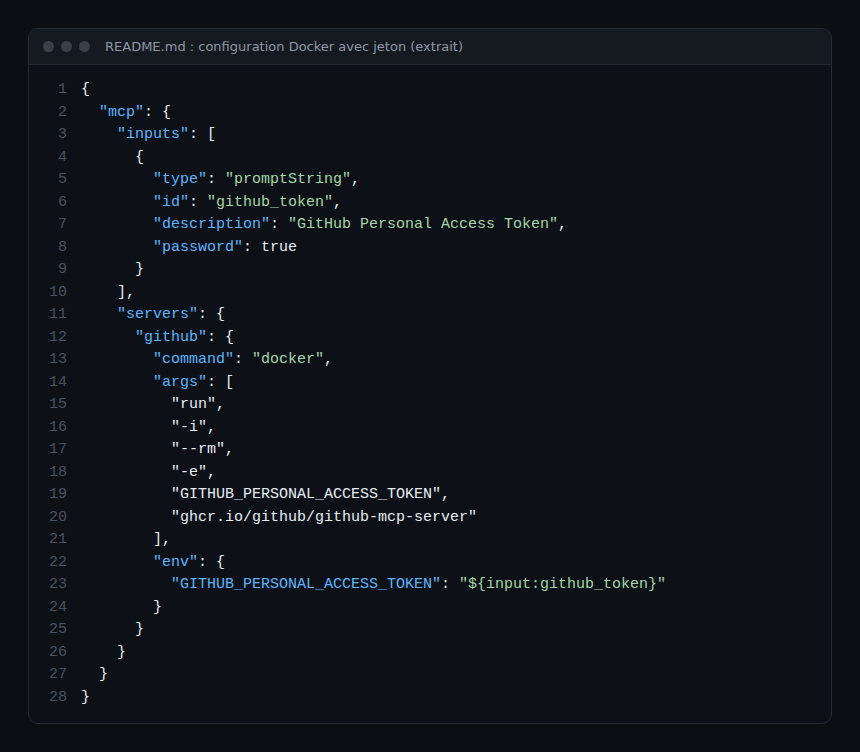
Line by line: -i keeps standard input open, which the stdio transport requires; --rm removes the container at the end; -e GITHUB_PERSONAL_ACCESS_TOKEN passes the variable without putting it in the command; the promptString input with "password": true asks for the token at start-up.
Step-by-step installation
Step 1 — Choose local or remote
The local mode keeps execution on the workstation or build server, which makes isolation easier (see isolating a STDIO MCP server). The remote mode avoids Docker but moves monitoring to the client side, since there is no process for you to observe.
Step 2 — Install the local server
With Docker running, the Claude Code installation guide in the repository gives this command to declare the server with a token:
claude mcp add github -e GITHUB_PERSONAL_ACCESS_TOKEN=YOUR_GITHUB_PAT -- docker run -i --rm -e GITHUB_PERSONAL_ACCESS_TOKEN ghcr.io/github/github-mcp-serverWithout Docker, the README suggests building from a clone:
go build -o github-mcp-server ./cmd/github-mcp-server
./github-mcp-server stdio
The stdio command reads GITHUB_PERSONAL_ACCESS_TOKEN from the environment. Check the list with claude mcp list, as the guide recommends. Caution: putting the token in clear text in the command stores it in the client’s configuration; prefer an environment variable or the masked prompt of the JSON above.
Step 3 — Reduce the exposed tools
By default the server enables the toolsets context, repos, issues, pull_requests and users. The README also lists, among others, actions, code_security, dependabot, gists, projects and secret_protection, plus a special value all. Every exposed tool uses some of the agent’s context and widens its surface: enable only what the task needs.
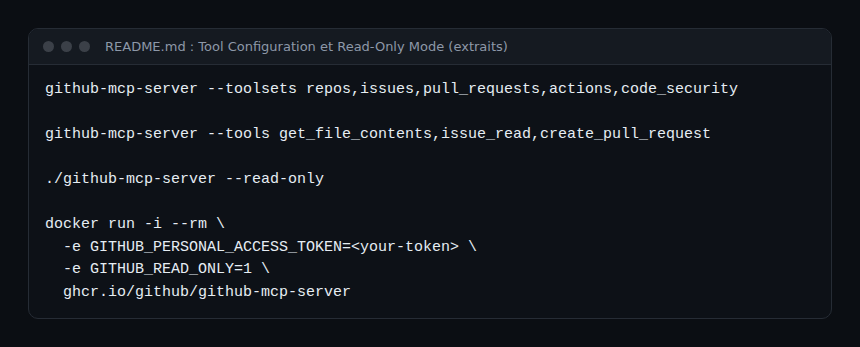
The GITHUB_TOOLSETS variable wins over the --toolsets option when both are present. Read-only mode (--read-only or GITHUB_READ_ONLY=1) takes priority: write tools are skipped even when requested through --tools. The configuration guide adds --exclude-tools, which wins over every inclusion.
Authentication: the least-privilege token
On github.com the README describes an OAuth login on first use, with the token kept in memory only. A personal access token set in GITHUB_PERSONAL_ACCESS_TOKEN takes precedence over OAuth. For a classic token, the README suggests repo, read:packages (access to the Docker image) and read:org (teams) as a minimum, and invites you to grant only the permissions you are comfortable giving the agent.
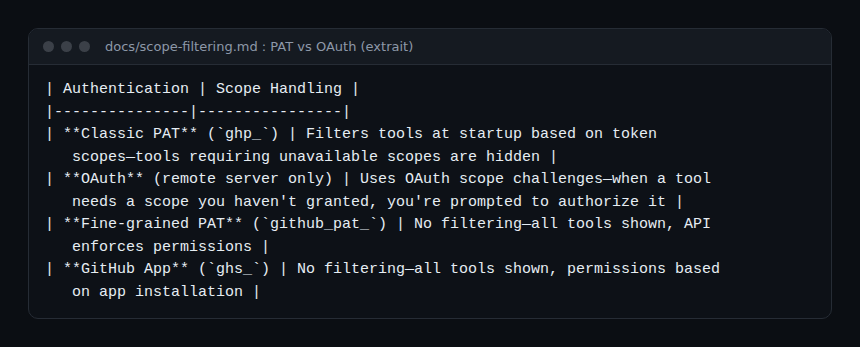
This table matters for operations: with a classic token (ghp_) the server hides at start-up the tools the token has no scopes for; with a fine-grained token or a GitHub App there is no filtering and the API does the refusing. In that second case the restriction comes from the token itself, not from the server.
Lockdown mode (--lockdown-mode) limits the public-repository content returned to the agent to authors with push access, to reduce prompt-injection risk. The README describes it as a best-effort filter, not an authorisation boundary. The risk of instructions hidden in an issue is covered in our article on MCP tool poisoning, and general practice in securing an MCP server.
Tracing the server’s calls
The README describes no trace or metric export by the server itself. Traceability therefore comes from three places.
- The agent’s client. Claude Code, for example, emits through OpenTelemetry a
claude_code.tool_resultevent withtool_name,success,duration_msandmcp_server_scope, and attributes tokens and costs tomcp_server.nameandmcp_tool.name. Setting it up is described in supervising a coding agent in the enterprise. Tool parameters are only included withOTEL_LOG_TOOL_DETAILS=1: avoid it until you control what goes into your logs. - The OpenTelemetry conventions for MCP (Development status): a client span named
{mcp.method.name} {target}, for exampletools/call get_file_contents, withmcp.method.nameandgen_ai.tool.name. The approach is in observing MCP agents with OpenTelemetry. - GitHub’s side. According to the README, API requests from STDIO mode identify themselves as
github-mcp-server/<version>, with the MCP client’s name and version in parentheses. To tell several instances apart (github.com and a GitHub Enterprise Server, say), the README documentsGITHUB_MCP_SERVER_NAMEandGITHUB_MCP_SERVER_TITLE.
Limits and open points
- An agent with write tools can change repositories: the safeguard is the token and read-only mode, not the politeness of the prompt.
- The content of issues and pull requests is untrusted input; lockdown mode reduces the risk without removing it.
- The project moves fast: the README notes that the v2.0.0 tag predates a Go module-path correction and cannot be used as a module. Pin the image version rather than following the latest.
- The tool and toolset names quoted here come from today’s README; check them after every update.
How to check that it works
claude mcp listshows thegithubserver; your client lists the expected tools, and only those.- With
--read-only, ask the agent to create an issue: the write tool should be absent. - In your OpenTelemetry backend (Dynatrace SaaS or Managed, or another), a tool call appears with its name, duration and status.
Best practices
- Start read-only with the
reposandissuestoolsets, then widen as needed. - Use a dedicated, short-lived token, never an administrator’s.
- Log write calls and review them after every incident, without looking for someone to blame.
- Keep the token out of tool arguments and traces.
Frequently asked questions
Should I use the local or the remote server?
Local gives more control (isolation, pinned version); remote avoids Docker but lets GitHub host the server. The choice depends on your execution policy.
What are the minimum rights for a token?
The README suggests repo, read:packages and read:org for a classic token. Reduce them if you use neither the Docker image nor teams.
Does the server send OpenTelemetry traces itself?
The README does not describe any. Trace on the agent’s client side, or see our guide to the Chrome DevTools MCP server for another server in the same series.
Conclusion
The GitHub MCP server is worth the detour: official, MIT-licensed, well documented. Using it well comes down to four settings: local or remote, minimal toolsets, a limited token, read-only by default. What remains is tracing every call on the client side so you can answer “who did what, and when”. Source: the github/github-mcp-server repository.
span.observer is an independent community blog, not affiliated with Dynatrace LLC or with the projects mentioned. Trademarks belong to their owners. Tools change quickly: check commands and options in their official documentation.