A deployment reaches production, then restarts begin for no obvious reason. Or the opposite: a broken application keeps receiving traffic. In both cases the liveness readiness startup probes are often involved: well tuned, they protect availability; badly tuned, they erode it. This guide covers the nine most common pitfalls, all checked against the Kubernetes documentation.
Goal: set probes that stay accurate under load, at startup and during an incident, so that needless restarts do not eat the error budget. The content is plain Kubernetes: it applies to any cluster, whether monitored by Dynatrace SaaS, Dynatrace Managed or something else. For the neighbouring case of restart loops, see CrashLoopBackOff and OOMKilled.
Liveness readiness startup probes: three separate questions
Each probe answers a different question, and the kubelet reacts differently to a failure.
| Probe | Question asked | Effect of a failure |
|---|---|---|
startupProbe |
Has the application finished starting? | The container is killed, then subject to its restartPolicy |
livenessProbe |
Can the process still make progress? | The container is restarted |
readinessProbe |
Can it take traffic right now? | The Pod leaves the Services, with no restart |
According to the documentation, while a startup probe is defined the kubelet runs neither liveness nor readiness until it first succeeds. The readiness probe runs for the whole life of the container. Here is the documentation’s example, which combines all three:
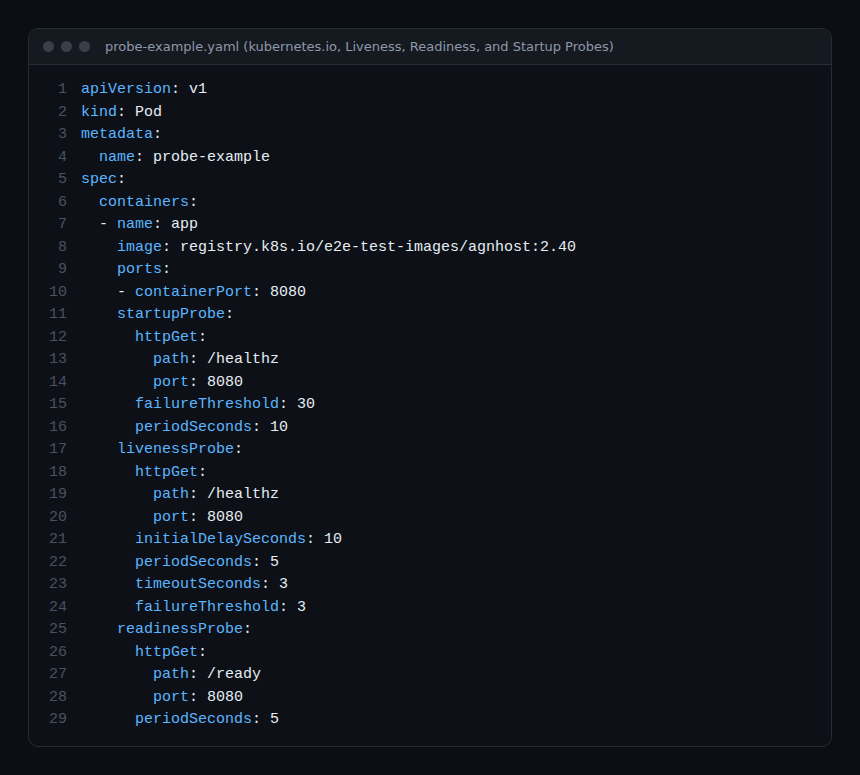
The tuning fields and their defaults, from the same documentation: initialDelaySeconds 0, periodSeconds 10, timeoutSeconds 1, successThreshold 1 (must be 1 for liveness and startup), failureThreshold 3.
Pitfall 1: a liveness probe that queries dependencies
The documentation is explicit: a liveness probe should signal an unrecoverable failure, such as a deadlock. An incorrect implementation can cause cascading failures: restarts under high load, failed client requests, and extra load on the remaining Pods.
If liveness tests the database and the database slows down, every Pod restarts at once, although restarting fixes nothing. Keep dependency checks in readiness. The documentation describes this pattern: liveness passes when the app itself is healthy, while readiness also checks the services it needs.
Pitfall 2: a slow-starting application without a startup probe
Without a startup probe, liveness begins after initialDelaySeconds and tolerates failureThreshold failures spaced periodSeconds apart. If startup takes longer than that total, the container is killed before it is ready, then starts again: the restart loop. Lengthening liveness slows down the detection of a real deadlock. The documentation recommends a startup probe aimed at the same endpoint instead:
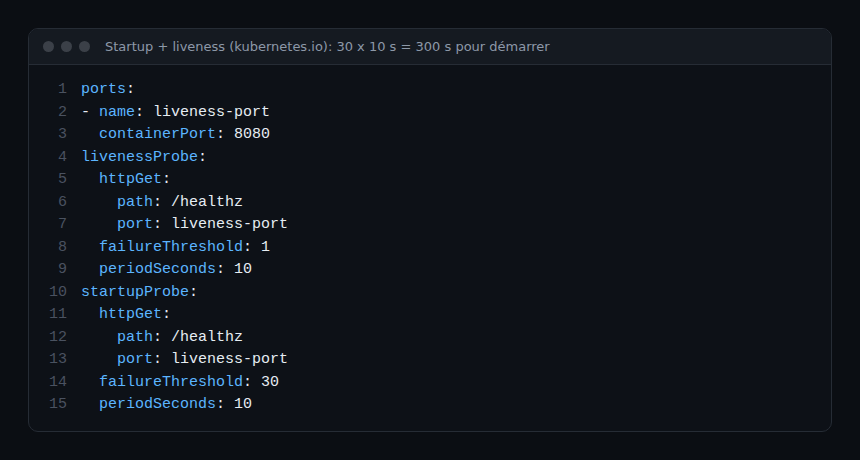
Here the application gets 300 seconds (30 x 10) to start. Once the startup probe has succeeded, liveness takes over with its original reactivity. If the startup probe never succeeds, the container is killed after 300 s and subject to its restartPolicy.
Pitfall 3: assuming readiness and liveness wait for each other
The documentation states that liveness and readiness probes do not depend on each other. Liveness does not wait for readiness to succeed. To delay either one, use initialDelaySeconds or a startup probe. Otherwise an aggressive liveness probe can kill a container that has not finished getting ready.
Pitfall 4: confusing “not ready” with “broken”
When readiness fails, the kubelet keeps the container running and keeps probing it. It sets the Pod’s Ready condition to false, and the EndpointSlice controller removes the Pod’s IP address from the matching Services. No restart happens. This is intended: the documentation lists temporary overloads and cache warm-up among the uses.
Two practical consequences. First, a 0/1 Pod in Running is not crashed: it is out of service. Second, readiness counts as failed before the initial delay, so a Pod without traffic early in its life is normal. The case of an ActiveGate stuck at 0/1 is detailed in ActiveGate Kubernetes not ready.
Pitfall 5: the 1-second timeout
The default timeoutSeconds is 1 second. An endpoint that answers in 1.2 s during a load peak therefore counts as a failure. With liveness, three failures in a row trigger a restart, which makes the load worse. Measure the real latency of the endpoint under load before setting this field, then leave some margin.
Pitfall 6: an exec probe that runs too often
The documentation warns that exec probes fork several processes each time they run. On nodes with a high Pod density and short intervals, they can cost CPU. The httpGet, tcpSocket and grpc mechanisms avoid that cost. An exec probe with periodSeconds: 1 on a hundred Pods is a good candidate for replacement.
Pitfall 7: what the HTTP probe actually validates
- A code greater than or equal to 200 and less than 400 is a success: a 302 redirect passes like a 200.
- With
scheme: HTTPS, the kubelet does not verify the certificate. - The kubelet sends the request to the Pod’s IP address. For a virtual host, set the
Hostheader inhttpHeadersrather than thehostfield.
An endpoint that returns 200 without testing anything, such as a static page, declares healthy a process whose work is stuck. Have it test a minimum: the main loop responds, the queue is not saturated.
Pitfall 8: identical liveness and readiness probes
Using the same endpoint for both is allowed, but the documentation suggests a safer pattern: the same low-cost endpoint, with a higher failureThreshold on liveness. The Pod is then seen as not ready for some time before it is killed, which leaves room for recovery.
Pitfall 9: forgetting the termination grace period
When a liveness or startup probe fails, the kubelet honours terminationGracePeriodSeconds: 30 seconds by default if nothing is set. Since Kubernetes 1.25 the field also exists at probe level (stable since 1.28) and takes precedence over the Pod-level value. The API server rejects it on a readiness probe.
How to check that it works
Probe failures leave events. Read them before changing anything:
kubectl describe pod <pod> -n <namespace>
kubectl get events -n <namespace> --field-selector reason=Unhealthy
The Kubernetes documentation shows the typical trace of a failing liveness probe:
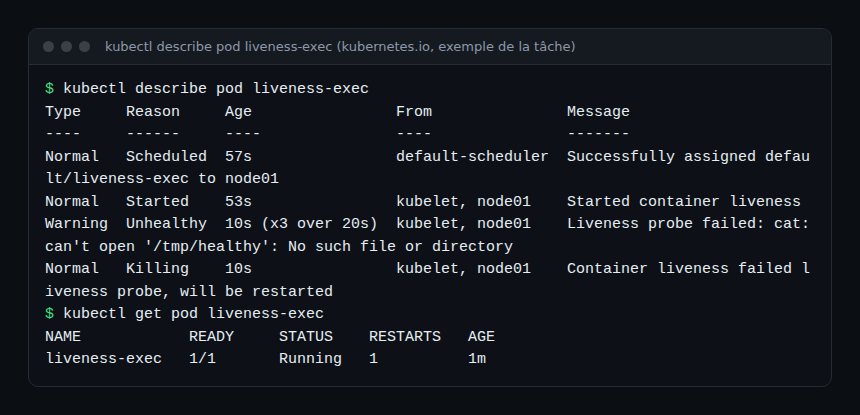
- The Liveness probe failed or Readiness probe failed lines stop appearing after your fix.
- The RESTARTS column of
kubectl get podssettles. - The READY column reaches
1/1and the Pod receives traffic again.
On the monitoring side, watch restarts and not-ready Pods rather than the probes themselves: see Kubernetes alerts on nodes, pods and quotas. Endpoint latency measurements, useful for setting timeoutSeconds, belong to application metrics; the difference between a health signal and observability is covered in observability versus monitoring.
Best practices
- Keep liveness minimal: it should detect only what a restart can repair.
- Put external dependencies in readiness only.
- Add a startup probe once startup exceeds
initialDelaySeconds + failureThreshold x periodSeconds. - Set delays from measurements, not copied values.
- After every probe change, read the events during a progressive rollout.
Frequently asked questions
Does every container need a liveness probe?
No. According to the documentation, if the process crashes by itself when something goes wrong, a liveness probe is not necessary: the kubelet already applies the restartPolicy.
What is the difference between startup and readiness?
A startup probe acts only at startup and gets the container killed on failure. Readiness acts for the whole life of the container and only removes the Pod from traffic. The documentation suggests readiness if you want to tell a failed application from one that is still loading its data.
Why is my Pod Running but 0/1?
Its readiness probe is failing: the container runs, but the Pod is outside the Services. Read the Readiness probe failed events to see the code or error returned.
Conclusion
Liveness readiness startup probes are not set once and forgotten: they encode what the team knows about the application’s behaviour. Three habits avoid most incidents: a sober liveness probe, a readiness probe that carries the dependencies, and a startup probe for slow starts.
This article comes from an independent blog, not affiliated with Dynatrace LLC. The behaviours described are those of the Kubernetes documentation as read in October 2026; check them against your cluster version.