CADCraft CAD open source Rust is a fair summary of this project from the creative suite of the GitHub organisation storytold, built by the ArtCraft team. It is a computer-aided design and drafting application written in Rust. The repository describes itself as a “clean-room” reimplementation of a commercial CAD program (“an AutoCAD-style app”), which is the project’s own claim. Its README states that it is not affiliated with, sponsored by or endorsed by that program’s publisher.
In mid-October 2026 the storytold/cadcraft repository showed about 5,400 stars, 491 commits and 345 issues, and the latest release read was v0.7.0, published on 14 October 2026. This guide describes what the project claims, shows the interface with the repository’s own screenshots, summarises installation from the README and, above all, the limits the project admits itself.
A note on honesty: span.observer has neither installed nor run CADCraft. Everything comes from the README, the repository roadmap and the project’s site.
CADCraft CAD open source Rust: what the project says
The README highlights the workflow of a technical drawing program: a command line with prompts and keywords, object snaps, layers, dimensions, hatches, blocks and DXF drawings. The application is written in Rust with egui, “no Electron, no web view”, and runs on macOS, Windows, Linux, FreeBSD and in the browser (WebAssembly). The licence is dual, MIT or Apache-2.0 at your option. The icons, the single-stroke drafting font, the hatch patterns and the linetypes are, according to the README, original work.
- Files: DXF read (R12 to 2018, ASCII and binary) and written as R2000; DWG read (R13 to 2018) through the open-source
acadrustlibrary and written as R2000; SVG, PNG and PDF export. - Drawing and annotation: draw and modify commands, associative dimensions, TrueType text, tables, hatches, blocks, parametric constraints.
- Layouts and plotting: paper space, viewports, page setups and PLOT to PDF.
- Automation: an MCP server, a JSON control channel and the
cadcraft-clitool (info, convert, run, commands, mcp).
A tour of the interface
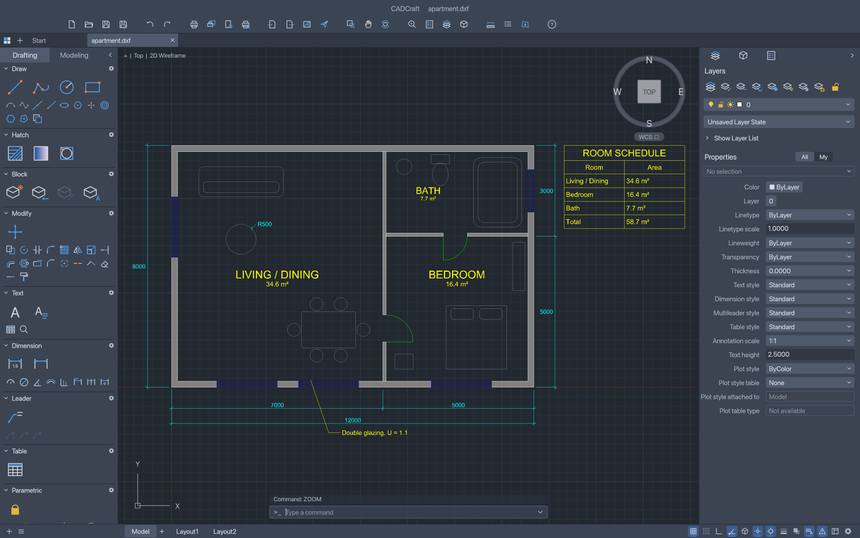
The screenshots below come from the repository and show sample drawings “built entirely from CADCraft commands”, according to the README. The first shows an apartment floor plan: tool palettes on the left, layers and properties on the right, the command line at the bottom, and a room schedule with areas.
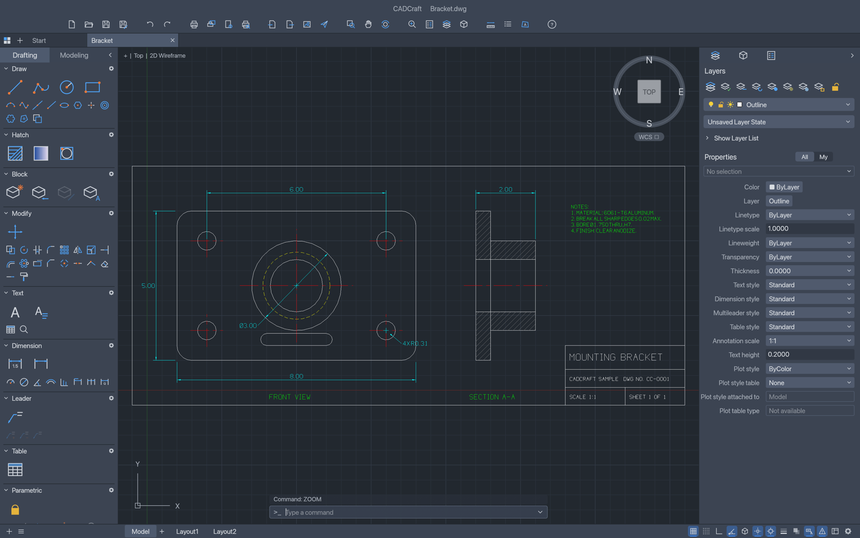
The second shows a mechanical part: a mounting bracket with a front view, bolt holes, centre lines, dimensions, a hatched section view and a title block.
Installing CADCraft step by step
Step 1 — Download a prepared build
The README points to the GitHub “latest release” page. The files listed: Windows (.msi or portable archive, in x64, arm64 and x86), macOS (universal .dmg and a command-line tool), Linux (AppImage, Flatpak, .deb, .rpm, archive), FreeBSD and a web build. A SHA256SUMS.txt file gives a checksum for every file: compare it with the one of your download.
For a silent install on Windows, the README gives:
msiexec /i cadcraft-<ver>-windows-x64.msi /qn DESKTOPSHORTCUT=1<ver> is the version number, /qn suppresses the installer interface and DESKTOPSHORTCUT=1 adds the desktop shortcut.
Step 2 — Or compile from source
The desktop interface needs Rust 1.95 or newer.
git clone https://github.com/storytold/cadcraft
cd cadcraft
cargo run --release -p cadcraft -- --sample       # opens the sample drawing
Step 3 — Try the command line
In the window, type the commands from the README:
line 0,0 @10,0 @0,5 c          a closed triangle
circle 5,2 1                    a circle
zoom e                          zoom to extents
Without a window, the README offers a one-shot run: cadcraft-cli run --sample --script 'CIRCLE 22,3 1\n' --save out.dxf --export out.png.
If the application does not open on Windows
The README explains that the app initialises only DirectX 12 by default, because OpenGL can crash some AMD drivers. The WGPU_BACKEND variable (for example vulkan) switches the graphics backend for troubleshooting.
Limits and open questions
- Pre-alpha stage: the roadmap (last reviewed on 10 October 2026) puts “ready for real work” at about 38%, by its own estimate. It states that four of the five core workflows still fail the alpha gate.
- Snaps and edits: object snap tracking is missing, and some TRIM, EXTEND and OFFSET options are stubs.
- Plotting: plots ignore plot styles.
- DWG: a DWG saved by CADCraft drops what the software does not model yet, and has never been checked in the original program, says the roadmap.
docs/file-format-parity.mddetails the gaps: work on copies. - Feature coverage: about 50% of menu items have a live command (245 of 491 according to the roadmap).
- Driving it with an agent: the MCP server can type at the command line like a person. Isolate it as in the article on isolating stdio MCP servers, and follow the rules in securing an MCP server.
What you can measure on the workstation
CADCraft is a desktop application: the README describes no metrics to export. What it does document still lets you measure:
- The log:
logs/cadcraft.login the settings folder (~/.config/cadcraft/logs/on Linux and the BSDs,~/Library/Application Support/CADCraft/logs/on macOS,%APPDATA%\CADCraft\logs\on Windows, or the folder named byCADCRAFT_CONFIG_DIR). Each launch archives the previous one; the file stops growing at 16 MiB. - Verbosity:
RUST_LOG, defaulting toinfofor CADCraft’s own crates andwarnfor the rest. - Batch jobs:
cadcraft-cli convert drawing.dxf drawing.svgorrun … --exportcan be timed withtimeon a real drawing, giving a reproducible conversion time on your machine. Do not compare it with another program without a shared protocol. - Download integrity: check each file’s SHA-256 sum against
SHA256SUMS.txt.
Good practice
- Work on copies of your DXF or DWG files, and reopen the result in your usual tool before sending it to anyone.
- Note the version (v0.7.0 at the date of this guide) and the roadmap extract that concerns you.
- Keep
cadcraft.logfor any bug report. - For PDF plotting, compare with your reference tool; see also PdfCraft, the PDF reader from the same suite, and the overview of the ArtCraft suite.
Frequently asked questions
Can CADCraft replace a commercial CAD program?
Not at this stage, according to the project’s roadmap: pre-alpha, about 38% “ready for real work” by its estimate. It aims for parity eventually (2D first) but has not reached it.
Which file formats does it open?
DXF (R12 to 2018) and DWG (R13 to 2018) for reading; R2000 for writing in both. Entities that are not modelled are not kept on save.
Which licence?
MIT or Apache-2.0, at your option. The README adds that the ArtCraft name and logo are not covered by that licence.
Conclusion
CADCraft is of interest to those following open technical drawing, a scriptable command line and agent control, but its own README invites you to treat it as a project under construction. Sources: the CADCraft repository and the project page.
span.observer is an independent community blog, not affiliated with Dynatrace LLC or with the projects mentioned. Trademarks belong to their owners. Tools change quickly: check commands and options in their official documentation.