text-to-cad AI agent CAD: the earthtojake/text-to-cad repository is a plugin that gives a coding agent local workflows for producing 3D models (STEP, GLB, STL or 3MF), checking manufacturability, generating dimensioned drawings and preparing files for 3D-printing, sheet-metal and CNC services. It showed about 22,400 stars and 2,200 forks in mid-October 2026, under the MIT licence.
For engineers two questions arise: what do you actually get (a usable CAD file, or a demo?) and what does the plugin do on the machine, network included? This article follows the README: installation, bundled skills, telemetry, limits. It also suggests ways to supervise such a tool across a team.
The information comes from the README and the repository layout. span.observer has not installed text-to-cad: the first image is the presentation image published in the repository, the others are real README excerpts rendered for readability.
text-to-cad AI agent CAD: what the repository says
- Publisher and licence: repository of the GitHub user
earthtojake; the LICENSE file is MIT, copyright 2026 “Thompson Labs LLC”. - Version: the repository’s
VERSIONfile reads 0.7.26, and the README points to thecadgenPython package on PyPI. The GitHub page showed no release at the time of reading. - Technology (README badges): Python 3.11 or later, Node.js 20 or later, build123d 0.11 and Open CASCADE 7.9. The CAD kernel runs locally through uv.
- Supported tools: the README names Claude Code, Claude Desktop, Codex, Cursor, Grok Build, Gemini, and any agent compatible with the skills format (
npx skills add).
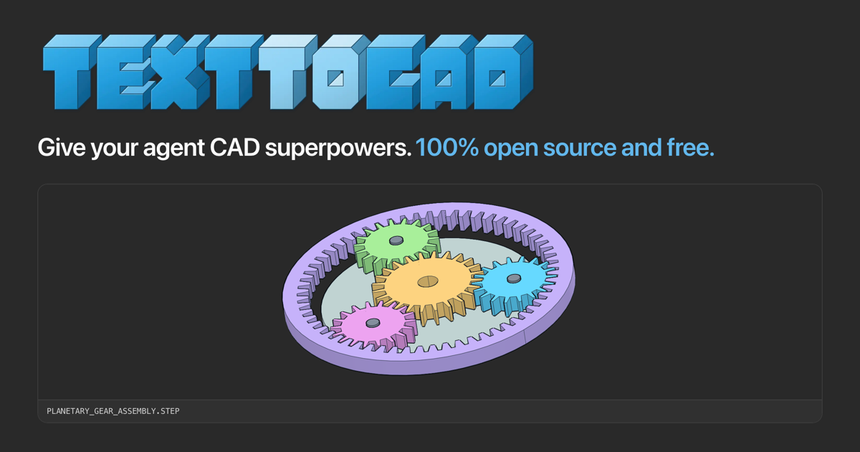
The image, published in the repository (apps/docs/public/social-preview.png), shows the project’s CAD viewer with a planetary gear assembly. The README explains that in tools able to display app views, models appear as orbitable cards inside the conversation; otherwise the agent returns a link that opens the model in the browser-based “CAD Viewer”.
Installing text-to-cad as the README describes
Prerequisite
CAD runs through uv: check uv --version, install it if missing, then restart the agent app. According to the README, the first start downloads the CAD runtime and therefore needs a network connection.
Step 1 — Claude Code
claude plugin marketplace add earthtojake/text-to-cad#latest
claude plugin install text-to-cad@earthtojake
The plugin also starts the CAD server (cadgen mcp). The latest branch holds the plugin alone, published once the version is on PyPI; main may hold unreleased changes.
Step 2 — Other tools
For Codex, Cursor, Grok Build or Gemini, the README gives one command per tool (for example gemini extensions install https://github.com/earthtojake/text-to-cad --ref latest --consent --auto-update). For an agent without plugin support, install the skills alone:
npx skills add earthtojake/text-to-cad#latestThe README is firm: install the plugin or the skills in one app, not both, otherwise every skill appears twice.
Step 3 — Switch telemetry off before you start
uvx cadgen telemetry off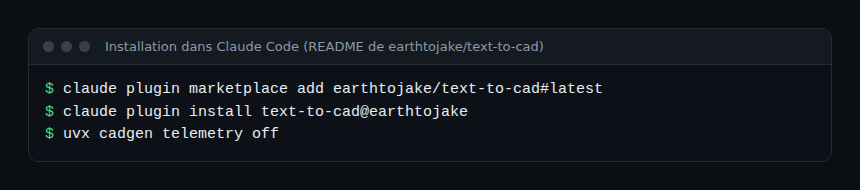
The bundled skills
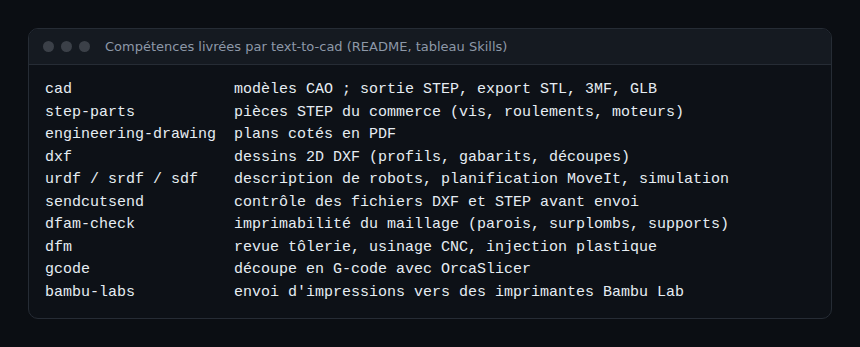
The README’s “Skills” table lists twelve skills. In short: cad (models, with STEP as the main output and STL, 3MF and GLB exports), step-parts (off-the-shelf parts), engineering-drawing (dimensioned PDF drawings), dxf (2D drawings), urdf, srdf and sdf (robotics and simulation), pre-upload checks for SendCutSend, dfam-check and dfm (manufacturability), gcode (slicing with OrcaSlicer) and bambu-labs (sending to Bambu Lab printers).
To compare with another open-source take on CAD, see CADCraft, open-source CAD in Rust. The two projects do not share the same ambition: text-to-cad is a set of agent-driven skills, not a desktop application.
Supervising an agent that does CAD
A local CAD plugin does not publish OpenTelemetry traces: the README does not document any. What the repository does document is its product telemetry and several control variables. Beyond that, supervision happens at the agent level: see observing MCP agents, since the cadgen mcp server is a local MCP server.
What telemetry sends, according to the README
- By default: usage statistics and crash reports, tagged with a random install ID (versions, OS, agent app, tool-call counts, durations, file formats shown). The README states it never includes file names, paths, contents or prompts.
- It is stored with PostHog, with the country derived from the IP address, which the server does not keep.
- Opt-out:
uvx cadgen telemetry off(which also deletes what was sent, per the README), the “Share usage stats” menu in the viewer, or theDO_NOT_TRACK=1andCADGEN_TELEMETRY=0variables for a single process. Nothing is sent by default in continuous integration. - An update check calls
api.texttocad.dev/v1/versionsat most once a day;CADGEN_UPDATE_CHECK=0turns it off.
For a company, review these points with the same guardrails as for other agents: network allowlist, telemetry off by default, pinned versions.
How to check that it works
- The README mentions the
cadgen doctorcommand, which among other things diagnoses the blocked native library on Windows 11. - Ask the agent for a simple model (a plate with four holes) and open it in the CAD Viewer: dimensions should match your request, measured in another CAD tool.
- Check with your firewall or proxy which domains the plugin contacts after
telemetry off.
Limits and open points
- Windows 11 and Smart App Control. The README explains that OpenCascade’s native module (OCP) is unsigned: with Smart App Control on, every
cadgencommand fails with “DLL load failed while importing OCP”. README remedies: turn it off (irreversible without reinstalling Windows) or use WSL. - A generated part is not a validated part. The DfM and DfAM skills measure criteria on a mesh; they are not an engineering review or a strength calculation. Have parts reviewed before they are manufactured or carry a load.
- Actions on real hardware. Some skills send files to manufacturing services or to a printer. Keep a human approval step before any upload or print start.
- Version dependence. The Claude Desktop configuration pins a
cadgenversion; updates are manual in that case. - Young project. Version 0.x and heavy attention: interfaces may change.
Best practices
- Disable telemetry at install time if your policy requires it, and reread the README’s “Telemetry” section.
- Install the
latestbranch, notmain, and pin the version. - Work in a dedicated project folder; limit the agent’s permissions as in the GitHub MCP server guide.
- Require human review of dimensions and tolerances before manufacturing.
Frequently asked questions
Does text-to-cad work offline?
According to the README, offline nothing is sent and everything works, but the first start downloads the CAD runtime and needs a connection.
Which file formats does it produce?
STEP as the main output, with STL, 3MF and GLB exports, plus DXF drawings and PDF drawings depending on the skills.
Is it free?
The code is MIT licensed and the project presents itself as free. Calls to your agent’s model are billed by your provider.
Conclusion
text-to-cad extends the agent-skills idea to CAD and fabrication. The idea is sound on paper, but the project is young (version 0.7.x) and touches physical objects: human review, controlled telemetry and pinned versions are the three habits to keep.
span.observer is an independent community blog, not affiliated with Dynatrace LLC or the projects mentioned. Trademarks belong to their owners. Tools change quickly: check commands and options in the official documentation (texttocad.dev).