FigCraft interface design prototyping open source is a project from the creative suite of the GitHub organisation storytold, led by the ArtCraft team: a tool for designing interfaces and prototypes, written in Rust. The project describes itself as a “clean-room” reimplementation of a commercial collaborative design tool, which is its own claim. Its README states that FigCraft is independent and not affiliated with that tool’s publisher.
In mid-October 2026 the storytold/figcraft repository showed about 1,900 stars and 703 commits, and the latest release read was v0.6.0, published on 14 October 2026. FigCraft stands out from its neighbours in the suite through a server component: a collaboration server, figcraft-server, which can be monitored like any other service.
A note on honesty: span.observer has neither installed nor run FigCraft. This guide relies on the README, the repository documentation (docs/server.md) and the project’s site. The screenshots come from the repository.
FigCraft interface design prototyping open source: what the project claims
The README sums the tool up as frames, auto layout, components and variants, vector networks, styles, variables and prototypes, in a native application that works offline. It runs on macOS, Windows, Linux, FreeBSD and in the browser (WebAssembly). The licence is dual, MIT or Apache-2.0 at your option.
- Command engine: more than 400 commands go through a single registry. The interface, the command line, a JSON control channel and an MCP server all call the same commands.
- Rendering: an in-house engine based on tiny-skia for the canvas and exports.
- Extensions: WebAssembly plugins run in a sandbox with no file or network access, according to the README.
- Interface: English, Russian and Turkish reviewed by native speakers, and nine other languages as drafts, including French.
For the MCP server, start with the Model Context Protocol explained.
A tour of the interface
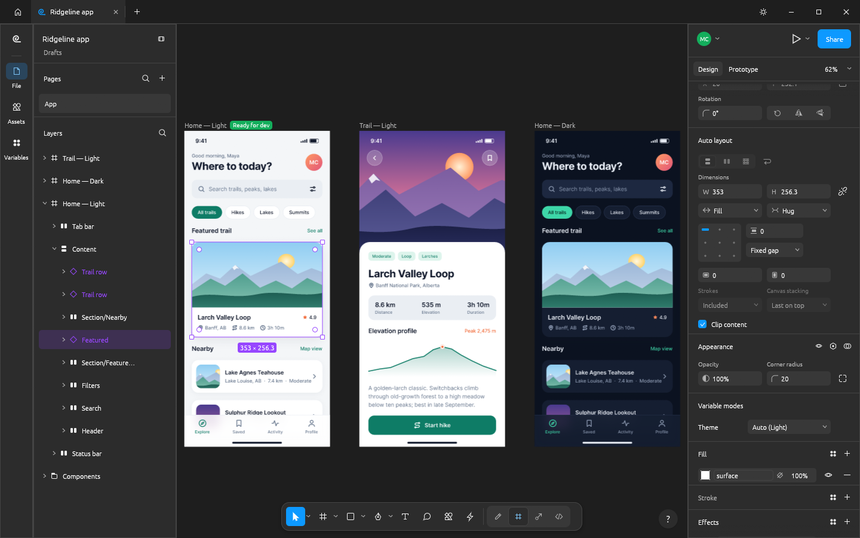
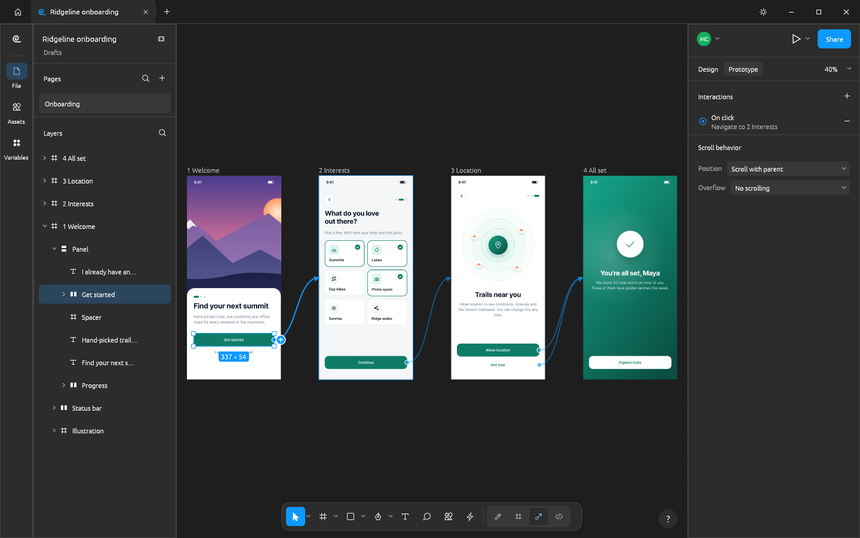
The three screenshots below come from the repository. They show example files shipped with the project, a fictional hiking app called Ridgeline, built with the tool’s own commands. The first shows the editor: layers on the left, three phone screens on the canvas in light and dark themes, and the Design panel with auto layout on the right.
The second shows the Prototype tab: four onboarding screens joined by blue curves, with an “On click” interaction selected in the right-hand panel.
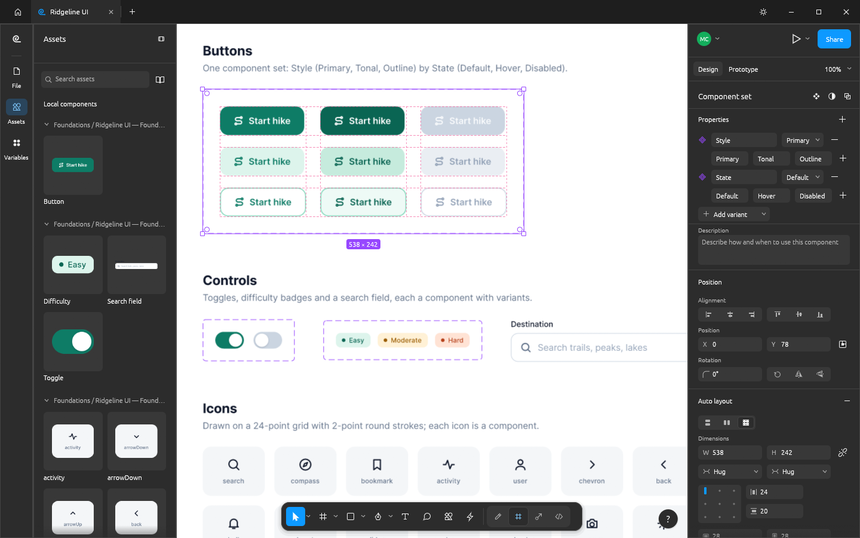
The third is about components: a Button component set with nine variants (Style by State) and the Assets panel with component thumbnails.
Installing FigCraft step by step
Step 1 — Prepared build
The README says installers are attached to each GitHub release: macOS (universal, signed and notarised), Windows (x64, x86, arm64), Linux (AppImage, .deb, .rpm, Flatpak, archive), FreeBSD and the web. The v0.6.0 files have names like figcraft-0.6.0-linux-x86_64.AppImage.
Step 2 — Compile from source
git clone https://github.com/storytold/figcraft
cd figcraft
cargo run --release -p figcraft            # the desktop app
cargo run --release -p figcraft-server     # the collaboration server (docs/server.md)
cargo test --workspace                     # the test suite
The interface fonts come from craft-fonts, to be cloned alongside (../craft-fonts); without it FigCraft falls back to the system fonts. For the web, install trunk and run cargo xtask wasm.
Step 3 — Try it without a window
figcraft-cli render landing.figcraft -o landing.png --scale 2
figcraft-cli export landing.figcraft -o out/ --format svg
figcraft-cli commands --filter autoLayout
These README commands render a file to PNG, export it to SVG or list the auto layout commands. The home screen also offers eight starter templates.
Limits and open questions
- Alpha stage: the README puts FigCraft at about 49% of the way to replacing the tool it targets, “by our own estimate”. It adds that
.figfiles open only on a best-effort basis, and that the project has not been checked against real documents from that tool. - Multiplayer is a preview: no accounts, no teams, no cloud. The share link or code is the access to the file.
- Online sharing: “Share ▸ Online” uploads the file to a server, by default the public server
collab.craftapps.dev; the connection is encrypted (TLS) but the server stores the file unencrypted. The README advises against sharing confidential work there and suggests running your own server or sharing on the local network. - Public server without guarantees: offered “as is”, with no backups or uptime promise.
- Driving it with an agent:
figcraft-cli mcpexposes the commands to an agent. Apply the rules from securing an MCP server.
What you can observe and measure
Server side: figcraft-server
Here the project runs on the server side, so it can be operated like a service. According to docs/server.md:
- it listens on
127.0.0.1:47900by default;--listen 0.0.0.0:47900opens it to the network, and the documentation then recommends a TLS reverse proxy; GET /healthzanswers200 okon the same port, for an availability probe;- logs go to standard output (
RUST_LOG=debugfor more detail), askey=valuelines such asevent=published,event=refusedorevent=expired, with no keys or file contents; - only one server at a time per data folder (
--data); - a clean stop on SIGTERM or SIGINT saves the open files.
These lines can be collected like the logs of any service. For the principle of a log pipeline, see forwarding logs to Dynatrace: this guide claims no integration between FigCraft and that product.
On the workstation
For the desktop app, the README describes neither metrics nor a log file. What you can measure without inventing a feature: start-up time, resident memory on an example file from the repository (examples/), the time taken by figcraft-cli render with time, and open network connections. The README states that no server is contacted before a share: a system network tool lets you check that on your own machine.
Good practice
- Do not share confidential files through the public server; host your own behind TLS or use the local network.
- Keep the server on
127.0.0.1until a TLS proxy is in place, and give the server key only to people you trust. - Back up the
--datafolder and keep a local copy of every shared file. - Note the version tested (v0.6.0 at the date of this guide) before comparing two exports.
- Also read DesignCraft, the page layout editor from the same suite, and the ArtCraft overview.
Frequently asked questions
Does FigCraft replace a commercial design tool?
Not yet, according to its own README: alpha stage, about 49% of the way by the project’s estimate, and .fig files opened on a best-effort basis.
Does FigCraft send data anywhere?
According to the README it has no account and no telemetry, and contacts no server until you share or join a file. Online sharing uploads the file to the server you choose.
Can it be used without installing it?
The README mentions a web version compiled to WebAssembly. The collaboration server exists only as a native build (docs/server.md).
Conclusion
FigCraft is a young but well-documented project, with one feature of interest to an SRE: a small server that can be monitored. Sources: the FigCraft repository and the project page.
span.observer is an independent community blog, not affiliated with Dynatrace LLC or with the projects mentioned. Trademarks belong to their owners. Tools change quickly: check commands and options in their official documentation.