PdfCraft, open source PDF reader and editor written in Rust, is developed by the ArtCraft team (GitHub organisation “storytold”). The project describes itself as a clean-room reimplementation of Adobe Acrobat, built from the ISO 32000 specification and observation of behaviour, and says it is not affiliated with Adobe. These are the project’s claims, and span.observer does not vouch for them.
Figures read on the repository page in mid-October 2026: about 14,900 stars and 5,800 forks, dual-licensed MIT or Apache-2.0 (your choice), latest release v0.8.0 published on 14 October, Rust code according to the README (which asks for Rust 1.95 or later to build). span.observer has not installed the software: this article relies on the README, the repository documentation and its screenshots.
In the same family, WordCraft already exports to PDF, and PhotoCraft handles images. On the agent side, the README describes a CLI and an optional MCP server: first read the Model Context Protocol explained.
PdfCraft open source PDF reader: a tour
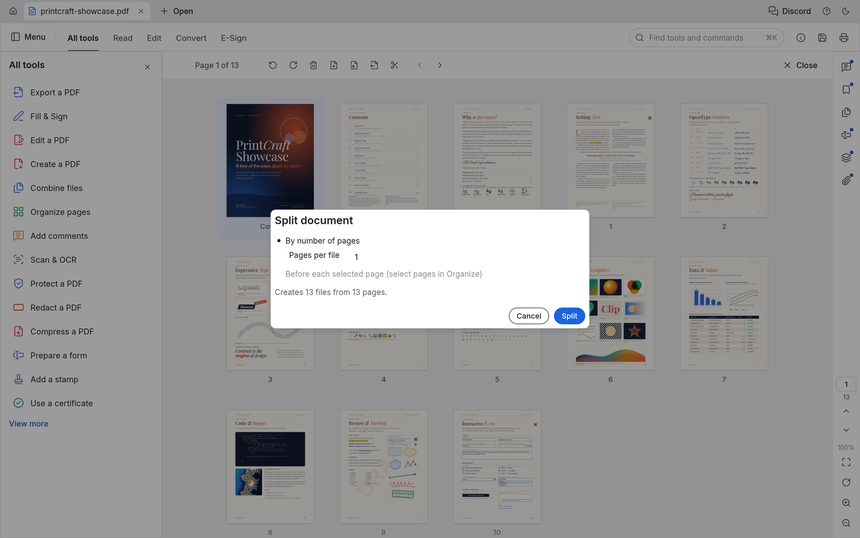
The window combines document tabs, modes (All tools, Read, Edit, Convert, E-Sign), a tool catalogue on the left and a comments panel on the right. The screenshot below shows the demonstration document that the repository generates itself (cargo xtask demo-pdf).
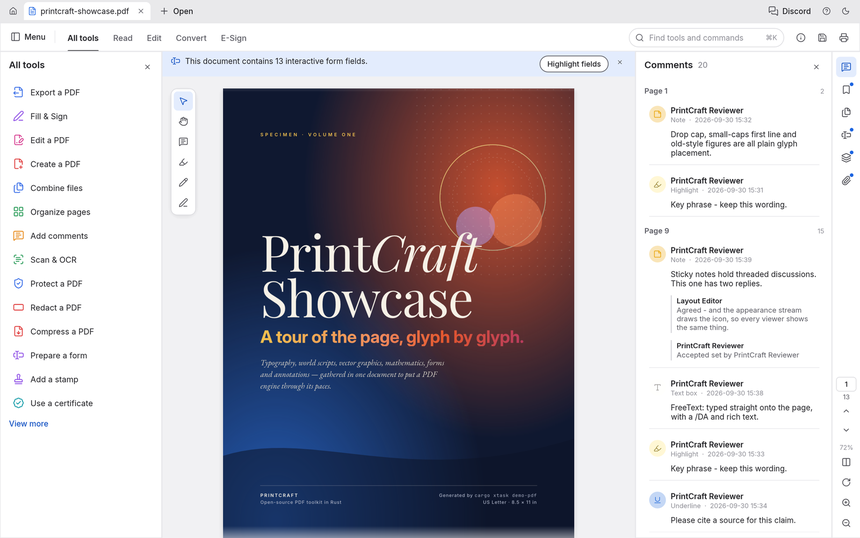
The README stresses careful reading: kerning and ligatures, right-to-left scripts, vertical CJK, tiled rendering so text stays sharp at deep zoom, light and dark themes. It adds that pages are still drawn by the hayro crate while the project builds its own renderer.
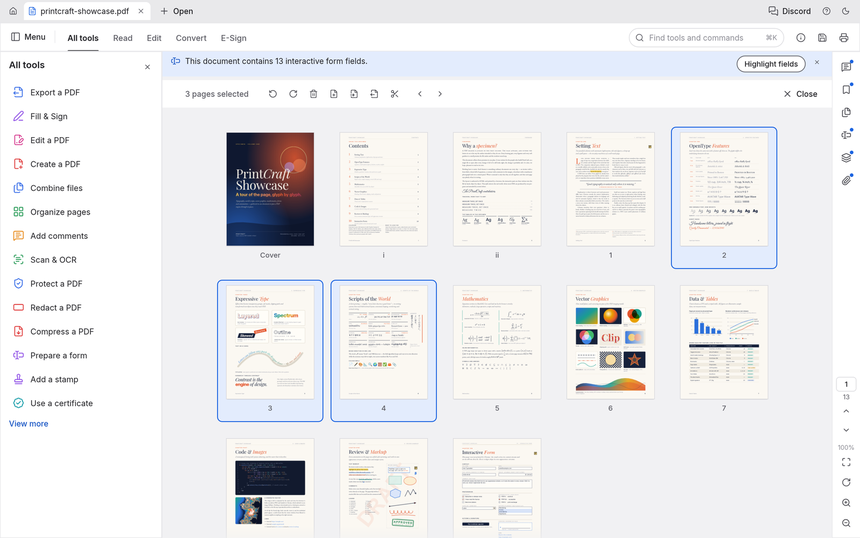
Page organisation (rotate, delete, insert, move, with deep undo) happens on a thumbnail grid. Saves are incremental and atomic: saving to the same location appends an update to the file without touching the original bytes.
Installing PdfCraft: the README commands
git clone https://github.com/storytold/pdfcraft
cd pdfcraft
cargo xtask models                                # OCR models for Scan & OCR
cargo run --release -p pdfcraft -- some.pdf       # desktop app
cargo xtask models fetches the OCR models; the README says the published builds include them. Without compiling, take a package from the GitHub releases: macOS, Windows (x64, x86, ARM64), Linux (AppImage, Flatpak, .deb, .rpm, tarballs), FreeBSD and a WebAssembly web build. To automate without an interface, the README cites pdfcraft-cli:
pdfcraft-cli combine report.pdf appendix.pdf --out combined.pdf
pdfcraft-cli extract report.pdf --pages 1,3,5-8 --out highlights.pdf
pdfcraft-cli split   report.pdf --every 10 --out-dir parts/
Limits and open questions
- Alpha: the project estimates it is about 55% of the way to replacing Acrobat for everyday work, and 49% against all of Acrobat Pro (the project’s estimates, October 2026).
- Editing existing text: the README lists it under “thin or missing”, especially for CJK and right-to-left text. The same goes for OCR beyond Latin script, Office import or export, PDF/X and PDF/UA, and XFA forms.
- Robustness: on the pdf.js test corpus (983 files) the README reports 963 files opened and rendered cleanly and 0 crashes. It admits that fuzzing still finds crashes and hangs on hostile files: be wary of PDFs from unknown sources.
- Privacy: the README states there is no account, no telemetry and no cloud processing.
Measuring PdfCraft on a workstation
PdfCraft is a desktop application: nothing to monitor server-side, and no telemetry feature to invent, since the project says it has none. What you can measure is local behaviour. The pdfcraft.log file is under ~/.local/share/pdfcraft/logs/ (Linux and FreeBSD), ~/Library/Application Support/PdfCraft/logs/ (macOS) or %APPDATA%\PdfCraft\data\logs\ (Windows). Each launch archives the previous one (pdfcraft.1.log, .2.log), the file is capped at 16 MiB, and the control-channel token and document passwords are never written to it.
The level is set with RUST_LOG (for example RUST_LOG=warn,pdfcraft_render=trace), and WGPU_POWER_PREF steers GPU choice; the log says which card was chosen. The README adds that autosave runs every minute, with an offer to recover after an unexpected exit: a crash therefore leaves a trace in the log and a recoverable document. For the rest, use operating-system tools: start-up time, resident memory on a large PDF, number of sessions without a panic. A target such as “99% of sessions without a panic over a month” is a simple SLI to hold across a fleet of workstations.
Good practice
- Open doubtful PDFs in an isolated environment while the project is in alpha.
- Work on copies before saving anything, even though writes are atomic.
- The control channel and MCP server are optional: the README asks you to keep the control file in a folder only you can write. See securing an MCP server and guardrails for AI agents in production.
- Attach
pdfcraft.logto bug reports.
Frequently asked questions
Is PdfCraft a free, open source PDF reader?
Yes: dual MIT or Apache-2.0 licence, your choice. The ArtCraft names and logos are trademarks excluded from that licence, according to the README.
Can PdfCraft merge and split PDFs?
Yes according to the README: combine, extract and split, keeping links, form fields, layers and attachments.
Does PdfCraft handle password-protected PDFs?
The README states full support for the standard security handler, from 40-bit RC4 to AES-256, with user and owner passwords.
Conclusion
PdfCraft is already solid for reading, organising, merging and commenting, and honest about what is missing. Sources: the storytold/pdfcraft repository and getartcraft.com. The screenshots come from the repository, under MIT or Apache-2.0.
span.observer is an independent community blog, not affiliated with Dynatrace LLC or ArtCraft. Trademarks belong to their owners. Figures date from mid-October 2026 and change quickly: check them on the repository.