Consumer MCP has reached the living room: Google is opening a Home MCP server in Early Access that lets an assistant such as Claude list rooms, read device states, turn off lights and replay the home’s history. For an SRE, the point is not home automation. It is a real, documented case of an agent acting on a physical system on someone’s behalf, with an OAuth token, limits and revocation.
This analysis reads Google’s public documentation and the MCP specification to draw three operational lessons: who authenticates the agent, what it is allowed to do, and how you find out afterwards what it did. The facts quoted come from the Google Home MCP developer page (updated on 21 September 2026), the MCP 2025-11-25 specification and the OpenTelemetry semantic conventions.
If the protocol is new to you, read Model Context Protocol explained first. For the server side, see securing an MCP server.
What Google Home MCP actually exposes
The Google Home MCP Server page describes five tools, from the most harmless to the most consequential:
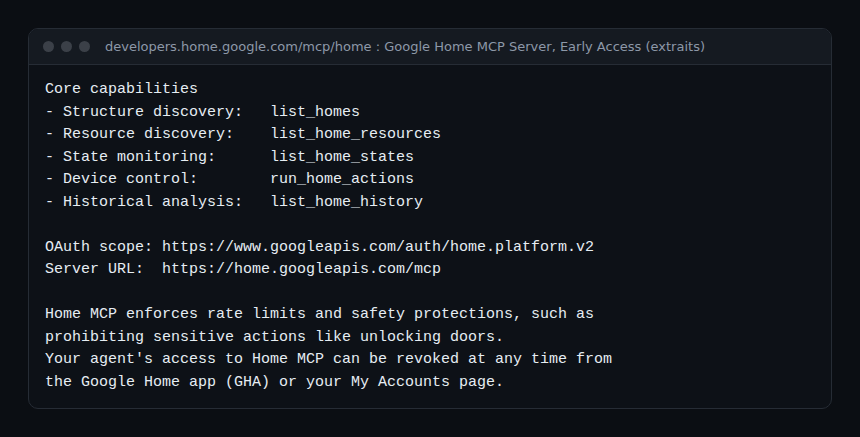
list_homesandlist_home_resources: discovery of structures, rooms, devices and command schemas;list_home_states: real-time state and connectivity;run_home_actions: execution of parameterised commands;list_home_history: history of state changes and events.
The prerequisites are specific: a home set up in Google Home, a Google Home Premium Advanced subscription, a Google Cloud project and an MCP-compatible client. The page names Google Antigravity, Claude Cowork and OpenClaw. It does not name ChatGPT, which several press articles mention: check before claiming it. The page also lists known issues (latency, experimental traits, subscription enforcement) and notes that automations are not supported yet.
Consumer MCP, lesson 1: the agent’s identity is the user’s
To connect the agent, users create an OAuth consent screen and a “Web application” client ID in Google Cloud themselves, register the client’s redirect URI (for example https://claude.ai/api/mcp/auth_callback for Claude Cowork), then authorise access with the https://www.googleapis.com/auth/home.platform.v2 scope. Google’s comparison table sums it up: authentication through a “User-authorized OAuth flow”.
This is the model the MCP specification describes for protected HTTP servers (authorisation is optional there, but strictly framed once used). The server acts as an OAuth 2.1 resource server; it must publish its protected resource metadata (RFC 9728), the client must send the resource parameter (RFC 8707) and use PKCE with S256 when it can, and the server must reject any token for which it is not the audience.
The lesson for your operations agents: in this model an agent has no identity of its own, it carries a delegation. In the logs, “turn off the light” appears under the user’s name. If your on-call agent restarts a service with an engineer’s token, the audit log will say the engineer did it. So plan one OAuth client ID per agent, to tell agents apart, limit them and revoke each one separately.
Google adds another level: access to familiar faces from cameras requires a separate consent, given by a home manager through a link specific to the OAuth client and the structure. A broad scope is not enough for sensitive data. Applied to operations: access to logs containing personal data deserves its own consent, not a silent extension of the agent’s scope.
Lesson 2: permission is decided at three levels
Google’s documentation shows three separate barriers, each useful in production.
Server side: what is forbidden to everyone
Home MCP enforces rate limits and safety protections that prohibit sensitive actions such as unlocking a door. Whatever the prompt or scope, the tool will not do it. This matches the MCP specification’s rule for servers: validate inputs, implement access controls, rate limit tool invocations, sanitise outputs.
Client side: what the human approves
The Google page asks you to grant tool execution permissions “when prompted” by the client. Clients expose this setting tool by tool:
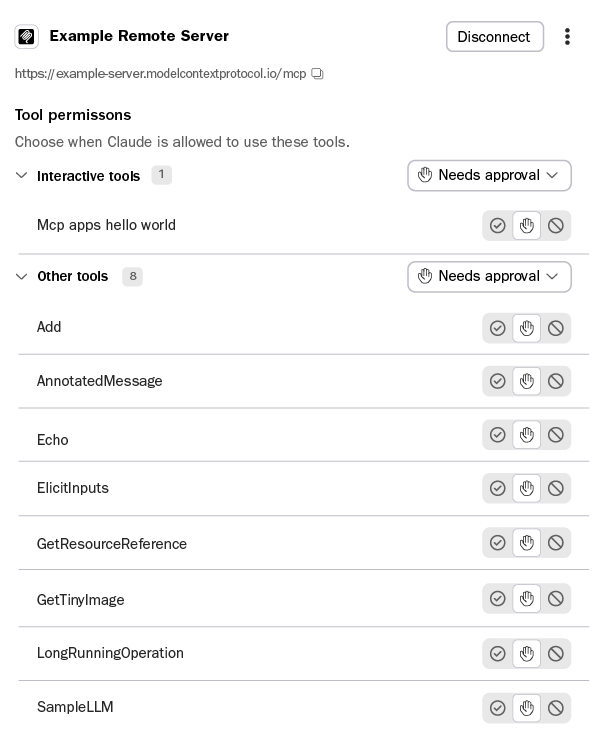
The MCP specification recommends it: a human in the loop able to deny an invocation, confirmation for sensitive operations and display of inputs before the call. Tool annotations (readOnlyHint, destructiveHint, idempotentHint, openWorldHint) help the client decide, but the specification states they must be considered untrusted unless they come from a trusted server. By default, readOnlyHint is false and destructiveHint is true: an unannotated tool is treated as potentially destructive.
Owner side: revocation
The agent’s access can be revoked at any time from the Google Home app or the My Accounts page. Google also advises telling other household members, or creating a test home. Applied to operations: a revocation switch known to on-call, and a test environment before connecting the agent to production.
Lesson 3: auditability does not come for free
The MCP specification lists what clients should do, including logging tool usage for audit purposes:
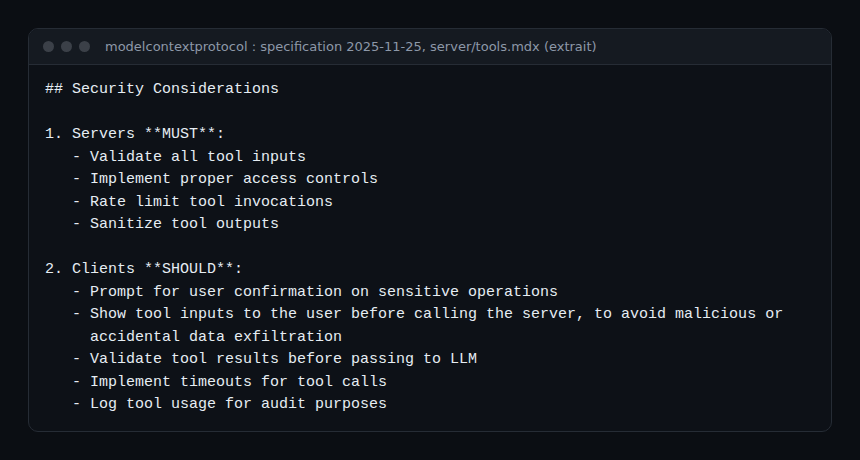
It is a “should”, not a “must”. On the home side, list_home_history says the light went off; it does not say which prompt led the agent to do it. For your agents, build the audit trail yourself with the OpenTelemetry GenAI conventions (status Development):
# MCP client span for a tool call (GenAI and MCP conventions)
span name:           tools/call run_home_actions
mcp.method.name:     tools/call
gen_ai.tool.name:    run_home_actions
jsonrpc.request.id:  request-7
# Link it through the trace to the agent span (gen_ai.operation.name = execute_tool)
The span name follows the {mcp.method.name} {target} format. By linking this span to the agent span and the model call span in the same trace, you answer the three post-mortem questions: which request, which decision, which action. Sent over OTLP, these spans reach Dynatrace SaaS and Dynatrace Managed alike; the method is detailed in monitoring MCP agents with OpenTelemetry. Mind the attributes: do not put full tool arguments in spans if they contain personal data.
Best practices for your own agents
- One OAuth client per agent, never an engineer’s personal token shared between agents.
- Server-side bans (like Google’s door), not just instructions in the prompt.
- Human approval by default on any tool that changes state; read-only tools freely available.
- Separate consent for sensitive data rather than a wider scope.
- Revocation documented in the runbook and tested.
- One trace per action: request, model decision, tool call, result.
- A test environment before production, like the “test home” Google recommends.
Frequently asked questions
Is Google’s consumer MCP available everywhere?
No. The page presents it as Early Access and requires a Google Home Premium Advanced subscription. Check availability on the official page before building on it.
Can ChatGPT control Google Home through MCP?
Google’s developer page names Antigravity, Claude Cowork and OpenClaw as clients, with instructions for each. ChatGPT is not listed as of the update date consulted.
Are tool annotations enough to secure an agent?
No. They are hints supplied by the server. The specification says to treat them as untrusted unless the server is trusted; the real barriers are server access control and client-side approval.
Conclusion
Google Home MCP makes visible what operations teams discover with their own agents: the agent acts under a delegated identity, permission is split between server, client and owner, and auditing has to be built. Apply these three levels to your agents and tie them to your reliability objectives as described in AI and SRE reliability. Sources: Google Home MCP Server and MCP specification, authorization.
span.observer is an independent community blog, not affiliated with Dynatrace LLC, Google or the projects mentioned. Trademarks belong to their owners. The service described is in early access: check terms and options in the official documentation.