
Supabase open source Postgres: the supabase/supabase repository gathers a development platform built around PostgreSQL, with authentication, automatic APIs, file storage, functions and a toolkit for vectors and AI. It showed around 113,200 stars in October 2026 and is licensed under Apache-2.0. Its README presents it as “the Postgres development platform”, building the features of Firebase with enterprise-grade open source tools.
For a product team it is a ready-made back end. For an operations team it is above all a stack of several services to host and monitor if you choose self-hosting. This article presents what the repository says, the Docker installation according to the documentation, and what you can observe, with one important limit: the hosted service’s metrics API does not exist when self-hosting.
The information comes from the README and the official documentation. span.observer has not installed Supabase: the images below come from the project’s repository and documentation.
Supabase open source Postgres: what the repository says
- Licence: Apache-2.0 (the repository’s LICENSE file). The README adds that the project uses tools under MIT, Apache 2 or equivalent licences when they exist, and builds and open-sources the others itself: that is the project’s own description.
- Listed features: hosted Postgres database, authentication and authorisation, generated APIs (REST, GraphQL, realtime subscriptions), database functions and Edge Functions, file storage, an AI and vector toolkit, and a dashboard.
- Ways to use it: the hosted platform (nothing to install), self-hosting, or local development, according to the README.
- Official clients: JavaScript and TypeScript, Flutter, Swift and Python; other languages are community-maintained.
- Versions: the repository shows no release on its releases page at the time of reading; the self-hosting documentation cites a
self-hosted/v0.8.3tag.
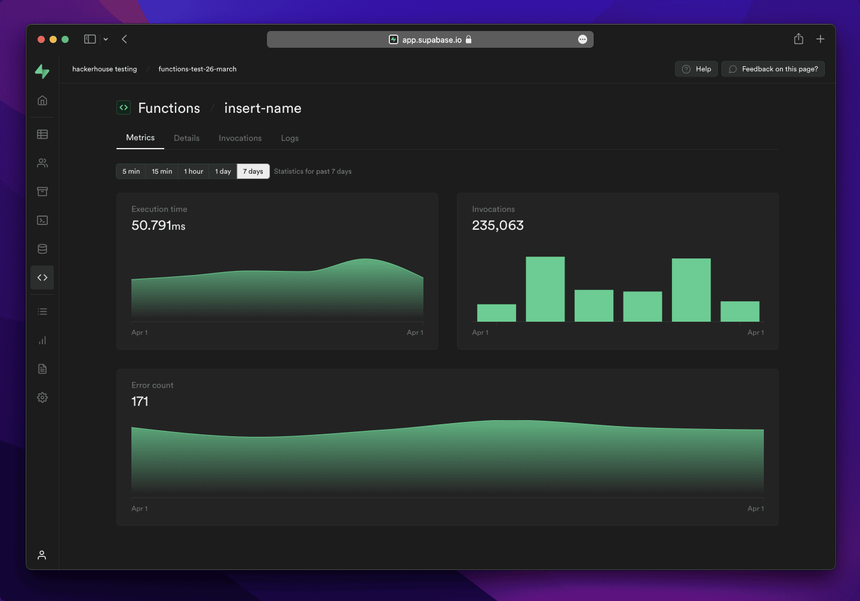
The README screenshot shows the dashboard (Studio) on an Edge Function: execution time, invocations and errors. It is the basic application-health view.
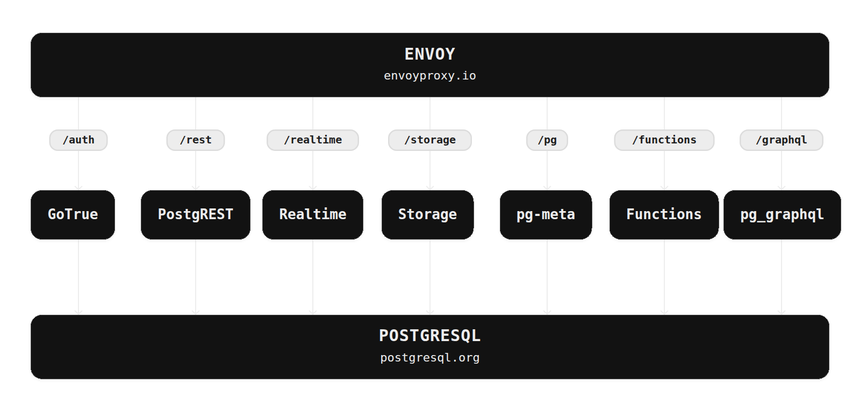
The architecture diagram shows the essentials: an Envoy gateway routes each path to a service, and all of them rely on PostgreSQL. The README describes these building blocks: Postgres, Realtime (an Elixir server that broadcasts database changes over websockets), PostgREST (generated REST API), GoTrue (JWT-based authentication), Storage (files on S3, permissions in Postgres), pg_graphql and postgres-meta.
Self-hosting Supabase with Docker
Step 1: Prerequisites
The documentation assumes you are comfortable with Linux administration, Git, Docker and Docker Compose. Minimum resources: 4 GB of RAM, 2 cores and 40 GB of SSD; recommended: 8 GB or more, 4 cores or more and 80 GB or more.
Step 2: Quick start on Linux
curl -fsSL https://supabase.link/setup.sh | sh
cd supabase-project && \
sh run.sh start
The script, supported on Debian, Ubuntu and the RHEL family, installs prerequisites, fetches the configuration, generates secrets and keys and prepares the images. The documentation notes that the short link points to setup.sh: inspect it before running it. sh run.sh secrets displays the generated credentials.
Step 3: Or manual installation on any system
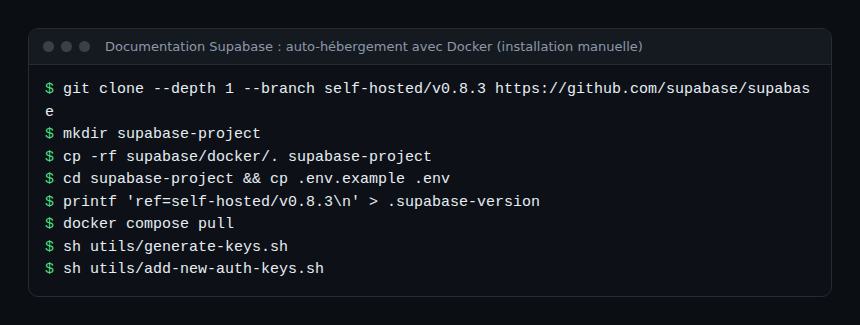
The .env.example file contains sample passwords. The documentation warns never to start with those values: generate secrets with sh utils/generate-keys.sh and sh utils/add-new-auth-keys.sh, then set SUPABASE_PUBLIC_URL, API_EXTERNAL_URL and SITE_URL. The gateway listens on port 8000 by default.
Monitoring Supabase
What the hosted service offers
The documentation describes a Prometheus-compatible metrics API (about 200 Postgres series) to plug into Grafana or other tools. It states that this API is in beta, that metric names may change, and that it is not available in self-hosted instances.
When self-hosting
The default configuration does not include Logs and Analytics. The documentation says you can enable Logflare (analytics), Vector (log collection) and Studio’s Log Explorer with an optional Docker Compose override file, at the cost of extra resources. For the rest, you monitor an ordinary Docker stack:
- Containers and resources: state, restarts and memory of each service (gateway, database, authentication, Realtime, Storage and so on), with your usual tools.
- PostgreSQL: connections, locks, slow queries and replication, with a suitable exporter; for moving signals, see the OpenTelemetry Collector to Dynatrace.
- Logs: if you ship them to a platform, keep the trace ID on every line; see OpenTelemetry logs with trace ID.
I found no documented native OpenTelemetry export for the self-hosted stack.
How to check that it works
docker compose psshows every service started and healthy.- The Studio dashboard opens on the gateway address, with the password generated at installation.
- A request to the REST API of a test table answers, and the matching container’s log shows it.
Limits and open points
- You run the stack: backups, upgrades, TLS and network security are yours; the documentation recommends the hosted platform if these topics are new to you.
- Partial parity: the metrics API is absent when self-hosting; check the feature list before migrating.
- Default secrets: never keep the values from
.env.example. - Tracked version: with no releases page, the documentation’s
self-hosted/…tag is the reference; note it at every installation.
Best practices
- Pin the configuration tag (
self-hosted/vX.Y.Z) and read the notes before upgrading. - Do not expose the database to the internet: go through the gateway and a TLS proxy.
- Read the data access control documentation before exposing tables through the API.
- Schedule database backups and test the restore.
- For a full AI stack, see the self-hosted open-source AI stack and Dify and n8n.
Frequently asked questions
Is Supabase really a Firebase replacement?
The project describes itself as building Firebase’s features with open source tools, but says it is not a one-to-one mapping: the database is PostgreSQL, not a document store.
Can I use it for vectors and AI?
The README lists an AI and vector toolkit. Check its documentation for the extensions and limits in your version.
Is self-hosting free?
The code is under Apache-2.0; servers, storage and operations are your cost.
Conclusion
Supabase assembles open source building blocks around PostgreSQL and offers two paths: the hosted service, or a Docker stack you run yourself. In the second case, plan container and database monitoring from the start, because the hosted service’s metrics API is not included.
span.observer is an independent community blog, not affiliated with Dynatrace LLC or the projects mentioned. Trademarks belong to their owners. Tools change quickly: check commands and options in their official documentation (supabase.com/docs).