
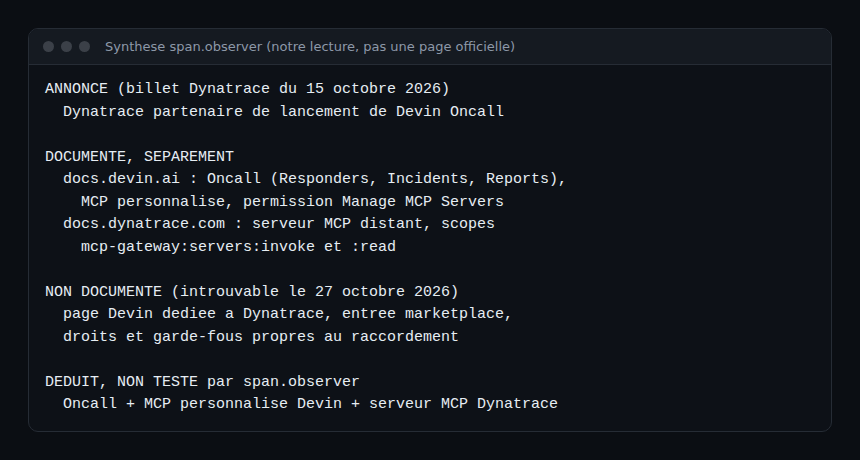
Devin Oncall Dynatrace: on 15 October 2026, Dynatrace announced that it is a launch partner for Devin Oncall, the Cognition product that responds to alerts and incidents. For an SRE team the question is not “is it impressive?” but “what is actually documented, and what rights do we give an agent that answers at 3 a.m.?”.
This article separates four things: what is announced, what is documented separately, what is not documented, and what we infer. To be clear, span.observer is an independent blog with no link to Dynatrace or Cognition. We have not installed or run Devin Oncall, and we have tested nothing. The announcement post is used only to date the news; the analysis rests on the documentation pages read on 27 and 29 October 2026.
Devin Oncall Dynatrace: what is announced
The announcement of 15 October 2026 presents Dynatrace as a launch partner for Devin Oncall. The devin.ai/oncall product page lists Dynatrace among the tools for tracing infrastructure problems to their root cause, with a link to the MCP page of the Devin documentation. That is an announcement, not a how-to: neither the post nor the product page points to a documentation page describing the connection.
What the Devin documentation says about Oncall
The Devin Oncall page on docs.devin.ai describes three products.
- Responders: they handle alerts, bug reports and support questions as they arrive. A trigger comes from Slack, Microsoft Teams or PagerDuty, and repeated events are grouped into one issue.
- Incidents: Devin joins Slack channels whose name starts with a chosen prefix (for example
incident-). There are two modes: proactive, which keeps investigating and maintains a report, and “one-shot RCA”, which posts a likely root cause with a confidence level and stops. A tab lets you Stop or Resume. - Reports: scheduled summaries, run under a service user.
Setup is done once per organisation: Begin setup, connect at least one telemetry tool (or “Set up without tools”), choose how often skills update (Never, Weekly, Monthly), then Finish. The page gives 1 to 2 hours. On control, it mentions the run-as identity, MCP connectors, the network policy, and ACU and invocation limits per responder. It does not describe an approval workflow.
What the Dynatrace documentation says about MCP
For Dynatrace SaaS, the MCP server page gives a remote server address of the form https://{environment-name}.apps.dynatrace.com/platform-reserved/mcp-gateway/v0.1/servers/dynatrace-mcp/mcp. Two authentication modes are documented: a Bearer token in the header (the page recommends a Platform token) or a confidential OAuth client using the Authorization Code flow. The server does not support public clients or dynamic registration.
The permissions required for any access are mcp-gateway:servers:invoke and mcp-gateway:servers:read, for both the user and the token. For full tool access with an OAuth client, the page lists about twenty more scopes, including storage:logs:read, storage:spans:read, storage:events:read, davis:analyzers:read and davis:analyzers:execute. Effective permissions are the intersection of the client’s and those of the user who created it. We cover this server in the Dynatrace SaaS MCP: installation and tools.
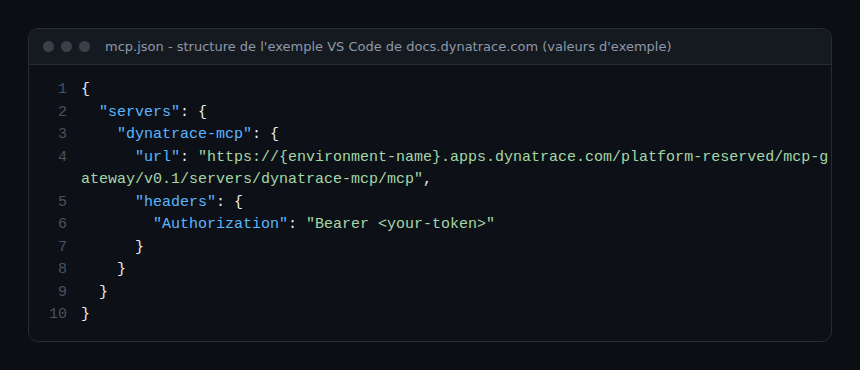
This example targets VS Code. The page does not say the server is read-only: its scope list contains :execute permissions next to the :read ones. Do not assume read-only access.
What is not documented
As of 27 October 2026, we found no docs.devin.ai page dedicated to Dynatrace, no Dynatrace entry in Devin’s integrations list or MCP marketplace, and no mention of Devin or Oncall on the MCP page of docs.dynatrace.com. So there is no written answer on the exact configuration, the minimum scopes for Oncall, how write tools behave, or any guardrails specific to the connection. If your version shows a marketplace entry, it takes precedence over this article.
What we infer: a custom MCP
The Devin documentation lets you add a server missing from the marketplace through Add custom MCP. The transports are STDIO, SSE (described as being deprecated) and HTTP, recommended for new integrations. For HTTP, the fields are a URL and headers, with authentication set to None, Auth Header or OAuth. Adding a custom MCP requires the Manage MCP Servers permission, and the Test tools button checks an HTTP server.
Put the two pages side by side: a remote HTTP address, an Authorization header carrying a Platform token. That looks like what Devin accepts. It is our inference from two separate documentations. We have not tested it, and we do not know whether Oncall uses it as a “telemetry tool” during setup. Treat it as a working hypothesis for a test environment.
Guardrails to demand before connecting the agent
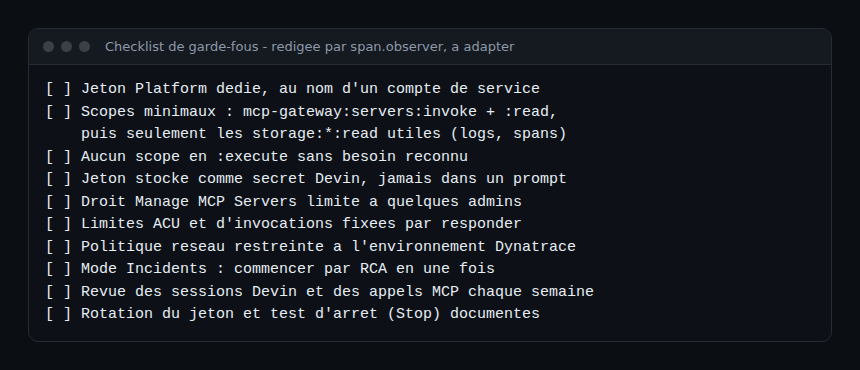
The guardrails below come from the pages we read, not from a shared official procedure. The checklist is our own wording.
- Least privilege on the token: a dedicated token with the two
mcp-gatewayscopes, then only the storage reads you need. Token permissions never exceed those of their creator, hence the value of a service account. - No
:executewithout an explicit decision, since read-only access is not guaranteed. - Shared identity: for organisation-level OAuth, Devin recommends a service account rather than a personal one, and notes that personal OAuth is not a security boundary.
- Secrets: the Devin documentation advises storing keys and tokens in Devin Secrets.
- Limits and network: ACU and invocation caps, and a network policy restricted to your environment.
- Stopping and traceability: know how to use Stop, and review sessions and MCP calls.
To go further, see guardrails for AI agents in production and supervising an enterprise coding agent. An agent that joins an incident should also feed your blameless postmortem: what it read and proposed must stay reviewable.
How to check that it works
Before any production use, in a test environment: add the MCP, run Test tools and check that the tool list matches your scopes. Remove a scope, run it again, then confirm the refusal. Next, trigger a fictitious incident in “one-shot RCA” mode and read what Devin consulted. Finally, try Stop. Measure the effect on your MTTR only after several real incidents, with no figure promised in advance.
Best practices
- Start with a non-critical responder or incident channel.
- Keep a human on call: the product page speaks of escalating to a human “when needed”.
- Date your readings: these documentations change quickly.
- Cut noise at the source, because each invocation consumes ACUs.
Frequently asked questions
Does Devin Oncall work with Dynatrace?
Dynatrace is announced as a launch partner and named on the product page. We found no dedicated integration documentation; connecting through MCP remains an untested inference.
What rights should the Dynatrace token have?
At minimum mcp-gateway:servers:invoke and mcp-gateway:servers:read, then only the reads you need, for example storage:logs:read. Leave out :execute scopes until the need is established.
Should Devin act alone during an incident?
The documentation offers a proactive mode and a one-shot RCA mode. To begin with, the second limits the effect: Devin posts a likely cause and stops, and a human decides what happens next.
Conclusion
Devin Oncall Dynatrace is today an announcement resting on two documentations that do not cite each other. Before connecting the agent, demand a minimal token, limits, a simple stop and readable traces, then test in an isolated environment.
span.observer is an independent blog, not affiliated with Dynatrace LLC or Cognition. Product names belong to their owners. span.observer tested nothing, and the extracts come from the official documentation read on 27 and 29 October 2026.