An Elasticsearch snapshot is a backup, but an index mounted as a searchable snapshot is not one: both words name the same object in the repository, with opposite roles. This confusion, common in ILM policies, is the subject of this guide, written from the Elastic documentation read on 30 October 2026.
The goal: know when to restore and when to mount, what each operation leaves in the cluster, and how to back up a cluster that already holds searchable snapshots. Frozen tier cost is covered in https://span.observer/en/elasticsearch-frozen-tier-searchable-snapshots-cost/ and ILM deletion in https://span.observer/en/ilm-delete-searchable-snapshot-removes-snapshots/: I do not repeat them here. Searchable snapshots need an Enterprise licence, according to the Elastic documentation.
Elasticsearch snapshot: backup or searchable index?
The “Snapshot and restore” page is direct: a snapshot is a backup of a running cluster, stored in a repository outside the cluster. By default it holds the cluster state, data streams and regular indices (open indices only), including ILM policies and index templates. It is used to recover data after a deletion or hardware failure, or to move data to another cluster. Copying node data directories is not a supported backup method.
A searchable snapshot uses the same storage mechanism, but the usage changes. The index is “mounted”: its data stays in the repository and the cluster reads it on demand. According to the searchable snapshots page, the repository then holds the only full copy of the data; the local cache is incomplete and cannot be used for recovery.
In short
- Restoring copies the data into the cluster; mounting leaves it in the repository and reads it on demand.
- A mounted index has no replicas by default: per Elastic, “the underlying snapshot provides resilience”.
- To back up a cluster that holds searchable indices, Elastic recommends regular snapshots, which store only metadata pointing to the original snapshot.
- The original repository must stay registered and reachable to restore these indices.
Restore or mount: what each operation does
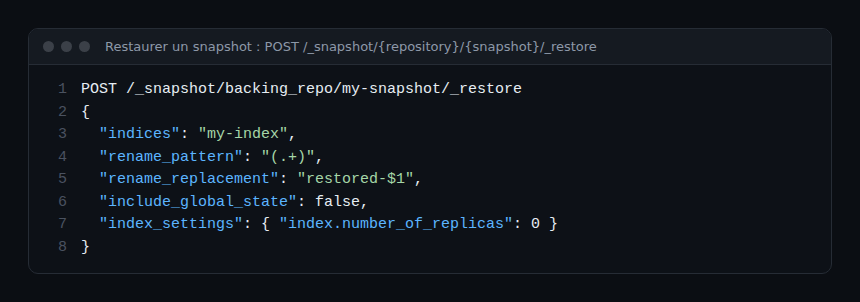
Restoring uses POST /_snapshot/{repository}/{snapshot}/_restore. The body accepts indices, rename_pattern and rename_replacement to rename, plus include_global_state and index_settings to override settings such as the replica count. The documentation states you cannot restore an existing open index, including data stream backing indices: delete it or rename the restored copy.
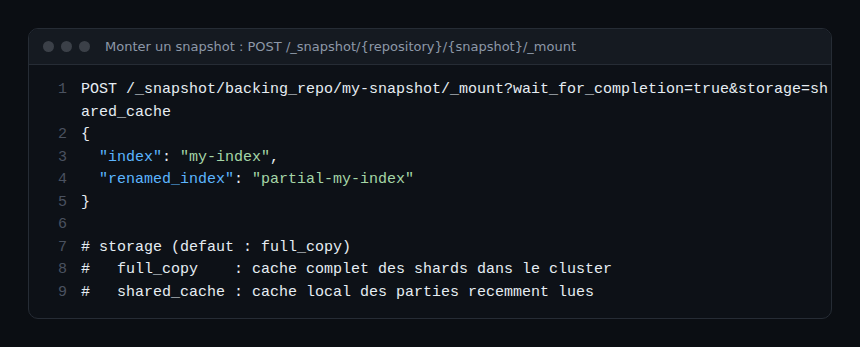
Mounting uses POST /_snapshot/{repository}/{snapshot}/_mount. In the API reference, index is required, renamed_index sets another name, and storage picks the mode: full_copy (default) or shared_cache. wait_for_completion defaults to false.
A useful vocabulary point: if you restore a snapshot that contains searchable snapshot indices, they come back as searchable snapshot indices, with data still read from the original repository. Restoring does not “bring them home”.
Full or partial mount: where your data lives
According to the documentation, a fully mounted index (full_copy) caches all its shards in the cluster, with performance normally comparable to a regular index; it maps to the hot and cold phases and the restored- prefix. A partially mounted index (shared_cache) keeps only recently read data; it maps to the frozen phase and the partial- prefix. Reads outside the cache fetch data from the repository.
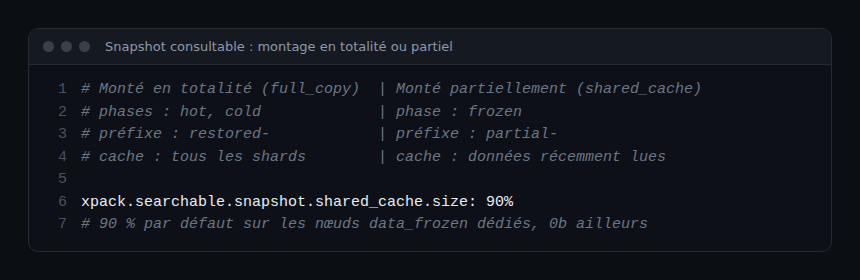
Two operational consequences. The partial cache is cleared when a node restarts; fully mounted data stays on disk. And xpack.searchable.snapshot.shared_cache.size is 90% of the disk on dedicated data_frozen nodes, 0b elsewhere. If a node fails, shards are rebuilt from the repository: cluster health may differ from green for a while, and searches may fail or return partial results.
Backing up a cluster that holds searchable snapshots
Here is the procedure, from the “Backups” section of the searchable snapshots page.
- Take regular snapshots of the cluster, for example with SLM, as for any other cluster.
- Remember what they contain: for a searchable index, only metadata pointing to the original snapshot, “no data” from the index.
- Before a restore, register the original repository: the restore fails for any searchable index whose original snapshot is unavailable.
- Do not rely on a “source only” repository: it cannot hold snapshots of searchable indices.
The consequence is counter-intuitive: the backup of your cold indices depends on the survival of the repository that serves them. If that repository is corrupted, Elastic warns that data loss can be permanent. For a retention requirement, protecting the repository (copy, write permissions, cluster separation) is part of the design. Another cluster that can write to this repository must not delete these snapshots.
Avoid manual mounts under ILM
The documentation advises against manually mounting snapshots managed by ILM: it can interfere with ILM and cause data loss or snapshot-handling problems. To query old data occasionally, prefer a restore under another name with rename_replacement rather than mounting a snapshot that ILM drives.
How to check it works
On a test index, mount a snapshot with storage=shared_cache, then run GET /_cat/indices/partial-* to check the prefix. Then restore the same snapshot with rename_replacement and compare behaviour. This check depends on your cluster version: the page I read does not pin a specific version, so read the documentation matching yours.
OpenTelemetry and Dynatrace angle
To follow the state of an Elasticsearch cluster, the OpenTelemetry Collector can collect metrics; see https://span.observer/en/opentelemetry-collector-kubernetes-dynatrace/. In the pages I read I found no Dynatrace integration specific to Elasticsearch snapshots, and I claim none. The difference between watching a state and understanding an outage is covered in https://span.observer/en/observability-vs-monitoring-difference/, and platform comparison in https://span.observer/en/dynatrace-vs-datadog-comparison-sre/.
Frequently asked questions
Does a searchable snapshot replace a backup?
No. According to the Elastic documentation, the mounted snapshot holds the only full copy of the index data. Back up the cluster with regular snapshots and protect the repository.
What is the difference between restoring and mounting?
Mounting makes the index searchable from the repository, with a cache; ILM usually does it automatically. Restoring a snapshot that contains searchable indices brings them back as searchable indices, still backed by the original repository.
Which storage value should I choose?
full_copy is the mount API default and caches all shards; shared_cache keeps only recent data and suits the frozen phase, according to the documentation.
Conclusion
Keep one distinction: a regular snapshot backs up, a mounted snapshot serves as storage. Document which one you have for each index, and keep the original repository registered and protected.
Independent blog, not affiliated with Dynatrace LLC or Elastic N.V. The behaviours described come from the Elastic documentation read on 30 October 2026; check them against your cluster version.