An app built by us, free. Skill Advisor is a local application made by the team behind this blog and released under the MIT licence. Here is how it helps you install Agent Skills for Claude Code (and for other agents) without installing them blind.
An Agent Skill is a folder with a SKILL.md file that teaches an AI agent how to do one job well. The choice is huge: the public skills.sh index listed 92,899 of them when version 1.0 came out in November 2026, and that number moves daily. With popularity contests, unknown authors and instructions an agent will follow to the letter, how do you pick?
A skill is text and scripts that run with your rights, in your folders. Copying one from a random repository means trusting it unread. Skill Advisor covers three needs: find the skills that suit your project, check them before anything is written to disk, and keep control of what is installed.
See what your agents have installed at a glance
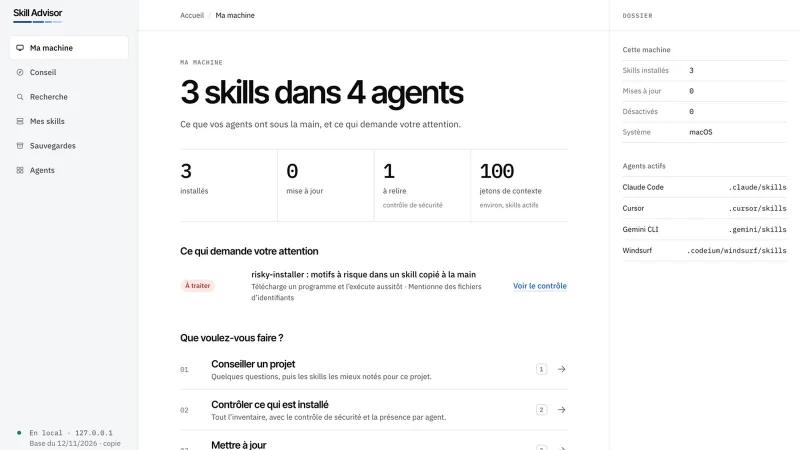
The app runs on your machine and opens in your browser. The “Ma machine” (My machine) screen counts your skills and agents, the available updates, the skills to review and the context they use. Under the counters, a list tells you what needs attention first.
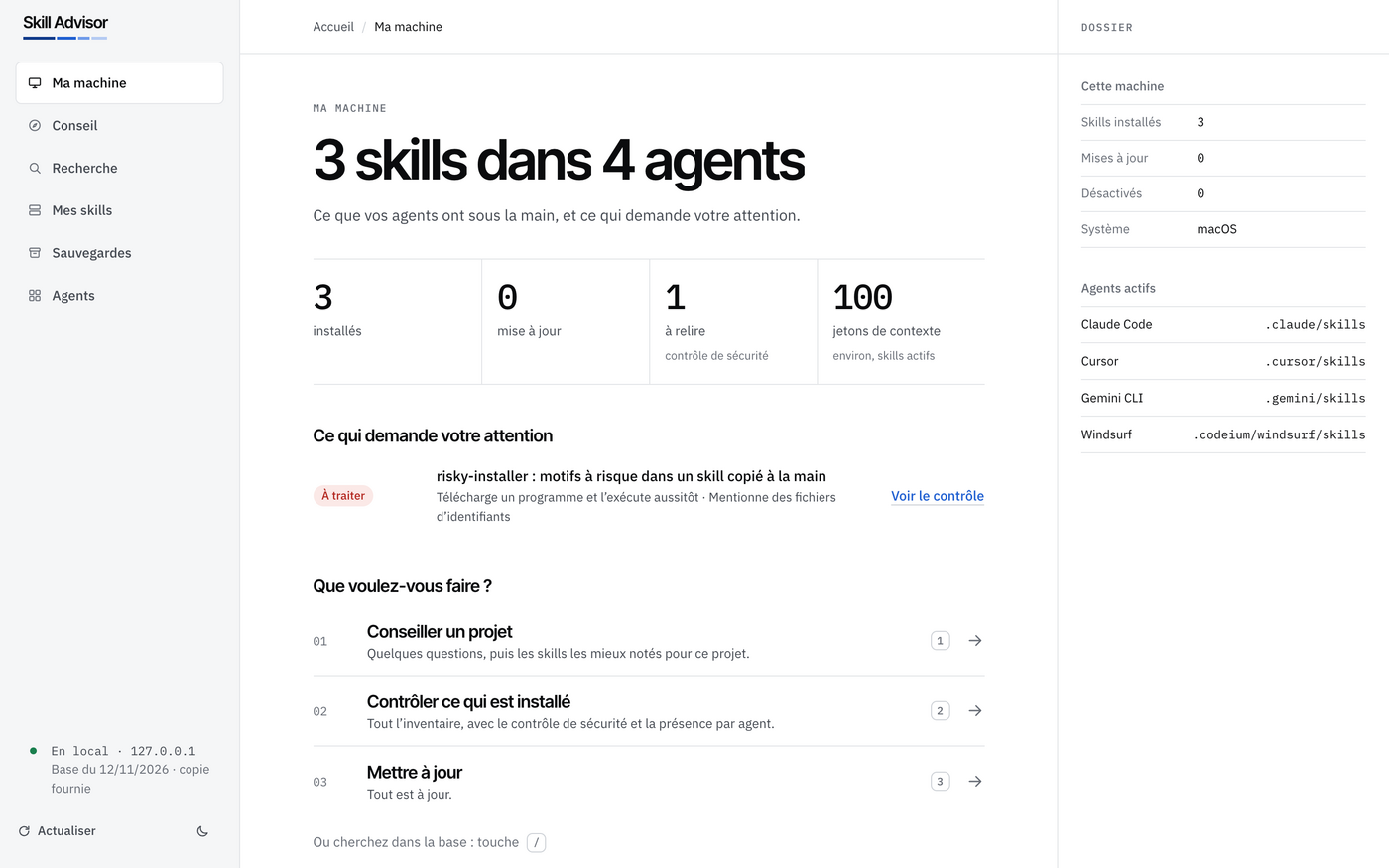
Skill Advisor knows 78 agents and spots the ones present on your computer. On the test machine in our screenshot there are four: Claude Code, Cursor, Gemini CLI and Windsurf. A skill with risky patterns shows up straight away, with a link to its check.
How to choose skills: one goal, a few questions
To find suitable skills, you first pick one of 17 goals: a website, an application, data analysis, a backend, tests, security, documents. A few short questions follow (project type, technology, hosting, needs). The right-hand panel keeps your answers.
Then comes the ranked list, with a score out of 100 for each skill. It has four parts:
- popularity: 40 points;
- source reputation: 25 points;
- freshness: 15 points;
- security: 20 points.
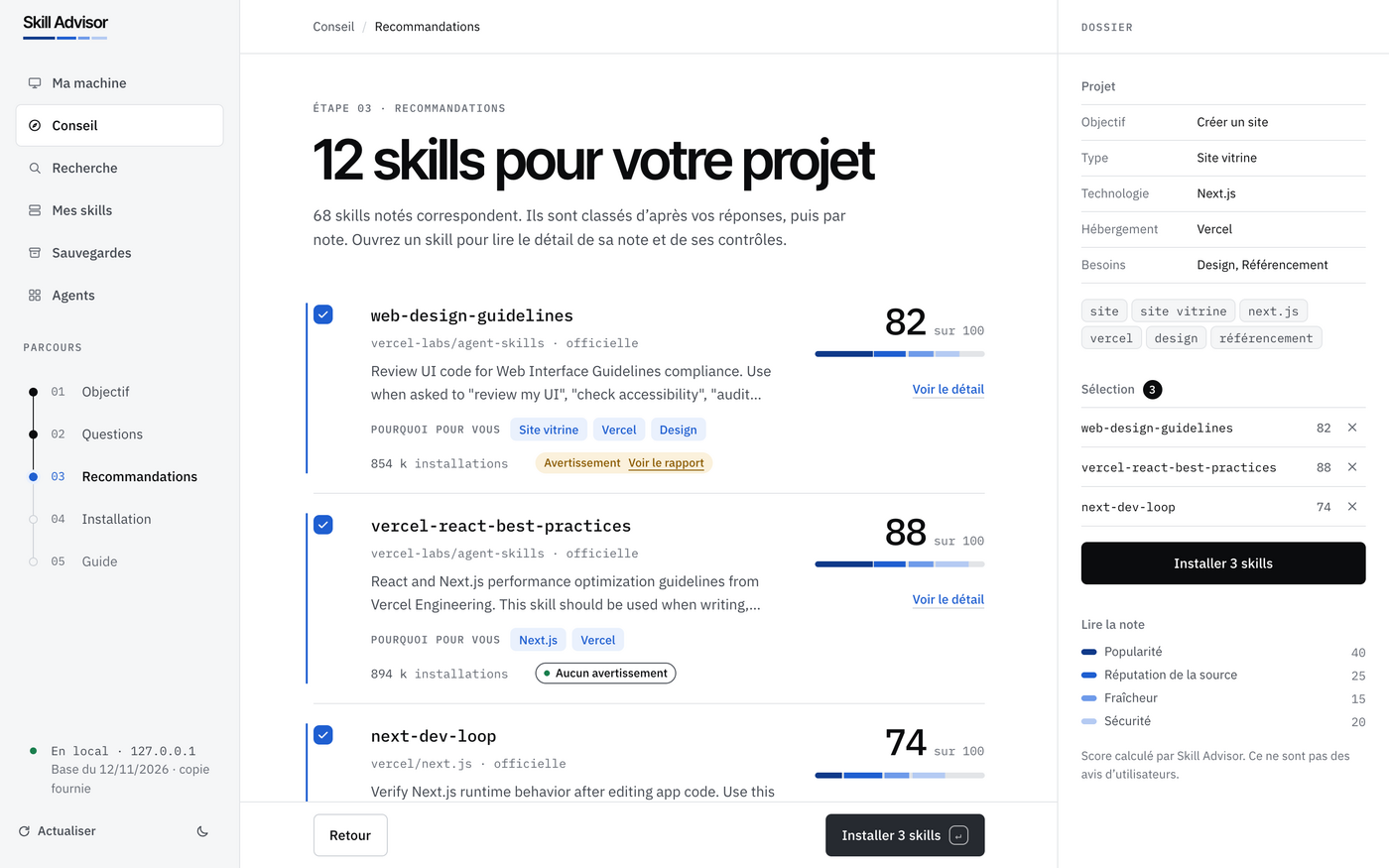
Each card says why the skill fits and shows its warnings. A warning never removes a skill from the list: it is displayed, and you decide. The score is computed by Skill Advisor. It is not user reviews.
Check before writing: security first
This is the heart of the app. The “Vérifiez avant d’écrire” (Check before writing) screen shows exactly what will be created and where. Nothing has been written yet. When you confirm, Skill Advisor downloads each skill into a temporary folder and runs a static security check before anything lands in your folders.
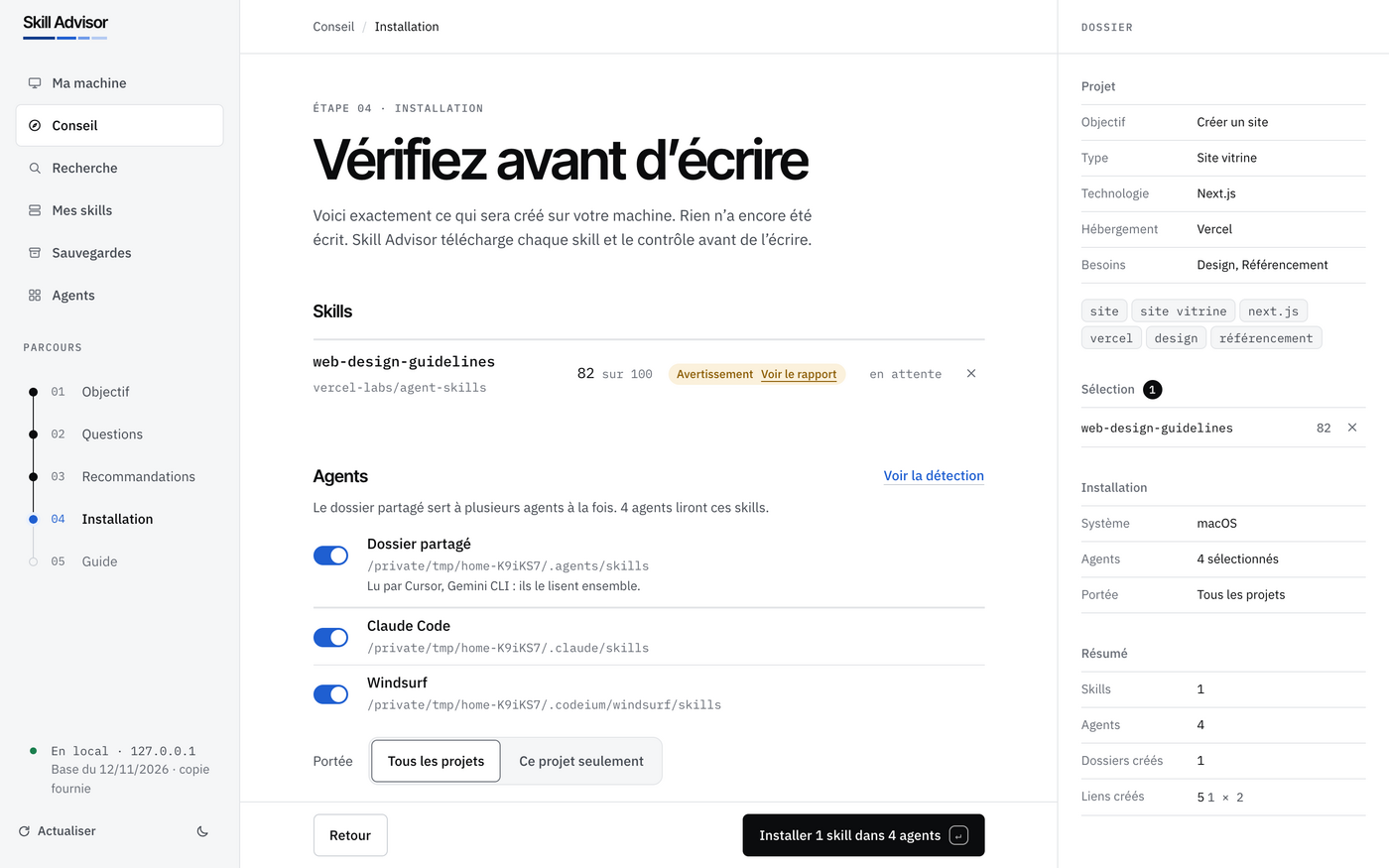
The check reads files as text and never runs them. Its 11 rules look for download-and-run commands, hidden code, instruction injection, invisible text, credential files and data sent outside, among others. Three cases to know:
- Held skill. A skill with a high-risk pattern is not written until you choose “Installer malgré l’avertissement” (Install despite the warning).
- Conflict. If a skill of the same name already exists, nothing is written. You keep the existing one or replace it, after an automatic backup.
- Shared folder.
~/.agents/skillsis read by several agents. A skill placed there reaches them all. Without it, each chosen agent gets its own copy.
A green verdict means “no known pattern found”, not “risk free”. Read a skill before you trust it: that is the app’s own warning, and we adopt it. It echoes what we say about MCP tool poisoning: an instruction hidden in a tool is an attack vector.
Manage your skills: updates, disabling, uninstalling
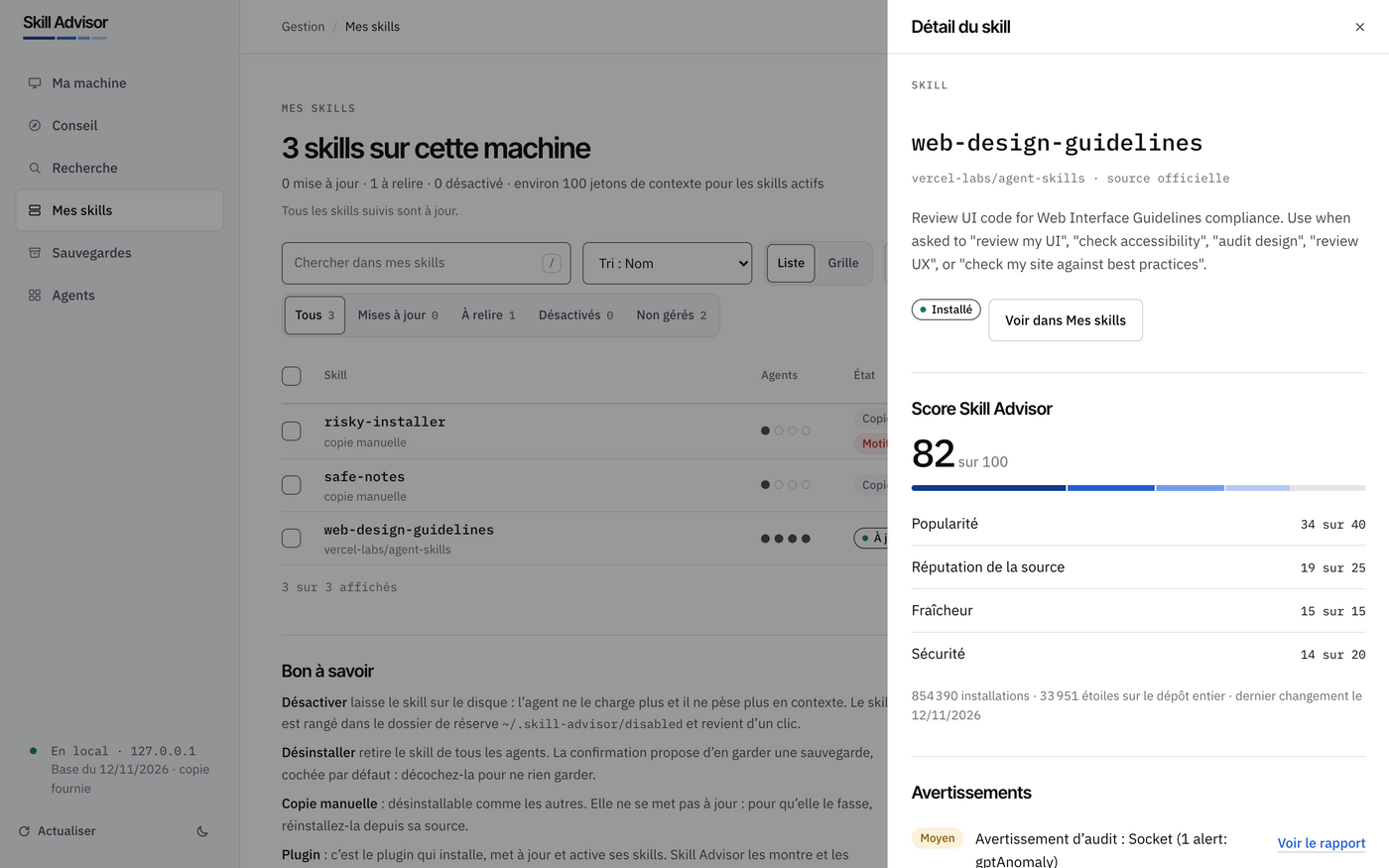
“Mes skills” (My skills) lists each skill with its agents, its state, its check result and its context cost. The detail panel shows the score line by line, and the warnings.
- Update. “Ce qui change” (What changes) lists added, removed and changed files, plus the check of the new version. A high-risk update is held until you force it.
- Disable. The switch moves the skill to
~/.skill-advisor/disabled: the agent no longer loads it. - Uninstall. The confirmation offers “Garder une sauvegarde” (Keep a backup), ticked by default.
Disabling is valuable for trimming the context that unused skills consume. We also cover agent oversight in our article on supervising an enterprise coding agent.
Backups: roll back or change machine
The “Sauvegardes” (Backups) screen keeps copies of your skills with their agents and their check result, in ~/.skill-advisor/backups.
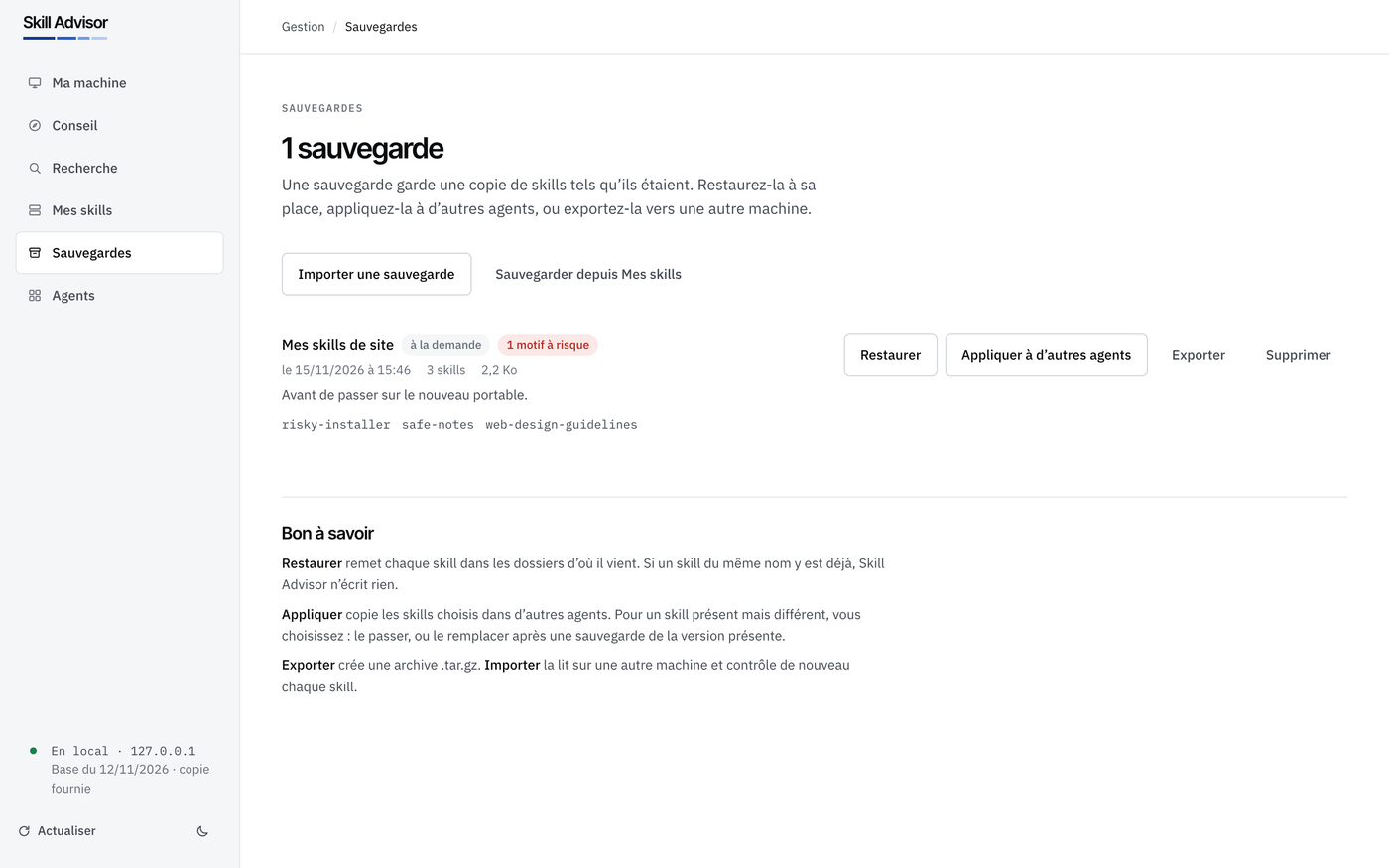
You can back up on demand (with a name and a note), restore (if a skill of the same name is already there, nothing is written), export to a single .tar.gz file, then import on another machine: every skill is checked again. You can also apply a backup to other agents. For a different version of a skill already present, you choose “Passer” (Skip) or “Remplacer” (Replace); Replace backs up the present version first.
Install Agent Skills for Claude Code with Skill Advisor, step by step
Requirements: Node.js 22.20 or later with npm, and git. The script installs no system software and needs no administrator rights. Read it before you run it.
- On macOS or Linux, download then run the script:
curl -fsSLO https://raw.githubusercontent.com/warezfr/skill-advisor/main/install.sh bash install.sh - On Windows, in PowerShell:
irm https://raw.githubusercontent.com/warezfr/skill-advisor/main/install.ps1 -OutFile install.ps1 powershell -ExecutionPolicy Bypass -File install.ps1 - The script asks for your language (French or English), checks the tools, downloads the app, installs dependencies, runs the tests, then starts the app in your browser.
- To start it again later: go to
~/skill-advisorand runnpm start(npm.cmd starton Windows). Stop with Ctrl+C.
To check it works, look at the “Ma machine” screen: it should list your detected agents. Then open “Conseil” (Advice), pick a goal and go as far as “Vérifiez avant d’écrire”. You can also install by hand: git clone, npm ci --omit=dev, npm start. The installation manual walks through each screen.
For a single project, run npm start -- --project <folder>. By default, installation applies to all your projects.
Privacy and limits: what you should know
- The app listens on
127.0.0.1only. At each start it prints a one-time address, valid for 10 minutes. Do not share it. - No cookies. Your settings stay in
~/.skill-advisor. Nothing about you is sent anywhere: it reaches the internet only to download the skills you install and look for their updates. The page loads its fonts from Google Fonts, and telemetry of theskillstool is turned off. - Skill Advisor reads and changes the real skill folders of your agents. Export the backups you want to keep before uninstalling: installed skills stay in your agents.
- The interface is in French. Search covers the 1,551 most installed skills, from a copy of the database dated 12 November 2026 that ships with the app.
- The check is static: it does not replace your own reading. The content of each skill belongs to its authors and keeps its licence.
- Continuous integration tests macOS, Ubuntu and Windows with Node.js 22.20.0 and 26.
The code is under the MIT licence. For a bug or an idea, open an issue on GitHub issues; for a security problem, use the repository’s private security advisory.
If you work with coding agents, also read our article on Dynatrace skills for coding agents, our guardrails for AI agents in production, and the presentation of Selecto AI, another free app from the team.
Frequently asked questions
Is Skill Advisor really free?
Yes. It is developed by our team, released under the MIT licence, and its code is open on GitHub.
What does the score out of 100 mean?
It is a score computed by Skill Advisor: popularity (40), source reputation (25), freshness (15) and security (20). It is not user reviews, and it does not replace your own reading.
Does Skill Advisor only work with Claude Code?
No. It knows 78 agents, including Claude Code, Cursor, Gemini CLI and Windsurf in our screenshots, and can install into a shared folder that several agents read.
Conclusion: try Skill Advisor
Find, check, install, back up: Skill Advisor brings method to a step that is too often done without looking. Download it from GitHub, try it on one project, and tell us what you think.
Support us
Skill Advisor is developed by our team and stays free. If it is useful to you, two simple gestures help it get known: leave a star on GitHub (one click with your GitHub account) and share it with someone who needs it, a colleague, a friend or a community. Every star and every share makes the project more visible, and keeps us motivated to carry on.
Independent blog, not affiliated with Dynatrace LLC. This article is not about Dynatrace: Skill Advisor is an app developed by this blog’s team.