Worktrunk git worktree: the max-sixty/worktrunk repository is a command-line tool, written in Rust, that simplifies Git worktree management. Its README describes it as “designed for running AI agents in parallel”. It is released under a dual MIT or Apache 2.0 licence, at your option. The README calls it the most popular git worktree manager: that is the project’s own claim, and we do not endorse it.
The problem is practical. When five or ten coding agents work in parallel, each needs its own working directory. Native Git worktrees allow this, but the syntax is heavy. How does Worktrunk lighten the task, how is it installed, and what can be observed when it runs on a developer machine?
A note on honesty: span.observer has not installed or run Worktrunk. The commands come from the README and from the repository documentation (the docs/ folder, published on worktrunk.dev), read on 5 November 2026. The screenshots reproduce their examples. The star count could not be re-read at the source, so it is not quoted.
Worktrunk git worktree: what the repository says
- Licence: the LICENSE file holds the MIT and Apache 2.0 texts, and
Cargo.tomlstatesMIT OR Apache-2.0. - Version:
Cargo.tomland the first changelog entry both show version 0.81.0. The changelog gives no date for it, so none is quoted. A 0.x number points to a young project. - Principle: worktrees are addressed by branch name, and the path is computed from a configurable template. Three commands form the core:
wt switch,wt listandwt remove, pluswt mergeto merge. - Agents: plugins exist for Claude Code, Codex, OpenCode, Pi, oh-my-pi and Gemini CLI. According to the documentation, they add activity tracking in
wt list, and worktree isolation for Claude Code and OpenCode only.
The README compares the commands with plain Git: creating a worktree and starting Claude goes from three chained commands (git worktree add -b, cd, claude) to wt switch -c -x claude feat.
A tour of the commands and the documentation
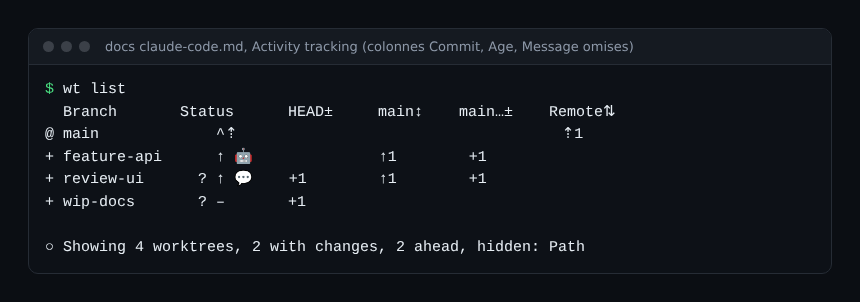
The first screenshot reproduces the README quick start: creating a worktree, then listing the state of each branch. The Commit, Age and Message columns were removed to fit 860 px; the rest is reproduced as is.
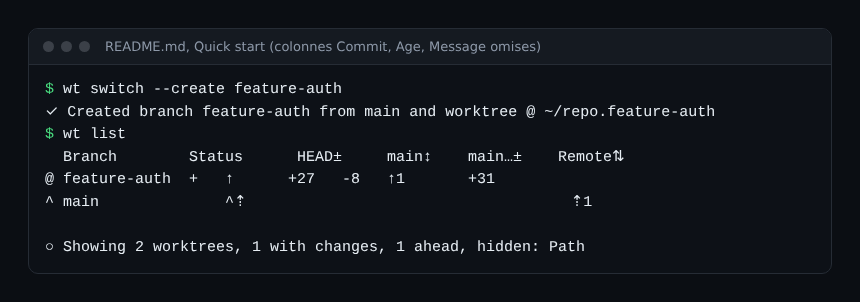
The documentation explains the symbols: @ marks the current worktree, + staged changes, ↑1 one commit ahead of main and ⇡ unpushed commits. For several agents, the README gives three wt switch -x claude -c commands, where -x runs a command after switching worktree. The hooks in the documentation are written in TOML, and the second screenshot sets them side by side.
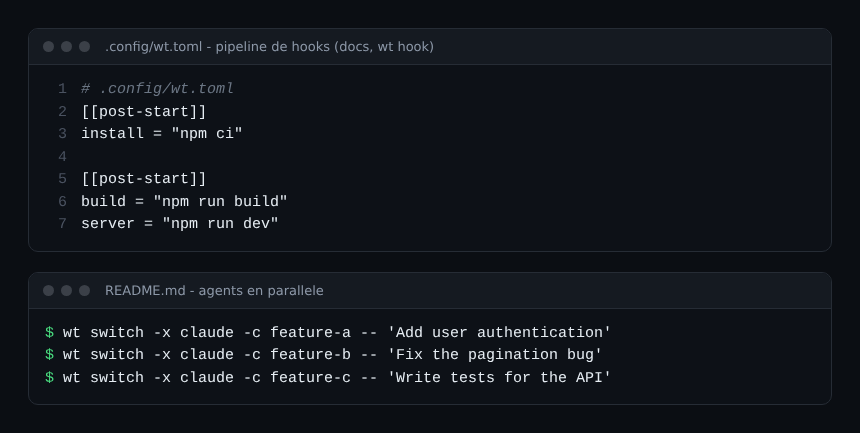
In this documentation example, install runs first, then build and server run together. post-* hooks run in the background.
Step-by-step installation
Step 1: install the wt command
The README offers Homebrew (macOS and Linux), Cargo and other package managers:
brew install worktrunk && wt config shell install
# or
cargo install worktrunk && wt config shell install
Shell integration lets the commands change directory. On Windows, wt clashes with the Windows Terminal command, so Winget installs the tool as git-wt (winget install max-sixty.worktrunk, then git-wt config shell install). The FAQ states that Git for Windows is required, because hooks run through Git Bash. It also lists Git 2.43 or newer as a prerequisite. Arch Linux (pacman) and Conda or Pixi are listed too.
Step 2: create a worktree
- In a Git repository, run
wt switch --create feature-auth: the command creates the branch from the default branch and the worktree. - Work, then check everything with
wt list. - Finish with the pull request flow (
wt step commit,gh pr create, thenwt removeafter the merge) or withwt merge main, which bundles squash, rebase, merge and clean-up.
Step 3: start several agents
wt switch -x claude -c feature-a -- 'Add user authentication'
wt switch -x claude -c feature-b -- 'Fix the pagination bug'
Arguments after -- are passed to the command that is launched. According to the documentation, wt switch first runs the blocking pre-start hooks, then starts the post-start hooks in the background.
Step 4 (optional): the agent plugin
wt config plugins claude installThe plugin adds activity markers to wt list: 🤖 when the agent is working, 💬 when it is waiting. The third screenshot reproduces the documentation example.
Limits and open points
- Maturity: version 0.81.0, and a changelog that flags breaking changes in that same version, notably for hooks and templates. Read it before each update.
- Hooks and security: project hook commands ask for approval on first run, saved in
~/.config/worktrunk/approvals.toml. The--yesoption skips the prompts: keep it for continuous integration. A project hook runs commands that come from the repository, so read the.config/wt.tomlof a third-party repository before approving. - Parallel agents: the documentation warns that concurrent hooks can race when writing the same file. Use ordered blocks for dependent commands. See also guardrails for AI agents in production.
- Disk: each worktree adds a copy of the tracked files. Build-cache copying (
wt step copy-ignored) shares disk blocks only on APFS, btrfs and XFS, not on ext4 or NTFS. - Stacked branches: not natively supported, according to the FAQ.
- Integrations: CI status goes through the forge CLI (
gh,glab,teaoraz) and needs the network with--full.
Observing Worktrunk and its agents
Worktrunk is a local command-line tool, not a service. The repository documents no metrics and no OpenTelemetry export, and the documentation states that the tool collects no telemetry or usage analytics, so we assume none. What does exist is documented:
- Command log:
.git/wt/logs/commands.jsonl, one JSON line per hook or LLM command run, with the fieldsts,wt,label,cmd,exitanddur_ms. It rotates at 1 MB. - Background hook logs: one file per hook under
.git/wt/logs/{branch}/{source}/{hook-type}/{name}.log, listed bywt config state logs. - Diagnostics: the
-vvoption writestrace.log,trace.jsonlandsubprocess.log, andwt config state logs profilesummarises timings. - Agent state: the 🤖 and 💬 markers in
wt list. A marker can linger if the agent is killed before its session ends;wt config state marker clearremoves it.
To measure what the agents themselves do (cost, tool calls, durations), the approach is to instrument the agent: see monitoring a coding agent in the enterprise. To run a fleet of agents, compare with Orca.
What about Dynatrace?
Worktrunk documents no Dynatrace integration, and we do not invent one. A log collector can read the commands.jsonl file; the configuration then depends on the documentation of the collection tool you use.
Best practices
- One worktree per agent and per task, named after the branch, then
wt removeonce the merge is done. - Put dependency installation in
pre-startand development servers inpost-start, as the documentation recommends. - Read project hooks before approving them, and keep secrets out of
.config/wt.toml. - Check
commands.jsonlwhen a hook fails: the exit code and duration are there. - Equip your agents with a trusted MCP server, for example the GitHub MCP server.
Frequently asked questions
Does Worktrunk replace git worktree?
No: the tool builds on Git and its worktrees. It adds branch-based addressing, hooks, a status list and a merge flow. Your worktrees remain ordinary Git worktrees.
Does Worktrunk work with agents other than Claude Code?
According to the documentation, plugins exist for Codex, OpenCode, Pi, oh-my-pi and Gemini CLI. Features differ: worktree isolation exists only for Claude Code and OpenCode. Other agents are used with wt switch --create and wt remove.
Does Worktrunk send any data?
The documentation states that it collects no telemetry. It runs git and, optionally, the forge CLI for CI status, as well as any LLM commands you configure yourself.
Conclusion
Worktrunk cuts the repetitive work around Git worktrees, which matters as soon as several coding agents run in parallel. The tool is young and changes quickly, and it documents no metrics: observation relies on its logs and on instrumenting the agents. Try it on a low-stakes repository before rolling it out.
span.observer is an independent community blog, not affiliated with Worktrunk or its author, or with Dynatrace LLC. Trademarks belong to their owners. Tools change quickly: check commands and options in their official documentation.