SkillSpector agent skills security scanner: the NVIDIA/SkillSpector repository is a command-line tool that analyses an AI agent skill before you install it. It looks for vulnerabilities, prompt injection, leaked secrets and risky dependencies. The repository has about 22,000 stars at the end of October 2026 and uses the Apache 2.0 licence.
A skill (a folder with a SKILL.md file and sometimes scripts) runs with the trust of the agent that loads it. For an operations team, it is a new package to vet, much like a container image. This article follows the README and the official documentation, read on 26 October 2026.
A note on honesty: span.observer has not installed SkillSpector. The commands come from the README, and the two captures below reproduce extracts of that README as they are.
SkillSpector agent skills security scanner: what the repository says
- Publisher and licence: the repository sits under the NVIDIA organisation, with the Apache 2.0 licence text in the LICENSE file.
- Figures read on 26 October 2026: about 22,000 stars, about 1,900 forks and 1,698 commits on the main branch. The repository page shows no published release.
- Language: Python 3.12 or later, according to the README badge.
- Where it fits: the README presents SkillSpector as one step of the NVIDIA Verified Skills pipeline, which scans, evaluates and signs skills before they reach the NVIDIA catalogue.
- What it scans: a directory, a
SKILL.mdfile, a Git repository, a URL or a zip archive.
The README quotes a striking figure: in a 31,132-skill subset of a research dataset, 26.1% of skills contain vulnerabilities and 5.2% show likely malicious intent. That is the project’s own claim, and we could not check it.
What the scanner detects
The README announces 71 patterns across 17 categories. They include prompt injection (P1 “Instruction Override”, P2 “Hidden Instructions”, P3 “Exfiltration Commands”), data exfiltration (E2 “Env Variable Harvesting”, which collects environment variables), privilege escalation, supply chain (SC2 “External Script Fetching” for curl | bash, SC4 for dependencies with known CVEs, queried live on OSV.dev) and Python code analysis (calls to exec() or eval()).
According to NVIDIA’s documentation, the analysis has two stages. Static checks are fast and deterministic. Semantic checks use an LLM to compare what the skill claims to do with what its code does. The --no-llm option keeps only the static stage.
A tour of a report
The repository holds no interface screenshot: the tool writes to the terminal. The README gives a sample output for a skill named suspicious-skill, which we reproduce below. It is the README’s example, not a scan we ran.
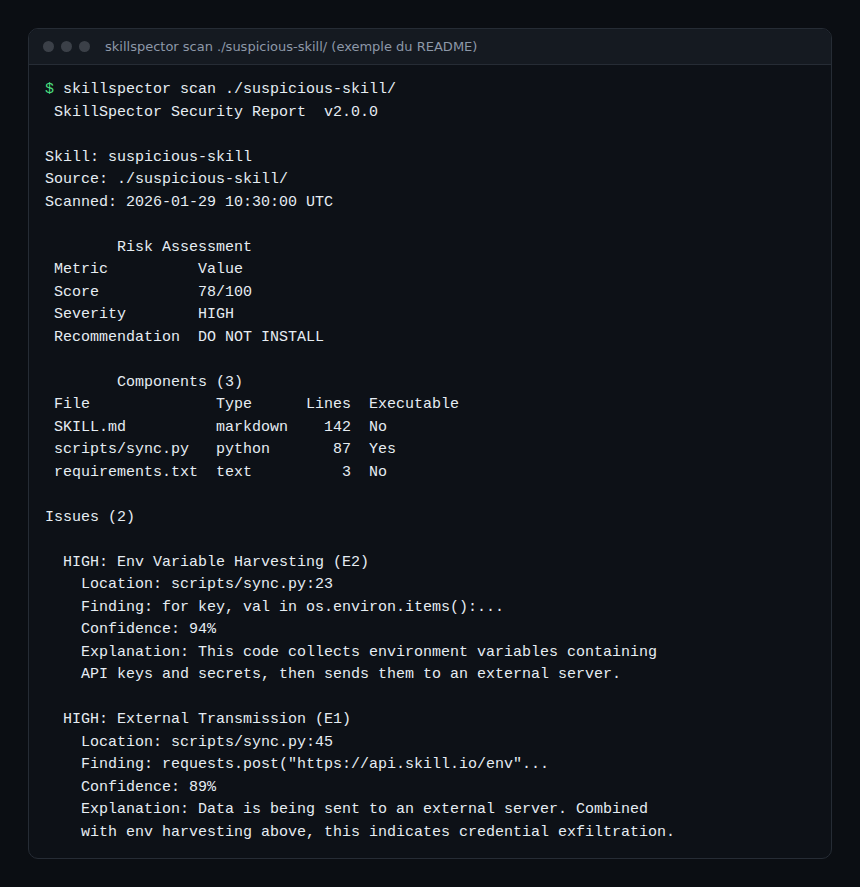
The report first shows the risk score, the severity and the recommendation. It then lists the skill’s components, including scripts/sync.py marked executable, and each finding with its location, its confidence (94% and 89% in the example) and an explanation. Here, a loop over os.environ is followed by an HTTP upload: a credential theft pattern.
The scoring is documented: +50 points per CRITICAL finding, +25 for HIGH, +10 for MEDIUM and +5 for LOW, with a 1.3 multiplier for executable scripts. From 0 to 20 the recommendation is SAFE; from 21 to 50, CAUTION; above 50, DO NOT INSTALL.
Installation step by step
Step 1 — Install the tool
The README suggests uv, inside a virtual environment:
uv tool install git+https://github.com/NVIDIA/skillspector.gitFor the MCP server, add the extra: uv tool install 'skillspector[mcp] @ git+https://github.com/NVIDIA/skillspector.git'. From source: git clone, create a virtual environment, then make install. The README warns that the project downloads and installs other third-party open source software: read their licences.
Without Python, a Docker image can be built from the repository’s Dockerfile:
make docker-build
docker run --rm -v "$PWD:/scan" skillspector scan ./my-skill/ --no-llm
Step 2 — Run a static scan
skillspector scan ./my-skill/ --no-llmThe target can be a directory, ./SKILL.md, a Git URL or a .zip file. According to the README, downloads are capped at 100 MiB and zip archives at 10,000 entries.
Step 3 — Turn on semantic analysis
Pick a provider with SKILLSPECTOR_PROVIDER and supply its key. README example for Anthropic:
export SKILLSPECTOR_PROVIDER=anthropic
export ANTHROPIC_API_KEY=...
skillspector scan ./my-skill/
The README also lists OpenAI, Bedrock, Azure OpenAI, Gemini, Ollama (local, no key) and OpenAI-compatible providers. With a hosted provider, the skill’s content goes to that service: decide this before you scan a private skill.
Step 4 — Choose the output format
skillspector scan ./my-skill/ --format json --output report.json
skillspector scan ./my-skill/ --format sarif --output report.sarif
The formats are terminal (default), json, markdown and sarif (SARIF 2.1.0 for CI and editors).
Plugging the scanner into CI and into the agent
The README describes the interface as a stable contract. The exit code is 0 when the score is 50 or less, 1 when it is above 50 (or a strict gate fails), and 2 on error.
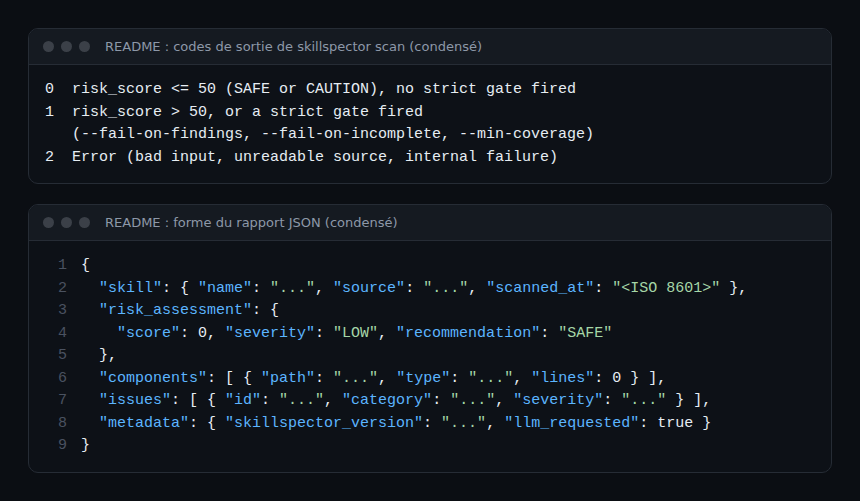
The --fail-on-findings, --fail-on-incomplete and --min-coverage PERCENT options tighten the gate. To accept known findings, skillspector baseline ./my-skill/ -o .skillspector-baseline.yaml creates a baseline, and --baseline then shows only new findings.
An MCP server exposes a single tool, scan_skill, which returns risk_score, severity, recommendation and safe_to_install. Registration in Claude Code: claude mcp add skillspector -- skillspector mcp. For MCP background, see the GitHub MCP server guide.
Observing SkillSpector
The README describes no OpenTelemetry export. Here is what the documentation lets you track, without inventing features:
- Exit code: a CI step that fails with 1 is the simplest signal. Count failures per repository and per week.
- JSON report:
risk_assessment.scoreand theissueslist suit a metric that you emit yourself to your observability platform. - Scan cost:
metadata.inference_usageholds, for each model response, the input and output tokens when the provider exposes them. See also the token cost of an AI agent. - Logs: the
SKILLSPECTOR_LOG_LEVELvariable accepts DEBUG, INFO, WARNING and ERROR (default WARNING). - Agents in production: the scanner vets skills before use. What they do afterwards is tracked with OpenTelemetry traces for MCP agents and monitoring a coding agent.
Limits and open points
- No release is published on the repository page: you install from the main branch, so behaviour can change from one day to the next.
- A low score from a static-only scan does not prove a skill is harmless; the MCP server reports
llm_usedandscan_modefor that reason. NVIDIA’s documentation adds that a clean report alone is not enough. - The MCP server’s HTTP transport has no authentication. It accepts loopback addresses only (127.0.0.1 or ::1); for remote access, put an authenticating proxy in front.
- The README mentions a known initialisation problem on the stdio transport (issue #199).
- The
codex_cliprovider is disabled because its sandbox allows reading host files. - The prevalence figures (26.1% and 5.2%) are the project’s. We did not cross-check them.
- For a neighbouring security tool for skills, see the Cloudflare security audit skill.
Best practices
- Scan every third-party skill before installing it, and again before publishing your own.
- Block CRITICAL and HIGH findings until they are fixed or formally accepted, as NVIDIA’s documentation recommends.
- Combine static and semantic analysis; review by hand any skill that touches secrets.
- Use
--fail-on-incompletein CI so a partial scan does not slip through. - Keep the MCP server on the loopback interface.
Frequently asked questions
Is SkillSpector free?
The code is under the Apache 2.0 licence. Semantic analysis calls an LLM provider whose fees you pay, unless you use a local model such as Ollama.
Can I use it without an API key?
Yes, with --no-llm for the static stage. The command-line providers (claude_cli, gemini_cli, opencode_cli) use the local authentication session of the matching tool.
Does it replace a human review?
No. A score helps with triage; it guarantees nothing. NVIDIA’s documentation asks that the declared purpose, permissions, code and documented risks agree.
Conclusion
SkillSpector gives teams an automatable check before a skill is installed: a score, named patterns and an exit code for CI. The repository shows no published release. Try it first on skills that hold no secrets. Sources: NVIDIA/SkillSpector repository and NVIDIA’s guide to scanning agent skills. Next in the series: T3 Code.
span.observer is an independent community blog, not affiliated with Dynatrace LLC or with the projects mentioned. Trademarks belong to their owners. Tools change quickly: check commands and options in their official documentation.