
The Ponytail skill is an instruction file that asks a coding agent to write less code: the project presents it as a “lazy senior dev” who replaces fifty lines with one. The DietrichGebert/ponytail repository shows around 172,300 stars at the end of October 2026 for only 363 commits, which justifies a critical look at what this skill really brings.
A skill is an instruction file the agent loads into its context. It does not change the model: it changes its behaviour, and therefore the amount of code produced, the token cost and the working time. This article presents the project according to its README, shows the visuals the repository provides, explains installation, then proposes a method to verify the announced gains with OpenTelemetry. A note on honesty: span.observer has not installed this skill; the figures quoted are the author’s, and the images come from the repository.
Ponytail skill: what the repository says
- Licence: MIT, 2026 copyright in the name of the repository’s maintainer (
DietrichGebert). - Figures read on 22 October 2026: about 172,300 stars, about 9,400 forks, 363 commits; the version shown in
package.jsonis 5.3.2. - Nature of the project: “Ponytail is one prompt”: a
skills/ponytail/SKILL.mdfile and a compactAGENTS.mdversion, which adapters load into different agents (Claude Code, Codex, OpenCode, Gemini, Cursor, Copilot and others). - Core rule: write only what the task needs, never cutting validation, error handling, security or accessibility. The README insists that the rule is never “fewest tokens”.
The skill’s method is a “ladder”: stop at the first rung that holds (does it need to exist? already in the repository? in the standard library? a native platform feature? an installed dependency?), then write the minimum and one small test if the logic warrants it. Every reply ends with what was skipped or not checked. That is consistent with the safeguards described in our guardrails for agents in production.
Tour: the band and the README figures
Since version 5.3, the project adds a band above the prompt in Claude Code. According to the README, it shows the current task’s cost, the tokens and agent time used, the share of existing code reused, and whether the tests pass after the last change. It needs Claude Code 2.1.290 or later, and does not appear in the VS Code chat panel or with claude -p.
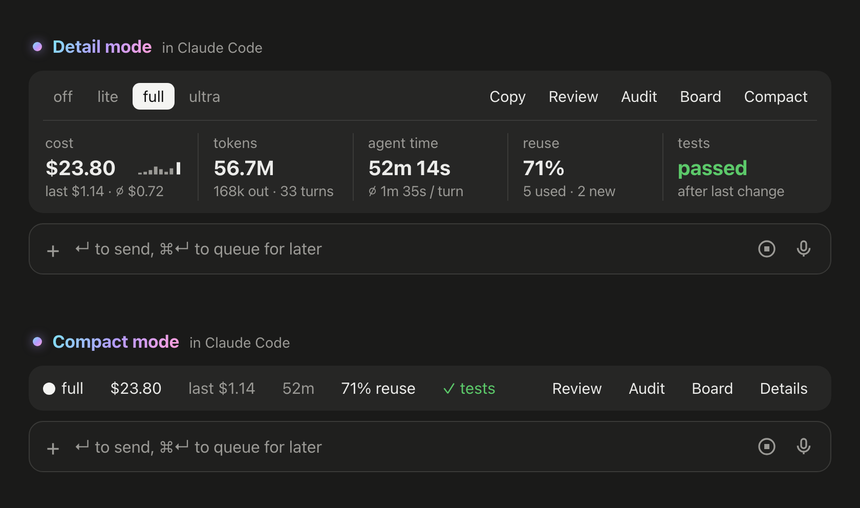
The screenshot comes from the repository; the values are the project’s examples. A “Board” also opens a local page that gathers the tasks of all your projects: cost, time and tokens over time. The README states that everything stays on your machine, in ~/.config/ponytail/band/.
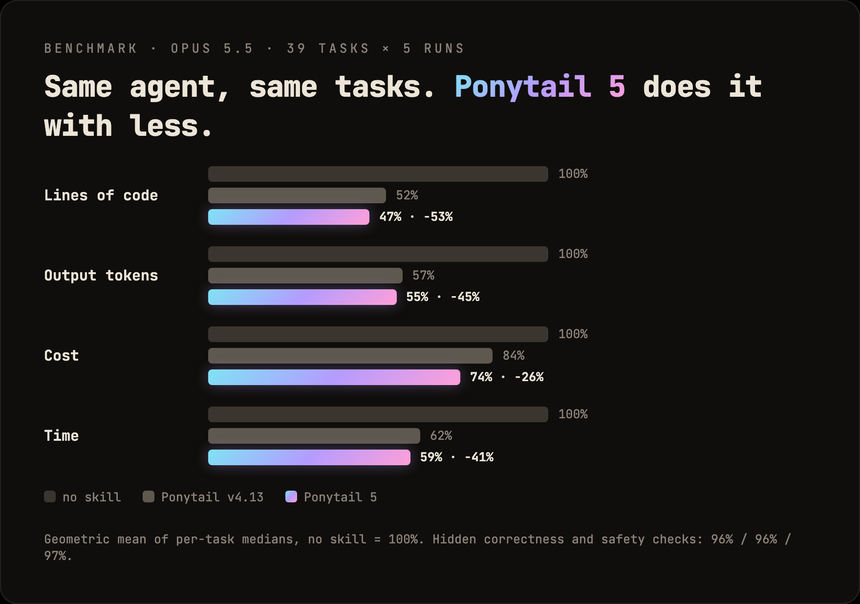
The README’s central chart compares, according to the author, three set-ups: the agent without a skill, Ponytail v4.13 and Ponytail 5.
Installation step by step
Step 1 — Claude Code
The README asks for two separate prompts:
/plugin marketplace add DietrichGebert/ponytail/plugin install ponytail@ponytailStep 2 — Codex or another agent
codex plugin marketplace add DietrichGebert/ponytail
codex plugin add ponytail@ponytail
Then open /hooks in Codex, trust its two lifecycle hooks and start a new thread. For any other agent, the README suggests copying AGENTS.md into the project or installing skills/ponytail/SKILL.md as a skill; per-agent details are in INSTALL.md.
Step 3 — Choose the intensity
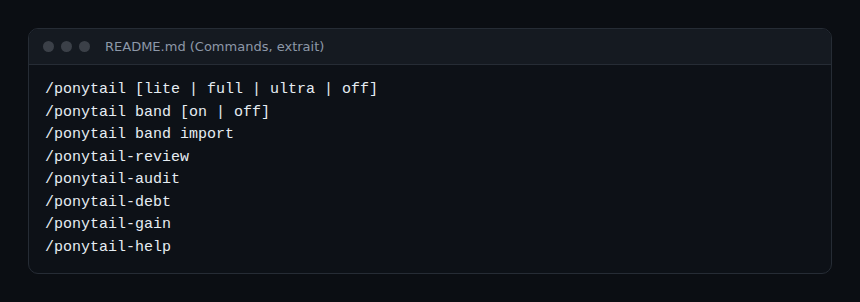
The /ponytail command accepts lite, full, ultra or off. The README adds /ponytail-review and /ponytail-audit (review of the diff, then of the whole repository), /ponytail-debt (a list of deferred shortcuts) and /ponytail-gain (an impact scoreboard taken from the benchmark).
The project warns to install only from DietrichGebert/ponytail on GitHub or @dietrichgebert/ponytail on npm, and says it never ships .exe or .dll files.
Limits and open points
- Figures declared by the author: according to the repository’s benchmark file (7 October 2026), 39 tasks, 5 runs each, so 585 Claude Code sessions without a shell, measured with Opus 5.5. The README announces -53% lines of code, -41% time, -26% cost, -45% output tokens, and 98% of risky logic shipping with a test against 68% without the skill. These are geometric means of per-task medians, with confidence intervals published in the file. It is not an independent measurement.
- A skill also costs tokens: its instructions are loaded every session. The net result depends on your repository and your tasks.
- Less code is not always better: the skill may pick a native function instead of a library your team has standardised. Review the result.
- Hooks and supply chain: the project installs hooks and plugins. Treat it like any code your agent runs (see our article on a security audit skill for the same caution) and pin a version.
How to verify the gains with OpenTelemetry
The band is a handy local indicator, but for a figure of your own, compare sessions with and without the skill (/ponytail off). Claude Code exports the claude_code.token.usage metric through OpenTelemetry, split by token type; the comparison protocol is detailed in our context-mode article and applies identically here: same repository, same model, same prompt, several repetitions, and the sum of all token types. The export set-up for Dynatrace is in supervising a coding agent in the enterprise and the per-task cost logic in the token cost of an AI agent. This holds for Dynatrace SaaS and for Dynatrace Managed receiving OTLP.
Add quality measures: passing tests, review round-trips, bugs found after merge. Shorter code that fails more often is not a saving.
How to check that it works
- After installation,
/ponytail-helpshows the command reference. - Startup or a mode change displays the current mode (the README says so).
- On a reference task, the diff’s line count and the tokens go down, without more failing tests.
Best practices
- Start with
liteon a small repository, with a fixed reference task. - Keep human review: the skill proposes shortcuts, it does not validate them for you.
- Record the skill, model and agent versions next to each measurement.
- Read the
shortcut:comments and treat them as debt.
Frequently asked questions
Does Ponytail change the model?
No. It is a prompt (a skill file and a compact rule) that changes the agent’s behaviour. The effects come from those instructions.
Can the -53% code figure be trusted?
It is a result declared by the author, with a method published in the repository. It holds for its 39 tasks and its agent; measure on yours before generalising.
Is an account or an external service needed?
The README mentions none: installation goes through the repository, and the board stays local by default.
Conclusion
The Ponytail skill illustrates a simple, measurable idea: ask the agent to reuse before writing. Its announced gains are the author’s; the right way to adopt them is to measure them on your own tasks, with OpenTelemetry metrics. Source: DietrichGebert/ponytail repository.
span.observer is an independent community blog, not affiliated with Dynatrace LLC or the projects mentioned. Trademarks belong to their owners. Tools change quickly: check commands and options in their official documentation.