The OpenCode coding agent is the subject of the anomalyco/opencode repository, which presents itself as “the open source AI coding agent”. It runs in your terminal (with a desktop app in beta), reads your repository, proposes changes and runs commands, with the model of your choice. It has around 219,900 stars in October 2026, which makes it one of the most followed repositories in the series.
A coding agent that runs commands and writes files is one more actor in your delivery chain. This article follows the project’s README and documentation: what it is, installation, what the interface looks like, the security limits the project itself describes, and how to follow logs, tokens and costs. For enterprise-side supervision, see supervising a coding agent in the enterprise.
A note on honesty: span.observer has not installed or tested OpenCode. The commands come from the README and documentation. The first screenshot is published in the repository; the other two are excerpts of those documents, rendered by us.
The OpenCode coding agent: what the repository says
- Who: the repository belongs to the GitHub organisation
anomalyco. The LICENSE file reads “Copyright (c) 2025 opencode”. - Licence: MIT.
- Figures read on 22 October 2026 on the repository page: around 219,900 stars, around 29,400 forks, 20,722 commits on the
devbranch. - Version: to be checked, see below. The repository’s CHANGELOG describes “OpenCode V2” and its latest entry is v2.1.2 of 21 October 2026, whereas the releases page showed v1.19.3 of 16 October. The project has two version lines, V1 and V2, which are no longer installed side by side by default.
- Built-in agents:
build(full access, the default) andplan(read-only: it denies file edits and asks permission before shell commands), switched with the Tab key. Ageneralsubagent handles complex searches. - Models: the project is provider-independent; the documentation describes how to configure providers and models. The screenshot below shows a Claude model and the “OpenCode Zen” service.
A tour of the interface
Here is the terminal screenshot published in the repository (it comes from the project’s landing page and from an older version). The session header shows the token count, the percentage of context used and the cost in dollars. Tool calls (Grep, Glob, Read) are listed as the conversation goes, then the agent asks a question before changing anything.
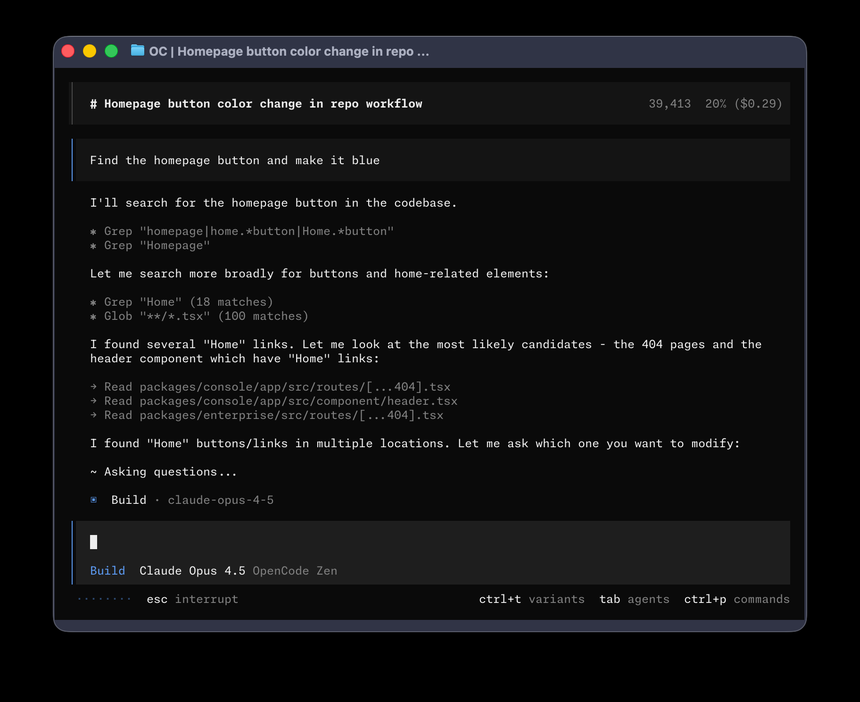
That counter is useful for supervision: each session shows its token cost on screen, before you even wire up a metric. The shortcuts at the bottom recall the main functions: Esc to interrupt, Tab to switch agent, Ctrl+T for model variants, Ctrl+P for the command palette.
Installation according to the README
Step 1 — Install the CLI
The README offers a script and several package managers:
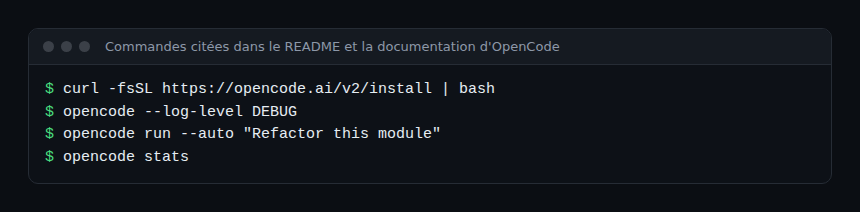
curl -fsSL https://opencode.ai/v2/install | bash
npm i -g @opencode/cli@latest
brew install anomalyco/tap/opencode-v2
brew install opencode
sudo pacman -S opencode
mise use -g opencode
nix run github:anomalyco/opencode
Piping a remote script into a shell is a risky habit: prefer a package manager, or read the script before running it. The script follows the order $OPENCODE_INSTALL_DIR, $XDG_BIN_DIR, $HOME/bin, then $HOME/.opencode/bin. The migration guide notes that a package-managed V1 installation must be removed before installing V2.
Step 2 — The desktop app (beta)
The README gives the macOS (Apple Silicon and Intel), Windows and Linux packages (.deb, .rpm, .AppImage) and the command brew install --cask opencode-desktop for macOS.
Step 3 — Frame the permissions
The documentation describes a permission configuration where each action is allow, ask or deny. The last matching rule wins, so the catch-all "*" rule goes first. The page’s example:
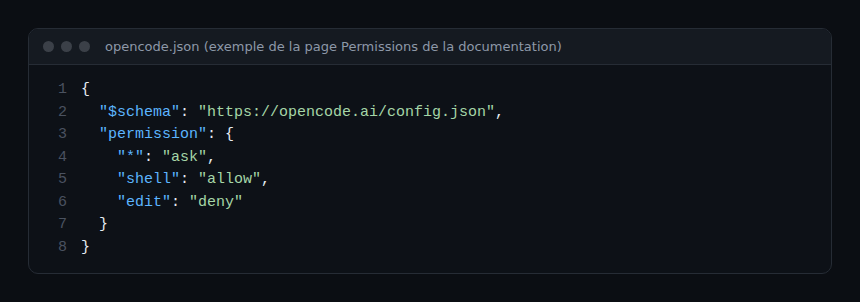
The --auto option automatically approves requests that are not explicitly denied; deny rules still apply. Reserve it for an isolated environment.
Security: what the project says about itself
- The repository’s SECURITY.md is explicit: OpenCode does not sandbox the agent. The permission system is an awareness aid for the user, not isolation. For real isolation, the project recommends running the tool in a Docker container or a virtual machine.
- Server mode (
opencode serve,opencode web) is optional. The documentation asks you to setOPENCODE_SERVER_PASSWORDto enable HTTP basic authentication; without a password, the server runs unauthenticated, with a warning. - Data sent to the model provider falls under its terms; the MCP servers you configure are outside the project’s trust boundary.
Apply the same precautions as for any privileged agent: guardrails for AI agents in production and, if you plug in MCP servers, the GitHub MCP server guide.
Limits and open points
- Two version lines: V1 and V2 coexist. V2 changes the plugin API, the server contracts and the terminal client configuration; some experimental V1 fields (including
openTelemetry) are ignored, according to the migration guide. Check the version shown before following a tutorial. - Pace: more than 20,000 commits; pin the version on developer workstations.
- Free models: the CHANGELOG mentions zero-cost models and an
OPENCODE_DISABLE_FREE_MODELSvariable to hide them; check what is sent to which provider before putting proprietary code in. - The project states that it does not accept AI-generated security reports.
Observing OpenCode: logs, tokens, costs
OpenCode is a local tool, not a service: supervision starts from the workstation or container. These leads apply to Dynatrace SaaS and Dynatrace Managed alike if you collect data through an OpenTelemetry Collector.
- Local logs: the troubleshooting page gives
~/.local/share/opencode/log/on macOS and Linux, timestamped files of which the ten most recent are kept.opencode --log-level DEBUGdetails the output, and--print-logsprints it in the terminal. - Tokens and costs:
opencode statsshows token usage and session costs, with the options--days,--tools,--modelsand--project. To follow that cost in a backend, see AI agent token cost with OpenTelemetry. - OpenTelemetry export (to be verified): in the main branch source code, the
packages/util/src/observability.tsmodule readsOTEL_EXPORTER_OTLP_ENDPOINTandOTEL_EXPORTER_OTLP_HEADERSand, if an endpoint is set, sends logs to/v1/logsand traces to/v1/traces. This feature does not appear in the documentation we read: test it on your version before relying on it. - Command audit: the
permissionsection is also a log of intentions; requireaskforshellandediton shared workstations.
How to check that it works
opencodeopens the interface in a test repository.- With the
planagent, a request to modify a file is refused: that is the read-only mode. - After a session,
opencode statsshows tokens and cost. - A timestamped log file appears in the log directory.
Best practices
- Run the agent in a container or virtual machine for sensitive repositories.
- Start with the
planagent andaskrules, then loosen as needed. - Always set
OPENCODE_SERVER_PASSWORDbefore opening server or web mode. - Keep provider keys out of repositories and logs.
- Track cost per session and review deviations without looking for a culprit.
Frequently asked questions
Is OpenCode really free?
The software is MIT-licensed. Models cost whatever your chosen provider charges, and the CHANGELOG mentions free models whose limits change; the project does not sell the tokens of your other providers.
Does my code go to a third party?
The context sent goes to the model provider you configure, and SECURITY.md notes that its data handling depends on that provider. Choose it according to your data policy.
Does OpenCode isolate the commands it runs?
No, according to SECURITY.md: permissions are not a sandbox. Use a container or virtual machine.
Conclusion
OpenCode deserves its popularity for those who want an open-source coding agent, free in the choice of model and configurable by file. Adopt it knowingly: check whether you are on V1 or V2, keep permissions strict, isolate with a container, and track tokens and logs. For another open-source agent in the same series, see OpenClaw. Sources: anomalyco/opencode repository.
span.observer is an independent community blog, not affiliated with Dynatrace LLC or the projects mentioned. Trademarks belong to their owners. Tools change quickly: check commands and options in their official documentation.