The NVIDIA OpenShell agent runtime: the NVIDIA/OpenShell repository describes itself as “the safe, private runtime for autonomous AI agents”. Written in Rust and licensed Apache-2.0, it showed about 16,400 stars in mid-October 2026, and its latest release, 0.1.4, dates from 13 October 2026. The principle: each agent runs in a sandbox, and a declarative policy states what it may touch (files, network, processes). Everything else is denied.
Our article on AI agent guardrails in production places OpenShell among other building blocks. Here we take the project on its own: what the repository says, a getting-started path from the README and documentation, and above all the logs that let you prove what an agent tried to do. An isolated but unobserved agent is only half secured.
The information comes from the README and official documentation. span.observer did not install OpenShell: the images are excerpts from the project’s documentation.
NVIDIA OpenShell agent runtime: what the repository says
- Isolation: according to the README, kernel controls limit which files and system calls are reachable, and every network connection passes a policy check before leaving the sandbox. The documentation says filesystem rules are enforced by Landlock.
- Credentials: per the README, the agent never sees real credentials; OpenShell adds them only to requests bound for approved endpoints.
- Verifying changes: the project describes a “prover” (formal verification) that flags risky access a policy change would grant, so it waits for human review, and an “advisor” that lets the agent propose the network rule it needs.
- Components: a gateway (control plane), a supervisor and the sandbox; Python, TypeScript, Go and Rust SDKs.
- Platforms: Linux, macOS on Apple Silicon, or Windows with WSL 2 (experimental), with Docker, Podman or host virtualisation.
Getting started from the README
Step 1 — Install and create a sandbox
curl -LsSf https://raw.githubusercontent.com/NVIDIA/OpenShell/main/install.sh | sh
openshell sandbox create --name demo
The installer sets up the CLI and a local gateway. The default image is a minimal Ubuntu with no agent: the documentation offers “Run Your First Agent”, which runs OpenCode against a free OpenRouter model. Read the script before running it, as with any “curl | sh”.
Step 2 — See the default deny, then open a precise access
The official tutorial creates a sandbox with no network rule: a curl to the GitHub API fails with a proxy 403. A read-only rule is then added, without restarting:
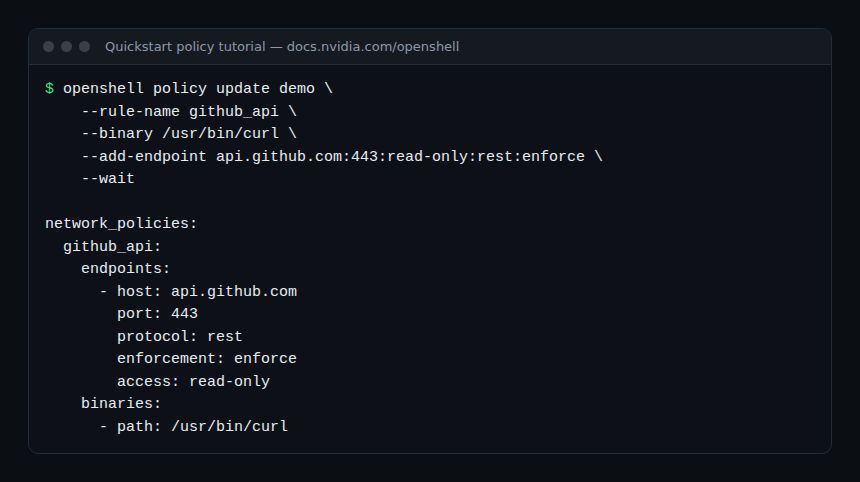
The api.github.com:443:read-only:rest:enforce specification gives the host, port, access preset, protocol and enforcement mode. With rest the proxy terminates TLS and inspects each HTTP request; read-only allows GET, HEAD and OPTIONS. A POST gets a 403 with policy_denied.
The documentation notes you can write enforcement: audit to log violations without blocking: handy for building a policy iteratively before switching to enforce. To restrict the rule to a specific agent, replace the curl binary with the agent’s.
Observing OpenShell: OCSF logs, SIEM and metrics
Reading the denials
Each sandbox logs network connections, process lifecycle, filesystem decisions and configuration changes. Security events follow the OCSF format (Open Cybersecurity Schema Framework, version 1.8.0 in the documentation), with prefixes such as NET:, HTTP:, PROC:, FINDING: or CONFIG:.
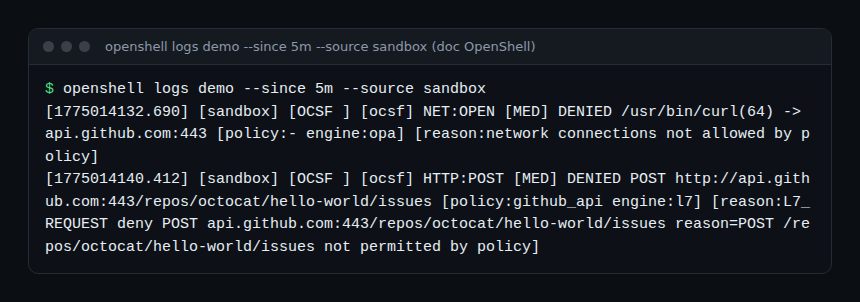
Each denial shows the destination, the binary that made the attempt and the reason. That is the raw material for an agent-security dashboard: denials per rule, per binary, per host.
Exporting JSON to a SIEM
The human-readable format is not meant for machines. For a SIEM, the documentation describes a setting to enable globally or per sandbox, with no restart:
openshell settings set --global --key ocsf_json_enabled --value true
openshell settings set my-sandbox --key ocsf_json_enabled --value true
Supervisors then write to stderr, in addition to the readable line, an OCSF-JSON line followed by a complete JSON object. Configure the collector to keep only those lines, read with docker logs --follow, podman logs --follow or kubectl logs … -c supervisor --follow. The gateway can also write its own events as JSONL through [openshell.gateway.ocsf_log] in gateway.toml.
Gateway metrics
The gateway exposes GET /metrics in Prometheus format on a separate listener, disabled by default: enable it with metrics_bind_address, --metrics-port or OPENSHELL_METRICS_PORT. The documentation warns that the endpoint is plain HTTP with no authentication: keep the service internal and restrict access to the monitoring system (it gives an example NetworkPolicy). Scrape each replica, not the Service.
To tie these signals to the agents’ own cost and activity, see AI agent cost: OpenShell logs security, not tokens.
How to check that it works
- A
curlto an unauthorised host fails, andopenshell logs demo --since 5m --source sandboxshows aDENIEDevent with its reason. - After the rule, a
GETsucceeds and aPOSTis refused withpolicy_denied. - With
ocsf_json_enabled, your collector receives decodableOCSF-JSONlines; if not, check that you are reading the supervisor logs.
Limits and open points
- 0.x version. The latest release is 0.1.4, with three releases between 28 September and 13 October 2026. The README speaks of a “stable release cadence” from 0.1.x, but the API and options may still change: read the 0.1.0 upgrade guide.
- Best-effort logging. The documentation states JSON collection is best-effort, not a guarantee of complete history; the gateway keeps only 2,000 recent lines per sandbox in memory, lost on restart. For durable retention, export to external storage.
- Two log sources. The main process output (stdout, stderr) does not arrive through
openshell logs: collect it separately with the container logs. - Telemetry. OpenShell sends anonymous statistics by default (categories and counts, with no sandbox names, paths, prompts or credentials);
OPENSHELL_TELEMETRY_ENABLED=falsedisables it on the gateway. - Legal notice. The README states the software retrieves external content under separate licences and is provided “as is”.
Best practices
- Start from default deny, log in
auditmode, then switch toenforcerule by rule. - Attach each rule to the agent’s binary, not a generic shell.
- Export OCSF events to durable storage, with an alert on repeated or new denials.
- Keep the metrics endpoint on an internal network.
- Combine isolation with orchestration and a budget: Paperclip decides who works, OpenShell limits what an agent can touch. For an agent with MCP tools, see also securing an MCP server.
Frequently asked questions
Does OpenShell replace a content guardrail?
No. It controls actions (files, network, processes), not the meaning of answers. The two levels complement each other, as in our guardrails article.
Can it be used with OpenClaw?
OpenClaw’s documentation describes OpenShell as a managed sandbox backend, with a plugin and a minimum OpenShell version. See OpenClaw.
Do I need a GPU or NVIDIA hardware?
The README does not require it: it asks for Linux, macOS on Apple Silicon or WSL 2, and Docker, Podman or virtualisation.
Conclusion
OpenShell puts control of an agent’s rights in a reviewed, verifiable policy, and produces OCSF logs a SIEM can use. The project is young (version 0.1.4) and its log collection is best-effort: treat it as a layer of defence, not a guarantee, and complement it with observation of the agent’s cost and behaviour.
span.observer is an independent community blog, not affiliated with Dynatrace LLC or the projects mentioned. Trademarks belong to their owners. Tools change quickly: check commands and options in their official documentation (docs.nvidia.com/openshell).