The OpenClaw AI agent is an open-source assistant you install on your own computer and talk to in the messaging apps you already use (WhatsApp, Telegram, Slack, Discord, Teams, iMessage and more than twenty others, according to the README). The openclaw/openclaw repository showed about 392,000 stars in mid-October 2026, which makes it one of the most followed projects on GitHub. Its description fits on one line: “The AI that really does things. Any OS. Any Platform.”
“Does things” is what matters to us. An agent that reads files, runs commands and writes to chat apps is an operational service like any other: it burns tokens, it fails, it holds privileges. This article presents the project with dated facts, summarises the installation from the README, then covers what an SRE cares about: OpenTelemetry traces, the audit log, cost tracking and the security settings to apply before any exposure.
Everything below relies on the project’s README and official documentation. span.observer did not install the software: the images come from the project’s documentation and examples, not from a test run.
OpenClaw AI agent: what the repository says
- Licence: MIT, with “Copyright (c) 2026 OpenClaw Foundation” in the LICENSE file.
- Governance: the README says the project is stewarded by the OpenClaw Foundation, a 501(c)(3), which employs the core team and signs releases. It states there is no paid tier, hosted service or token, and that OpenAI is a donor, not an owner.
- Technology: a Node.js and TypeScript project (pnpm workspace); Node 24.16 or newer for the npm install.
- Latest release: v2026.10.4, published on 16 October 2026 according to the releases page. The release cadence is very fast.
- Architecture: a local Gateway is the control plane (sessions, tools, events, channel connections). The web Control UI, the CLI and the TUI connect to it, along with companion apps for macOS, iOS, Android, Windows and Linux.
- Models: Claude, Codex and local models are swappable plugins, per the README.
The README takes a position on privacy: state, memory and credentials stay on your machine; prompts go to the model provider and chat platforms you configure; by default OpenClaw itself only makes a daily version check, and update.checkOnStart: false turns it off.
Installing OpenClaw step by step
The commands below are the README’s. Read the script before running it: a “curl | bash” hands control to its content.
Step 1 — Install
# macOS / Linux / WSL2
curl -fsSL https://openclaw.ai/install.sh | bash

# Windows PowerShell
iwr -useb https://openclaw.ai/install.ps1 | iex

# If you already manage Node.js (Node 24.16+ or 26.1+)
npm install -g openclaw@latest --allow-scripts=openclaw
The README notes that --allow-scripts=openclaw applies to npm 12 or npm 11.16 and later; on npm 11.15 and earlier, omit it.
Step 2 — Onboard and check
openclaw onboard --install-daemon
openclaw gateway status
openclaw dashboard
Onboarding verifies model access, creates the workspace and configures the Gateway; openclaw dashboard opens the Control UI, where a test message confirms the assistant answers.
Security: an agent with rights on your machine
The README is plain about it: inbound messages are untrusted input, and tools run on the host for the main session unless you configure sandboxing. Direct-message channels pair unknown senders by default (openclaw pairing approve <channel> <code>). The security documentation adds that on a regular host install the Gateway binds to loopback, while container images default to an exposed bind, which requires authentication.
- Run
openclaw security audit(add--deepfor checks against the running Gateway): the documentation describes it as an audit of common configuration mistakes. - The trust model is “one operator per Gateway”. For users who do not trust each other, the documentation asks for separate Gateways, credentials and ideally separate OS users.
- Isolate execution: the documentation describes OpenShell as a managed sandbox backend, with precise version prerequisites; see our article on NVIDIA OpenShell.
- Keep secrets out of the session: no personal token or production key on the host that runs the agent.
Observing OpenClaw: OpenTelemetry, audit and costs
Guardrails can be measured (see AI agent guardrails in production) and so can cost (see AI agent cost). OpenClaw ships what you need for both without extra code.
OTLP traces, metrics and logs
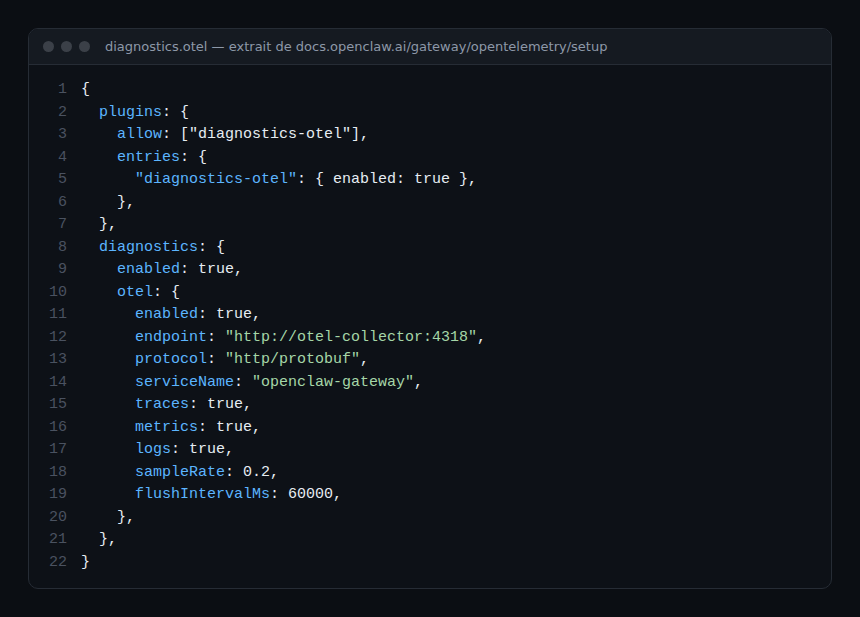
OpenTelemetry export goes through a plugin, diagnostics-otel (openclaw plugins install clawhub:@openclaw/diagnostics-otel). The documentation gives this starting configuration:
- Only the
http/protobufprotocol is accepted; gRPC is retired. Traces and metrics are on as soon asdiagnostics.otel.enabledis true; logs stay off untillogsis explicitlytrue. - The metric catalogue includes
openclaw.tokens(counter by channel, provider, model and agent),openclaw.cost.usd(counter by channel, provider and model) andopenclaw.run.duration_ms(histogram). The standardgen_ai.client.token.usageandgen_ai.client.operation.durationmetrics keep their names. - Traces cover model usage, tool execution, command execution and tool loops. Raw content (prompts, responses, tool arguments) is not exported by default; set
captureContenttotrueonly after checking retention on the collector side. - An
openclaw agent execrun exports no telemetry; go through the Gateway oropenclaw agent --localto get traces.
The Collector and the destination (Dynatrace SaaS over OTLP, Grafana, Langfuse) are set up as for any service; see Langfuse and OpenLLMetry. On Dynatrace Managed there is no DQL: stay on the Prometheus path or an open-source backend.
Audit log: who ran what
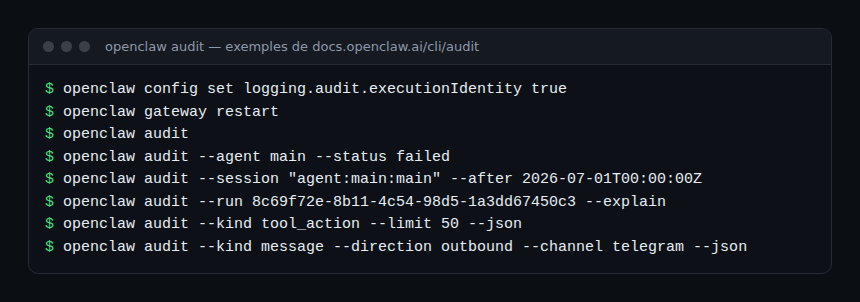
The Gateway keeps an audit ledger, on by default and limited to metadata: identity, timestamps, tool names, normalised outcomes, never prompts, arguments or results. Records expire after 30 days and the ledger is capped at 100,000 rows; the documentation states that writing is best-effort and not a compliance archive.
How to check that it works
openclaw doctorandopenclaw status --allshow a redacted exporter state for each signal; they display neither endpoints nor headers.- After a test message, a trace appears in the backend under the service name you set, and the
openclaw.tokenscounter increases. openclaw audit --status failedlists failed runs;openclaw gateway usage-cost --days 7summarises the last seven days of cost from session logs (the documentation warns totals may be incomplete while the cache refreshes).
Limits and open points
- Very fast growth. A star count measures attention, not maturity or safety. Releases are date-numbered (v2026.10.4) and settings move: several documentation pages describe keys that are “retired” or migrated by
openclaw doctor --fix. - Personal trust model. The project is not designed for mutually hostile users inside one Gateway.
- Extensions. Skills and plugins from the ClawHub marketplace add code and privileges: read their audit results before installing.
- Log files. Raw files hold records without masking when read directly; they are
0600, so protect them like the state databases.
Best practices
- Install on a dedicated account or machine, never on the workstation that holds your production keys.
- Enable sandboxing before connecting a chat app with several correspondents.
- Export traces and metrics to a backend separate from the agent’s machine; set
sampleRateto fit the volume. - Alert on
openclaw.cost.usdand on run duration, and treat drift as an incident without hunting for a culprit. - Keep
captureContentoff until a retention policy allows it.
Frequently asked questions
Is OpenClaw free?
The code is MIT-licensed and the README states there is no paid tier. You do pay your model provider, per token.
Does OpenClaw send data to its maintainers?
According to the README, nothing beyond a daily version check by default; anonymous usage statistics are opt-in. Your prompts go to the model provider and platforms you configure.
Can I expose it to the Internet?
The documentation provides a pre-flight checklist before exposing the Gateway beyond loopback. Follow it, enable authentication and isolation, and run openclaw security audit.
Conclusion
OpenClaw pairs a large messaging ecosystem with a local Gateway, and it ships what operations needs: OpenTelemetry export, cost metrics, an audit ledger. Its popularity does not excuse treating it as anything but a privileged service: isolation, secrets, cost alerts. Next in the series, see Paperclip, which orchestrates teams of agents that OpenClaw can be part of.
span.observer is an independent community blog, not affiliated with Dynatrace LLC or the projects mentioned. Trademarks belong to their owners. Tools change quickly: check commands and options in their official documentation (docs.openclaw.ai).