Impeccable design language AI agents: the pbakaus/impeccable repository describes itself as “the design language that makes your AI harness better at design”. In practice it is a skill (a reusable instruction for a coding agent) with 24 commands, a detector of 61 rules that spots typical flaws in AI-generated frontends, and a mode for iterating in the browser. The repository has about 84,600 stars at the end of October 2026.
Why cover it on an operations blog? Because a skill that installs hooks, downloads a binary and offers telemetry is a component of your delivery chain. This article follows the project’s README and documentation: what it does, how to install it, what it writes to your disk, and how to measure what it detects. For another skill in the series, see the Cloudflare security audit skill.
A note on honesty: span.observer has not installed Impeccable. The commands come from the README, and the screenshot comes from the project’s website.
Impeccable design language AI agents: what the repository says
- Author and licence: the README says the project was created by Paul Bakaus; Apache 2.0 licence (LICENSE file).
- Figures checked on 22 October 2026: about 84,600 stars, about 5,100 forks, 2,517 commits. The repository page shows no release.
- Advertised content: 1 skill, 24 commands (
craft,shape,critique,audit,polish,harden,animate,live…), 61 deterministic detection rules, and LLM critique commands. - Origin: the README says the project started from Anthropic’s
frontend-designskill; it is not presented as a product of that company. - Supported tools: Cursor, Claude Code, GitHub Copilot, Gemini CLI, Codex CLI, Grok Build, OpenCode and about ten others, according to the README list.
The README’s reasoning: all models learned from the same SaaS templates, hence the same flaws (Inter everywhere, purple-to-blue gradients, cards inside cards). The skill gives the agent a shared vocabulary, and the detector checks the result with no model and no API key.
A tour: what the detector looks for
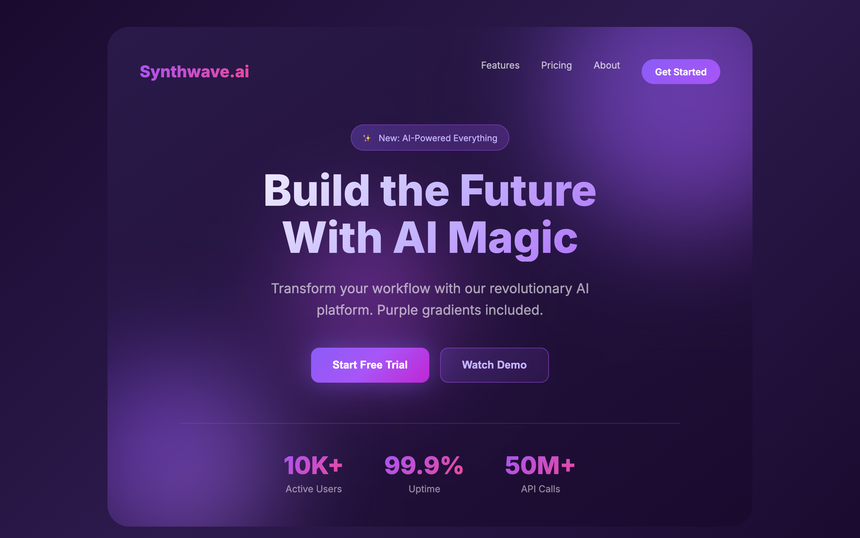
The project’s website illustrates each flaw with an example page. Here is the purple gradients one: a deliberately typical page, with a fictional brand, which the project files among the patterns to avoid.
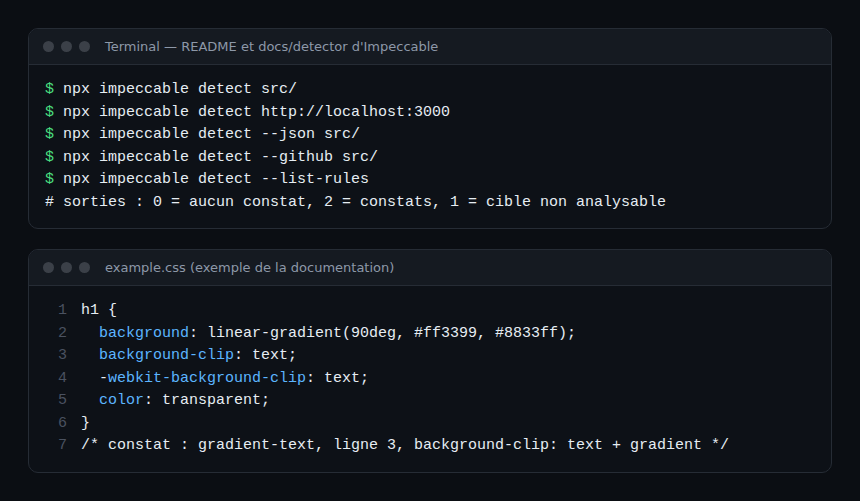
The detector documentation shows a real finding on a small CSS file (rule gradient-text, line 3) and the scan commands.
Step-by-step installation
Step 1 — The recommended installer
From your project root:
npx impeccable install
/impeccable init
The installer detects your tools (for example ~/.claude or a project .cursor folder), asks whether to install for the project or the machine, then drops the skill. The options --providers=claude,cursor and --scope=project|global skip the questions in scripts. To update: npx impeccable update. In the agent, /impeccable init writes a PRODUCT.md file describing audience, purpose and constraints.
Step 2 — README alternatives
- Git submodule:
git submodule add https://github.com/pbakaus/impeccable .impeccable, thennpx impeccable link --source=.impeccable --providers=claude,cursor. - Claude Code:
/plugin marketplace add pbakaus/impeccable, then install from/plugin. - Manual copy from
dist/, or the ZIP from the official website.
Step 3 — The detector alone, without an agent
npx impeccable detect src/
npx impeccable detect http://localhost:3000
npx impeccable detect --json src/
npx impeccable detect --github src/
The README states the exit codes: 0 for no findings, 2 for findings, 1 if a target could not be scanned. The --github option produces GitHub Actions annotations (at most 10 of each type per step and 50 per job, according to the README). This is the most useful part for an SRE team: a continuous-integration check, with no model.
What the tool writes and sends
- Hooks: on Claude Code, Copilot, Codex, Cursor and Grok Build, the installer adds a hook manifest that runs the detector after each interface-file edit. The README warns that, on Claude Code, these hooks run independently of tool approval: the first event may download and cache the engine in
~/.impeccable/bin/. Review hooks before an unattended run. .impeccable/folder: screenshots, live-mode state and caches. The README gives a.gitignoreblock to copy and lists the files to commit (config.json,design.json,surfaces/*.md).- Telemetry: the skill calls the impeccable.style API to deal a “hand” of visual worlds; unless you opt out, an anonymous record of the choice is sent. The README says neither the project name, nor files, nor code, nor
PRODUCT.mdare sent. To switch it off:npx impeccable telemetry off, orDO_NOT_TRACK=1, orIMPECCABLE_NO_TELEMETRY=1. - Live mode: it edits a local checkout through a development server; applying it to a production site is not supported. Applying copy edits runs the optional
impeccable:manual-edit-validatescript from yourpackage.jsonin a shell: read it in an unfamiliar repository.
Observing Impeccable
Impeccable is not a service: there are no traces or metrics to export, and the README describes none. What you can measure:
- Detector findings: the
--jsonoutput or--githubannotations give a count of findings per rule. Track it across pull requests as a quality indicator, without making it an absolute goal: the README reminds that a clean scan is not proof of visual or accessibility quality. - Hook execution: the
hook.auditLogsetting in.impeccable/config.json(or theIMPECCABLE_HOOK_LOGvariable) writes one NDJSON line per hook call. Feed that file to your log collector. - Token cost: critique commands go through your agent’s model. To attribute it, follow supervising a coding agent.
Limits and open points
- The project moves fast (24 commands, about fifteen supported tools): re-read the documentation before each update.
- The detector applies rules of taste: “no Inter” or “no purple gradient” remain design choices to discuss, not absolute errors. Exceptions are declared in the configuration.
- Part of the flow (dealing visual worlds) goes through the project’s server; the README does not say what happens offline. Test it before depending on that mode.
- Versions: the repository page showed no release at the time of checking.
Best practices
- Try the detector alone in CI first, and only then the skill in the agent.
- Disable telemetry on machines under a data policy, and commit that decision in
.impeccable/config.json. - Put your agents’ skills under review like code; see also the official Claude Code plugin directory.
- Do not declare a global exception just to silence a rule: prefer the targeted waiver in the file.
Frequently asked questions
Does Impeccable work without an API key?
The detector does: the README says the CLI and browser extension run the deterministic rules with no model and no key. The design commands go through the agent you already use.
Do I need Node.js?
Only for npx. The skill ships a launcher that runs a self-contained binary, downloaded once into ~/.impeccable/bin/ if it is not shipped alongside.
Is it tied to Anthropic or Cursor?
The README does not present it as a product of either Anthropic or Cursor: it says it started from Anthropic’s frontend-design skill and supports many tools, including both.
Conclusion
Impeccable gives a shared language to ask an agent for better than a “generic” frontend, and a detector that fits into CI. Its good use comes down to three settings: detector first, telemetry decided, hooks reviewed. Sources: pbakaus/impeccable repository and detector documentation.
span.observer is an independent community blog, not affiliated with Dynatrace LLC or the projects cited. Trademarks belong to their owners. Tools change quickly: check commands and options in their official documentation.