claude plugins official plugin directory: the anthropics/claude-plugins-official repository is the Claude Code plugin directory maintained by Anthropic, under the Apache-2.0 licence. It showed about 43,700 stars and 4,600 forks in October 2026, read on the repository page on 22 October. It is not software you run: it is a catalogue (a marketplace.json file and some folders) that Claude Code reads when you type /plugin.
For an operations team the useful question is not “how many plugins?” but “what am I allowing to run on a developer’s machine?”. A plugin can bring commands, agents, skills and MCP servers. This article covers what the repository contains according to its README, how to install from it, and how to keep control of what gets installed.
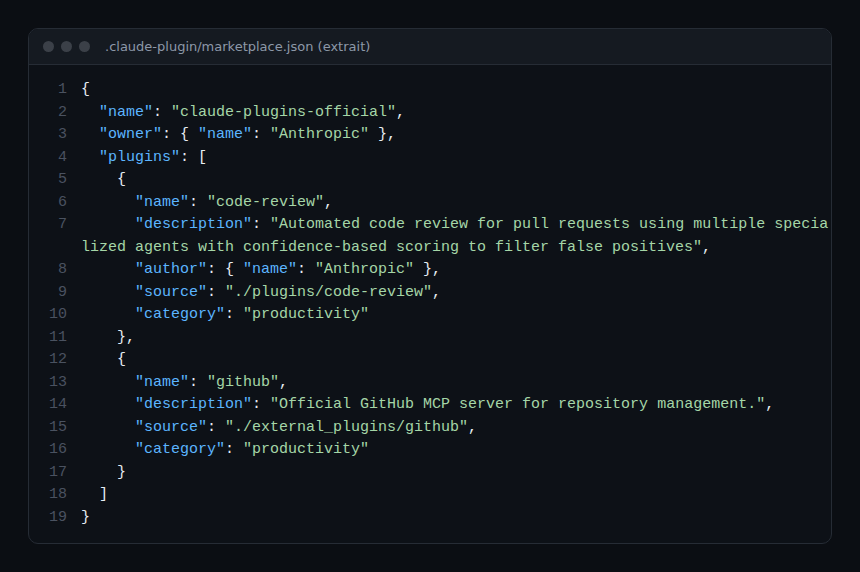
The information comes from the README and the marketplace.json file, read on 22 October 2026. span.observer did not install these plugins and is not affiliated with Anthropic: the images below reproduce real excerpts from the repository.
Claude plugins official plugin directory: what the repository contains
- Who: Anthropic. The README calls it a “curated directory of high-quality plugins for Claude Code”.
- Licence: Apache-2.0 for the repository. The README states that each listed plugin keeps its own licence: see each plugin’s LICENSE file.
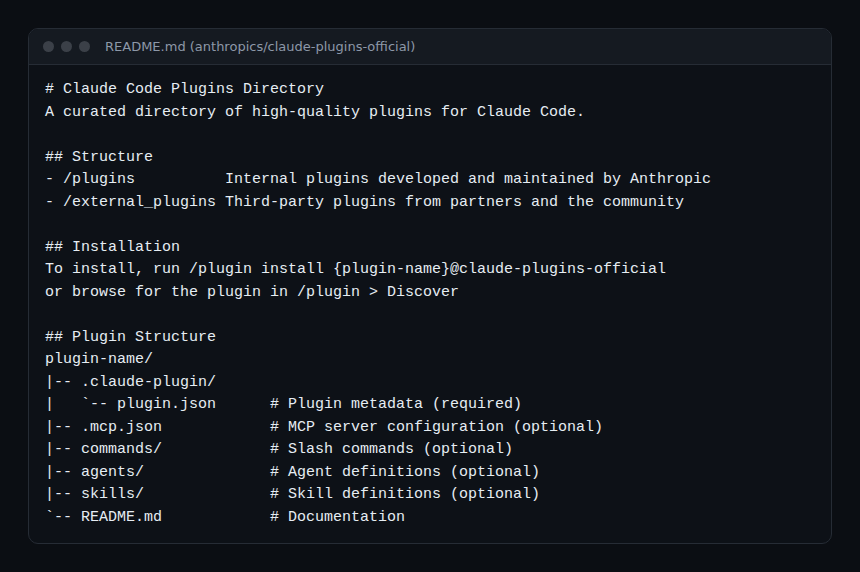
- Layout:
/pluginsfor plugins built by Anthropic,/external_pluginsfor those from partners and the community. - Releases: the repository page shows no release; change tracking is through the roughly 4,630 commits.
- Catalogue size: reading
marketplace.jsonon 22 October 2026, we counted 315 entries. Of these, 53 point to a local folder in the repository, 98 to a subfolder of another Git repository (git-subdir) and 164 to a repository address (url). The most frequent categories are development (123), productivity (69), database (39), monitoring (22) and security (18). These numbers change with every commit.
The README opens with a warning worth reading first: make sure you trust a plugin before installing, updating or using it, because Anthropic does not control what MCP servers, files or other software plugins include and cannot verify that they will not change.
Installing a plugin from the directory
Step 1 — Install by name
In Claude Code, according to the README:
/plugin install {plugin-name}@claude-plugins-officialReplace {plugin-name} with the name of a catalogue entry, for example code-review, which appears in the file.
Step 2 — Or browse the catalogue
The README also says to look for the plugin in /plugin > Discover. Claude Code’s reference documentation on plugins is at code.claude.com/docs/en/plugins.
Step 3 — Read before installing
Each catalogue entry points to a homepage (homepage) or a repository. Open it, read .claude-plugin/plugin.json, the .mcp.json if there is one, and the commands, agents and skills. This is the only check the README explicitly asks of the user.
Under the hood: the marketplace.json file
The catalogue is a JSON file: a name, an owner, and a list of plugins with description, author, category and source.
The README describes three rules that help teams maintaining their own catalogues:
- Names are immutable. The
namefield is an identifier; if it changes, existing installs fail with aplugin-not-founderror. To change the displayed label you usedisplayName; if a rename is unavoidable, a top-levelrenamesmap provides the mapping (the file contains one today). - Skill-bundle plugins. If a source repository ships only
SKILL.mdfiles with noplugin.json, the entry can declare"strict": falseand askillslist; each skill is then registered asplugin-name:skill-name. - Pinned sources. The README example uses
git-subdirwith arefand asha: the installed version is a specific commit.
Monitoring what you install
The repository is a static directory: there is no server to watch and no metric to export. The risk moves to the machines and agents that load these plugins. The practices from guardrails for AI agents in production apply: least privilege, separate secrets, a record of what runs.
- Inventory. Keep a list of approved plugins (name, source, version or commit). A plugin whose entry points at a moving branch can change without you knowing; prefer a source pinned to a
shawhen you publish your own catalogue. - MCP servers. A
.mcp.jsondeclares servers that receive context and can act. Follow the approach in our article on the GitHub MCP server: minimal token scopes, read-only first. - Cost and traces. A plugin that launches sub-agents consumes tokens: see measuring an AI agent’s cost with OpenTelemetry. The repository itself exposes no telemetry; what you observe comes from the agent and the tools it calls.
- Isolation. For little-known plugins, use an isolated machine or runtime, as in NVIDIA OpenShell.
How to check that it works
- After
/plugin install, the plugin appears in the/pluginlist and its commands or skills are available in the session. - Compare the installed content with the plugin’s folder in the repository: same commands, same declared MCP servers.
- After an update, re-read what changed before continuing to use it: the README reminds you that trust also applies to updates.
Limits and open points
- Not a security guarantee. “Official” describes the directory, not the code of each plugin; the README itself says Anthropic does not control plugin contents.
- Varied sources. The catalogue references many third-party repositories: each has its own licence, update pace and level of maintenance.
- No repository releases. None is displayed; for strict reproducibility, copy the catalogue at a given commit rather than following the branch.
- Submission. External plugins go through a submission form and must “meet quality and security standards”: the repository does not detail the criteria here.
Best practices
- Install one plugin at a time, after reading its page and its MCP servers.
- Record the approved plugin list in a team file, with who validated each.
- Avoid bulk installs on a machine that holds production secrets.
- Review the list at each Claude Code update and remove unused plugins.
- If you publish your own catalogue, copy the README’s rules: immutable names, pinned sources.
Frequently asked questions
Is the claude-plugins-official directory free?
The repository is under Apache-2.0. Each plugin has its own licence, and the services a plugin calls (models, third-party APIs) may be paid.
Are all the plugins written by Anthropic?
No. According to the README, /plugins holds Anthropic’s own and /external_plugins those from partners and the community; many catalogue entries also point to external repositories.
What is the difference between a plugin and a skill?
A plugin is a package that can contain commands, agents, skills and MCP server configuration; a skill is a folder with a SKILL.md file. See also Scientific Agent Skills for a large skill collection.
Conclusion
The claude-plugins-official directory is a practical starting point for discovering Claude Code extensions, with a clear plugin format and stable naming rules. It does not replace your own review: read, pin, inventory, and treat each plugin as code running with your rights.
span.observer is an independent community blog, not affiliated with Dynatrace LLC or Anthropic. Trademarks belong to their owners. Tools change quickly: check commands in the official documentation (code.claude.com).