The Octop self-hosted AI assistant is how the TencentCloud/Octop repository describes itself, with “multi-user, multi-agent” as its tagline. It runs as one process that serves a web dashboard, a command line, messaging channels (Feishu, DingTalk, QQ, WeChat, Telegram, Discord, WeCom) and scheduled jobs. The repository has about 10,700 stars at the end of October 2026.
For an operations team the question is not “does it look good?” but “where does my data go, who holds which rights, and what happens if I expose it on the network?”. This article follows the repository README and documentation. It covers installation, a tour of the interface, limits and observability. It complements our article on OpenClaw, another self-hosted assistant.
A note on honesty: span.observer has not installed or run Octop for this article. The commands come from the README, and the screenshots come from the project’s repository.
Octop self-hosted AI assistant: what the repository says
- Publisher and licence: the repository sits under the TencentCloud organisation, MIT licence (the LICENSE file reads “Copyright (c) 2026 Octop”).
- Stack: Python 3.12 or later, FastAPI and uvicorn, a React front end; SQLite control-plane database by default, PostgreSQL optional.
- Figures checked on 22 October 2026: about 10,700 stars, about 1,400 forks, 844 commits. The repository page shows no published release; the README badge says version 1.0.2, and the package is on PyPI as
octop. - Advertised features: experts (agents) per user, agent teams in beta (AgentTeams), OAuth and MCP connectors, a knowledge base (RAG), plugins, remote desktop, a driven browser, a desktop client, and ACP to delegate to OpenCode or Claude Code.
According to its README the project is local first: configuration, conversations, workspaces and credentials live under ~/.octop/. The README also lists a roadmap (managed agents, a plugin marketplace) that it calls indicative, and so should you.
A tour of the interface
The README shows a web dashboard opened at http://127.0.0.1:8088. The screenshot below comes from the repository (docs/assets folder); the interface is in Chinese and shows version v0.9.8, older than the 1.0.2 badge in the README.
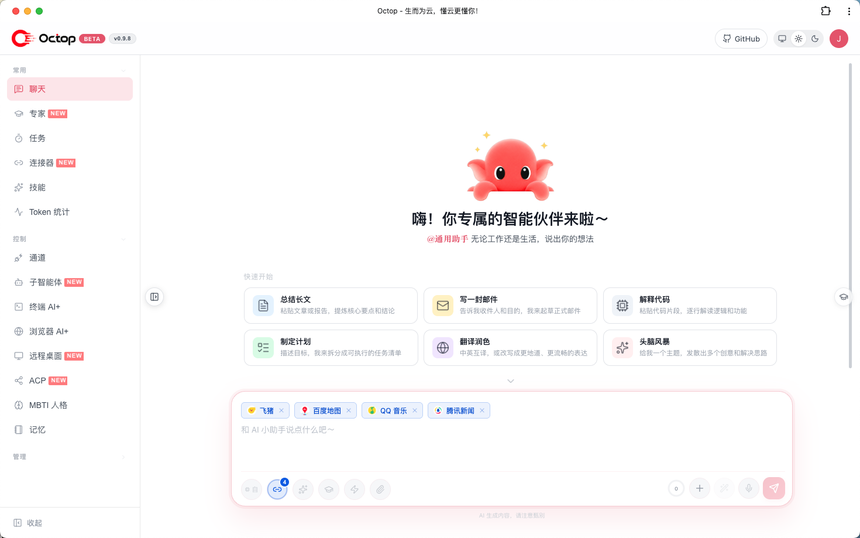
The left menu includes “Token 统计” (token statistics), “终端 AI+” and “浏览器 AI+” (AI-assisted terminal and browser), “远程桌面” (remote desktop) and, in the management section, an audit log.
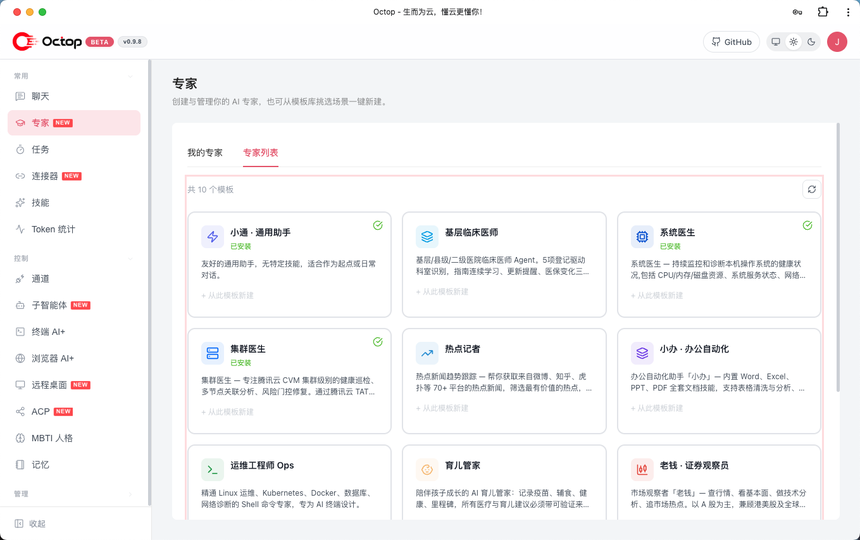
The experts page lists installable templates. According to the README each expert has its own workspace, model providers, channels and cron jobs.
Step-by-step installation
Step 1 — Pick a method
The README offers a one-line install script (macOS, Linux, Windows), desktop apps from the releases page, pip install octop and Docker. The script provisions an isolated Python environment with uv under ~/.octop/ and leaves the system Python alone.
Watch out: the script address is a Tencent Cloud object-storage bucket (domain cos.ap-guangzhou.myqcloud.com), not the GitHub repository. Running curl … | bash unread on a server is risky. Read the script first, or prefer pip in a virtual environment, or Docker.
Step 2 — Install, initialise, start
pip install octop
octop init
octop run
octop init creates the SQLite database, the JWT secret and the first administrator account under ~/.octop/; the password needs at least 8 characters with letters and digits. octop run starts the API and dashboard in the foreground. For a system service: octop service start (systemd, launchd or a Windows service).
Step 3 — Docker, the README’s “production” route
docker compose -f docker/docker-compose.yml up -d
# or
docker run -d -p 8088:8088 -v octop-data:/data/.octop -e HOME=/data octop:latest
The README also offers a China mirror (docker-compose.cn.yml) for when ghcr.io is unreachable. Without OCTOP_DEFAULT_PASSWORD no administrator is created: you finish the setup wizard with the unlock password read from /data/.octop/octop-login.txt.
Data and rights: what to look at
The configuration documentation describes the tree: config.json, octop.db (users, agents, providers, sessions, audit), secrets/jwt_secret, agents/<id>/ (one workspace per agent), plugins/ and logs/. The default config.json settings include bind_host set to 127.0.0.1, login_max_attempts at 5, login_lockout_seconds at 900 and enable_api_docs set to false.
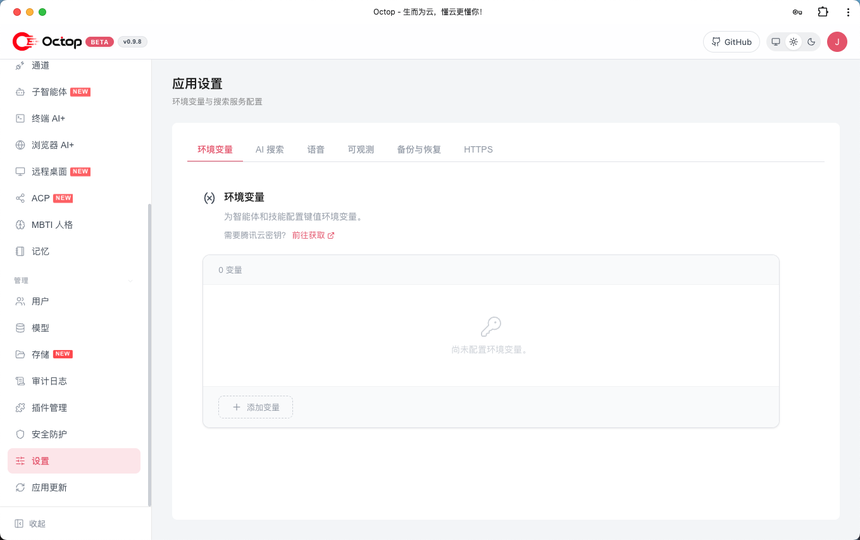
The settings tabs include “可观测” (observability), backup and HTTPS. The repository’s SECURITY.md reminds operators that they remain responsible for host security, network exposure, rotating JWT secrets, the guardrail rules under ~/.octop/security/tool_guard/ and protecting LLM keys and channel credentials.
- Where text goes: “local first” describes storage. A conversation sent to an online model provider leaves your machine; only a local model (the README names Ollama) keeps everything at home.
- Exposure:
octop run --host 0.0.0.0opens port 8088 to the whole network. Put a TLS proxy in front and restrict allowed addresses. - Agent rights: the README cites per-user isolation (JWT), tool approval and rules on shell commands. Agents can also drive a browser or a desktop: treat them as an operations account.
- Channels: each messaging channel needs a bot token, to be stored as a secret.
Observing Octop
The source code shows an observability integration with Langfuse: an admin route reads and writes the configuration (enabled, host, public key, secret key), and a connection test is provided. The settings form suggests a host such as https://cloud.langfuse.com; a self-hosted instance can be targeted. See Langfuse and OpenLLMetry for LLM observability. The README describes no native OpenTelemetry export: if you need one, check the code before promising it to your teams.
- Costs: the dashboard has a token statistics page. To tie costs to budgets, see the token cost of an AI agent.
- Logs:
~/.octop/logs/for the service,~/.octop/octop.login the foreground. Forward them to your usual log collector. - Process: on Linux,
octop service startinstalls default systemd memory limits (MemoryHigh=60%,MemoryMax=75%of RAM). Watch for service restarts. - Audit: the interface offers an audit log; review it after every change of rights.
Limits and open points
- The interface shown in the repository is in Chinese; the README and documentation are in English.
- Agent teams are announced as beta, the mobile app as closed beta.
- The repository page showed no release at the time of checking: pin the version you install (
octop updateinstalls the latest). - The install script is hosted outside GitHub; check it before running it.
- The README describes no data collection by the project; watch your instance’s outbound connections to be certain.
Best practices
- Start locally on
127.0.0.1, a single user, with a local model or a dedicated, capped API account. - Back up with
octop backupbefore any upgrade (the README asks for it before a cross-version upgrade). - Keep API keys and channel tokens out of repositories and traces; see our guide to AI agent guardrails in production.
- Limit MCP connectors to what is needed (see securing an MCP server).
Frequently asked questions
Does Octop send my data to Tencent?
The README describes local-first operation and mentions no collection. Your text goes to the model provider you configure; the install script is hosted by Tencent Cloud. To be sure, watch outbound connections.
Do I need to install Python?
Not with the install script, which provisions Python 3.12 with uv. With pip you need Python 3.12 or later already.
Can I use it without an online model?
The README lists Ollama among the supported providers. Quality then depends on the local model you choose and your hardware.
Conclusion
Octop packs many features into a single process, which simplifies installation and concentrates risk: one administrator account, agents able to act and channel tokens in the same place. The project deserves an isolated trial, with the README’s cautious defaults. Sources: TencentCloud/Octop repository.
span.observer is an independent community blog, not affiliated with Dynatrace LLC, Tencent or the projects cited. Trademarks belong to their owners. Tools change quickly: check commands and options in their official documentation.