T3 Code coding agent control surface: the pingdotgg/t3code repository describes T3 Code as an “agent harness control surface”. It drives the agents already installed on your machine (Claude Code, Codex, Cursor, Grok Build, OpenCode, Google Antigravity) from a mobile app, a web app or an Electron desktop app. The repository has about 29,300 stars at the end of October 2026.
For an operations team it is a new intermediary between a human and agents that run commands. The subject is not speed but rights: who approves what, from which device, over which network path. This article follows the repository README and documentation. For supervision on the agent side, see supervising a coding agent in the enterprise.
A note on honesty: span.observer has not installed T3 Code. The commands come from the README and the repository documentation, and the screenshot comes from the project’s official website.
T3 Code coding agent control surface: what the repository says
- Publisher and licence: MIT licence; the LICENSE file reads “Copyright (c) 2026 T3 Tools Inc.”.
- Figures checked on 22 October 2026: about 29,300 stars, about 7,900 forks, 7,360 commits on the main branch. The repository page shows no published release; installers and packages are described in the README.
- Principle: T3 Code does not replace your agents, it commands them. The README says it works with your existing subscriptions: if a provider is installed and authenticated, T3 Code can control it.
- Maturity: the README says “We are very very early in this project. Expect bugs” and that it is (mostly) not accepting contributions yet.
A tour of the interface
The project’s website, t3.codes, shows the desktop app: a thread list on the left, the conversation with the agent in the middle, and the repository’s code differences (diff) on the right. The screenshot comes from that official site; it shows a working thread of the project’s own team.
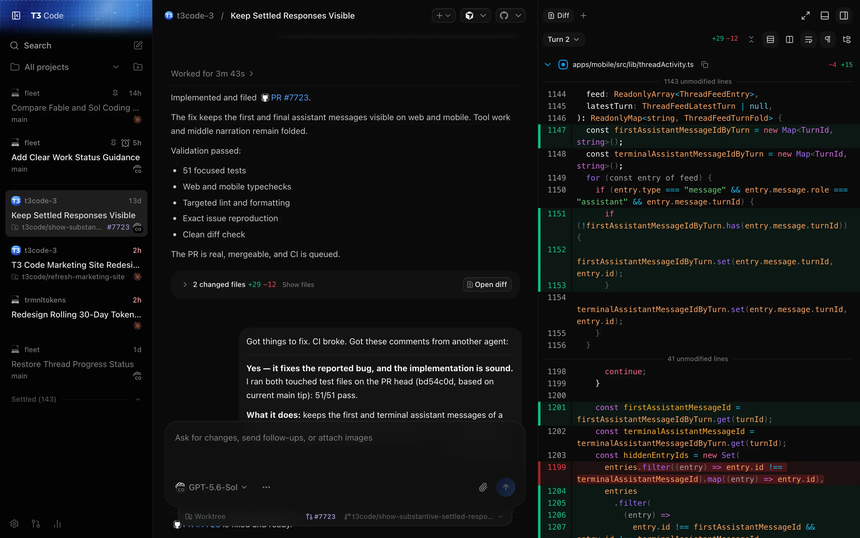
You can see the model picker under the input box, a worktree indicator with the pull request number, and a diff panel per agent turn. According to the documentation a thread is tied to a project, and permission modes apply thread by thread.
Step-by-step installation
Step 1 — Install and authenticate at least one provider
The README asks you to install and sign in to at least one agent before use, for example codex login, claude auth login, agent login (Cursor), grok login or opencode auth login. Antigravity is enabled in settings, with no CLI.
Step 2 — The command line
curl -fsSL https://t3.codes/install.sh | sh
t3
On Windows: irm https://t3.codes/install.ps1 | iex. The t3 binary installs into ~/.local/bin. t3 starts the server and opens the local web app; t3 service install keeps it running in the background (macOS and Linux); t3 update updates it; npx t3@latest lets you try it without installing. As with any curl | sh command, read the script first.
Step 3 — The desktop app
winget install T3Tools.T3Code
brew install --cask t3-code
yay -S t3code-bin
These are the README commands for Windows (winget), macOS (Homebrew) and Arch Linux (AUR) respectively. The README also mentions Scoop, a .deb package for Debian and Ubuntu, and the GitHub releases.
Rights and remote access: the heart of the matter
The permission-modes documentation describes four levels: Supervised (approval for commands and file changes), Auto-accept edits, Auto (the provider’s automatic review) and Full access (no prompts). The initial default is Full access, adjustable under Settings, General, New threads, Permissions.
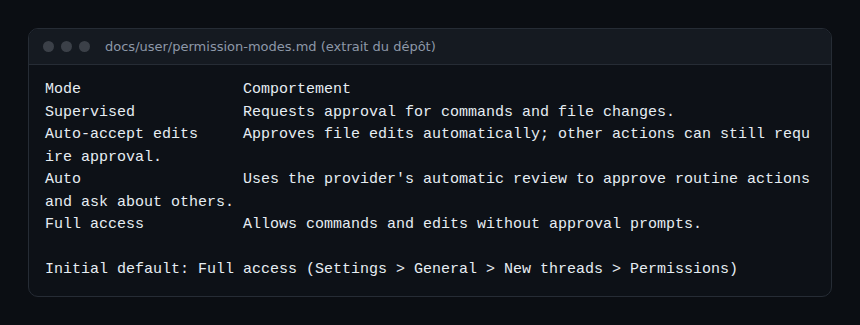
In other words, out of the box, an agent started from T3 Code can run commands without asking. If that does not suit you, set the default to Supervised before the first thread. The documentation adds that providers enforce permissions differently and that some cases (Claude, Antigravity) can still ask for approval even in Full access.
- Remote access: T3 Connect makes an environment available on your other devices without port forwarding (
t3 connect, after signing in to an account). Otherwise, pairing over a local or private network:t3 serve --host <private-ip>, thent3 pairfor a one-time link. The documentation states that the host must stay on and reachable. - Outside agents: T3 Code exposes an MCP server at the environment address followed by
/mcp. Agents (Claude Code, Codex, ChatGPT) connect after an approved sign-in; access is read-only by default, and sign-in only completes overlocalhostorhttps. - Background service: service variables go in
~/.t3/service.env(for exampleT3CODE_PORT=3773,T3CODE_HOST=127.0.0.1). If the file holds credentials, the documentation recommendschmod 600.
T3 Code’s MCP server is itself a server to watch: re-read the GitHub MCP server guide for the read-only and minimal-token logic.
Observing T3 Code
The README describes no OpenTelemetry export and no metrics. What the documentation lets you follow:
- Service state:
t3 service statusshows the state and the log location;t3 doctorreclaims database space. - Local data: projects, threads and settings are under
~/.t3/userdata; back that folder up before a major update. - Underlying agents: traces, events and costs come from the agents themselves. Follow the approach in observing MCP agents with OpenTelemetry and the token cost of an AI agent.
- Updates: restarting the service interrupts running agent turns, terminals and remote clients;
t3 updateasks for confirmation.
Limits and open points
- A young project, by the README’s own admission: expect bugs and changing options.
- No documentation site: everything is in the repository’s
docs/folder. - Default in Full access: change it before using it on a machine that holds secrets.
- Remote paths (T3 Connect, Tailscale, SSH) widen the attack surface; the documentation recommends a one-time link for each device.
- To compare with another fleet-control tool, see Paperclip.
Best practices
- Set Supervised as the default mode; widen thread by thread.
- Keep
T3CODE_HOST=127.0.0.1until you need remote access, and prefer T3 Connect or a private network to public exposure. - Grant outside agents “read only” access by default.
- Log who approved what, without looking for someone to blame.
Frequently asked questions
Does T3 Code replace Claude Code or Codex?
No. According to the README it drives them: the agent must already be installed and authenticated on the machine.
Is it for sale?
The README answers “Nothing” to the question “what are you selling me?”; the repository is under the MIT licence. Agent providers’ subscriptions remain your cost.
Can I use it from a phone?
Yes, the README links iOS and Android apps. They connect to an environment through T3 Connect or pairing; the agent runs on the host machine, which must stay reachable.
Conclusion
T3 Code is a remote control for your coding agents, easy to install and worth setting up with care: permission mode, listening address, remote access. It is young; try it on a machine without secrets before widening use. Sources: pingdotgg/t3code repository and t3.codes website.
span.observer is an independent community blog, not affiliated with Dynatrace LLC or the projects cited. Trademarks belong to their owners. Tools change quickly: check commands and options in their official documentation.