The Cloudflare security audit skill is a coding-agent skill that turns the agent into a security auditor: it orchestrates isolated agents through six phases, from reconnaissance of the code to the report. The cloudflare/security-audit-skill repository has around 30,200 stars in mid-October 2026. The README presents it as the single-repository starting point of a larger vulnerability-discovery system described in a Cloudflare blog post.
Such a tool interests an SRE for a practical reason: a multi-agent audit is a workload like any other, with tokens, run time and executed code. This article explains what the repository documents, how a skill is installed, its limits (false positives, scope) and what an automated audit does not replace. A note on honesty: span.observer did not run this audit; the commands come from the README and the screenshots are excerpts rendered from the repository’s files. No detection claim is made here.
Cloudflare security audit skill: what the repository documents
- Publisher and licence: Cloudflare, MIT licence (LICENSE file, copyright 2025-2026 Cloudflare, Inc.).
- Figures read on 16 October 2026: about 30,200 stars, about 1,900 forks, 14 commits on the main branch, no published release.
- Contents: a
skills/security-audit/folder with aSKILL.md, instruction files per phase and per target family (AI and LLM, web protocols, supply chain, cloud…), a JSON schema and two dependency-free Node.js validators.
The repository has little versioning (14 commits, no release) and the README calls it a “starting point” from which the internal system has evolved. Treat it as a working base to read through, not a proven product. It depends on no Dynatrace product; the monitoring part applies to Dynatrace SaaS and Dynatrace Managed because it relies on OpenTelemetry on the agent side.
The six phases of an automated audit
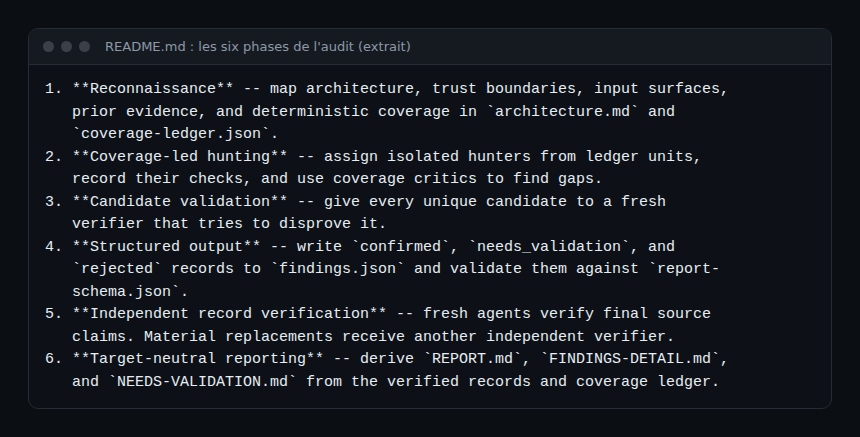
Three ideas structure the workflow. Every candidate is given to a fresh verifier that tries to disprove it: the agent that checks is never the one that found it. Results carry a distinct verdict: confirmed (a complete source trace and a bounded observed result), needs_validation (one exact fact remains to be established, no severity) or rejected. Finally, a coverage ledger (coverage-ledger.json) makes visible what was examined and what was not.
Installing a skill: step by step
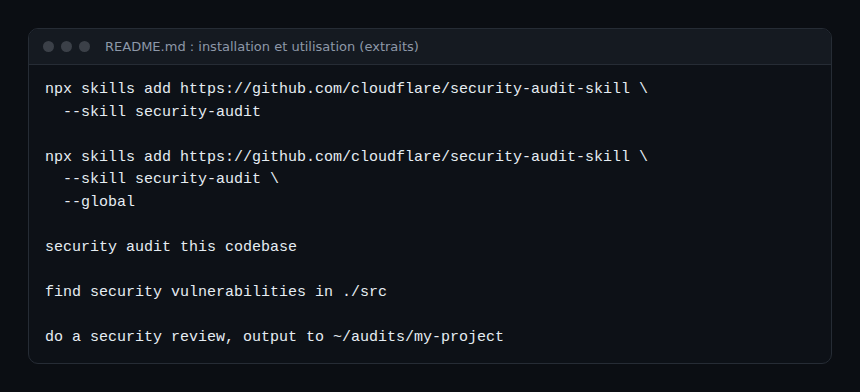
A skill is a folder whose SKILL.md file carries a name and a description. The agent loads it when a request matches. The README installs this one with the Skills CLI (skills.sh):
Step 1 — Check the prerequisites
You need an agent whose model handles tools and parallel sub-agents, Node.js for the validators, and above all an operating-system-enforced sandbox for any build, test or process coming from the target. The README spells out the requirements: no external network, a sanitised environment, resource limits and writes confined to a working folder. Without these controls, the workflow keeps the lead as needs_validation instead of executing the code. Isolating an agent is covered in AI agent guardrails in production and the runtime of the NVIDIA OpenShell project.
Step 2 — Install
Run the command in the screenshot above: npx skills add https://github.com/cloudflare/security-audit-skill --skill security-audit. The --global option installs at user level. npx skills --help lists agent selection and non-interactive options. For the structure of a skills repository in another context, see Dynatrace for AI: skills for coding agents.
Step 3 — Run
Start the agent in the code to audit and ask, for example, “security audit this codebase”. The skill distinguishes two modes: guidance mode, the default for security questions, and full audit mode for an explicit audit or report request. In full audit mode, the default output directory is ~/security-audit-skill/<repo-name>/run-<N>, outside the target repository.
Limits: false positives, scope and repeatability
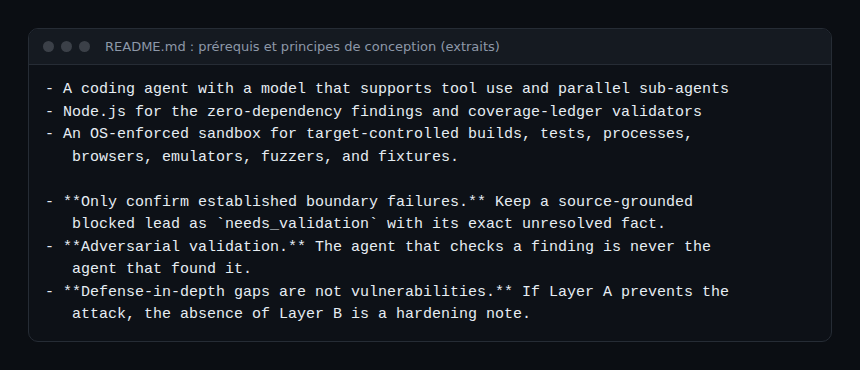
- False positives. The repository limits the risk by design (adversarial verifier,
needs_validationverdict, “defense-in-depth gaps are not vulnerabilities”), but the README publishes no false-positive rate or benchmark. Measuring on your own code is up to you. - False negatives. The README says that, in the team’s test runs, a single run found roughly half of what repeated runs found in total. A “clean” audit is not proof that there are no flaws; the skill itself says never to imply that one run exhausts the target.
- Scope. A source-first approach: no probing of deployed endpoints, no testing on a shared service. A fact that depends on production configuration, a proxy or an identity policy absent from the repository stays
needs_validation. - Profiles and cost. The skill defines
quick,standardanddeepprofiles and a budget expressed as a maximum number of agent invocations, recorded inrun-metadata.json.
Observing a multi-agent audit
The skill’s budget counts agent invocations, not tokens or euros: relating the two is up to you. With Claude Code, the claude_code.token.usage metric exported through OpenTelemetry lets you total a session’s tokens; the documentation says the counter also carries attribution by agent, skill, plugin and MCP (check the exact attribute names in the documentation before building a dashboard). Setting it up is in supervising a coding agent in the enterprise, the token reasoning in AI agent cost, and choosing a model capable of tools and sub-agents in choosing an LLM. If the code must not leave your infrastructure, see the self-hosted open source AI stack.
Another risk is specific to the exercise: the agent reads untrusted code. A booby-trapped comment in the target may try to give it instructions, which ties in with MCP tool poisoning. Hence the README’s sandbox requirement, and the value of tracing the session’s tool calls.
What an automated audit does not replace
- Human review of the findings: only a
confirmedrecord has a severity, and a code owner must validate it. - Tests on the deployed environment (configuration, network, identity), which the skill forbids itself on principle.
- Dependency analysis and patch tracking, which are other tools.
- Threat modelling and operations: detection, monitoring and incident response remain necessary.
How to check that it works
- After installation, the agent lists the
security-auditskill. - An audit request creates a
run-1folder containingrun-metadata.json,architecture.mdandcoverage-ledger.json. - A finished run writes
findings.json,REPORT.md,FINDINGS-DETAIL.mdandNEEDS-VALIDATION.md, or else recordsrun_status: "incomplete"with its reason.
Best practices
- Start with a narrow scope and the
quickprofile on a test repository. - Run several passes before concluding, and keep the previous runs.
- Treat each finding as a hypothesis to validate, without looking for someone to blame.
- Keep reports outside the repository, with restricted access rights.
Frequently asked questions
Does this skill replace a penetration test?
No. It works on source code, without probing deployed systems, and its findings need human validation.
Do I need a Cloudflare subscription?
The README mentions none: it asks for a coding agent, Node.js and a sandbox. The skill is MIT-licensed.
How do I limit the cost of an audit?
Choose a profile and a scope, set an agent-invocation budget in the request, and measure the tokens consumed with OpenTelemetry.
Conclusion
The Cloudflare security audit skill formalises an audit into phases, with independent verification and distinct verdicts. It is an interesting working base and a good example of what a skill is, provided you know its limits: no published false-positive rate, a source-only scope, a sandbox that is indispensable. Measure it like any other workload. Source: the cloudflare/security-audit-skill repository.
span.observer is an independent community blog, not affiliated with Dynatrace LLC or with the projects mentioned. Trademarks belong to their owners. Tools change quickly: check commands and options in their official documentation.