
Module 4 of the Monaco SaaS learning path: Monaco SaaS deployment, from projects and JSON templates to the dry run that validates your repository before any call to the API.
Path: Monaco SaaS · Module 4 · Duration: ~50 min · Level: Intermediate
Objectives:
- Organise a repository into projects, YAML files and JSON templates
- Write a Settings configuration (schema, scope) and its parameters
- Declare a dependency between two configurations
- Validate with
monaco deploy --dry-run, then target a project or an environment
Prerequisites: Monaco installed and a manifest ready (module 2), ideally an export already read (module 3), and a Dynatrace SaaS test environment.
An export is only a starting point: the value of configuration as code is to redeploy, identically or with variants, to another environment. This module covers Monaco SaaS deployment: how Monaco reads a repository, how it orders configurations and how you check the result without breaking anything. For an SRE, this is where configuration stops being a manual action and becomes a reviewed, tested and reproducible change. The content applies to Dynatrace SaaS only.
Monaco SaaS deployment: projects, YAML and templates in a repository
Monaco rests on three building blocks, described in the official documentation: the manifest, projects and configurations. Each configuration pairs two files:
- a YAML file giving the identifier, type, name, template and parameters;
- a JSON template holding the payload sent to the API, with
{{ .name }}placeholders filled by the parameters.
The manifest declares the projects (a name and a path) and the target environments, grouped into environment groups. Here is the example from the documentation’s getting-started guide: one project, one environment, authentication with a platform token read from an environment variable.
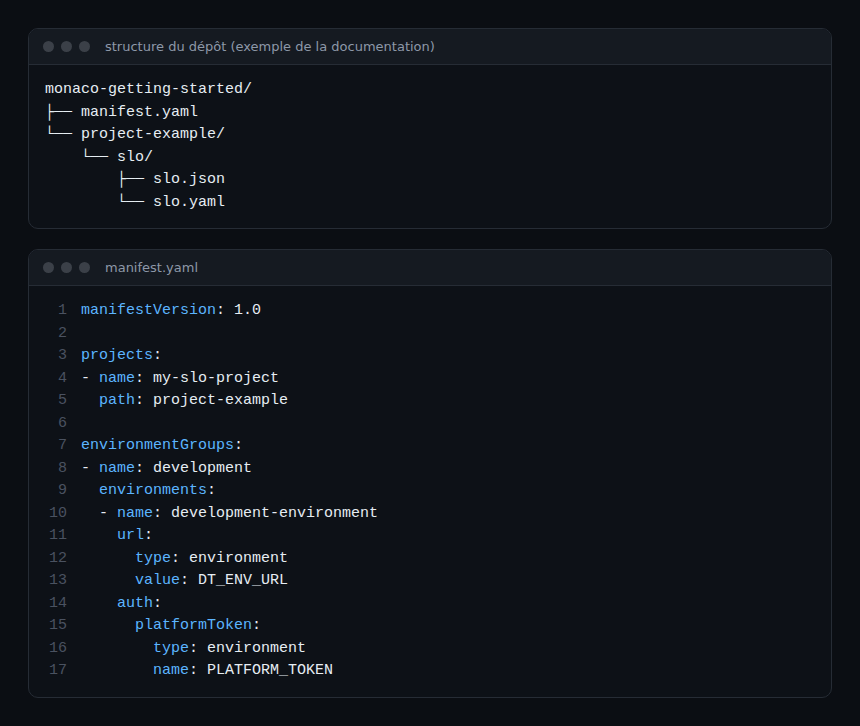
Two points to remember. First, a simple project’s path defaults to its name when omitted, and paths use forward slashes whatever the operating system. Second, a project of type grouping loads each subfolder as a separate project: general/infrastructure and general/zones become general.infrastructure and general.zones.
Write a YAML configuration and its template
The configuration file starts with configs, a list. Each entry requires id, type and config. The id is local to Monaco: it must be unique for a given type and project, and it does not match the identifier issued by Dynatrace. Inside config you find template (the template file), skip (do not deploy when true) and parameters.
Example from the documentation, an SLO configuration with a list of tags:
configs:
- id: my-sample-slo
  config:
    name: mySampleSLO
    parameters:
      tags:
        type: list
        values: ["service:myService", "dt.owner:myTeam"]
    template: slo.json
    skip: false
  type: slo-v2
In the template, "name": "{{ .name }}" and "tags": {{ .tags }} pick up these values. A list is written without extra brackets in the JSON. The documentation recommends keeping templates simple and sticking to this variable syntax.
Parameter types
| Type | Use |
|---|---|
| value | Fixed value; short form available for a scalar (threshold: 15) |
| environment | Reads an environment variable (name, optional default); deployment fails if it is missing and no default exists |
| reference | Points to another configuration (project, configType, configId, property) |
| compound | Builds a string from other parameters (format, references) |
| list | List of values (values) |
| file | Loads the content of a file (from Monaco 2.14.0) |
A parameter is only evaluated if a configuration being deployed references it. A missing environment variable therefore does not block a deployment that does not use it.
Settings objects, scope and dependencies
For a Settings object, the type field takes a settings block with schema, an optional schemaVersion and a scope. The scope can be a value, a reference or environment, the latter targeting the whole environment. Referencing another configuration’s identifier lets you configure an entity that Monaco has just created. The documentation gives this example: a web application, then its RUM settings.
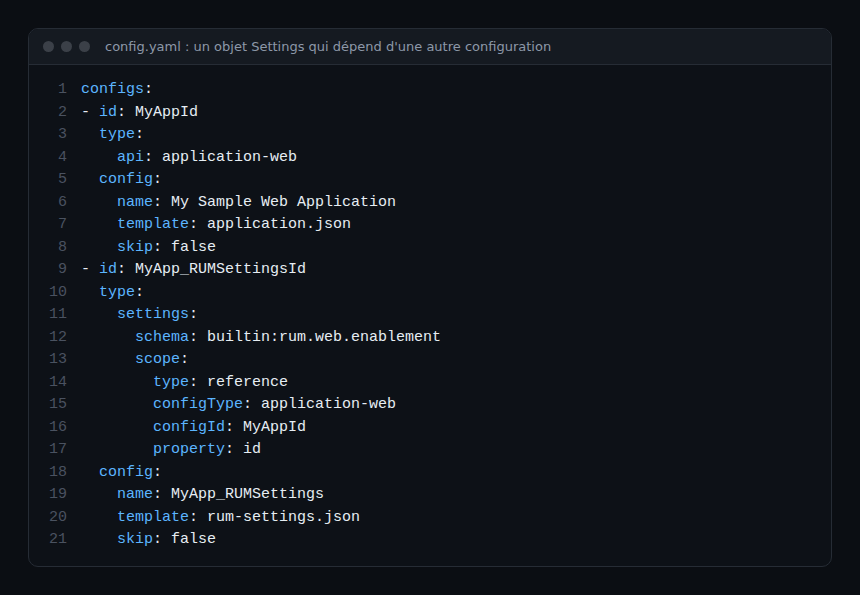
This reference creates a dependency. Monaco deploys configurations in order, the dependency first. A dependency cycle makes the deployment fail with an error. The insertAfter field (ordering of objects for ordered schemas) and permission also exist for Settings; the documentation notes that not every schema accepts them.
For the short form of a reference, an array is enough: [ project, configType, configId, property ]. You may omit the upper levels: without configType, the current project is used. For a Settings configuration, configType is the schema ID.
Per-environment variants
The optional environmentOverrides and groupOverrides fields change a value for one environment or group, for example skip: true to leave a configuration out of production. This is the tool for dev-to-prod promotion, covered later in the path.
Validate, then deploy
The command is monaco deploy <manifest.yaml>. Its options, read in the dynatrace-configuration-as-code repository and in the command reference page:
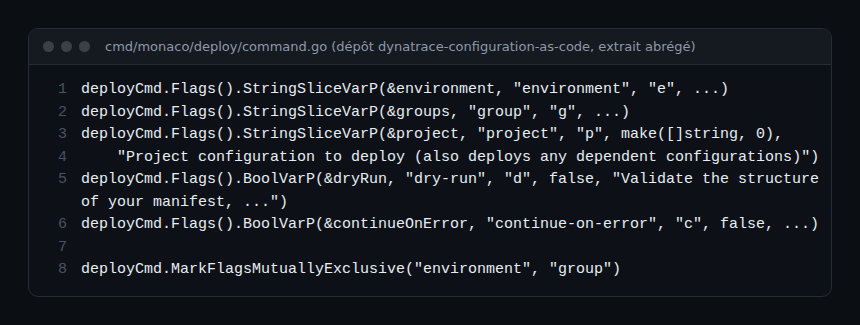
--dry-run(-d): checks the structure of the manifest, projects and configurations, resolves parameters and renders templates. It does not connect to Dynatrace: an HTTP 400 error is still possible at real deployment if the JSON content is invalid;--environment(-e) or--group(-g), mutually exclusive: with neither, all environments are targeted;--project(-p): deploys only that project and the configurations it depends on;--continue-on-error(-c): carries on despite an error, at the risk of follow-up errors in dependent configurations.
The command expects a manifest file ending in .yaml. A successful dry run ends with the message “Validation finished without errors”, according to the getting-started guide.
Hands-on exercise
Run this on a Dynatrace SaaS test environment. The commands below come from the documentation; they were not executed while writing this module.
Step 1 — Create the tree
mkdir -p monaco-getting-started/project-example/slo
cd monaco-getting-started/project-example/slo
touch slo.json slo.yaml
cd ../..
touch manifest.yaml
Expected result: the tree shown in the first screenshot.
Step 2 — Fill in the files
Copy the manifest from the screenshot, the SLO YAML and an slo.json template that uses {{ .name }} and {{ .tags }}. The getting-started guide provides the full template. For this example the platform token needs the scopes slo:slos:read, slo:slos:write and slo:objective-templates:read.
Step 3 — Export the variables
export DT_ENV_URL="https://<your-environment>.apps.dynatrace.com"
export PLATFORM_TOKEN="<your-token>"
Never put the token in a versioned file. Expected result: both variables are visible in the shell, not in the repository.
Step 4 — Validate
monaco deploy --dry-run manifest.yamlExpected result: the project and the environment are listed, then “Validation finished without errors”. Deliberately break the template’s JSON to see the failure, then fix it.
Step 5 — Deploy, then target
monaco deploy manifest.yaml -p my-slo-project -e development-environmentExpected result: the SLO appears in the test environment. Run the command again: the object should be updated, not duplicated.
Quiz
- What does a JSON template contain? a) Environment identifiers b) The payload sent to the API, with variables c) The API token d) The list of projects
- What can
--dry-runnot detect? a) Malformed YAML b) A template that is not JSON c) JSON content rejected by the Dynatrace API d) A missing parameter - How do you declare that a Settings object depends on an application created by Monaco? a) With a
scopeof typereferenceb) With an identical name c) With the-coption d) With a second manifest - What happens with a dependency cycle? a) Monaco ignores it b) The deployment fails with an error c) Monaco picks alphabetical order d) Only the dry run fails
Answers
- b) The YAML describes the configuration; the template carries the API’s JSON.
- c) The dry run does not connect to Dynatrace; only a real deployment reveals rejected JSON.
- a) The reference makes the referenced configuration deploy first.
- b) The documentation states that the deployment fails with an error.
Further reading
- Dynatrace Monaco: configuration as code, step by step
- Monaco or Terraform: which tool for Dynatrace configuration?
- Dynatrace SaaS API Settings schemas, to find the
schemato use - Monaco configuration YAML file structure
← Module 3: Monaco SaaS export · Course overview · Module 5: Monaco SaaS OAuth →
Frequently asked questions
Does the dry run guarantee that deployment will succeed?
No. It validates structure and template rendering but does not contact Dynatrace. JSON that is valid for Monaco can still be rejected by the API.
Does every configuration need a name?
For api types, yes: the name identifies the object. Since Monaco 2.7.0 it is optional for other types, which are identified by their coordinate (project, type, identifier) or by originObjectId.
How do you deploy to a single environment?
With --environment (or --group for a group). The two options are mutually exclusive.
You can now structure a repository, declare dependencies and validate before deploying. The next module covers authentication with OAuth and platform tokens, secrets and deletion.
span.observer is an independent community blog, not affiliated with Dynatrace LLC. This learning path does not replace the official Dynatrace University training and certifications. Check features in the official documentation for your version.