
Module 4 of the Monaco Managed path: Monaco Managed deployment turns a folder of YAML and JSON files into live configuration in your cluster, after a dry-run validation.
Path: Monaco Managed · Module 4/5 · Duration: ~45 min · Level: Intermediate
Objectives:
- Organise a Monaco project: folders,
config.yamland JSON template - Parameterise a template with variables and references between configurations
- Override a value per environment
- Validate with
deploy --dry-run, then deploy
Prerequisites: the monaco CLI installed and a manifest (module 2), a project exported with monaco download (module 3), a Managed test environment.
The earlier modules installed the tool and retrieved an existing configuration. This module covers the central action: Monaco Managed deployment. You write or edit files, check that they are consistent, then send them to the target environment. This sequence replaces console clicks and makes every change reviewable in Git.
The content applies to Dynatrace Managed only: API token, classic configuration APIs and Settings 2.0. Verified points come from the Managed pages of the official documentation and from the code of the Dynatrace/dynatrace-configuration-as-code repository.
Monaco Managed deployment: anatomy of a project
According to the documentation, a project is a folder. It contains sub-folders named after APIs, and these in turn contain the files of each configuration. A configuration has two parts: a YAML file (parameters, dependencies, name, template) and a JSON template, which is the payload sent to the Dynatrace API.
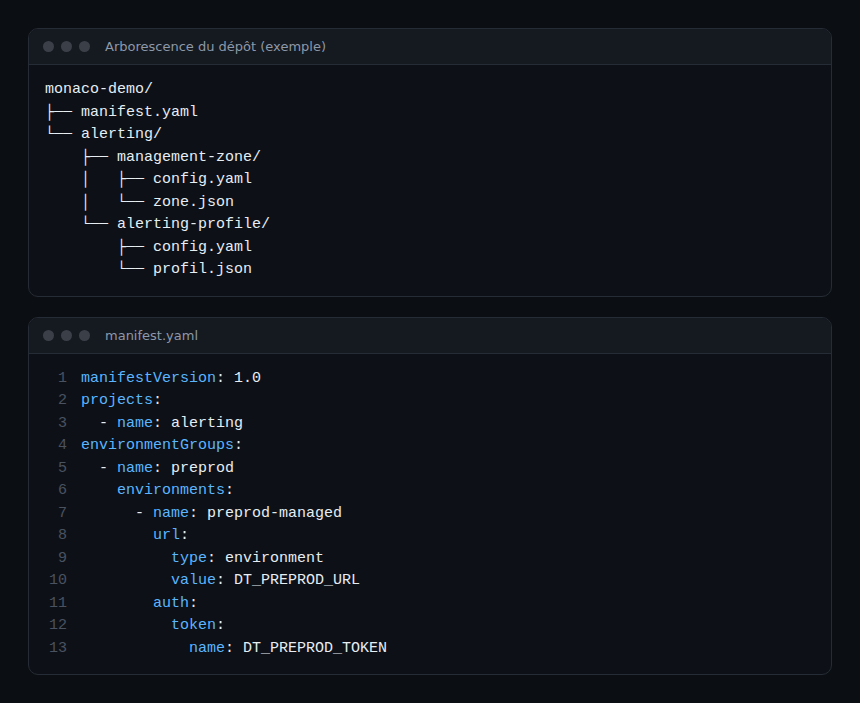
The manifest names the projects to deploy and the target environments. Its top-level keys are manifestVersion, projects and environmentGroups. Each environment belongs to exactly one group. The API folder names (for example management-zone, alerting-profile, dashboard) are listed on the “Configuration types and access permissions” page, which also covers Settings 2.0 schemas.
| Element | Role |
|---|---|
manifest.yaml |
Which projects, to which environments, with which token (variable name) |
| Project folder | Groups configurations logically (a team, a service) |
config.yaml |
List of configurations: id, type, config |
| JSON template | Body of the object, with {{ .name }}-style variables |
The manifest knows two project types: simple (the default, with name and optionally path) and grouping, which loads each sub-folder as a separate project, prefixed with the project name and a dot (for example general.zones).
The config.yaml file
The file starts with the configs key, a list. Each entry requires three fields: id, type and config. The id exists only for Monaco: it must be unique per type and per project, and is mainly used for references. The type is either an API (api: dashboard, or the short form type: dashboard) or a Settings 2.0 schema (settings with schema and scope).
The config block holds name, template, and optionally skip and parameters. For a classic API, the name identifies the object in the environment: it decides between creation and update. The template must therefore use it as is, with no stray characters, as "{{ .name }}". An extra space explains the duplicate objects sometimes seen after a deployment.
JSON templates and variables
The template is written in JSON, with Go template syntax. The documentation recommends keeping it simple: referencing a parameter with {{ .PARAMETER_NAME }} is enough in most cases. YAML values are escaped before insertion, which keeps the JSON valid even with quotes or line breaks.
One trap: some payloads already contain double braces. They must then be escaped ({{`{{`}} to open, {{`}}`}} to close). Monaco does this automatically for files produced by monaco download.
Parameters come in several types: value (short form: threshold: 15), environment (reads an environment variable, with an optional default), reference, compound, list and file. A parameter is evaluated only if a deployed configuration references it. If an environment variable is missing and no default is set, the deployment fails. Module 5 returns to secrets.
Dependencies between configurations
A reference parameter reads a property of another configuration, most often its real Dynatrace id. Monaco derives the order from it: the referenced configuration is deployed first. A dependency cycle makes the deployment fail. The short form is [project, type, configId, property]; leading levels can be omitted when they match those of the current configuration.
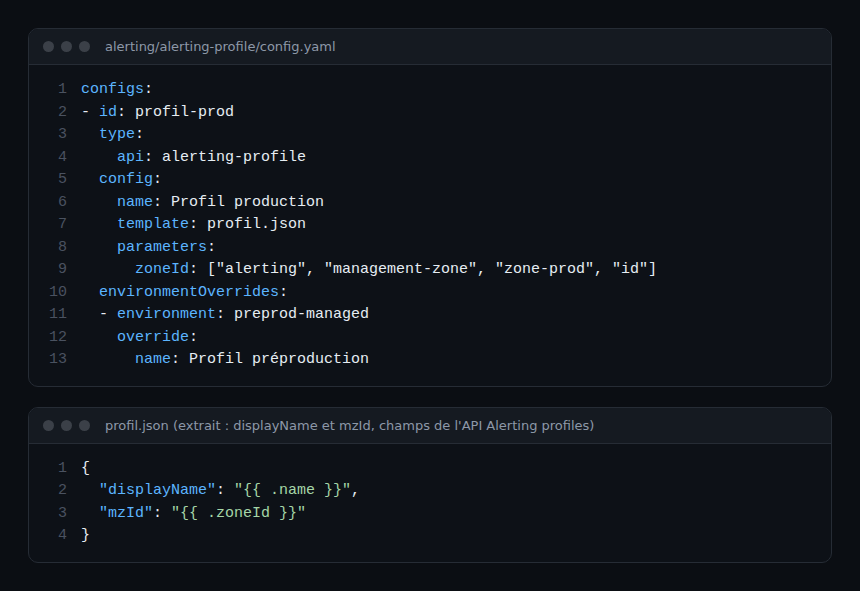
In the example, zoneId resolves the identifier of the zone-prod management zone, defined in the management-zone folder of the same project. The template field mzId is the one used by the alerting profiles API; its type is a string. Since the value is inserted between quotes, the result stays valid JSON.
The environmentOverrides section changes values for one environment (here the name), and groupOverrides does so for a whole group. With skip: true in an override, a configuration is not deployed to that group.
Validate with deploy –dry-run
The basic command is monaco deploy manifest.yaml. Its --dry-run option (short form -d) validates the structure of the manifest, projects and configurations: it resolves parameters and renders the JSON templates. The documentation states that a dry-run does not connect to Dynatrace and cannot validate the content of the payloads. A deployment can therefore still fail with an HTTP 400 error if a template is wrong.
Other options help target a deployment:
--environment(-e): one or more environments from the manifest;--group(-g): an environment group, mutually exclusive with--environment;--project(-p): a project, with its dependencies;--continue-on-error(-c): carries on despite errors, at the risk of cascading errors on dependent configurations.
For an SRE team, the dry-run is a cheap check to run on every merge request: it catches broken references, missing variables and malformed JSON before they reach an environment. It does not replace a deployment to a test environment.
Best practices
- Start from an object exported with
monaco downloadrather than writing JSON from memory. - Keep templates simple; move logic into parameters.
- Deploy to the test environment first (
-e), then to the production group. - Never write a token in the manifest: only the variable name belongs there.
Hands-on exercise
The commands below were not run while writing this module: the expected results rely on the documentation and the CLI source code. Use a Managed test environment.
Step 1 — Prepare the project
Create the monaco-demo folder with the manifest from the illustration and an alerting project. Export two existing objects (a management zone and an alerting profile) with monaco download (module 3) to use as templates. Expected result: one folder per API type, each with a config.yaml and a JSON file.
Step 2 — Parameterise the template
In the profile JSON, replace the name with "{{ .name }}" and the zone identifier with a variable fed by a reference to the management zone, as in the example. Expected result: no environment-specific value remains hard-coded, apart from those in parameters.
Step 3 — Validate with a dry-run
export DT_PREPROD_URL="<URL of your Managed test environment>"
export DT_PREPROD_TOKEN="<test API token>"
monaco deploy manifest.yaml --dry-run
Expected result: the CLI source code logs “Validation finished without errors” when everything is consistent (wording not confirmed on every version).
Step 4 — Trigger a deliberate error
Replace the configId of the reference with a non-existent identifier, re-run --dry-run, then restore it. Expected result: an error at load or validation time, with no call to the environment.
Step 5 — Deploy
monaco deploy manifest.yaml -e preprod-managedExpected result: the management zone is created before the alerting profile that refers to it. Run the command again: the object is updated, not duplicated, because the name is identical.
Quiz
- Which three fields are mandatory in a
configsentry? a) name, template, skip b) id, type, config c) id, name, scope d) project, type, parameters - What does
--dry-runcheck? a) That the Dynatrace API accepts the JSON payload b) The file structure and template rendering, without connecting c) The API token scopes d) Nothing, it deploys read-only - A
referenceparameter is used to: a) read an environment variable b) read a property of another configuration and enforce deployment order c) import a file d) disable a configuration - How do you deploy to one specific environment only? a)
--groupb)--projectc)--environmentd)--continue-on-error
Answer key
- b) Each configuration requires
id,typeandconfig. - b) A dry-run does not connect to Dynatrace: payload content is not validated.
- b) The reference creates a dependency: the target configuration is deployed first.
- c)
-etargets one or more environments of the manifest.
Going further
- Dynatrace Monaco: the configuration-as-code tutorial
- Monaco or Terraform: how to choose
- Dynatrace Managed path: automation and API
- Official documentation: Monaco YAML Configuration (Managed)
← Module 3: Monaco Managed export · Path overview · Module 5: Monaco Managed secrets →
Frequently asked questions
Does a dry-run guarantee that the deployment will succeed?
No. It validates structure and template rendering without contacting Dynatrace. A JSON payload that is invalid for the API can still cause an HTTP 400 error during the real deployment.
Why is an object created twice instead of updated?
For a classic API, the name identifies the object. If the template name differs from the YAML one (extra space or character), Monaco cannot find the existing object. Check that the template uses "{{ .name }}" with nothing around it.
Can the deployment order be forced?
Yes, through dependencies: a reference parameter makes the referenced configuration go first. For the order of some Settings 2.0 objects, the documentation also describes an insertAfter parameter (CLI 2.14.0 or later).
You can now structure a project, link configurations, validate with a dry-run and deploy to a chosen environment. The next module covers secrets, multiple environments and the delete command.
span.observer is an independent community blog, not affiliated with Dynatrace LLC. This path does not replace the official Dynatrace University training and certifications. Check features against the official documentation for your version.