Module 5 of the Monaco Managed path: Monaco Managed secrets, meaning how to keep tokens and URLs out of Git, target several environments from the same code and delete a configuration safely.
Learning path: Monaco Managed · Module 5/5 · Duration: ~45 min · Level: Intermediate
Objectives:
- Supply tokens and URLs through environment variables, never in clear text in Git
- Declare several Managed environments and adapt a configuration to each
- Write a
delete.yamlfile and runmonaco deletewithout surprises - Lay out a safe Git repository for configuration code
Prerequisites: module 4 (projects, config.yaml, deploy --dry-run), Monaco installed, a test Managed environment and one API token per environment.
A manifest that works on your laptop is not enough: it ends up in Git, read by the whole team and by the pipeline. This module therefore deals with Monaco Managed secrets first. It applies to Dynatrace Managed only: classic API tokens, URLs of the form https://<domain>/e/<environment-id>, no OAuth and no platform tokens.
For reliability, the stakes are twofold. A token published in a repository must be revoked urgently (toil and risk). A delete run against the wrong environment destroys production configuration, which lengthens the MTTR of an incident you caused yourself.
Monaco Managed secrets: everything goes through environment variables
The Monaco documentation is explicit: the tool does not let you enter sensitive information directly in the manifest. The name field of a token does not hold the token but the name of the environment variable that carries it. The official repository code confirms that these secrets are read only from the process environment.
The environment URL can follow the same logic: type: environment means that value is a variable name, not an address.
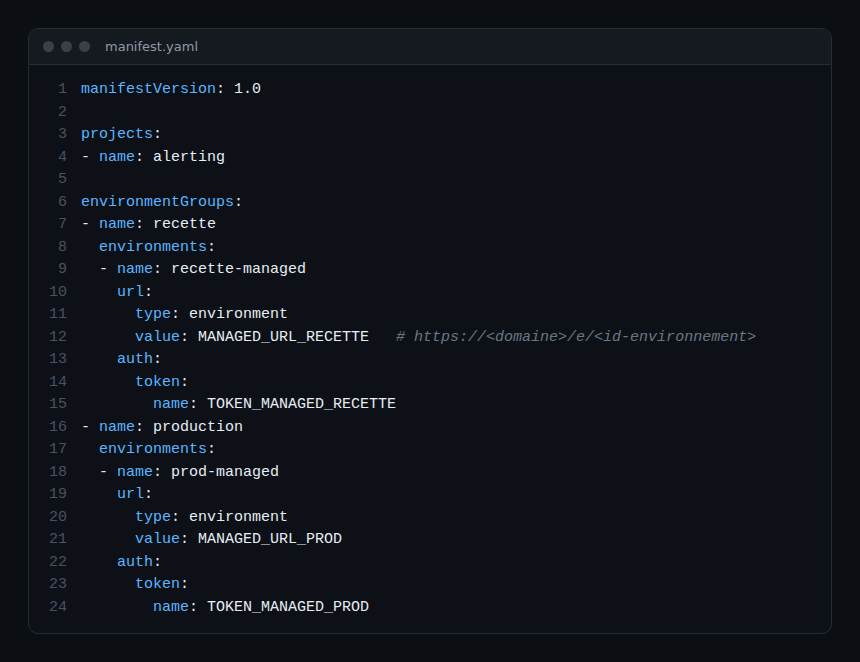
Critical lines:
url.type: environment:MANAGED_URL_RECETTEis read from the environment; the expected URL is that of the Managed environment, with its identifier;auth.token.name: name of the variable that holds the API token;environmentGroups: groups environments, here “recette” (test) and “production”. Thedeployanddeletecommands accept--group(-g) or--environment(-e), which are mutually exclusive.
On Linux or macOS, type the token without writing it to the shell history:
read -rs TOKEN_MANAGED_RECETTE
export TOKEN_MANAGED_RECETTE
export MANAGED_URL_RECETTE="https://<your-domain>/e/<environment-id>"
The “Migrate configuration” page of the Managed documentation gives the same advice: store the token in a safe place, such as a password manager, then supply it through an operating system environment variable. Use one token per environment: a test token must not open production.
Token scopes
That same page lists write scopes for the target environment of a migration: Write Configuration, Write settings and Write SLO, in addition to the read scopes. For a deployment, grant the token only the write scopes needed for the configuration types you deploy. The page gives no scope specific to deletion: that point is not verified, so test it on a test environment.
Multiple environments: one codebase, several targets
A project describes a configuration; the manifest describes where to deploy it. The documentation states that parameters can be overridden depending on the targeted group or environment. In config.yaml, three mechanisms cover most needs:
- a
type: environmentparameter withnameand, optionally,default: withoutdefault, a missing variable raises an error; skip, which can itself come from an environment variable;environmentOverrides(orgroupOverrides), which replace values for a named environment.
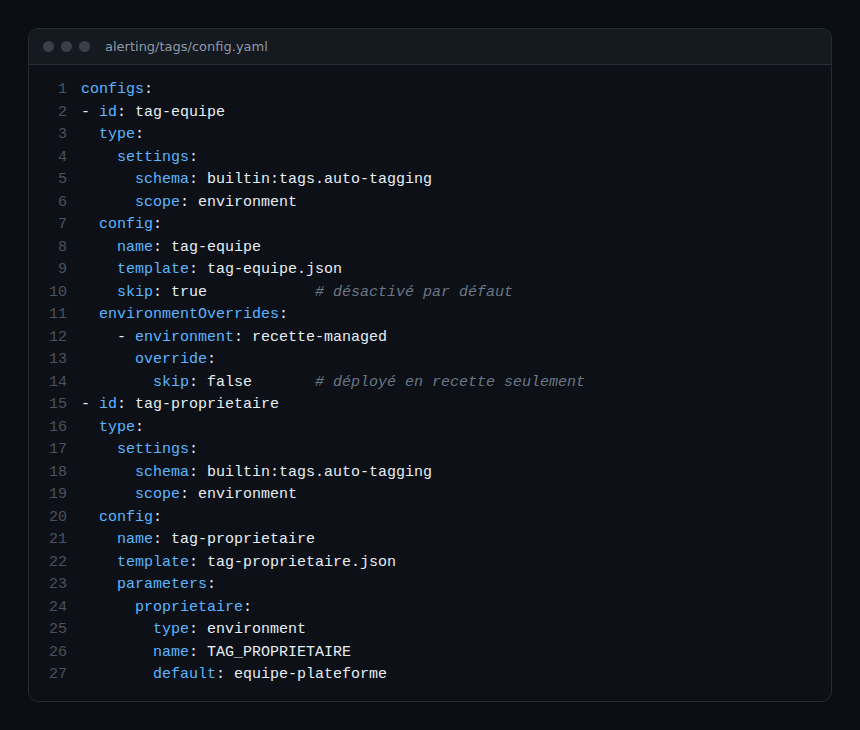
Here, tag-equipe is deployed on the test environment only. The builtin:tags.auto-tagging schema comes from the Monaco repository’s test data; check that it exists in your Managed version before reusing it.
A simple rule: a value that changes between environments and is not secret goes in environmentOverrides, under version control. A secret value never appears in a repository file: it goes through type: environment without default.
Deleting with monaco delete
Monaco deletes only what you list. The delete.yaml file (default name) contains a delete list. The format depends on the configuration type, according to the documentation and the repository code:
- classic configuration API:
typeandname; - Settings 2.0 objects:
project,type(the schema identifier) andid, the Monaco identifier of the configuration; - direct deletion:
typeandobjectId.
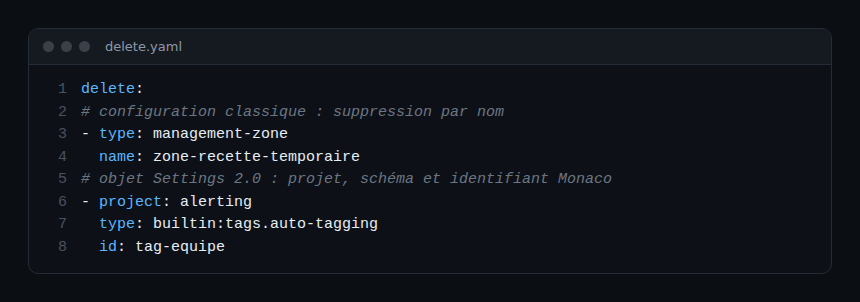
The command shown in the CLI help:
monaco delete --manifest manifest.yaml --file delete.yaml --environment recette-managedA point of caution from the command help: without --environment or --group, every environment in the manifest is targeted. Always name the target. The monaco generate deletefile command produces a file from the projects of a manifest, with the options --types, --exclude-types, --project and --output-folder: review the file before any use. The purge command only appears when the MONACO_ENABLE_DANGEROUS_COMMANDS variable is set: avoid it.
Git repository best practices
- Version the manifest, projects, JSON templates and
delete.yaml: they only contain variable names. - Never version a variables file holding real values: add it to
.gitignoreand provide an empty example. - Have every change reviewed: the diff of a
delete.yamltakes two minutes to read. - Inject tokens from your CI tool’s secret store, one per environment.
- Enable a secret scan before push (the scanning tool of your choice): a leak is caught before publication, not after.
- Plan for rotation: a token with an expiry date is replaced without touching the repository, since only the variable changes.
For the overall picture, see Dynatrace Monaco: configuration as code; to compare with Terraform, see the separate Terraform course.
Hands-on exercise
Run this on a test Managed environment, with a project from module 4. None of the commands below was run while writing this module: compare your results with the expected outcomes described, not with a copied output.
Step 1 — Take the secrets out of the manifest
Replace the URL and token with type: environment references and token.name, as in the first excerpt. Expected result: git grep on the repository finds no token.
Step 2 — Validate
Export the variables, then run monaco deploy manifest.yaml --dry-run --environment recette-managed. Expected result: validation succeeds. Then unset a variable used without default: an error should report the missing variable.
Step 3 — Differentiate test and production
Add an environmentOverrides block and check that a --dry-run targeting production does not include the configuration reserved for the test environment.
Step 4 — Delete on the test environment
Deploy a test configuration to the test environment, write its delete.yaml, then run monaco delete with --environment recette-managed. Expected result: the configuration disappears from the test environment and stays intact elsewhere.
Quiz
- What does
auth.token.namecontain in the manifest? a) The token b) The name of the environment variable holding the token c) The name of the token file d) The environment identifier - What happens if
monaco deleteruns without--environmentor--group? a) Nothing b) An error c) Every environment in the manifest is targeted d) Only the test environment is targeted - Which
config.yamlkey overrides a value for a single environment? a)environmentOverridesb)templatec)scoped)originObjectId - Which file must never hold a real value in Git? a)
manifest.yamlb)delete.yamlc) An environment variables file d) A JSON template without secrets
Answers
- b) Monaco refuses clear-text secrets and reads the named variable.
- c) With no target given, every environment in the manifest is used for deletion.
- a)
environmentOverridesredefines parameters orskipfor a named environment. - c) It holds the real values; only variable names are versioned.
Further reading
- Monaco Managed to SaaS: export and replay configuration
- Migrating from Managed to SaaS
- Monaco: manifest and configuration files (official documentation)
- Official Monaco repository
← Module 4: Monaco Managed deployment · Course overview · Terraform Managed course (separate)
Frequently asked questions
Can the token go in the manifest if the repository is private?
No. The Monaco documentation does not accept secrets entered directly, and a private repository is still readable by the whole team and by its backups. Use an environment variable.
How do you avoid a delete on production?
Always name --environment or --group, and have the delete.yaml reviewed. With no target, every environment in the manifest is hit.
Does the same manifest work for Managed and SaaS?
The format is the same, but authentication is not: this module uses only Managed API tokens. The SaaS path covers OAuth and platform tokens separately.
You can now keep secrets out of Git, target one precise environment and delete a configuration in a controlled way. The Monaco path ends here; Terraform is covered by a separate course.
span.observer is an independent community blog, not affiliated with Dynatrace LLC. This learning path does not replace the official training and certifications of Dynatrace University. Check features in the official documentation for your version.