
Module 3 of the Monaco SaaS course: a Monaco SaaS export with monaco download turns an existing configuration into version-controllable files.
Course: Monaco SaaS · Module 3 · Duration: ~40 min · Level: Intermediate
Objectives:
- Run
monaco downloadwith a manifest or with a URL - Choose the exported scope with the
--only-*options - Read the generated structure: manifest, type folders,
config.yamland JSON templates - Know the limits of an export before redeploying
Prerequisites: Monaco installed and a working manifest (module 2), a Dynatrace SaaS test environment, an OAuth client or a platform token.
A SaaS environment rarely starts life in a Git repository: alerts, zones and settings were created by hand over the years. A Monaco SaaS export is the quickest way to take control of them. It reads the environment and writes files that you can review, compare and version. This module covers Dynatrace SaaS only; Managed has its own course.
Monaco SaaS export: what monaco download does
The command queries the environment’s APIs and writes a manifest and a project to disk. It changes nothing in Dynatrace: it is a read operation. For reliability it serves three purposes: backing up a configuration before a risky change, seeding a configuration-as-code repository, and comparing two environments.
There are two modes, according to the official Monaco command documentation.
| Mode | Key options | When to use it |
|---|---|---|
| With a manifest | --manifest (-m), --environment (-e) |
The module 2 manifest already describes the environment and its authentication |
| With a URL | --url and --oauth-client-id + --oauth-client-secret, or --platform-token |
A one-off export with no manifest beforehand |
The two modes are mutually exclusive: --url cannot be combined with --manifest. The credential options take the name of an environment variable, not the secret itself. The two OAuth options always go together, and an OAuth client cannot be combined with a platform token.
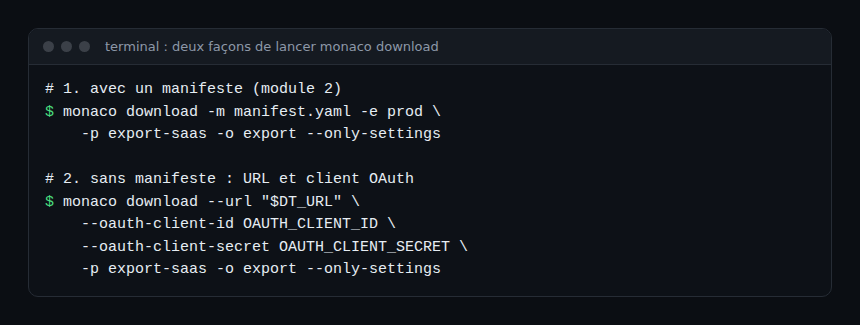
Required permissions: the OAuth client scopes
The export can only read what the client or token is allowed to see. The official page on creating an OAuth client for Monaco lists the scopes by purpose. For reading, keep these in mind:
app-engine:apps:run: environment metadata;settings:objects:readandsettings:schemas:read: Settings 2.0 objects and schemas;automation:workflows:read,automation:calendars:read,automation:rules:read: Automation;storage:bucket-definitions:read: Grail buckets;document:documents:read: documents;storage:filter-segments:read: segments;slo:slos:read: SLOs.
The scopes for each type appear in the “Monaco API support and access permission handling” page. The client’s permissions can also be restricted by the policies of the service user’s groups, so check that those groups grant the same scopes. The --admin-access option, which exports OpenPipeline resources of all owners, requires the settings:objects:admin permission. The scopes specific to a platform token are not listed in the pages read for this module: see the official guide for creating that token.
Choosing the scope of the export
Without a scope option, the documentation does not say what is downloaded, so target explicitly. The published options are:
--only-settings: Settings 2.0 objects only;--settings-schema(-s) targets one or more schemas;--only-apisand--api(-a): classic configuration APIs;--only-automation,--only-buckets,--only-documents,--only-segments,--only-slo-v2: one specific type.
Several --only-* options can be combined in one command. Start small, with one schema or one type, then widen. A targeted export is faster and easier to review.
Reading the generated structure
The output folder (option --output-folder, -o) receives a manifest.yaml file and a project folder named after --project (-p, default project). Without -o, the folder is called download followed by a timestamp. Inside the project, the Monaco source code creates one sub-folder per configuration type, named after the API or schema with special characters (colons, for example) removed. Each holds a config.yaml and JSON templates.
The config.yaml file declares configurations: an id, a type (here a Settings 2.0 schema and its scope), a name, a JSON template and parameters. This excerpt comes from a test file in the Monaco repository; it illustrates the format and is not real export output.
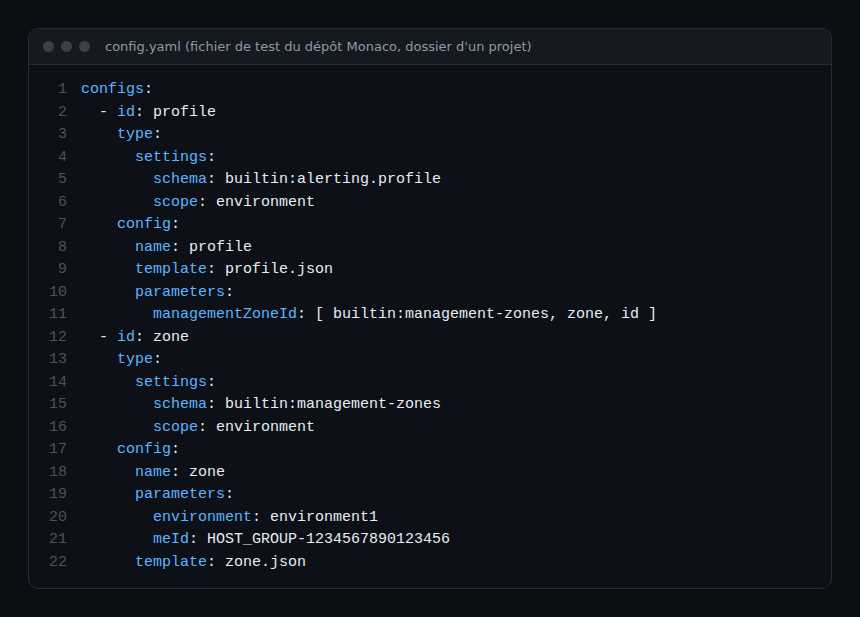
Note the profile’s managementZoneId parameter: it references the zone configuration as [ schema, id, property ]. During export, Monaco replaces known Dynatrace identifiers with references of this kind, which creates dependencies between configurations. Module 4 uses them at deployment.
If a manifest already exists in the folder, Monaco does not overwrite it without --force: it creates a timestamped manifest_ file instead. The project folder follows the same rule, with a timestamp suffix. The generated manifest holds no secrets, only the names of the environment variables it reads.
Limits of the export
- Excluded types. The
aws-credentials,azure-credentials,kubernetes-credentials,credential-vaultandextensiontypes are not downloaded; read-only configurations are skipped by default. - Filters can be disabled. With
MONACO_FEAT_DOWNLOAD_FILTER=false(CLI 2.2.0 or later) everything is downloaded, but the documentation warns that such a project cannot be deployed automatically without manual rework. - Circular dependencies. At the end of the export, Monaco looks for cycles and warns if it finds any: they must be resolved by hand.
- An export is not proof of fidelity. Review it and run a dry run (module 4) before applying it elsewhere.
The MONACO_CONCURRENT_REQUESTS variable (5 by default) sets the number of simultaneous requests: lower it if the network throttles or drops calls.
Hands-on exercise
The commands below were not run for this article; the exact output depends on your environment and Monaco version. Use a test environment.
Step 1 — Prepare the credentials
Create an OAuth client with the read scopes listed above. Put the client ID and secret in two environment variables (for example OAUTH_CLIENT_ID and OAUTH_CLIENT_SECRET). Never write them in a repository file.
Step 2 — Export the Settings 2.0 objects
export DT_URL="YOUR_SAAS_ENVIRONMENT_URL"
monaco download --url "$DT_URL" \
  --oauth-client-id OAUTH_CLIENT_ID \
  --oauth-client-secret OAUTH_CLIENT_SECRET \
  -p export-saas -o export --only-settings
Expected result: an export folder with a manifest.yaml and an export-saas folder, plus the final “Finished download” message and a message about circular dependencies in the logs.
Step 3 — Read the result
Open the manifest and check that it names variables and holds no secret. Browse a sub-folder: find the config.yaml, a JSON template, then a reference between two configurations.
Step 4 — Version it
Initialise a Git repository, commit the export as is, then run the command again later: the difference between the two commits shows the environment’s drift.
Best practices
- Export by scope (one schema, one type) rather than in bulk.
- Keep the raw export in a commit separate from your edits.
- Use a dedicated OAuth client, read-only for exports.
- Never commit a secret value.
Quiz
- What do the
--oauth-client-idand--oauth-client-secretoptions receive?- A. The value of the ID and secret
- B. The name of an environment variable
- C. A file path
- Can
--urland--manifestbe combined?- A. Yes, always
- B. Yes, if the environment is named
- C. No, they are mutually exclusive
- Which of these types is not downloaded by default?
- A.
credential-vault - B. A modifiable Settings 2.0 schema
- C. A bucket
- A.
- What does each type sub-folder of the exported project contain?
- A. A
config.yamland JSON templates - B. The environment’s logs
- C. Only the manifest
- A. A
Answers
- B: the options take the variable name, so the secret stays out of commands and the manifest.
- C: the documentation declares them mutually exclusive.
- A: types that carry credentials are excluded from the export.
- A: a
config.yamldeclares the configurations, and the JSON templates carry their content.
Going further
- Monaco and Dynatrace configuration as code
- Monaco or Terraform to configure Dynatrace
- Dynatrace SaaS APIs and Settings schemas
- Managing Dynatrace SLOs with Terraform
- Official Monaco command reference (SaaS)
- Create an OAuth client for Monaco
← Module 2: Installing Monaco · Course overview · Module 4: Deploying with Monaco →
Frequently asked questions
Does the export modify the Dynatrace environment?
No. The command reads configurations and writes local files. Only deployment, in module 4, changes the environment.
Can an export be redeployed as is?
Often, but not always. Excluded types are missing, and circular dependencies or objects specific to the source environment can block it. Review it, then run a dry run first.
Are secrets exported?
No: credential types are excluded, and the manifest stores only environment variable names. Secrets must be supplied at deployment, the subject of module 5.
You can now turn a SaaS environment into a readable, version-controlled Monaco project. The next module deploys those files: projects, templates, dependencies and a dry run.
span.observer is an independent community blog, not affiliated with Dynatrace LLC. This course does not replace the official training and certifications of Dynatrace University. Check features in the official documentation for your version.