Orca coding agent fleet management is the job of this open source desktop application: each task gets its own Git worktree, and several agents (Claude Code, Codex, OpenCode and others) run side by side in terminals tracked in one place. The stablyai/orca repository shows around 101,900 stars at the end of October 2026, making it one of the most followed projects in this series.
Running five agents in parallel also multiplies tokens, the access rights you hand to agents and the logs you must read. This article presents the project, its installation according to the README, what its screenshots show, its limits (telemetry, a young project) and how to supervise such a workstation. A note on honesty: span.observer has not installed or run Orca; the commands come from the README and the project’s documentation, and the screenshots come from the repository.
Orca coding agent fleet: what the repository says
- The project’s own definition: “The AI Orchestrator for 100x builders. Run Codex, ClaudeCode, OpenCode or Pi side-by-side — each in its own worktree, tracked in one place.”
- Licence: MIT, with, according to the LICENSE file, a 2026 copyright in the name of Lovecast Inc.
- Figures read on 22 October 2026: about 101,900 stars, about 6,400 forks, 15,728 commits; the
package.jsonon the main branch shows version 1.4.214. The project says it ships daily, so these figures move fast. - Platforms: macOS, Windows and Linux on the desktop, plus an iOS and Android companion app.
Orca works with “any CLI agent”: if it runs in a terminal, it runs in Orca. The README list ranges from Claude Code and Codex to Goose, Cline or Mistral Vibe. To understand what you launch there, see our articles on OpenClaw and Paperclip, two other approaches to agent orchestration.
Interface tour: worktrees, remote servers, environments
The central idea, according to the documentation, is being “worktree-native”: instead of branching and stashing on a single folder, every task gets its own copy of the repository through git worktree, with its own branch, files and agent terminals. According to the project, that is what makes parallel agents safe: they do not step on each other’s files. Deleting a worktree removes the folder and the branch, after confirmation.
The README lists the main features: mobile companion, parallel worktrees, terminal splits, Design Mode (click an element in an embedded Chromium to send its HTML and CSS to the agent), native GitHub and Linear, SSH worktrees, diff annotation, and an orca CLI (orca worktree create, snapshot, click, fill) so agents can drive Orca themselves.
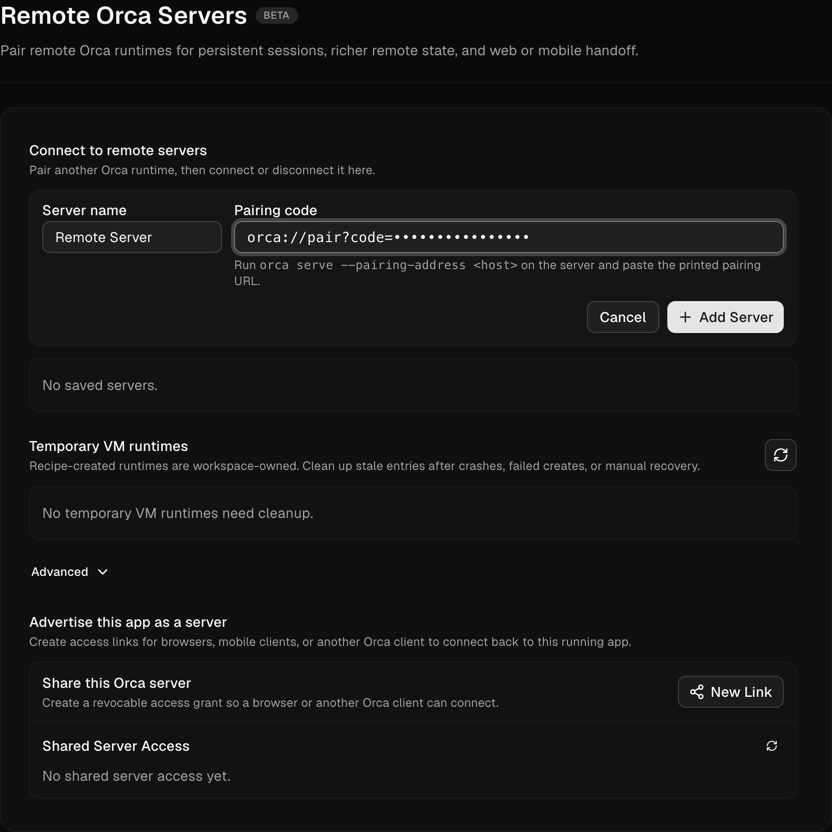
The next screenshot, taken from the repository’s documentation, shows the remote servers screen (“Remote Orca Servers”, marked beta): you paste a pairing code of the form orca://pair?code=… obtained by running orca serve --pairing-address <host> on the server.
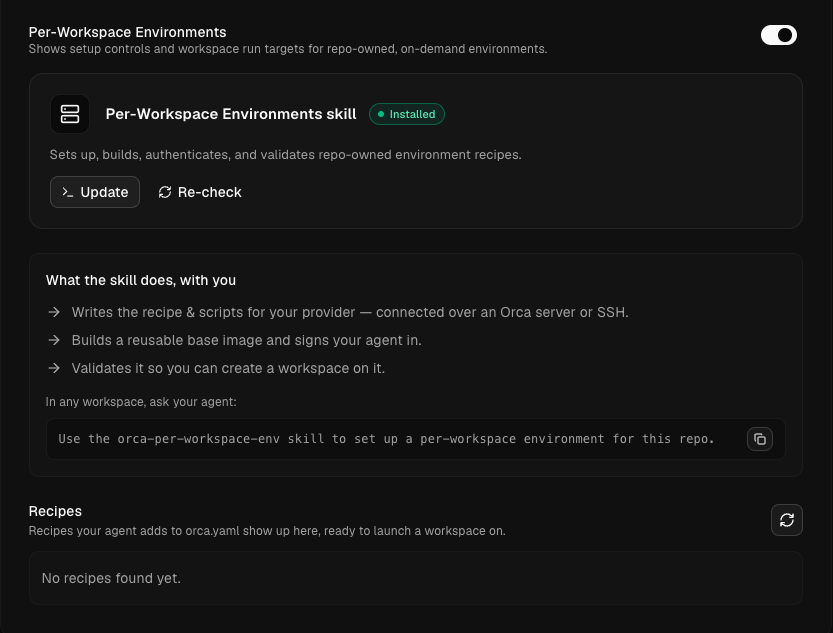
The second screenshot shows the “Per-Workspace Environments” setting: an installed skill writes a recipe (an orca.yaml file) describing a workspace’s environment, connected through an Orca server or SSH, and the list of recipes appears on the screen.
Installation step by step
Step 1 — Install the application
The README offers a download from the project’s site, direct builds (macOS Apple Silicon and Intel, Windows .exe, Linux AppImage), or a package manager:
# macOS (Homebrew)
brew install --cask stablyai/orca/orca

# Arch Linux (AUR)
yay -S stably-orca-bin
The repository states that Windows builds are signed with a certificate provided by the SignPath Foundation. Still, check where a binary comes from: only download from the repository or the site named in the README.
Step 2 — Add a repository and create a worktree
In the application you add a repository, then create a worktree by choosing the project, where it runs (“Run on”, local or a remote server) and the agent. The documentation notes that creation continues in the background while you work elsewhere.
Step 3 — Pair the phone or a remote server (optional)
On a headless machine, the documentation points to orca serve (on Linux the command is called orca-ide), with options such as --port and --pairing-address. The relay that pairs the mobile app with the desktop host is published in the repository, in the cloud/ folder.
Limits and open points
- A project that moves every day: the README admits its feature list is “perpetually behind”. Pin the version and read the release notes before updating.
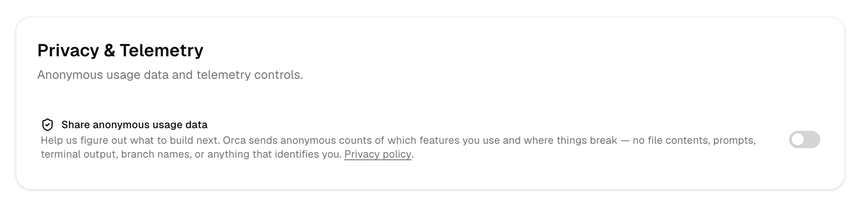
- Telemetry: the documentation describes anonymous usage telemetry in packaged builds (a random local ID, hosted on PostHog in the United States). It states that prompts, terminal output, repository names and paths are never sent, but it does collect, among other things, which agents you use and their token counts. You turn it off through the Privacy setting (“Share anonymous usage data”), or with
DO_NOT_TRACK=1orORCA_TELEMETRY_DISABLED=1. - Agent permissions: the workstation launches agents that read and modify code. The README screenshot shows agents in “bypass permissions” or “YOLO” mode; decide explicitly what each agent may do, as in our guardrails for agents in production.
- Cost: one prompt fanned out to five agents is five times the token bill, unless you compare results before merging.
How to observe and supervise a fleet of agents
Orca is not an inference server: it is a workstation that launches other agents. So you observe two separate things. On the Orca side, the README’s “Account switcher & usage tracking” feature shows Claude and Codex usage and rate-limit resets, a useful but local indicator. On the agent side, serious measurement goes through the agent’s own OpenTelemetry telemetry, as explained in supervising a coding agent in the enterprise. This approach applies to Dynatrace SaaS and Dynatrace Managed alike, since it relies on OTLP metrics.
To find out whether parallelism pays off, compare cost and time per task, not per session: see the token cost of an AI agent with OpenTelemetry. One worktree per task gives a natural unit of comparison.
How to check that it works
- Create two worktrees on the same repository: each has its own branch and folder, visible in
git worktree list. - Launch an agent in each: changes in one do not appear in the other.
- Turn off usage telemetry if your policy requires it, then restart the application.
Best practices
- One worktree per task and one task per measurable goal (a passing test, a closed ticket).
- Limit simultaneous agents to what you can review: diff annotation does not replace code review.
- Keep agent tokens out of the repository and grant minimal rights on remote servers.
- Record the Orca and agent versions alongside every cost measurement.
Frequently asked questions
Is Orca really open source?
The repository is under the MIT licence, a permissive OSI-approved licence. Packaged builds add telemetry described in the documentation, which you can turn off.
Do I need an account to use Orca?
The telemetry documentation says Orca has no account system. Each agent still keeps its own credentials, for example Claude Code or Codex.
Does Orca replace Git or my editor?
No: it builds on git worktree and adds an editor, a browser and terminals. You stay in charge of branches and merging.
Conclusion
Orca offers a simple method for running a fleet of coding agents: one task, one worktree, one agent, one central view. Its real value depends on your ability to review, limit permissions and measure cost per task. Sources: stablyai/orca repository and Orca telemetry documentation.
span.observer is an independent community blog, not affiliated with Dynatrace LLC or the projects mentioned. Trademarks belong to their owners. Tools change quickly: check commands and options in their official documentation.