
Paperclip AI agent orchestration: the paperclipai/paperclip repository offers a Node.js server and a React interface for running a team of AI agents the way you run a task manager, with an org chart, budgets and approvals. It showed about 103,000 stars in mid-October 2026. The project sums itself up this way: “If OpenClaw is an employee, Paperclip is the company”.
For an operations team the interest is not the metaphor. Once a dozen agents run in parallel, nobody knows who did what, what it cost, or which agent may touch which resource. Paperclip claims to answer those three questions (activity, costs, permissions). This article presents what the repository says, how to install it from the README, and how to supervise such a fleet of agents.
The information comes from the project’s README and documentation. span.observer did not install Paperclip: the image and diagram below come from the repository.
Paperclip AI agent orchestration: what the repository says
- Licence: MIT. The LICENSE file reads “Copyright (c) 2025 Paperclip AI”, while the GitHub footer mentions “Paperclip Labs, Inc.”; the legal entity’s name varies by page.
- Technology: a Node.js server (24.11 or newer) and a React UI, with an embedded PostgreSQL database locally.
- Latest release: v2026.1012.0, published on 12 October 2026, after v2026.1005.0 and v2026.1001.0: a release every one to two weeks.
- Positioning: “not an agent framework” (the README): your agents (Claude Code, Codex, Cursor, Gemini CLI, OpenClaw, custom processes or webhooks) stay what they are, and Paperclip organises them as a company with goals, roles and budgets.
- Commercial offer: the README also links to a waitlist for “Paperclip Cloud”; the self-hosted software needs no account.
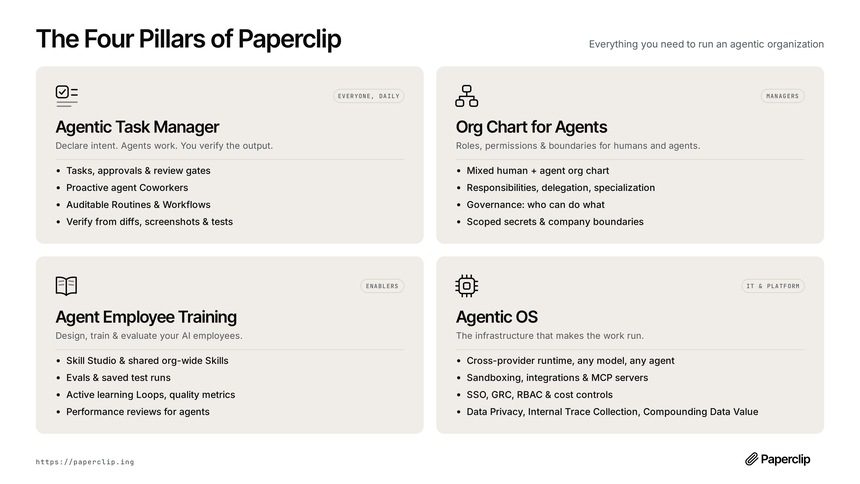
The repository’s diagram groups features into four pillars: tasks and approvals, org chart and permissions, agent training and evaluation, and infrastructure (cross-provider runtime, sandboxing, SSO, cost controls, run history and opt-in tracing).
Installing Paperclip from the README
Step 1 — Run onboarding
npx paperclipai@latest onboard --yesThe README says the command runs from the npm cache and that configuration and data stay local. By default the quick start uses “trusted local” loopback mode. To start in authenticated mode instead, choose a bind preset:
npx paperclipai@latest onboard --yes --bind lan
# or
npx paperclipai@latest onboard --yes --bind tailnet
If Paperclip is already configured, rerunning onboard keeps the existing configuration; npx paperclipai configure edits it.
Step 2 — Try it without commitment
The README describes test-drive: an isolated test instance already initialised with a CEO agent, which stays in the foreground and creates neither a service nor a first task.
ANTHROPIC_API_KEY=... npx paperclipai test-driveStep 3 — Or from source
git clone https://github.com/paperclipai/paperclip.git
cd paperclip
pnpm install
pnpm dev
The UI and API start on http://localhost:3100 with an embedded PostgreSQL database. Requirements: Node.js 24.11+ and pnpm 9.15+. For lasting use the README suggests pointing to your own PostgreSQL and describes a Docker deployment.
Under the hood
The README publishes an architecture diagram: a single server groups identity and access, tasks, “heartbeat” execution, governance, org chart, workspaces, plugins, budget, routines, secrets, activity and events.
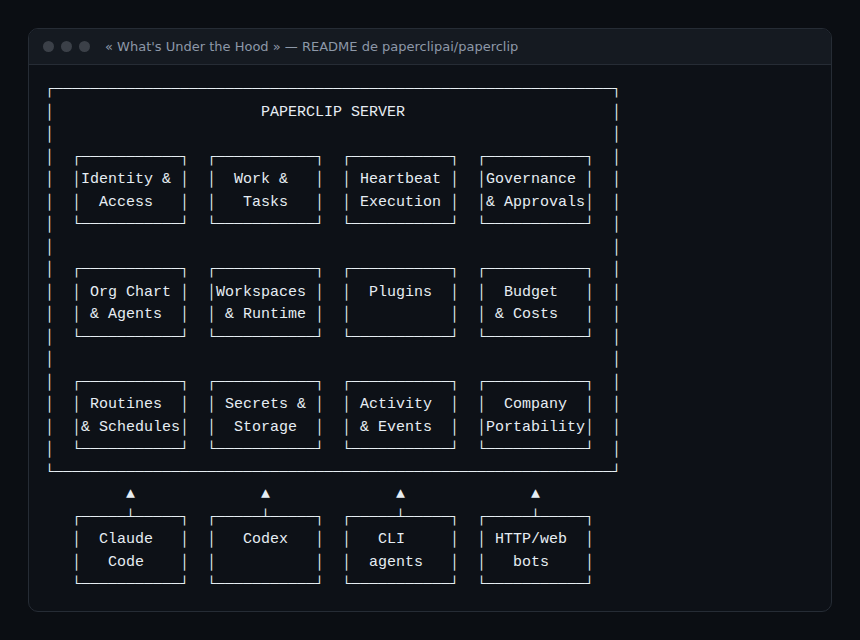
Two mechanisms matter for reliability: atomic task checkout (one agent per task, with execution locks) and budget hard stops.
Supervising a team of Paperclip agents
An orchestrator concentrates risk: it decides who works, with which secrets and at what price. The measures from AI agent cost and guardrails therefore apply twice: at each agent and at the orchestrator.
The Audit menu: activity, runs, costs, budgets
The documentation describes an Audit page with five tabs: Activity, Runs, Costs, Budgets and Timeline.
- Activity: every change (task status, comment, hire, agent pause, approval, spend) is recorded with actor, action, entity, details and timestamp. A toggle narrows the feed to agent actions.
- Costs: for each call Paperclip records the agent, model, token count and dollar cost, aggregated per agent and per UTC calendar month. The documentation says the amount kept is the billed one after cache discount, and that cached tokens are counted separately.
- Budgets: thresholds per company, agent or project. According to the documentation a warning is recorded at 80% and the agent is paused automatically at 100%.
The README qualifies the stop: it relies on recorded spend, and delayed usage reporting or in-flight work can postpone it. A budget cap is a guardrail, not a to-the-cent guarantee.
What about OpenTelemetry?
In the README and documentation pages I read, I found no documented OpenTelemetry export. The project mentions a plugin system (“custom tracing” as an example) and a run history with opt-in tracing. If you need traces in your backend, check the plugin and API documentation (costs, activity) before promising a dashboard; otherwise query the cost and activity API, and instrument the agents themselves as in observing MCP agents.
How to check that it works
- A test agent gets a task: the Activity tab shows the status change, the Runs tab the execution, the Costs tab a cost line for the model used.
- A deliberately low budget triggers the 80% warning then the 100% pause: check the incident appears in Budgets.
- Paperclip’s monthly total matches the model provider’s console, give or take the cache discount.
Limits and open points
- Rapid growth, young project. Over 100,000 stars and weekly-ish releases: attention is massive, interface stability remains to be shown. Several README features are marked “experimental” (Agent Chat, chat connectors).
- README claims. The text promotes orchestrating “autonomous businesses”; no figure is verifiable from the repository. The project answers the “is it maintained?” question itself by citing over 2,700 merged pull requests: that is the project’s own statement.
- Agent privileges. The default mode is “trusted local”; the agents it invokes (Claude Code, Codex, shell) keep their own rights on the machine. Orchestration is not isolation: combine it with an isolated runtime such as NVIDIA OpenShell.
- Real spend. The documentation warns that agents make real, billed calls; set a budget before automating.
Best practices
- Start with
test-driveand a low budget; widen later. - Keep trusted local mode for a personal workstation; otherwise use authenticated mode and a private network.
- Give each agent its own budget and secrets, and review the Activity tab weekly.
- Regularly export costs and activity to your monitoring tool, and alert on the gap between Paperclip spend and the provider invoice.
- Treat a looping agent as a reliability incident, without hunting for a culprit.
Frequently asked questions
Does Paperclip replace OpenClaw or Claude Code?
No. According to the README, Paperclip uses those agents and organises them into a team. See our article on OpenClaw.
Is Paperclip free?
The code is MIT-licensed and self-hosting needs no account. Model calls are billed by your provider; a cloud offer is announced through a waitlist.
Where is the data stored?
Locally, one Node.js process manages an embedded PostgreSQL database and local file storage; in production the README suggests your own PostgreSQL.
Conclusion
Paperclip meets a real need: making a fleet of agents legible, with an auditable activity trail and budgets. It remains a fast-growing project whose features change quickly and whose claims should be re-read on the repository. Treat it as a privileged service: low budgets, isolated agents and a regular review of the Audit tab.
span.observer is an independent community blog, not affiliated with Dynatrace LLC or the projects mentioned. Trademarks belong to their owners. Tools change quickly: check commands and options in their official documentation (docs.paperclip.ing).