Agent Reach CLI for AI agents is a command-line tool, published on GitHub by Panniantong, that gives an agent (Claude Code, Codex, OpenClaw…) read and search access to platforms its built-in tools reach poorly: sites behind a login, video subtitles, Chinese platforms. The repository has about 103,400 stars and 9,200 forks at the end of October 2026, according to its GitHub page.
For an engineering team the useful question is not only “what can it read?” but “what does it touch on my machine?”. This article follows the README, the docs/install.md file and the LICENSE file of the repository. For a neighbouring project that hands commands to an agent, see CLI-Anything.
A note on honesty: span.observer is an independent blog with no link to the project’s author, and has neither installed nor run Agent Reach. The commands come from the README and the repository documentation; the screenshots below are excerpts rendered from those files. The README is written in Chinese (an English version is linked as docs/README_en.md).
Agent Reach CLI for AI agents: what the repository says
- Author and licence: repository of the GitHub user Panniantong. The LICENSE file is an MIT licence reading “Copyright (c) 2025 Agent Eyes”.
- Language: Python 3.10 or later, according to the README badge.
- Figures read on 26 October 2026: about 103,400 stars and about 9,200 forks. I could not read a release number on the page;
install.mdinstalls the archive of the “latest release”. - Principle: for each platform and action, the project keeps an ordered list of upstream tools (a preferred one, then fallbacks). The README’s example for reading a web page: Jina Reader first, then Exa.
- Read-only: the “Security” section says the tool searches and reads, and does not post, comment, like or send direct messages.
A tour of the commands and platforms
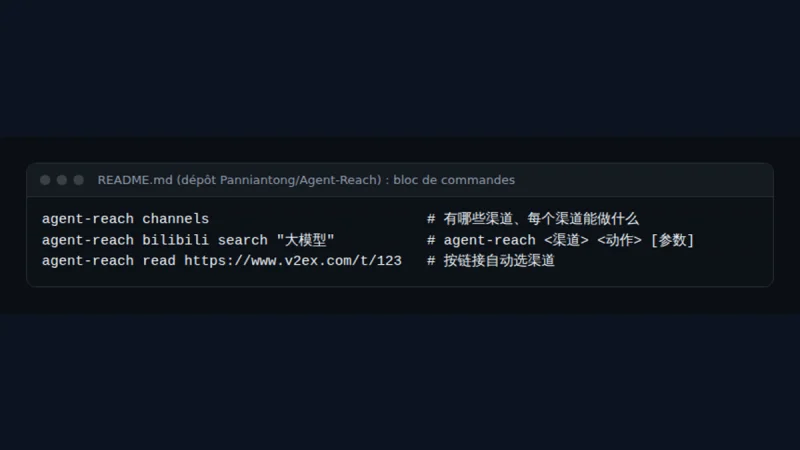
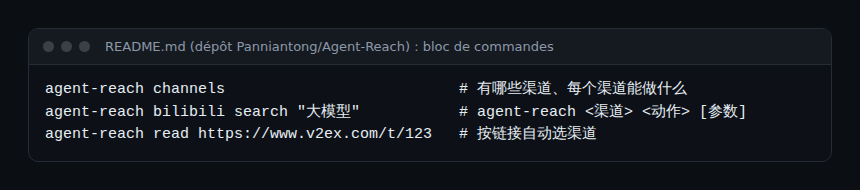
The README sums up usage in three commands: list the “channels”, run an action on a channel, or read an address and let the tool pick the channel.
The platform table ranks each channel on three levels: “default” (available after install), “optional” (enabled on request) and “experimental” (may stop working at any time, because platforms tighten their protections against automation).
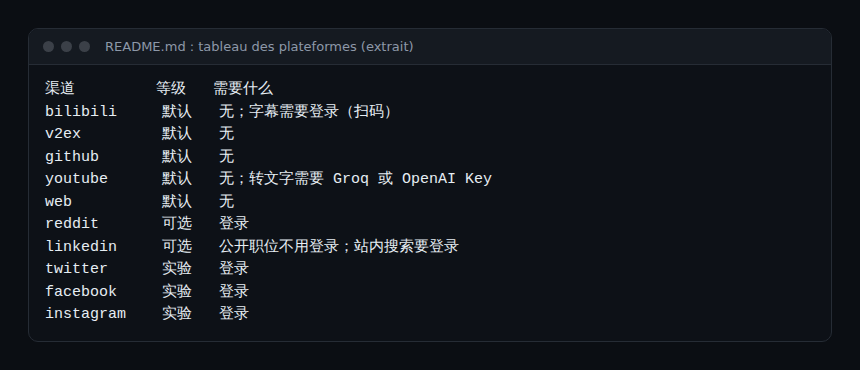
- Default: bilibili, v2ex, github, youtube, web. Audio transcription for YouTube needs a Groq or OpenAI key.
- Optional: xiaohongshu, xueqiu, boss, xiaoyuzhou, linkedin, reddit. Most need a login.
- Experimental: twitter (X), facebook, instagram, all with a login.
Step-by-step installation
The README does not give you a command to type first: it asks you to tell your agent to install the tool from the install.md file. That file is written “for the AI doing the work”.
Step 1 — Give the instruction to the agent
The README says to paste this sentence into the agent (in Chinese in the original):
帮我安装 Agent Reach:https://raw.githubusercontent.com/Panniantong/Agent-Reach/main/docs/install.mdThe same message is used to update. You can also read install.md yourself and type the commands by hand.
Step 2 — Install with uv
According to install.md, you need uv. If it is missing, the file gives curl -LsSf https://astral.sh/uv/install.sh | sh for macOS and Linux and an equivalent PowerShell command for Windows. Then:
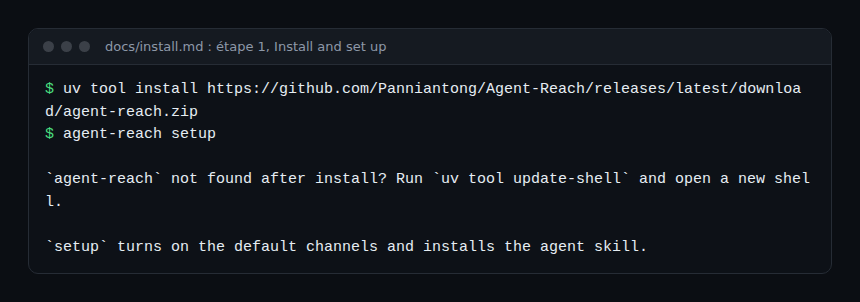
Step 3 — Check
According to install.md, since version 1.6 every agent-reach command returns a JSON object with the fields ok, result and error.hint. agent-reach version checks the installation; agent-reach update updates the program, the channel tools and the skill. Everything is kept in ~/.agent-reach/.
Warning from the README and install.md: the PyPI package named agent-reach is not this project. Do not install it from PyPI.
Limits and open points
- Third-party platforms: the tool reads sites you do not own. The README says platforms may tighten anti-scraping measures and may limit accounts with automated access, but it does not discuss their terms of use. Read the terms of each service (X, Reddit, LinkedIn, Facebook, Instagram…) before automating, especially for professional use.
- Login and personal data: for login platforms, the README says the tool copies the login already present in your Chrome, for that one site only, into its dedicated browser, without reading the password manager. It adds that this is often your main account and recommends a secondary one. What is read is then seen by your agent, so by its model provider.
- Keys: transcription needs a Groq or OpenAI key. The README asks you to enter it in your own terminal with
agent-reach configure groq-key, never in the chat. - Agent-driven install: having an agent run a remote file, with permission to execute commands, is a matter of trust. Read
install.mdfirst, or install by hand. - Experimental channels: the project warns they may break at any time.
- Standing: the repository has many stars and its author says they use it daily, but I did not assess the code quality. The README contains a sponsors section (commercial data-collection and proxy services) and a scam notice: the project states it has no official token or cryptocurrency.
Observe and monitor
The documentation read does not describe an OpenTelemetry export. What you can measure without inventing a feature:
- Agent calls: if your agent emits OpenTelemetry traces, each
agent-reachcall shows up there as a tool call. See end-to-end OpenTelemetry. - JSON outputs: the
okfield anderror.hintlet you count failures per channel and spot an experimental channel that breaks. - Workstation: watch the size of
~/.agent-reach/, outbound connections and the dedicated browser’s processes.
Best practices
- Start with the default channels, which need no login.
- Use a secondary account for any channel that needs a login.
- Read
install.mdbefore letting an agent run it. - Record which channels are enabled and why; see guardrails for AI agents.
- Treat text read from the web as untrusted: it may contain instructions aimed at the agent (see securing an MCP server).
Frequently asked questions
Can Agent Reach post or comment for me?
The README states the tool is read-only: no posts, comments, likes or direct messages. Check the code if that is a requirement.
Is it free?
The repository is under the MIT licence. External services (Groq or OpenAI keys for transcription) have their own pricing and terms.
Does it work with any agent?
The README answers that “all agents” can use it and names Claude Code, Codex, Hermes Agent and OpenClaw. I have not tested it with each.
Conclusion
Agent Reach gathers upstream tools behind one command and a JSON output. The value is real for reading hard-to-reach sources; the cost is handing logins and keys to an agent. Treat it as a component to audit. Sources: Panniantong/Agent-Reach repository and docs/install.md.
span.observer is an independent community blog, not affiliated with Dynatrace LLC, the author of Agent Reach or the projects mentioned. Trademarks belong to their owners. Tools change quickly: always check commands and options in their official documentation.