Twenty CRM open source: the twentyhq/twenty repository offers a CRM that you build, ship and version “like the rest of your stack”, according to its README, with objects, views, workflows and agents that you extend through code. It showed around 59,400 stars in October 2026. The README calls itself “The #1 Open-Source CRM”: that is the project’s slogan, not a ranking we have verified.
For a technical team, a self-hosted CRM is not only a sales tool: it is a web application with a PostgreSQL database, Redis, task queues and customer data to protect. This article presents the project, its licence (the part to read carefully), the Docker installation according to the documentation, and what you can monitor.
The information comes from the README, the LICENSE file and the official documentation. span.observer has not installed Twenty: the screenshots below come from the project’s documentation.
Twenty CRM open source: what the repository says
- Who: the commercial licence text in the repository is in the name of Twenty.com, PBC.
- Stack: TypeScript, Nx, NestJS with BullMQ, PostgreSQL and Redis, React (the README’s list).
- Three ways to use it: the cloud (sign-up on twenty.com), building apps in code with the CLI, or self-hosting with Docker Compose.
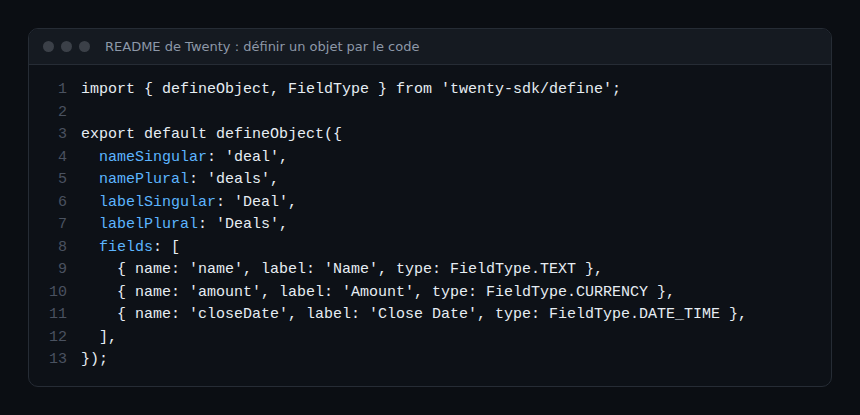
- Extensibility: the README shows the definition of a “deal” object in TypeScript, with text, currency and date fields.
- Version: the releases page showed nothing at the time of reading; the installation documentation cites the
v2.38.1tag as an example.
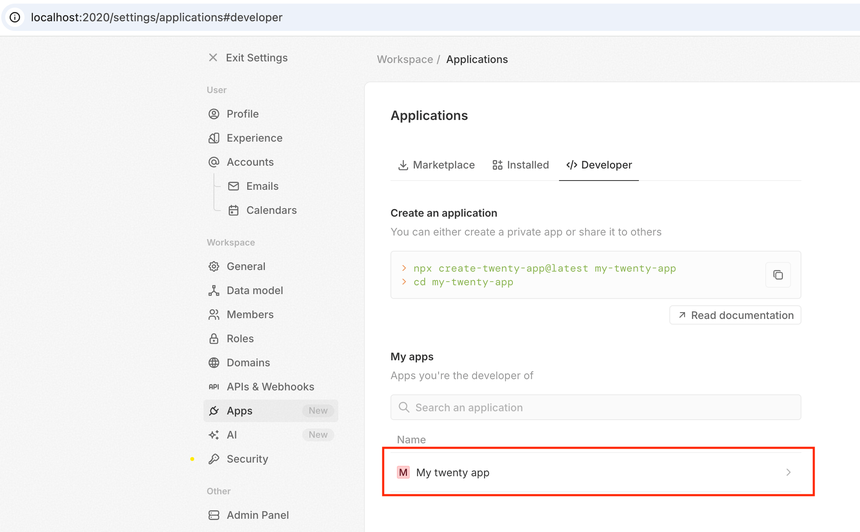
The screenshot, taken from the app development guide, shows Settings > Applications > Developer on a local instance (port 2020 in this example): the command to create an app and the list of your apps.
Licence: AGPL, MIT and “Enterprise” files
The repository’s LICENSE file is more nuanced than “open source”:
- the project is “mostly” under the AGPLv3;
- some files, marked
/* @license Enterprise */at the top, fall under a commercial licence: the text says they may only be used in production with a valid Twenty Enterprise Edition subscription, or an agreement with Twenty; - some packages are under MIT: the
twentyCLI,twenty-sdk,twenty-client-sdk,create-twenty-app,twenty-shared, thetwenty-uilibrary and the apps inpackages/twenty-apps; - an application exception (an additional permission under AGPL section 7) states that developing an application that talks to Twenty through its public APIs does not force it under the AGPL, but that if you modify Twenty itself, the AGPLv3 applies, including section 13 on network use.
In practice: before any commercial use, have the person in charge of compliance read this file. This is not legal advice.
Self-hosting Twenty
Step 1: Prerequisites
The documentation asks for at least 2 GB of RAM, and up-to-date Docker and Docker Compose.
Step 2: Option 1, the one-line script
bash <(curl -sL https://raw.githubusercontent.com/twentyhq/twenty/main/packages/twenty-docker/scripts/install.sh)For a specific version, put VERSION=v2.38.1 in front of the command; the value must be a full release tag published on Docker Hub (aliases such as latest are not accepted). Inspect the script before running it.
Step 3: Option 2, manual steps
curl -o .env https://raw.githubusercontent.com/twentyhq/twenty/refs/heads/main/packages/twenty-docker/.env.example
openssl rand -base64 32     # value for ENCRYPTION_KEY
openssl rand -hex 32        # value for PG_DATABASE_PASSWORD
curl -o docker-compose.yml https://raw.githubusercontent.com/twentyhq/twenty/refs/heads/main/packages/twenty-docker/docker-compose.yml
docker compose up -d
The documentation insists: keep ENCRYPTION_KEY secret, because losing it means losing access to every secret stored in the database (OAuth tokens, TOTP secrets, application variables). The Postgres password must avoid special characters, which break the connection URL. The interface then answers on http://localhost:3000, and the documentation advises setting SERVER_URL to your public URL.
A developer’s tour
To extend Twenty, the guide suggests npx create-twenty-app my-app, then a development mode whose output the documentation shows:
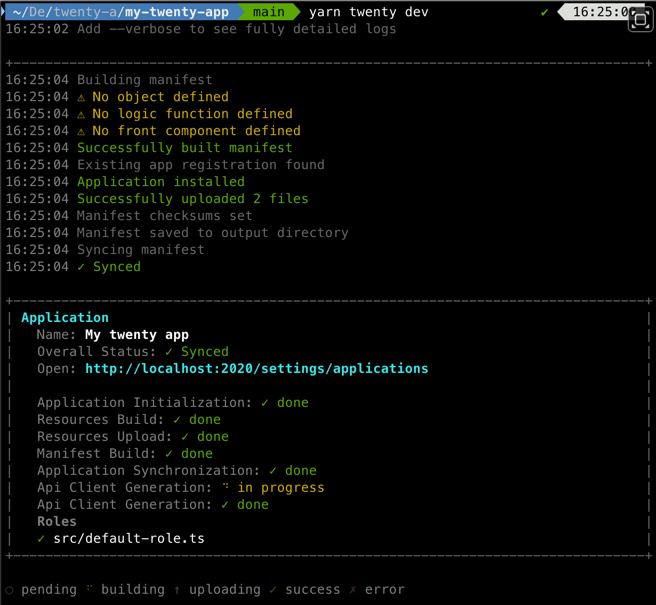
The command prints the synchronisation status, the address of the applications page and the default role. An object is then declared in TypeScript, as in the README example:
The README adds that you publish the app to a workspace with npx twenty app:publish --private.
Monitoring a Twenty instance
The repository’s Docker Compose file declares four services: the server (port 3000), a worker, PostgreSQL 16 and Redis. It defines health checks: the server is tested on /healthz, the database with pg_isready, Redis with redis-cli ping. These three signals are enough for a first dashboard:
- Availability: an HTTP probe on
/healthzfrom outside, in addition to the internal check. - Database and cache: PostgreSQL connections and disk space, Redis memory.
- Worker: container restarts and memory; queues rely on BullMQ and Redis according to the README’s stack.
- Logs: the containers’ own, to ship to your platform; see OpenTelemetry logs with trace ID.
I found no documented OpenTelemetry export or Prometheus metrics endpoint for Twenty in the README and the Compose file. For moving signals, see the OpenTelemetry Collector to Dynatrace.
How to check that it works
docker compose psshows the four services started, with the server “healthy”.curl http://localhost:3000/healthzanswers with a success code.- The sign-in page opens in the browser on port 3000.
Limits and open points
- Mixed licence: AGPLv3, MIT and commercial files; read the file before modifying, hosting for third parties or using “Enterprise” features in production.
- Fast-moving project: the README and documentation talk about apps and agents, which are recent features; re-read the documentation for your version.
- Customer data: a CRM holds personal data; backups, encryption, access and GDPR are yours when self-hosting.
- Native observability not documented: plan your own probes.
Best practices
- Set the image
TAGvariable in the Compose file (it defaults tolatest) to control upgrades. - Back up the database and the
ENCRYPTION_KEYvalue, separately. - Put Twenty behind a TLS proxy, with
SERVER_URLin HTTPS. - Alert on
/healthz, database disk space and worker restarts. - For automations around the CRM, see Dify and n8n and the self-hosted AI stack.
Frequently asked questions
Is Twenty entirely open source?
Not entirely, according to the LICENSE file: most of it is under the AGPLv3, some packages are under MIT, and files marked “Enterprise” are under a commercial licence.
Do I need an account to self-host?
The Docker installation steps in the documentation do not mention one. The “Enterprise” files, however, have subscription conditions for production use.
Can I build my own objects?
Yes, through the CLI and SDK: the README shows objects, fields and views defined in code.
Conclusion
Twenty is a CRM that aims to be extensible through code and self-hostable in a few commands. Pay attention to the mixed licence, the handling of the encryption key and monitoring, which the project does not document beyond the health checks in its Compose file.
span.observer is an independent community blog, not affiliated with Dynatrace LLC or the projects mentioned. Trademarks belong to their owners. Tools change quickly: check commands and options in their official documentation (docs.twenty.com).